
Java JSON组成和解析
本框架JSON元素组成和分析,JsonElement分三大类型JsonArray,JsonObject,JsonString。
JsonArray:数组和Collection子类,指定数组的话,使用ArrayList来add元素,遍历ArrayList再使用Array.newInstance生成数组并添加元素即可.
JsonObject:带有泛型的封装类,给带有泛型的字段赋值,关键在于如何根据“指定的类型”和“Field.getGenericType”来生成新的字段Type。
需要你了解java.lang.reflect.Type的子类
java.lang.reflect.GenericArrayType //通用数组类型 T[]
java.lang.reflect.ParameterizedType //参数类型,如: java.util.List<java.lang.String> java.util.Map<java.lang.String,java.lang.Object>
java.lang.reflect.TypeVariable //类型变量 K,V
java.lang.reflect.WildcardType //通配符类,例如: ?, ? extends Number, ? super Integer
java.lang.Class //int.class User.class .....
JsonString:分析字符串并解析成指定的对应类型
下面是本JSON框架的分析图
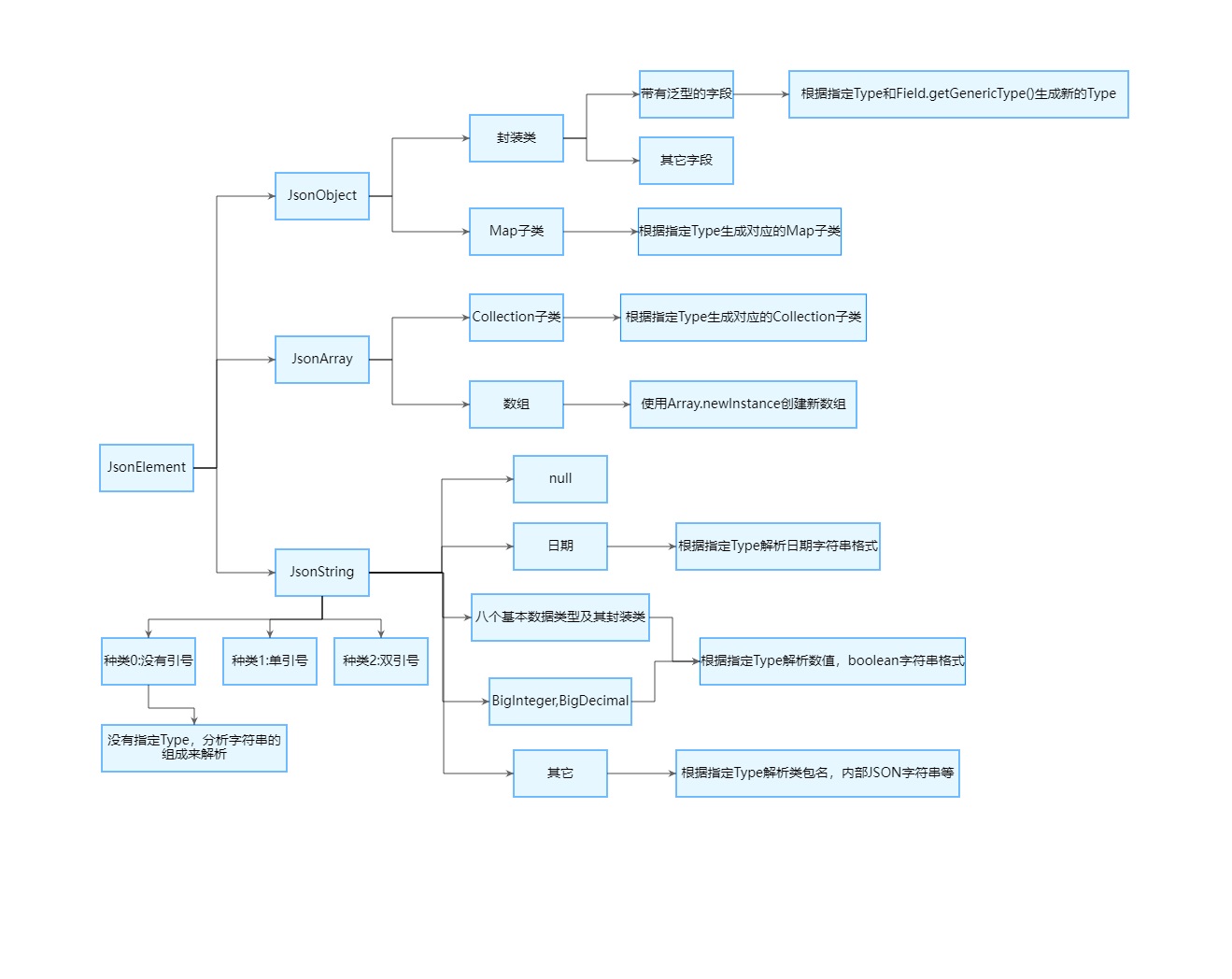
下面是简陋版的解析代码。该类没有解析日期,数值等代码,只是方便理解解析过程。
package june.zero.json.reader;

import java.io.IOException;

import java.io.Reader;

import java.io.StringReader;

import java.util.ArrayList;

import java.util.HashMap;

import java.util.List;

import java.util.Map;

public class JsonSimpleParser implements CharSequence {

    public static void main(String[] args) {

        String json = "[{a:1,b:2},[1,2,3]]";

        Object obj = new JsonSimpleParser().parse(json);

        System.out.println(obj);

    }

    protected static final String JSON_EXTRA_CHAR_ERROR = "Extra characters exist! ";

    protected static final String JSON_OBJECT_COLON_ERROR = "Wrong format of JsonObject, no separator colon! ";

    protected static final String JSON_OBJECT_END_ERROR = "The JsonObject format must end with comma as a separator or with right curly brace! ";

    protected static final String JSON_ARRAY_END_ERROR = "The JsonArray format must end with comma as a separator or with right bracket! ";

    protected static final String JSON_STRING2_END_ERROR = "The character starts with double quotation marks, but does not end with double quotation marks! ";

    protected static final String JSON_STRING1_END_ERROR = "The character starts with single quotation marks, but does not end with single quotation marks! ";

    protected Reader reader;

    protected static final int capacity = 1024;

    protected final char[] cache = new char[capacity];

    protected int count;

    protected int position;

    public void read() throws IOException {

        this.position = 0;

        this.count = this.reader.read(this.cache,0,capacity);

    }

    /**

     * 当前指针指向的字符

     * @return

     */

    public char current() {

        if(this.count==-1) return '\uffff';

        return this.cache[this.position];

    }

    /**

     * 当前指针指向的索引下标

     * @return

     */

    public int position() {

        return this.position;

    }

    /**

     * 指针指向下一个字符,判断是否需要重新读取数据

     * @return

     * @throws IOException

     */

    public boolean nextRead() throws IOException {

        return ++this.position>=this.count;

    }

    /**

     * 指针指向下一个字符

     * @return

     * @throws IOException

     */

    public void next() throws IOException {

        if(++this.position>=this.count){

            this.position = 0;

            this.count = this.reader.read(this.cache,0,capacity);

        }

    }

    /**

     * 跳过空白字符

     * @throws IOException

     */

    public void skip() throws IOException {

        while(this.count!=-1&&Character.isWhitespace(this.current())){

            if(++this.position>=this.count){

                this.position = 0;

                this.count = this.reader.read(this.cache,0,capacity);

            }

        }

    }

    public Object parse(String json) throws RuntimeException {

        return parse(new StringReader(json));

    }

    /**

     * 解析

     */

    public Object parse(Reader reader) throws RuntimeException {

        try {

            this.reader = reader;

            this.read();

            Object value = parse();

            this.skip();

            if(this.count!=-1){

                throw new RuntimeException(JSON_EXTRA_CHAR_ERROR);

            }

            return value;

        } catch (Throwable e) {

            throw new RuntimeException(e);

        } finally {

            try {

                this.close();

            } catch (IOException e) {

            }

        }

    }

    protected Object parse() throws IOException {

        this.skip();

        char current = this.current();

        if(current=='{'){

            this.next();

            this.skip();

            Map<Object, Object> object = new HashMap<Object, Object>();

            if(this.current() == '}') {

                this.next();

                return object;

            }

            do{

                Object key = parse();

                this.skip();

                if(this.current()!=':'){

                    throw new RuntimeException(JSON_OBJECT_COLON_ERROR);

                }

                this.next();

                object.put(key, parse());

                this.skip();

                current = this.current();

                if(current=='}') break;

                if(current!=','){

                    throw new RuntimeException(JSON_OBJECT_END_ERROR);

                }

                this.next();

                this.skip();

            }while(true);

            this.next();

            return object;

        }

        if(current=='['){

            this.next();

            this.skip();

            List<Object> array = new ArrayList<Object>();

            if(this.current() == ']'){

                this.next();

                return array;

            }

            do{

                array.add(parse());

                this.skip();

                current = this.current();

                if(current==']') break;

                if(current!=','){

                    throw new RuntimeException(JSON_ARRAY_END_ERROR);

                }

                this.next();

                this.skip();

            }while(true);

            this.next();

            return array;

        }

        this.skip();

        StringBuilder string = new StringBuilder();

        if(current=='"'){

            this.next();

            int offset = this.position;

            while(this.count!=-1&& this.current()!='"'){

                if(this.nextRead()){

                    string.append(this, offset, this.position);

                    offset = 0;

                    this.position = 0;

                    this.count = this.reader.read(this.cache,0,capacity);

                }

            }

            string.append(this, offset, this.position);

            if(this.current()!='"'){

                throw new RuntimeException(JSON_STRING2_END_ERROR);

            }

            this.next();

            return string;

        }

        if(current=='\''){

            if(++this.position>=this.count){

                this.position = 0;

                this.count = this.reader.read(this.cache,0,capacity);

            }

            int offset = this.position;

            while(this.count!=-1&&this.current()!='\''){

                if(this.nextRead()){

                    string.append(this, offset, this.position);

                    offset = 0;

                    this.read();

                }

            }

            string.append(this, offset, this.position);

            if(this.current()!='\''){

                throw new RuntimeException(JSON_STRING1_END_ERROR);

            }

            this.next();

            return string;

        }

        int offset = this.position;

        while(this.count!=-1&&

                (current = this.current())!=','&&

                current!=':'&&

                current!=']'&&

                current!='}'&&

                !Character.isWhitespace(current)){

            if(this.nextRead()){

                string.append(this, offset, this.position);

                offset = 0;

                this.read();

            }

        }

        string.append(this, offset, this.position);

        return string;

    }

    /**

     * 关闭流

     * @throws IOException

     */

    public void close() throws IOException{

        if(this.reader!=null){

            this.reader.close();

            this.reader = null;

        }

    }

    @Override

    public char charAt(int index) {

        return this.cache[index];

    }

    @Override

    public int length() {

        return this.count;

    }

    @Override

    public CharSequence subSequence(int start, int end) {

        if (start < 0)

            throw new StringIndexOutOfBoundsException(start);

        if (end > count)

            throw new StringIndexOutOfBoundsException(end);

        if (start > end)

            throw new StringIndexOutOfBoundsException(end - start);

        StringBuilder string = new StringBuilder();

        for (int i = start; i < end; i++) {

            string.append(this.cache[i]);

        }

        return string;

    }

    @Override

    public String toString() {

        if(this.count<0) return null;

        return new String(this.cache,this.position,this.count-this.position);

    }

}
转载请标明该来源。https://www.cnblogs.com/JuneZero/p/18252639
源码和jar包及其案例:https://www.cnblogs.com/JuneZero/p/18237283
Java JSON组成和解析的更多相关文章
- java json 的生成和解析 --json-lib
类(java json的解析和生成): import java.util.HashMap; import java.util.Map; import net.sf.json.JSONArray; im ...
- java JSON的使用和解析
There is no royal road to learning. 博主:JavaPanda https://www.cnblogs.com/LearnAndGet/p/10009646.html ...
- Java中哪个JSON库的解析速度是最快的?
JSON已经成为当前服务器与WEB应用之间数据传输的公认标准,不过正如许多我们所习以为常的事情一样,你会觉得这是理所当然的便不再深入思考 了.我们很少会去想用到的这些JSON库到底有什么不同,但事实上 ...
- android Json Gson FastJson 解析
一 Json xml <?xml version="1.0" encoding="utf-8"?> <LinearLayout xmlns:a ...
- java -json()
json-lib和org.json的使用几乎是相同的,我总结出的区别有两点: 两种包 1. List集合转换成json方法 List list = new ArrayList(); list.add( ...
- Android 之 json数据的解析(jsonReader)
json数据的解析相对而言,还是比较容易的,实现的代码也十分简单.这里用的是jsonReade方法来进行json数据解析. 1.在解析之前,大家需要知道什么是json数据. json数据存储的对象是无 ...
- JSON 之FastJson解析
http://blog.sina.com.cn/s/blog_7ffb8dd501013qas.html 一.阿里巴巴FastJson是一个Json处理工具包,包括“序列化”和“反序列化”两部分,它具 ...
- iOS开发网络篇-JSON文件的解析
一.什么是JSON数据 1.JSON的简单介绍 JSON:是一种轻量级的传输数据的格式,用于数据的交互 JSON是javascript语言的一个子集.javascript是个脚本语言(不需要编译),用 ...
- (转)JSON 之FastJson解析
一.阿里巴巴FastJson是一个Json处理工具包,包括“序列化”和“反序列化”两部分,它具备如下特征:速度最快,测试表明,fastjson具有极快的性能,超越任其他的Java Json parse ...
- Android Json生成及解析实例
JSON的定义: 一种轻量级的数据交换格式,具有良好的可读和便于快速编写的特性.业内主流技术为其提供了完整的解决方案(有点类似于正则表达式 ,获得了当今大部分语言的支持),从而可以在不同平台间进行数据 ...
随机推荐
- Flink CDC 2.0 正式发布,详解核心改进
简介: 本文由社区志愿者陈政羽整理,内容来源自阿里巴巴高级开发工程师徐榜江 (雪尽) 7 月 10 日在北京站 Flink Meetup 分享的<详解 Flink-CDC>.深入讲解了最新 ...
- 野火 STM32MP157 开发板 UBOOT 编译烧写
一.环境 编译环境:Ubuntu 版本:20.4.1 交叉编译工具:arm-none-eabi-gcc 版本:10.3.1 开发板:STM32MP157 pro 烧写软件:STM32CubeProgr ...
- css的animate做一个信号动画
html <div class="jump flex-fs fadeAndScaleIn"> <span></span> <span> ...
- Asp .Net Core 系列:国际化多语言配置
目录 概述 术语 本地化器 IStringLocalizer 在服务类中使用本地化 IStringLocalizerFactory IHtmlLocalizer IViewLocalizer 资源文件 ...
- VP NOI2023
一个月前的事情捏,因为今天刚好在摸鱼就想起来写写. Day 1 开题,先总的过一遍,好像比较传统. T1 基本上是一眼题了,简单容斥一下就可以解决.很快开始写,写好过了小样例.但是这个时候还没有大样例 ...
- 用 C 语言开发一门编程语言 — 更好的语言
目录 文章目录 目录 前文列表 原生类型 用户定义的类型 [] 方括号的补充 操作系统交互 宏 变量哈希表 池分配 垃圾回收 尾调用优化 词法作用域 静态类型 前文列表 <用 C 语言开发一门编 ...
- 读写可编程 SIM/USIM 卡
目录 文章目录 目录 SIM 卡 USIM 卡 USIM 卡的关键参数 pySim 读写软件与 ADM key SIM 卡 SIM 卡,用户身份模块(Subscriber Identity Modul ...
- 图片GPS度分秒转换经纬度
图片位置信息转化经纬度 1 public static String strToLatOrLng(String str) { 2 int i = str.lastIndexOf("°&quo ...
- IDS4 傻瓜式实践指南
前言: 这是一篇实践指南,不会过多的解释原理(因为我也说不清楚,想了解的同学请移步老张的博客,里面有非常详细的介绍),本篇文章讲解如何简单的使用IDS4来实现单点登录,以及遇到的一些坑实现功能: 1. ...
- 首次调用u8api遇到的问题总结
1.检索 COM 类工厂中 CLSID 为 {72A6FADA-FE26-46BD-A921-BFD1179C1E1E} 的组件时失败,原因是出现以下错误: 80040154. 解决办法是,把编译 ...