
Core开发-MVC 使用dotnet 命令创建Controller和View
NET Core开发-MVC 使用dotnet 命令创建Controller和View
使用dotnet 命令在ASP.NET Core MVC 中创建Controller和View,之前讲解过使用yo 来创建Controller和View。
下面来了解dotnet 命令来创建Controller和View,功能更加强大,更加完整。
结合VS Code 使你能跨平台更好更快速的开发 ASP.NET Core MVC。
也就可以在 Linux 和Mac 中更好的开发ASP.NET Core 应用程序。
创建ASP.NET Core应用程序
dotnet new -t web

dotnet restore

dotnet run
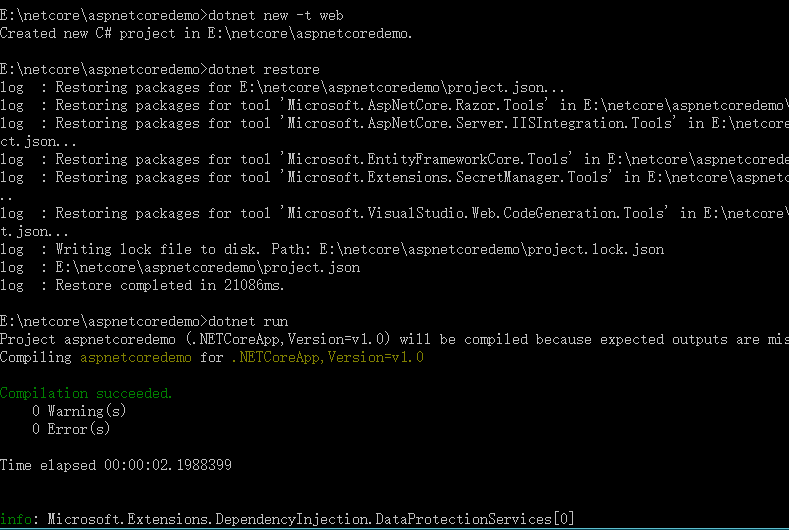
创建好以后,我们来添加 Controller和View。
创建使用的dotnet命令为: dotnet aspnet-codegenerator

创建Controller
1.空白Controller
dotnet aspnet-codegenerator controller -name LineZero -outDir Controllers
2.增删查改Controller
dotnet aspnet-codegenerator controller -name LineZero -actions -outDir Controllers
命令增加一个:-actions
3.增删查改+EF Controller
生成增删查改的action 及对应的视图。
dotnet aspnet-codegenerator controller -name LineZeroController -m ApplicationUser -dc ApplicationDbContext -outDir Controllers
-m 指的是model
-dc 指 DbContext
4.API Controller
dotnet aspnet-codegenerator controller -name LineZeroController -m ApplicationUser -dc ApplicationDbContext -api -outDir Controllers
增加一个 -api 就代表是生成api controller
更多命令可以参考帮助:dotnet aspnet-codegenerator controller -?

创建View
1.创建View
可以指定什么操作,Create|Edit|Delete|Details|List ,必须填入对应的model
dotnet aspnet-codegenerator view Index List -m ApplicationUser -f -outDir Views\LineZero
这里我们就创建了一个名为:Index 操作为:List 的View
-f 如果存在该文件则覆盖文件。dotnet aspnet-codegenerator 默认是不覆盖文件。
更多命令可以参考帮助:dotnet aspnet-codegenerator view -?

至此命令的展示也就完了。
dotnet aspnet-codegenerator 来源
那么这个命令是从哪里来的呢?dotnet 默认是没有aspnet-codegenerator
在 dependencies 节点添加如下:

  "dependencies": {

    ...

    "Microsoft.VisualStudio.Web.CodeGeneration.Tools": {

      "version": "1.0.0-preview2-final",

      "type": "build"

    },

    "Microsoft.VisualStudio.Web.CodeGenerators.Mvc": {

      "version": "1.0.0-preview2-final",

      "type": "build"

    }

  },
然后在 tools 节点添加如下:
  "tools": {

    ...

    "Microsoft.VisualStudio.Web.CodeGeneration.Tools": {

      "version": "1.0.0-preview2-final",

      "imports": [

        "portable-net45+win8"

      ]

    }

  },
dotnet restore
这样也就可以使用 dotnet aspnet-codegenerator 。
上面dotnet new 创建的web 项目可以使用 dotnet aspnet-codegenerator ,是由于项目默认已经给我们添加了对应的节点及引用。
如果你是在Windows 下使用 VS 2015 开发的话,你将得到更好的体验。
使用 VS 2015 打开带有dotnet aspnet-codegenerator的项目,VS 会自动扩展,新增额外添加功能。
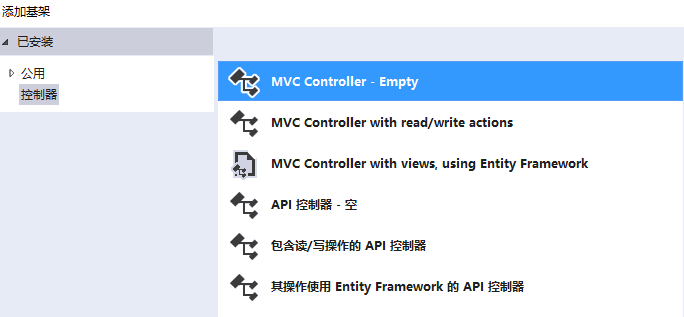
在项目右键会发现多了添加 控制器,在Views 文件夹下右键,会多一个 添加 视图。

选择以后就可以添加不同类型的Controller,这个其实也是调用dotnet aspnet-codegenerator 命令。
Core开发-MVC 使用dotnet 命令创建Controller和View的更多相关文章
- ASP.NET Core开发-MVC 使用dotnet 命令创建Controller和View
使用dotnet 命令在ASP.NET Core MVC 中创建Controller和View,之前讲解过使用yo 来创建Controller和View. 下面来了解dotnet 命令来创建Contr ...
- 创建ASP.NET Core MVC应用程序(1)-添加Controller和View
创建ASP.NET Core MVC应用程序(1)-添加Controller和View 参考文档:Getting started with ASP.NET Core MVC and Visual St ...
- VisualStudioCode中用dotnet命令创建多个ASP.NET Core 项目、类库、控制台程序,并添加应用间的引用
一.准备工作 首先安装VisualStudioCode并且可以使用. 1.首先新创建空的MyApps文件夹,作为项目主目录,下面将在这个文件夹中创建多个web应用程序.类型.控制台程序等. 2.打开V ...
- MVC 用基架创建Controller,通过数据库初始化器生成并播种数据库
1 创建MVC应用程序 2 在Model里面创建实体类 using System; using System.Collections.Generic; using System.Linq; using ...
- mvc源码解读(20)-controller和view之查找view
很多时候在mvc项目中我们需要去扩展自己的视图引擎,大概看起来应该下面这个样子的: public class RazorEngineExpand : RazorViewEngine { private ...
- .NET Core dotnet 命令大全
dotnet 命令大全,让你理解dotnet 命令. 本文将以一个实例串起 dotnet 所有命令,让你玩转dotnet 命令. 本篇文章编写环境为windows 10 ,dotnet 命令同样适用于 ...
- Core dotnet 命令大全
Core dotnet 命令大全 dotnet 命令大全,让你理解dotnet 命令. 本文将以一个实例串起 dotnet 所有命令,让你玩转dotnet 命令. 本篇文章编写环境为windows 1 ...
- [转].NET Core dotnet 命令大全
本文转自:http://www.cnblogs.com/linezero/p/dotnet.html https://docs.microsoft.com/en-us/dotnet/articles/ ...
- windows/Linux下设置ASP.Net Core开发环境并部署应用
10分钟学会在windows/Linux下设置ASP.Net Core开发环境并部署应用 创建和开发ASP.NET Core应用可以有二种方式:最简单的方式是通过Visual Studio 2017 ...
随机推荐
- 在Win7的IIS上搭建FTP服务及用户授权
FTP服务 FTP是文件传输协议(File Transfer Protocol)的简称,该协议属于应用层协议(端口号通常为21),用于Internet上的双向文件传输(即文件的上传和下载).在网络上有 ...
- HDU 1033 - Edge
题目很水 然翻译感人 顺时针或者逆时针走,输出坐标 #include <iostream> using namespace std; ]; int p; ]={,,,-,}; ]={,,- ...
- LVS客户端启动脚本
在设置LVS客户端时,如果我们使用手工设置的话会比较麻烦.现在我们直接使用脚本来启动lvs-client就OK了,下面是一个简单的脚本. VIP地址:10.0.0.230,把文件放到/etc/init ...
- Android 动画小知识点
<?xml version="1.0" encoding="utf-8"?> <translate xmlns:android="h ...
- SQL语句执行效率及分析
查询效率分析:子查询为确保消除重复值,必须为外部查询的每个结果都处理嵌套查询.在这种情况下可以考虑用联接查询来取代.如果要用子查询,那就用EXISTS替代IN.用NOT EXISTS替代NOT IN. ...
- 嵌入式平台组件白盒测试gcov、lcov和genhtml 使用指导
在嵌入式平台上使用了gtest白盒测试工具,覆盖了被测函数,但是不知道自己测试的效果如何,测试行覆盖率.函数覆盖率,分支覆盖率的数据. 便开始研究gcov这个代码覆盖率工具能否使用,来检查白盒测试的效 ...
- ubuntu下C编程,编译基础( 转)
buntu下C编程,编译基础 C 编程中相关文件后缀 .a 静态库 (archive) .c C源代码(需要编译预处理) .h C源代码头文件 .i C源代码(不需编译预处理) .o 对象文件 ...
- Mysql 关键字-保留字(转帖)
2008-02-01 10:51 ADD ALL ALTER ANALYZE AND AS ASC ASENSITIVE BEFORE BETWEEN BIGINT BINARY BLOB BOTH ...
- Jupyter Notebook通过latex输出pdf
主要步骤 1.将ipynb编译成tex ipython nbconvert --to latex Example.ipynb 2. 修改tex,增加中文支持 在\documentclass{artic ...
- Python实现CGI环境
要想安装Python的CGI环境,就继续往下看吧. 首先,要确定apache服务可以使用CGI服务. 打开apache的配置文件,设置如图. 在启动的apache服务的系统目录下,创建目录如/User ...