
【代码笔记】iOS-提醒时间的选择
一,效果图。

二,工程图。
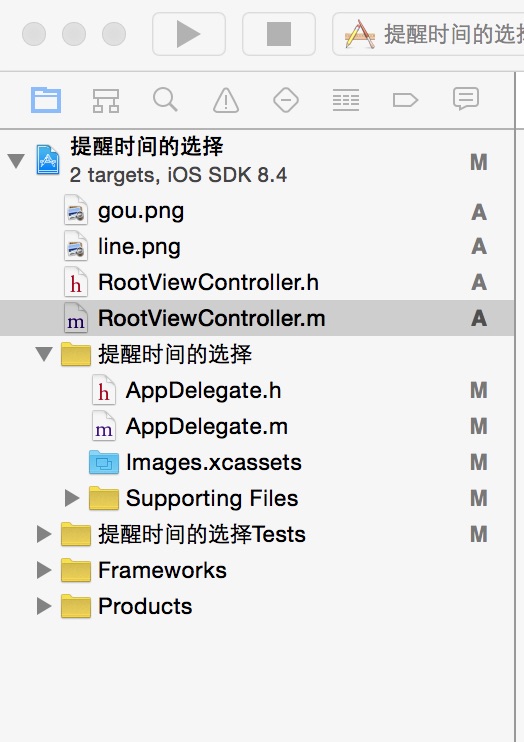
三,代码。
RootViewController.h

#import <UIKit/UIKit.h>

@interface RootViewController : UIViewController

<UITableViewDataSource,UITableViewDelegate>

{

    UITableView *remindTable;

    int lastIndex;

    int nowIndex;

    NSArray *textArray;

}

@end
RootViewController.m
#import "RootViewController.h"

@interface RootViewController ()

@end

@implementation RootViewController

- (id)initWithNibName:(NSString *)nibNameOrNil bundle:(NSBundle *)nibBundleOrNil

{

    self = [super initWithNibName:nibNameOrNil bundle:nibBundleOrNil];

    if (self) {

        // Custom initialization

    }

    return self;

}

- (void)viewDidLoad

{

    [super viewDidLoad];

    // Do any additional setup after loading the view.

    self.title=@"提醒时间";

    //UITableView

    remindTable = [[UITableView alloc]initWithFrame:CGRectMake(0, 1, 320, self.view.bounds.size.height)];

    [remindTable setSeparatorStyle:UITableViewCellSeparatorStyleNone];

    [remindTable setScrollEnabled:YES];

    [remindTable setDataSource:self];

    [remindTable setDelegate:self];

    [self.view addSubview:remindTable];

}

#pragma  -mark -UITableView Delegate

- (NSInteger)numberOfSectionsInTableView:(UITableView *)tableView

{

    return 1;

}

- (NSInteger)tableView:(UITableView *)tableView numberOfRowsInSection:(NSInteger)section

{

    return 9;

}

- (UITableViewCell*)tableView:(UITableView *)tableView cellForRowAtIndexPath:(NSIndexPath *)indexPath

{

    static NSString *cellIdentifier = @"Cell";

    UITableViewCell *cell = [tableView dequeueReusableCellWithIdentifier:cellIdentifier];

    if (cell == nil) {

        cell = [[UITableViewCell alloc]initWithStyle:UITableViewCellStyleDefault reuseIdentifier:cellIdentifier];

    }

    textArray = [[NSArray alloc]initWithObjects:@"无",@"5分钟前",@"15分钟",@"30分钟前",@"1小时前",@"两小时前",@"1天前",@"2天前",@"事件发生日",nil];

    cell.textLabel.text = [textArray objectAtIndex:indexPath.row];

    cell.textLabel.textColor = [UIColor orangeColor];

    //分割线

    UIImage *line = [UIImage imageNamed:@"line.png"];

    UIImageView *lineView = [[UIImageView alloc]initWithFrame:CGRectMake(5,cell.contentView.frame.size.height-1 , 310, 1)];

    [lineView setImage:line];

    [cell.contentView addSubview:lineView];

    //勾的图片

    UIImage *check = [UIImage imageNamed:@"gou.png"];

    UIImageView *checkView = [[UIImageView alloc]initWithFrame:CGRectMake(0, 0, check.size.width/2, check.size.height/2)];

    [checkView setImage:check];

    if (indexPath.row == nowIndex) {

        cell.accessoryView = checkView;

    }

    else if (indexPath.row == lastIndex){

        cell.accessoryView = UITableViewCellAccessoryNone;

    }

    cell.selectionStyle = UITableViewCellSelectionStyleNone;

    return cell;

}

- (void)tableView:(UITableView *)tableView didSelectRowAtIndexPath:(NSIndexPath *)indexPath

{

    lastIndex = nowIndex;

    nowIndex = (int)indexPath.row;

    NSLog(@"====%d",nowIndex);

    NSLog(@"----%d",lastIndex);

    [remindTable reloadData];

}

- (void)didReceiveMemoryWarning

{

    [super didReceiveMemoryWarning];

    // Dispose of any resources that can be recreated.

}
【代码笔记】iOS-提醒时间的选择的更多相关文章
- 【代码笔记】iOS-点击出现选择框
一,效果图. 二,工程图. 三,代码. RootViewController.h #import <UIKit/UIKit.h> @interface RootViewController ...
- 【代码笔记】iOS-忘记密码选择整体button
一,效果图. 二,工程图. 三,代码. RootViewController.h #import <UIKit/UIKit.h> @class BECheckBox; @interface ...
- 【hadoop代码笔记】hadoop作业提交之汇总
一.概述 在本篇博文中,试图通过代码了解hadoop job执行的整个流程.即用户提交的mapreduce的jar文件.输入提交到hadoop的集群,并在集群中运行.重点在代码的角度描述整个流程,有些 ...
- 笔记-iOS 视图控制器转场详解(上)
这是一篇长文,详细讲解了视图控制器转场的方方面面,配有详细的示意图和代码,为了使得文章在微信公众号中易于阅读,seedante 辛苦将大量长篇代码用截图的方式呈现,另外作者也在 Github 上附上了 ...
- IOS开发笔记 IOS如何访问通讯录
IOS开发笔记 IOS如何访问通讯录 其实我是反对这类的需求,你说你读我的隐私,我肯定不愿意的. 幸好ios6.0 以后给了个权限控制.当打开app的时候你可以选择拒绝. 实现方法: [plain] ...
- iOS关于时间的处理
转自:iOS关于时间的处理 做App避免不了要和时间打交道,关于时间的处理,里面有不少门道,远不是一行API调用,获取当前系统时间这么简单.我们需要了解与时间相关的各种API之间的差别,再因场景而异去 ...
- 极客时间 Mysql实战45讲 07讲行锁功过:怎么减少行锁对性能的影响笔记 极客时间
极客时间 Mysql实战45讲 07讲行锁功过:怎么减少行锁对性能的影响笔记 极客时间极客时间 Mysql实战45讲 07讲行锁功过:怎么减少行锁对性能的影响笔记 极客时间 笔记体会: 方案一,事务相 ...
- 原生js日期时间插件鼠标点击文本框弹出日期时间表格选择日期时间
原文出处 (这是我从互联网上搜来的,感觉能满足各方面的需求.个人感觉挺不错的,所以后期修改了一下向大家推荐!) 效果图: html代码: <!DOCTYPE html PUBLIC " ...
- <Python Text Processing with NLTK 2.0 Cookbook>代码笔记
如下是<Python Text Processing with NLTK 2.0 Cookbook>一书部分章节的代码笔记. Tokenizing text into sentences ...
随机推荐
- Redis 集群方案
根据一些测试整理出来的一份方案(转自http://www.cnblogs.com/lulu/): 1. Redis 性能 对于redis 的一些简单测试,仅供参考: 测试环境:Redhat6.2 , ...
- SQL--分页查询
SELECT * FROM ( SELECT ROW_NUMBER() OVER ( ORDER BY EmployeeID DESC ) AS Rownumber , ...
- Visual Studio Code编写HTML
第一步双击打开Visual Studio Code,我们发现什么也没有,但是有一个默认打开的编辑页面.我们先点击File->OpenFoldor 为什么先这么做呢,有两个原因,第一个原因假如你有 ...
- Dapper学习 - Dapper的基本用法(三) - CUD
之前介绍了Dapper的查询, 存储过程, 函数的调用, 接下来要说一下Dapper的增删改, 其实Dapper的增删改, 都是同一种模式的. 我就不分开介绍了, 直接在一个例子上展现好了. var ...
- ASP.NET MVC系列:开始
创建Asp.Net MVC项目 从visual studio主界面开始菜单中点击“新建项目”
- [转]HTML5 本地图片预览
[原文链接] https://www.huangwenchao.com.cn/2015/03/html5-image-preview.html 问题 加入我们在 HTML 里面有一个图片上传控件: & ...
- 【C#】让工具栏ToolStrip能触发焦点控件的Leave、Validating、DataError等事件以验证数据
----------------更新:2014-04-21--------------- 蒙doggo兄指教,得知有更好的方法可以代替蹩脚的0尺寸Button法,即调用窗体的验证方法Form.Vali ...
- 一个通过JSONP跨域调用WCF REST服务的例子(以jQuery为例)
JSONP(JSON with Padding)可以看成是JSON的一种“使用模式”,用以解决“跨域访问”的问题,这篇简单的文章给出一个简单的例子用于模拟如何通过jQuery以JSONP的访问调用一个 ...
- 驱动开发利器Microsoft Windows Driver Kit 7.1.0下载
在Windows 2000 与Windows XP 系统采用是WINDDK来开发WINDOWS驱动程序,我手头也有WINDDK,可是从Windows Vista开始之后,一般采用Microsoft W ...
- C# 重载的几种实现
算法重用是非常普遍的需求,在C#中可以使用如下手段实现,非常简单,自己记录一下,方便查询. 以一个小功能为例来说明一下:打印1-5这5个数,和A-E这5个字符. 重载方式 static void Ma ...