
【Win10】UAP/UWP/通用 开发之 RelativePanel
[Some information relates to pre-released product which may be substantially modified before it's commercially released. Microsoft makes no warranties, express or implied, with respect to the information provided here.]
[涉及某信息预发布的版本可能在它的商业版本大幅修改。对于这里提供的信息,微软不作任何担保。]
在MSDN中,Windows 10 SDK 的东东上,都会声明这一句话,我也引过来吧啦,他不担保,我也保不了。
RelativePanel
RelativePanel是Win10的 Xaml 中新的一个控件,看名字就知道是一个相对布局的控件。问了一个安卓的同学,说这个东西和他们的RelativeLayout是一样子的,都是相对于其它的东西布局的。
一、示例
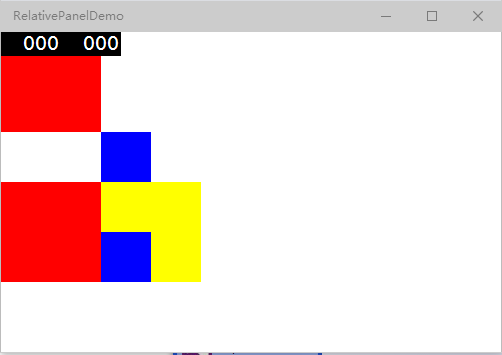
<StackPanel>

    <RelativePanel>

        <Rectangle x:Name="rectangle1" Fill="Red" Height="100" Width="100" />

        <Rectangle Fill="Blue" Height="50" Width="50" RelativePanel.RightOf="rectangle1" RelativePanel.Below="rectangle1"/>

    </RelativePanel>

    <RelativePanel>

        <Rectangle x:Name="rectangle2" Fill="Red" Height="100" Width="100" />

        <Rectangle x:Name="rectangle3" Fill="Blue" Height="50" Width="50" RelativePanel.RightOf="rectangle2" RelativePanel.AlignBottomWith="rectangle2"/>

        <Rectangle x:Name="rectangle4" Fill="Yellow" Height="100" Width="100" RelativePanel.RightOf="rectangle2"/>

        <Rectangle Fill="Blue" Height="50" Width="50" RelativePanel.RightOf="rectangle2" RelativePanel.AlignBottomWith="rectangle2"/>

    </RelativePanel>

</StackPanel>
二、主要属性
RelativePanel的用法与 Canvas 是相似的,都是用附件属性来设置。用法很简单,在这里例一下属性吧。
主要分以面四类
1.相对于控件的位置
RelativePanel.Above
RelativePanel.Below
RelativePanel.LeftOf
RelativePanel.RightOf
2.对齐于控件
RelativePanel.AlignTopWith
RelativePanel.AlignBottomWith
RelativePanel.AlignLeftWith
RelativePanel.AlignRightWith
RelativePanel.AlignHorizontalCenterWith
RelativePanel.AlignVerticalCenterWith
3.对齐于Panel,这个是bool 值
RelativePanel.AlignTopWithPanel
RelativePanel.AlignBottomWithPanel
RelativePanel.AlignLeftWithPanel
RelativePanel.AlignRightWithPanel
RelativePanel.AlignHorizontalCenterWithPanel
RelativePanel.AlignVerticalCenterWithPanel
三、总结
这个布局控件真心应该会很广泛的,方便了布局方式,也使布局更加的灵活了。但对于自己适应空间的大小,可能会差一些,到真正应用的时候就知道啦。
PS: 之前写了一次,浏览器莫名的刷新,全没啦,今天又很是的忙,也觉得这个控件也没写多少写的,就这么草草的结束的。
本文地址:http://www.cnblogs.com/gaoshang212/p/4539273.html
【Win10】UAP/UWP/通用 开发之 RelativePanel的更多相关文章
- 【Win10】UAP/UWP/通用 开发之 x:Bind
[Some information relates to pre-released product which may be substantially modified before it's co ...
- 【Win10】UAP/UWP/通用 开发之 x:DeferLoadStrategy
[Some information relates to pre-released product which may be substantially modified before it's co ...
- 【Win10】UAP/UWP/通用 开发之 SplitView
[Some information relates to pre-released product which may be substantially modified before it's co ...
- 【Win10】UAP/UWP (通用程序) 开发初体验(1) 之 开发准备
一.准备: 1.准备一个 10074或更高版本的Win10.可以通过 https://insider.windows.com/ 地址,加入Windows 的会员俱乐部免费获取的. 2.下载Visual ...
- UWP开发之Template10实践二:拍照功能你合理使用了吗?(TempState临时目录问题)
最近在忙Asp.Net MVC开发一直没空更新UWP这块,不过有时间的话还是需要将自己的经验和大家分享下,以求共同进步. 在上章[UWP开发之Template10实践:本地文件与照相机文件操作的MVV ...
- UWP开发之Template10实践:本地文件与照相机文件操作的MVVM实例(图文付原代码)
前面[UWP开发之Mvvmlight实践五:SuspensionManager中断挂起以及复原处理]章节已经提到过Template10,为了认识MvvmLight的区别特做了此实例. 原代码地址:ht ...
- UWP开发之Mvvmlight实践七:如何查找设备(Mobile模拟器、实体手机、PC)中应用的Log等文件
在开发中或者后期测试乃至最后交付使用的时候,如果应用出问题了我们一般的做法就是查看Log文件.上章也提到了查看Log文件,这章重点讲解下如何查看Log文件?如何找到我们需要的Packages安装包目录 ...
- Liferay7 BPM门户开发之10: 通用流程实现从Servlet到Portlet(Part1)
开发目的: 实现通用流程自动化处理(即实现不需要hardcode代码的bpm统一处理后台,仅需要写少量前端html form代码和拖拽设计BPM定义) 既可独立运行或可依托于Liferay或依托其它门 ...
- Android开发之旅: Intents和Intent Filters(理论部分)
引言 大部分移动设备平台上的应用程序都运行在他们自己的沙盒中.他们彼此之间互相隔离,并且严格限制应用程序与硬件和原始组件之间的交互. 我们知道交流是多么的重要,作为一个孤岛没有交流的东西,一定毫无意义 ...
随机推荐
- git更换仓库地址
1. 从原始地址 clone 一份不包含 work copy的仓库: git clone --bare bitbucket_project_address 2. 在os china上创建同名项目. ...
- CSS 浮动副作用 ,清除浮动
参考:http://www.divcss5.com/jiqiao/j406.shtml 副作用:一般是一个盒子里使用了CSS float浮动属性,导致父级对象盒子不能被撑开,背景色不显示(如果父级不设 ...
- CSS布局技巧 -- sticky属性
在一些很长的表格中,往往需要使用表头悬浮的设计以方便用户使用,例如H5电商页面通过下滑展示大量商品列表时,顶部的导航栏需要在离开屏幕时,需要固定在屏幕顶部以方便用户筛选类别.这种效果一直以来需要通过J ...
- CSV的导入导出
using System; using System.Data; using System.IO; namespace COMMON { public class CSVhelperClass { / ...
- MyBatis-NET
http://www.codeproject.com/Articles/894127/MyBatis-NET https://mybatis.github.io/mybatis-3/
- SQL Split
最初是根据数据ID批量删除数据,因为不知道到底是要删除多少条,而T-sql里也没有像C#中params这样方便的东西,所以想到字符串分割,但是发现T-sql中也没有提供字符串分割的函数,所以自己搜索了 ...
- Fiddler 手机端证书安装No root certificate was found
测试过程中发现在浏览器中访问代理服务器及端口,不通,提示要安装证书. 点击证书安装时,提示错误: No root certificate was found,Have you enabled HTTP ...
- bash快捷建
bash快捷建 ctrl键组合ctrl+a:光标移到行首.ctrl+b:光标左移一个字母ctrl+c:杀死当前进程.ctrl+d:退出当前 Shell.ctrl+e:光标移到行尾.ctrl+h:删除光 ...
- Web前端学习路线
第一阶段: HTML+CSS:HTML进阶.CSS进阶.div+css布局.HTML+css整站开发. JavaScript基础:Js基础教程.js内置对象常用方法.常见DOM树操作大全.ECMAsc ...
- Java变量自增和自减运算符的用法
1.后加加(num++): 先输出运算结果再加加: public static void main(String[] args){ int num=10; int p1=num++; System. ...