
Web Essentials之Bundling

本篇目录
介绍
这篇要讲的是Bundling,我看很多人把它翻译为捆绑,如果你喜欢你也可以这么理解,我是不太习惯,我还是喜欢它为bundling,或者bundle。
Bundling允许我们组合和压缩相同类型的文件来提升网站的性能。
啥是bundle?
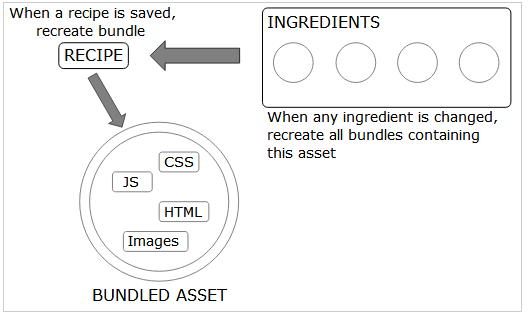
Web Essentials的bundle文件是用于组合和压缩相同类型的一组文件的一个食谱,它可以限制浏览器将要下载的数据量。
Web Essentials提供了两种bundling类型:
- .bundle:用于CSS和JS文件
对于CSS,会输出一个XML类型的bundle食谱文件,一个目标CSS文件和一个源代码的压缩版本(前提是在该食谱文件中打开了minify选项)。 - .sprite:用于图片文件(png,jpg和gif)。
它生成了一个sprite(很多人翻译为精灵)图片,对于background属性中的所有坐标都具有样例代码的CSS,具有保持相同background属性的混淆的LESS和SASS文件和一个自定义的映射文件(json)。
如何制造一个bundle呢?
创建一个bundle的步骤和所有类型文件的步骤是相同的:
- 在解决方案浏览器上,选择你想bundle在一起的文件。
- 在web Essentials的上下文菜单中,选择
Create image sprite...或者Create CSS/JS bundle file,取决于你的上下文。 - 为该bundle文件起一个名字。
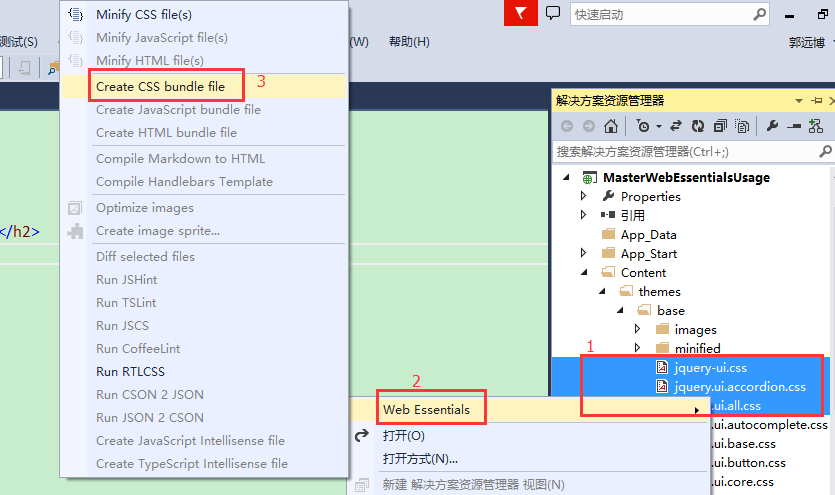
它如何工作?
基本上,有两种方法来更新bundled的资产(就是放在bundle中的资源文件):
- 更改原料,比如.js,css或者图片。
- 更新bundle的菜谱文件。
样例文件
我刚才已经创建了一个bundle文件,名字为是默认的MyBundle。我将刚才生成的XML文件内容放在下面。可以看到,生成的XML文件已经自己注释好了,只不过是英文的注释。
<?xml version="1.0" encoding="utf-8"?>

<bundle xmlns:xsi="http://www.w3.org/2001/XMLSchema-instance" xsi:noNamespaceSchemaLocation="http://vswebessentials.com/schemas/v1/bundle.xsd">

  <settings>

    <!--Determines if the bundle file should be automatically optimized after creation/update.-->

    <minify>true</minify>

    <!--Determine whether to generate/re-generate this bundle on building the solution.-->

    <runOnBuild>false</runOnBuild>

    <!--Use absolute path in the generated CSS files. By default, the URLs are relative to generated bundled CSS file.-->

    <adjustRelativePaths>true</adjustRelativePaths>

    <!--Specifies a custom subfolder to save files to. By default, compiled output will be placed in the same folder and nested under the original file.-->

    <outputDirectory />

  </settings>

  <!--The order of the <file> elements determines the order of the files in the bundle.-->

  <files>

    <file>/Content/themes/base/jquery-ui.css</file>

    <file>/Content/themes/base/jquery.ui.accordion.css</file>

    <file>/Content/themes/base/jquery.ui.all.css</file>

  </files>

</bundle>
下面我在创建一个sprite文件:
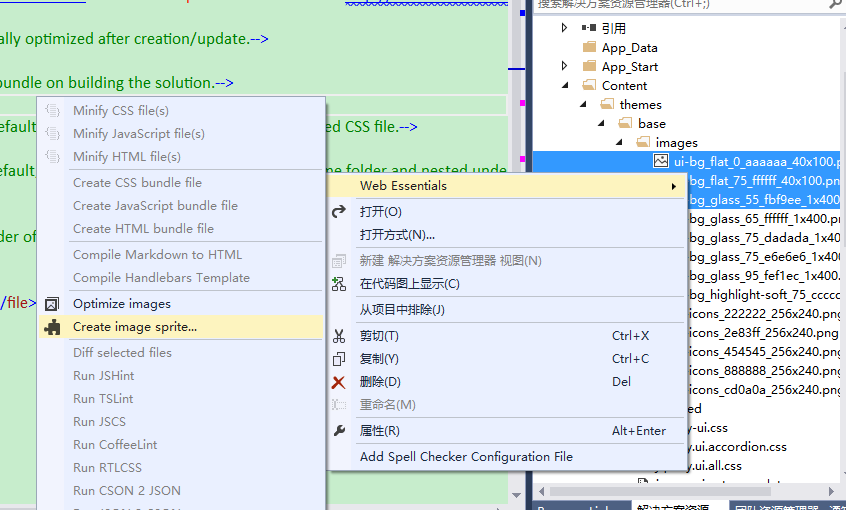
对应的XML类型的sprite文件内容如下:
<?xml version="1.0" encoding="utf-8"?>

<sprite xmlns:xsi="http://www.w3.org/2001/XMLSchema-instance" xsi:noNamespaceSchemaLocation="http://vswebessentials.com/schemas/v1/sprite.xsd">

  <settings>

    <!--Determines if the sprite image should be automatically optimized after creation/update.-->

    <optimize>true</optimize>

    <!--Determines the orientation of images to form this sprite. The value must be vertical or horizontal.-->

    <orientation>vertical</orientation>

    <!--The margin (in pixel) around and between the constituent images.-->

    <margin>1</margin>

    <!--File extension of sprite image.-->

    <outputType>png</outputType>

    <!--Determine whether to generate/re-generate this sprite on building the solution.-->

    <runOnBuild>false</runOnBuild>

    <!--Use full path to generate unique class or mixin name in CSS, LESS and SASS files. Consider disabling this if you want class names to be filename only.-->

    <fullPathForIdentifierName>true</fullPathForIdentifierName>

    <!--Use absolute path in the generated CSS-like files. By default, the URLs are relative to sprite image file (and the location of CSS, LESS and SCSS).-->

    <useAbsoluteUrl>false</useAbsoluteUrl>

    <!--Specifies a custom subfolder to save files to. By default, compiled output will be placed in the same folder and nested under the original file.-->

    <outputDirectory />

    <!--Specifies a custom subfolder to save CSS files to. By default, compiled output will be placed in the same folder and nested under the original file.-->

    <outputDirectoryForCss />

    <!--Specifies a custom subfolder to save LESS files to. By default, compiled output will be placed in the same folder and nested under the original file.-->

    <outputDirectoryForLess />

    <!--Specifies a custom subfolder to save SCSS files to. By default, compiled output will be placed in the same folder and nested under the original file.-->

    <outputDirectoryForScss />

  </settings>

  <!--The order of the <file> elements determines the order of the images in the sprite.-->

  <files>

    <file>/Content/themes/base/images/ui-bg_flat_0_aaaaaa_40x100.png</file>

    <file>/Content/themes/base/images/ui-bg_flat_75_ffffff_40x100.png</file>

    <file>/Content/themes/base/images/ui-bg_glass_55_fbf9ee_1x400.png</file>

  </files>

</sprite>
已知行为
通用
当为一个目录生成一个bundle时,文件的列表来自文件系统,而不是该VS项目。因此,如果该目录包含的文件没有包括在项目中,它们也会包括在sprite中。为了阻止这种情况,必须手动选择所有的文件而不是该目录。
Web Essentials之Bundling的更多相关文章
- 让人一用钟情的VS插件系列之一——Web Essentials(Web开发必备利器)
返回VS插件总目录 本篇目录 初识Web Essentials 看国外大牛如何评价Web Essentials Web Essentials下载与安装 Web Essentials涉及到了哪些内容 初 ...
- Web Essentials之Markdown和自定义编辑器(Web Essentials完结)
返回Web Essentials功能目录 本篇目录 功能 自定义编辑器 开源项目都会在项目的根目录放一个Readme.md文件来告诉读者一些重要的说明,那么就可以在VS中直接编辑Markdown文件. ...
- Web Essentials之HTML和CSS操作技巧
返回Web Essentials功能目录 一些Javascript功能也可以用于TypeScript. 本篇目录 功能 ZenCoding LESS 功能 最小化HTML文件 选中要最小化的.html ...
- Web Essentials之JavaScript,TypeScript和CoffeeScript
返回Web Essentials功能目录 一些Javascript功能也可以用于TypeScript. 本篇目录 功能 智能提示 TypeScript CoffeeScript 功能 JSHint J ...
- Web Essentials之样式表StyleSheets
返回Web Essentials功能目录 本篇目录 智能感知 视觉提示 验证 Web标准 转换器 Web Essentials中大多数的CSS功能也适用于LESS. 智能感知 生成供应商特定的属性 如 ...
- Web Essentials之Browser Link
返回Web Essentials功能目录 本篇目录 功能 当Browser Link运行时,会有一个菜单注入到你的网站上,Web Essentials可以使用该菜单上所有可用的一套Browser Li ...
- Web Essentials之通用功能
返回Web Essentials功能目录 本篇目录 功能 快捷方式 WEIgnore 功能 通用功能应用于很多方面. 设置 所有的设置都可以在VS选择工具 -> 选项 -> Web Ess ...
- 最锋利的Visual Studio Web开发工具扩展:Web Essentials详解(转)
Web Essentials是目前为止见过的最好用的VS扩展工具了,具体功能请待我一一道来. 首先,从Extension Manager里安装:最新版本是19号发布的2.5版 然后重启你的VS开发环境 ...
- 最锋利的Visual Studio Web开发工具扩展:Web Essentials详解
原文:最锋利的Visual Studio Web开发工具扩展:Web Essentials详解 Web Essentials是目前为止见过的最好用的VS扩展工具了,具体功能请待我一一道来. 首先,从E ...
随机推荐
- Asp.Net MVC4入门指南(10):第三方控件Studio for ASP.NET Wijmo MVC4 工具应用
ComponentOne Studio for ASP.NET Wijmo最新版本2013V1支持MVC4,其中包括: 新增 MVC 4 工程模板 (C# & VB) 开箱即用的MVC 4 工 ...
- iOS开发时,在Xcode中添加多个Targets进行版本控制
在iOS开发中,很可能有以下场景:需要开发多个版本,或因需区分收费版,免费版,或因为网络环境需要区分测试版,发布版,或因渠道不同需要区分企业版,AppStore版等等.解决办法无非就是CheckOut ...
- Python切片
切片是啥, 可以吃么 切片肿么用哈 辣么长,记不住 切片是啥, 可以吃么 嘛,所谓切片故名思意就有选取的意思啦, 跟java里面的subString()意思差不多, 从原始的字符串中按规则提取出新的字 ...
- 一个程序员眼中的好UI
最近接到一个项目发来的UI设计图,我觉得她给的材料很专业,特此分享. 发的RAR压缩包里面有一个images目录,里面放的都是切片好的图片. 图片切片基本上都是靠近边线切的,边上留的空白很少,这样切的 ...
- RHEL7学习之NTP配置
一,安装NTP [root@localhost ~]# yum install ntp Loaded plugins: product-id, subscription-manager This sy ...
- mysql将一张表中多条记录按联系整合成一条
现有表如下:id time is_login 3 2012-07-03 11:20:20 13 2012-07-03 11:25:20 04 2012-07-03 12:30:20 14 2012-0 ...
- IE插件BHO
一丶接口IObjectWithSite //BHO项目(类库)添加引用两个COM //Microsoft HTML Object Library, Microsoft Internet Control ...
- Sublime Text 安装Emmet
1.简单的安装方法 从菜单 View - Show Console 或者 ctrl + ~ 快捷键,调出 console.将以下 Python 代码粘贴进去并 enter 执行,不出意外即完成安装.以 ...
- js判断手机浏览器是横屏or竖屏
移动端的浏览器一般都支持window.orientation这个参数,通过这个参数可以判断出手机是处在横屏还是竖屏状态. 从而根据实际需求而执行相应的程序.通过添加监听事件onorientationc ...
- css中怎么设置透明度的问题
小伙伴们是不是在找怎么样去设置页面的透明度的方法呢...别找了,我这儿就有,而且肯定够用了. 我自己会用到的就有两种,可以和大家分享一下. 1.用opcity的方法去设置透明度.代码如下: .div ...