
Metro风格的Android界面应用
最近项目中需要一个选择月份查询客户余额的功能,原先的android只能满足查询当月,不可以查询任意月份。当然改起来还是很简单的,服务端增加一个月份参数,客户端传入这个参数即可。闲来无事,月份的选择风格不如做成Metro风格的,现在不是流行扁平化吗,况且我又是微软的忠实粉丝,最近工作没找到,静下心来学学东西,做做实验还是挺好的。
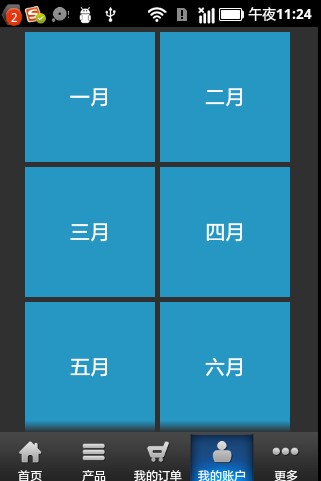
现在把核心布局文件写出来
<?xml version="1.0" encoding="utf-8"?>

    <ScrollView xmlns:android="http://schemas.android.com/apk/res/android"

        android:id="@+id/scrollView1"

        android:layout_width="fill_parent"

        android:layout_height="fill_parent" >

        <LinearLayout

            android:layout_width="fill_parent"

            android:layout_height="wrap_content"

            android:orientation="vertical"

             >

             <LinearLayout

            android:layout_width="fill_parent"

            android:layout_height="wrap_content"

            android:orientation="horizontal"

            android:layout_marginTop="5dp"

            android:gravity="center_horizontal"

            >

            <LinearLayout style="@style/menu_item_block_orange"

                >

                <TextView  android:text="一月"

                     android:clickable="true"

                    android:textSize="20dp"

                      android:textColor="@color/white"

                   android:layout_width="fill_parent"

                   android:layout_height="fill_parent"

                   android:gravity="center_vertical|center_horizontal"

                   android:id="@+id/yiyue"

                     />

            </LinearLayout>

            <LinearLayout style="@style/menu_item_block_orange"

                 android:layout_marginLeft="5dp" >

                <TextView  android:text="二月"

                     android:clickable="true"

                    android:textSize="20dp"

                   android:textColor="@color/white"

                   android:layout_width="fill_parent"

                   android:layout_height="fill_parent"

                   android:gravity="center_vertical|center_horizontal"

                   android:id="@+id/eryue"

                     />

            </LinearLayout>

        </LinearLayout>

           <LinearLayout

            android:layout_width="fill_parent"

            android:layout_height="wrap_content"

            android:orientation="horizontal"

            android:layout_marginTop="5dp"

             android:gravity="center_horizontal"

            >

            <LinearLayout style="@style/menu_item_block_orange"

                >

                <TextView  android:text="三月"

                     android:clickable="true"

                    android:textSize="20dp"

                    android:textColor="@color/white"

                     android:layout_width="fill_parent"

                   android:layout_height="fill_parent"

                   android:gravity="center_vertical|center_horizontal"

                   android:id="@+id/sanyue"

                     />

            </LinearLayout>

            <LinearLayout style="@style/menu_item_block_orange"

                 android:layout_marginLeft="5dp">

                <TextView  android:text="四月"

                     android:clickable="true"

                    android:textSize="20dp"

                      android:textColor="@color/white"

                     android:layout_width="fill_parent"

                   android:layout_height="fill_parent"

                   android:gravity="center_vertical|center_horizontal"

                   android:id="@+id/siyue"

                     />

            </LinearLayout>

        </LinearLayout>

         <LinearLayout

            android:layout_width="fill_parent"

            android:layout_height="wrap_content"

            android:orientation="horizontal"

            android:layout_marginTop="5dp"

             android:gravity="center_horizontal"

            >

            <LinearLayout style="@style/menu_item_block_orange"

                >

                <TextView  android:text="五月"

                     android:clickable="true"

                    android:textSize="20dp"

                    android:textColor="@color/white"

                     android:layout_width="fill_parent"

                   android:layout_height="fill_parent"

                   android:gravity="center_vertical|center_horizontal"

                   android:id="@+id/wuyue"

                     />

            </LinearLayout>

            <LinearLayout style="@style/menu_item_block_orange"

                 android:layout_marginLeft="5dp">

                <TextView  android:text="六月"

                     android:clickable="true"

                    android:textSize="20dp"

                      android:textColor="@color/white"

                     android:layout_width="fill_parent"

                   android:layout_height="fill_parent"

                   android:gravity="center_vertical|center_horizontal"

                   android:id="@+id/liuyue"

                     />

            </LinearLayout>

        </LinearLayout>

           <LinearLayout

            android:layout_width="fill_parent"

            android:layout_height="wrap_content"

            android:orientation="horizontal"

            android:layout_marginTop="5dp"

             android:gravity="center_horizontal"

            >

            <LinearLayout style="@style/menu_item_block_orange"

                >

                <TextView  android:text="七月"

                     android:clickable="true"

                    android:textSize="20dp"

                    android:textColor="@color/white"

                     android:layout_width="fill_parent"

                   android:layout_height="fill_parent"

                   android:gravity="center_vertical|center_horizontal"

                   android:id="@+id/qiyue"

                     />

            </LinearLayout>

            <LinearLayout style="@style/menu_item_block_orange"

                 android:layout_marginLeft="5dp">

                <TextView  android:text="八月"

                     android:clickable="true"

                    android:textSize="20dp"

                      android:textColor="@color/white"

                     android:layout_width="fill_parent"

                   android:layout_height="fill_parent"

                   android:gravity="center_vertical|center_horizontal"

                   android:id="@+id/bayue"

                     />

            </LinearLayout>

        </LinearLayout>

             <LinearLayout

            android:layout_width="fill_parent"

            android:layout_height="wrap_content"

            android:orientation="horizontal"

            android:layout_marginTop="5dp"

             android:gravity="center_horizontal"

            >

            <LinearLayout style="@style/menu_item_block_orange"

                >

                <TextView  android:text="九月"

                     android:clickable="true"

                    android:textSize="20dp"

                    android:textColor="@color/white"

                     android:layout_width="fill_parent"

                   android:layout_height="fill_parent"

                   android:gravity="center_vertical|center_horizontal"

                   android:id="@+id/jiuyue"

                     />

            </LinearLayout>

            <LinearLayout style="@style/menu_item_block_orange"

                 android:layout_marginLeft="5dp">

                <TextView  android:text="十月"

                     android:clickable="true"

                    android:textSize="20dp"

                      android:textColor="@color/white"

                     android:layout_width="fill_parent"

                   android:layout_height="fill_parent"

                   android:gravity="center_vertical|center_horizontal"

                   android:id="@+id/shiyue"

                     />

            </LinearLayout>

        </LinearLayout>

               <LinearLayout

            android:layout_width="fill_parent"

            android:layout_height="wrap_content"

            android:orientation="horizontal"

            android:layout_marginTop="5dp"

             android:gravity="center_horizontal"

            >

            <LinearLayout style="@style/menu_item_block_orange"

                >

                <TextView  android:text="十一月"

                     android:clickable="true"

                    android:textSize="20dp"

                    android:textColor="@color/white"

                     android:layout_width="fill_parent"

                   android:layout_height="fill_parent"

                   android:gravity="center_vertical|center_horizontal"

                   android:id="@+id/shiyiyue"

                     />

            </LinearLayout>

            <LinearLayout style="@style/menu_item_block_orange"

                 android:layout_marginLeft="5dp">

                <TextView  android:text="十二月"

                    android:clickable="true"

                    android:textSize="20dp"

                      android:textColor="@color/white"

                     android:layout_width="fill_parent"

                   android:layout_height="fill_parent"

                   android:gravity="center_vertical|center_horizontal"

                   android:id="@+id/shieryue"

                     />

            </LinearLayout>

        </LinearLayout>

        </LinearLayout>

    </ScrollView>
每个模块的样式(其实还有很多重复的可以写到样式文件里)
 <style name="menu_item_block_orange">

        <item name="android:background">@color/blue</item>

        <item name="android:layout_width">130dp</item>

        <item name="android:layout_height">130dp</item>

    </style>
java 文件
package com.example.crazy;

import android.os.Bundle;

import android.app.Activity;

import android.content.Intent;

import android.view.Menu;

import android.view.View;

import android.view.View.OnClickListener;

import android.widget.TextView;

public class MonthActivity extends Activity {

    @Override

    public void onCreate(Bundle savedInstanceState) {

        super.onCreate(savedInstanceState);

        setContentView(R.layout.activity_month);

        ((TextView)findViewById(R.id.yiyue)).setOnClickListener(l);

        ((TextView)findViewById(R.id.eryue)).setOnClickListener(l);

        ((TextView)findViewById(R.id.sanyue)).setOnClickListener(l);

        ((TextView)findViewById(R.id.siyue)).setOnClickListener(l);

        ((TextView)findViewById(R.id.wuyue)).setOnClickListener(l);

        ((TextView)findViewById(R.id.liuyue)).setOnClickListener(l);

        ((TextView)findViewById(R.id.qiyue)).setOnClickListener(l);

        ((TextView)findViewById(R.id.bayue)).setOnClickListener(l);

        ((TextView)findViewById(R.id.jiuyue)).setOnClickListener(l);

        ((TextView)findViewById(R.id.shiyue)).setOnClickListener(l);

        ((TextView)findViewById(R.id.shiyiyue)).setOnClickListener(l);

        ((TextView)findViewById(R.id.shieryue)).setOnClickListener(l);

    }

    private  OnClickListener l=new OnClickListener() {

        @Override

        public void onClick(View v) {

            // TODO Auto-generated method stub

        switch(((TextView)v).getId()){

        case R.id.yiyue:

            gotowebview("1");

            break;

        case R.id.eryue:

            gotowebview("2");

            break;

        case R.id.sanyue:

            gotowebview("3");

            break;

        case R.id.siyue:

            gotowebview("4");

            break;

        case R.id.wuyue:

            gotowebview("5");

            break;

        case R.id.liuyue:

            gotowebview("6");

            break;

        case R.id.qiyue:

            gotowebview("7");

            break;

        case R.id.bayue:

            gotowebview("8");

            break;

        case R.id.jiuyue:

            gotowebview("9");

            break;

        case R.id.shiyue:

            gotowebview("10");

            break;

        case R.id.shiyiyue:

            gotowebview("11");

            break;

        case R.id.shieryue:

            gotowebview("12");

            break;

            default:break;

        }

        }

    };

    private void gotowebview(String month){

        Identity.month=month;//Identity是我自定义的存放全局变量的类

        Intent it = new Intent(MonthActivity.this, MyAccount.class);

        startActivity(it);

    }

}
基本上就这些了。其实还可以做得更好一点,比如按下的时候有一个稍微变小的变化。
Metro风格的Android界面应用的更多相关文章
- VC/Wince 实现仿Win8 Metro风格界面2——页面滑动切换(附效果图)
前几天开始写仿Win8 Metro界面文章,部分网友觉得不错,感谢各位的意见.本来今天一直在折腾Android VLC播放器,没时间写.不过明天休息,所以今天就抽时间先写一下. 言归正传,我们都知道W ...
- VC/Wince 实现仿Win8 Metro风格界面1——设计概述和自绘Button(附效果图)
去年用VC做了一个仿Win8 Metro风格的界面,感觉挺有意思,最近打算把实现过程和一些技术原理记录下来. 主要是风格上类似Win8,其实功能上很多借鉴了Android的操作方式.界面只支持两种大小 ...
- 【转载】Android Metro风格的Launcher开发系列第二篇
前言: 各位小伙伴们请原谅我隔了这么久才开始写这一系列的第二篇博客,没办法忙新产品发布,好了废话不说了,先回顾一下:在我的上一篇博客Android Metro风格的Launcher开发系列第一篇写了如 ...
- [转载] Android Metro风格的Launcher开发系列第一篇
前言:从毕业到现在已经三年多了,回忆一下这三年基本上没有写过博客,总是觉得忙,没时间写,也觉得写博客没什么大用.但是看到很多大牛们都在写博客,分享自己的东西,所以嘛本着向大牛看齐,分享第一,记录第二的 ...
- Android Metro风格的Launcher开发系列第二篇
前言: 各位小伙伴们请原谅我隔了这么久才开始写这一系列的第二篇博客,没办法忙新产品发布,好了废话不说了,先回顾一下:在我的上一篇博客http://www.cnblogs.com/2010wuhao/p ...
- Android Metro风格的Launcher开发系列第一篇
前言:从毕业到现在已经三年多了,回忆一下这三年基本上没有写过博客,总是觉得忙,没时间写,也觉得写博客没什么大用.但是看到很多大牛们都在写博客,分享自己的东西,所以嘛本着向大牛看齐,分享第一,记录第二的 ...
- Android Metro风格的Launcher开发系列第三篇
前言: 各位小伙伴,又到了每周更新文章了时候了,本来是周日能发出来呢,这不是赶上清明节吗,女王大人发话了,清明节前两天半陪她玩,只留给我周一下午半天时间写博客,哪里有女王哪里就有压迫呀有木有!好了闲话 ...
- METRO风格
METRO风格是指微软在WINDOWS PHONE 7中新加入的界面风格,并且计划将其用于windows8中的开始菜单界面.该界面的特点是简洁高效,每一个METRO图标都没有边框,形状有点像地铁站中的 ...
- Win8 Metro风格的Web桌面HteOS
前言 曾经天天折腾ExtJS,折腾累了.近期这段时间開始用jquery来做一些东西,发现还是蛮有意思的.可是做到最后才发现,原来做好设计真的很重要. 上图就是HteOS项目的截图,眼下正在开发 ...
随机推荐
- c# dotfuscator 混淆后无法使用
在实体类中忘记给字段加上 get ;set ;导致编译后程序无法使用. 下面这个(A代码)是可以正常混淆的. public class PhoneUsedStatus { ...
- A multi-faceted language for the Java platform
最近在研究关于groovy 相关的技术 希望有研究交到研究这方面的朋友 Groovy 最新的地址 http://www.groovy-lang.org/
- ready与onload区别一
<!DOCTYPE html><html> <head> <title>ready与onload区别一</title> <meta c ...
- 解决 Oracle exp导出表数据时空表不能导出的问题
一.不能导出空表的原因 1.Oracle11g默认对空表不分配segment,故使用exp导出Oracle11g数据库时,空表不会导出. 2.设置deferred_segment_creation 参 ...
- NOIP2010 题解
机器翻译 题解:模拟 #include <cstdio> #include <cstring> ; ], ]; int main(){ memset(, sizeof(in)) ...
- webpack配置
1.初始化webpack npm install webpack -g (全局安装) npm init (初始化packge.json) npm install webpack --save- ...
- Core Audio(二)
用户模式音频组件 在windows vista中,core audio apis充当用户模式音频子系统的基础,core audio apis作为用户模式系统组件的一个thin layer,它用来将用户 ...
- Android中Button、ImageButton、ImageView背景设置区别
Button与ImageButton实际两者无关,Button继承自TextView,不支持src;ImageButton继承自ImageView.同一张图片在不设置大小,默认显示时,使用Button ...
- CAS 4.0.0RC编译环境
CAS 4.0.0RC编译环境 Eclipse Java EE IDE for Web Developers. JDK1.7,注意用JDK1.8是会出现编译错误的. Maven 在编译出现test错误 ...
- ansible 自动化(3)
批量执行playbooks 远程批量命令执行的另外一种方式是用playbooks:这里是playbooks的官方文档:http://docs.ansible.com/playbooks.html这里有 ...