
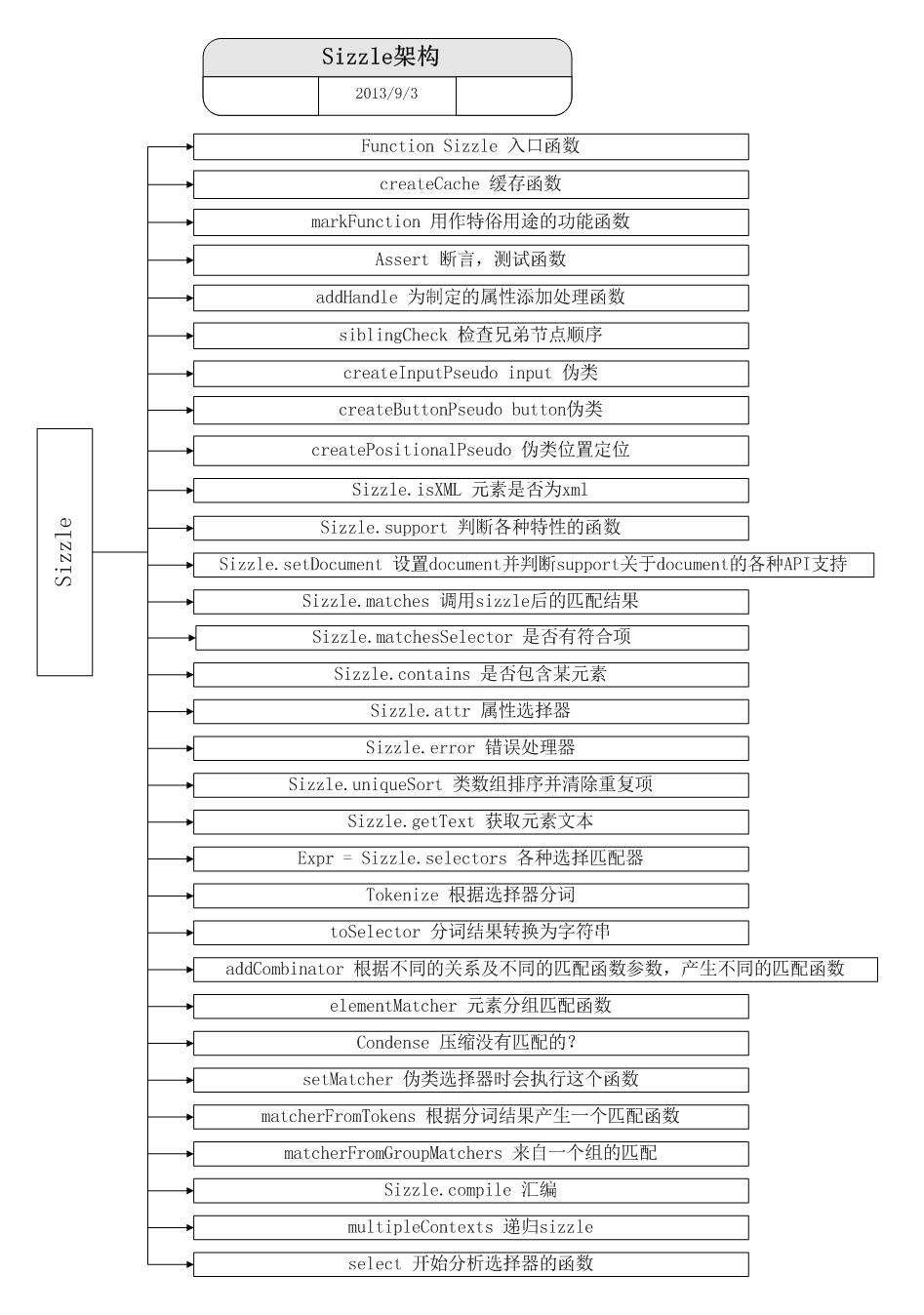
sizzle源码分析 (1)sizzle架构
classCache = createCache(),

    /*classCache:

    function cache( key, value ) {

        // Use (key + " ") to avoid collision with native prototype properties (see Issue #157)

        if ( keys.push( key += " " ) > Expr.cacheLength ) {

            // Only keep the most recent entries

            delete cache[ keys.shift() ];

        }

        return (cache[ key ] = value);

    }

    */

    tokenCache = createCache(),

    /*tokenCache:

    function cache( key, value ) {

        // Use (key + " ") to avoid collision with native prototype properties (see Issue #157)

        if ( keys.push( key += " " ) > Expr.cacheLength ) {

            // Only keep the most recent entries

            delete cache[ keys.shift() ];

        }

        return (cache[ key ] = value);

    }

    */

    compilerCache = createCache(),

    /*compilerCache:

    function cache( key, value ) {

        // Use (key + " ") to avoid collision with native prototype properties (see Issue #157)

        if ( keys.push( key += " " ) > Expr.cacheLength ) {

            // Only keep the most recent entries

            delete cache[ keys.shift() ];

        }

        return (cache[ key ] = value);

    }

    */

    hasDuplicate = false,

    sortOrder = function( a, b ) {

        if ( a === b ) {

            hasDuplicate = true;

            return 0;

        }

        return 0;

    },

    // General-purpose constants

    strundefined = typeof undefined,

    MAX_NEGATIVE = 1 << 31,

    // Instance methods

    hasOwn = ({}).hasOwnProperty,

    arr = [],

    pop = arr.pop,

    push_native = arr.push,

    push = arr.push,

    slice = arr.slice,

    // Use a stripped-down indexOf if we can't use a native one

    indexOf = arr.indexOf || function( elem ) {

        var i = 0,

            len = this.length;

        for ( ; i < len; i++ ) {

            if ( this[i] === elem ) {

                return i;

            }

        }

        return -1;

    },

    booleans = "checked|selected|async|autofocus|autoplay|controls|defer|disabled|hidden|ismap|loop|multiple|open|readonly|required|scoped",

    // Regular expressions

    // Whitespace characters http://www.w3.org/TR/css3-selectors/#whitespace

    //匹配空白 水平制表符 回车 换行 换页

    whitespace = "[\\x20\\t\\r\\n\\f]",

    // http://www.w3.org/TR/css3-syntax/#characters

    //可以匹配 由\\. 或 单词字符(所有字母数字下划线) 或 汉字(包括汉字标点符号),这里也可以说是全角符号组成

    characterEncoding = "(?:\\\\.|[\\w-]|[^\\x00-\\xa0])+",

    // Loosely modeled on CSS identifier characters

    // An unquoted value should be a CSS identifier http://www.w3.org/TR/css3-selectors/#attribute-selectors

    // Proper syntax: http://www.w3.org/TR/CSS21/syndata.html#value-def-identifier

    //识别码

    identifier = characterEncoding.replace( "w", "w#" ),

    // Acceptable operators http://www.w3.org/TR/selectors/#attribute-selectors

    //attributes ="\[[\x20\t\r\n\f]*((?:\\.|[\w-]|[^\x00-\xa0])+)[\x20\t\r\n\f]*(?:([*^$|!~]?=)[\x20\t\r\n\f]*(?:(['"])((?:\\.|[^\\])*?)\3|((?:\\.|[\w#-]|[^\x00-\xa0])+)|)|)[\x20\t\r\n\f]*\]"

    //匹配属性 例如:[a="b"] [a=b] [a|='er']

    attributes = "\\[" + whitespace + "*(" + characterEncoding + ")" + whitespace +

        "*(?:([*^$|!~]?=)" + whitespace + "*(?:(['\"])((?:\\\\.|[^\\\\])*?)\\3|(" + identifier + ")|)|)" + whitespace + "*\\]",

    // Prefer arguments quoted,

    //   then not containing pseudos/brackets,

    //   then attribute selectors/non-parenthetical expressions,

    //   then anything else

    // These preferences are here to reduce the number of selectors

    //   needing tokenize in the PSEUDO preFilter

    pseudos = ":(" + characterEncoding + ")(?:\\(((['\"])((?:\\\\.|[^\\\\])*?)\\3|((?:\\\\.|[^\\\\()[\\]]|" + attributes.replace( 3, 8 ) + ")*)|.*)\\)|)",

    // Leading and non-escaped trailing whitespace, capturing some non-whitespace characters preceding the latter

    //匹配开始或结束的空白字符

    rtrim = new RegExp( "^" + whitespace + "+|((?:^|[^\\\\])(?:\\\\.)*)" + whitespace + "+$", "g" ),

    //匹配逗号

    rcomma = new RegExp( "^" + whitespace + "*," + whitespace + "*" ),

    //匹配组合器 包括> + ~ 及"[\\x20\\t\\r\\n\\f]"

    rcombinators = new RegExp( "^" + whitespace + "*([>+~]|" + whitespace + ")" + whitespace + "*" ),

    //兄弟节点?

    rsibling = new RegExp( whitespace + "*[+~]" ),

    //属性选择器的等号后边部分,如:=aa]

    rattributeQuotes = new RegExp( "=" + whitespace + "*([^\\]'\"]*)" + whitespace + "*\\]", "g" ),

    //rpseudo=/:((?:\\.|[\w-]|[^\x00-\xa0])+)(?:\(((['"])((?:\\.|[^\\])*?)\3|((?:\\.|[^\\()[\]]|\[[\x20\t\r\n\f]*((?:\\.|[\w-]|[^\x00-\xa0])+)[\x20\t\r\n\f]*(?:([*^$|!~]?=)[\x20\t\r\n\f]*(?:(['"])((?:\\.|[^\\])*?)\8|((?:\\.|[\w#-]|[^\x00-\xa0])+)|)|)[\x20\t\r\n\f]*\])*)|.*)\)|)/

    //伪类选择器 如::nth-child(3)

    rpseudo = new RegExp( pseudos ),

    //匹配识别码

    ridentifier = new RegExp( "^" + identifier + "$" ),

    matchExpr = {//匹配各种选择器的正则表达式

        "ID": new RegExp( "^#(" + characterEncoding + ")" ),//ID选择器

        "CLASS": new RegExp( "^\\.(" + characterEncoding + ")" ),//类

        "TAG": new RegExp( "^(" + characterEncoding.replace( "w", "w*" ) + ")" ),

        "ATTR": new RegExp( "^" + attributes ),

        "PSEUDO": new RegExp( "^" + pseudos ),

        "CHILD": new RegExp( "^:(only|first|last|nth|nth-last)-(child|of-type)(?:\\(" + whitespace +

            "*(even|odd|(([+-]|)(\\d*)n|)" + whitespace + "*(?:([+-]|)" + whitespace +

            "*(\\d+)|))" + whitespace + "*\\)|)", "i" ),

        "bool": new RegExp( "^(?:" + booleans + ")$", "i" ),

        // For use in libraries implementing .is()

        // We use this for POS matching in `select`

        "needsContext": new RegExp( "^" + whitespace + "*[>+~]|:(even|odd|eq|gt|lt|nth|first|last)(?:\\(" +

            whitespace + "*((?:-\\d)?\\d*)" + whitespace + "*\\)|)(?=[^-]|$)", "i" )

    },

    //检查是否原生代码

    rnative = /^[^{]+\{\s*\[native \w/,

    // Easily-parseable/retrievable ID or TAG or CLASS selectors

    rquickExpr = /^(?:#([\w-]+)|(\w+)|\.([\w-]+))$/,

    //匹配input元素,其实包含了四种:input|select|textarea|button

    rinputs = /^(?:input|select|textarea|button)$/i,

    rheader = /^h\d$/i,

    rescape = /'|\\/g,

    // CSS escapes http://www.w3.org/TR/CSS21/syndata.html#escaped-characters

    //匹配解码字符

    runescape = new RegExp( "\\\\([\\da-f]{1,6}" + whitespace + "?|(" + whitespace + ")|.)", "ig" ),

    funescape = function( _, escaped, escapedWhitespace ) {//_代表整个匹配项,escaped代表第一个匹配项,escapedWhitespace代表第二个分组匹配项,即空白匹配项

        var high = "0x" + escaped - 0x10000;

        // NaN means non-codepoint

        // Support: Firefox

        // Workaround erroneous numeric interpretation of +"0x"

        return high !== high || escapedWhitespace ?

            escaped :

            // BMP codepoint

            high < 0 ?

                String.fromCharCode( high + 0x10000 ) :

                // Supplemental Plane codepoint (surrogate pair)

                String.fromCharCode( high >> 10 | 0xD800, high & 0x3FF | 0xDC00 );

    };
sizzle源码分析 (1)sizzle架构的更多相关文章
- Sizzle源码分析 (一)
Sizzle 源码分析 (一) 2.1 稳定 版本 Sizzle 选择器引擎博大精深,下面开始阅读它的源代码,并从中做出标记 .先从入口开始,之后慢慢切入 . 入口函数 Sizzle () 源码 19 ...
- jQuery1.11源码分析(1)-----Sizzle源码概览[原创]
最近在啃jQuery1.11源码,上来就遇到Sizzle这个jQuery的大核心,虽然已经清楚了Sizzle的用途,先绕过去也没事,但明知山有虎偏向虎山行才是我们要做的. 本文面向的阅读对象:正在学习 ...
- sizzle源码分析 (4)sizzle 技术总结及值得我们学习的地方
分析sizzle源码并不是为了去钻牛角尖,而是去了解它的思想,学习下期中一些技术的运用. 1,sizzle中的正则表达式jquery源码中充斥着各种正则表达式,能否看懂其源码的关键之一就是对正则表达式 ...
- jQuery1.11源码分析(5)-----Sizzle编译和过滤阶段[原创]
在上一章中,我们说到在之前的查找阶段我们已经获得了待选集seed,那么这一章我们就来讲如何将seed待选集过滤,以获得我们最终要用的元素. 其实思路本质上还是不停地根据token过滤,但compile ...
- Sizzle源码分析:一 设计思路
一.前言 DOM选择器(Sizzle)是jQuery框架中非常重要的一部分,在H5还没有流行起来的时候,jQuery为我们提供了一个简洁,方便,高效的DOM操作模式,成为那个时代的经典.虽然现在Vue ...
- jQuery 源码分析 7: sizzle
jQuery使用的是sizzle这个选择器引擎,这个引擎以其高速著称,其实现十分精妙但是也足够复杂,下面现简单分析一下相关的代码. 在jQuery的部分API接口是直接引用了Sizzle的方法,这些接 ...
- Sizzle源码分析:三 筛选和编译
好了有了之前的词法分析过程,现在我们来到select函数来,这个函数的整体流程,前面也大概说过: 1. 先做词法分析获得token列表 2. 如果有种子集合直接到编译过程 3. 如果没有种子集合并且是 ...
- jQuery1.11源码分析(2)-----Sizzle源码中的正则表达式[原创]
看完了上篇,对Sizzle有了一个大致的了解,我们接下来就可以正式开始啃Sizzle的源码了.上来就讲matcher难度太大,先来点开胃菜,讲讲Sizzle中的各个正则表达式的作用吧(本来还想讲初始化 ...
- jQuery源码分析-01总体架构
1. 总体架构 1.1自调用匿名函数 self-invoking anonymous function 打开jQuery源码,首先你会看到这样的代码结构: (function( window, und ...
- jQuery 2.0.3 源码分析core - 整体架构
拜读一个开源框架,最想学到的就是设计的思想和实现的技巧. 废话不多说,jquery这么多年了分析都写烂了,老早以前就拜读过, 不过这几年都是做移动端,一直御用zepto, 最近抽出点时间把jquery ...
随机推荐
- Visual C++ 6.0使用教程
Visual C++它大概可以分成三个主要的部分: 3. Platform SDK.这才是Visual C++和整个Visual Studio的精华和灵魂,虽然我们很少能直接接触到它.大致说来,Pla ...
- VS2013正则表达式应用示例
VS2013正则表达式语法 在查找替换对话框中查看 VS2013语法可在查找替换对话框中查看,具体过程如下: 通过编辑->查找和替换->在文件中替换或者相应快捷键(Ctrl+Shift+H ...
- JavaScript垃圾回收(三)——内存泄露
一.JavaScript内存监测工具 在讨论内存泄露之前,先介绍几款JavaScript内存监测工具. IE的sIEve与JSLeaksDetector(这两个可以在下面的附件中下载),firefox ...
- 漫谈可视化Prefuse(一)---从SQL Server数据库读取数据
上篇<可视化工具solo show-----Prefuse自带例子GraphView讲解>主要介绍了整个Prefuse工具集具有的一些特征.框架的运行流程,分析并展现了官方提供的例子Gra ...
- js每天进步一点点
本人菜鸟一枚,进入公司不久,任务不多,期待从零开始学习js,请各位大牛指导!! <!DOCTYPE html PUBLIC "-//W3C//DTD XHTML 1.0 Transit ...
- 坑人的微信新版支付(V3.3.6)
现在微支付的需求越来越多,最近刚接到一个需要微支付的项目,于是身为程序猿的我拿到最新的微信支付接口文档(3.3.6)就开始研究微信支付.本以为应该跟支付宝差不多的感觉结果被坑了.恕在下无能, ...
- Eclipse JAVA文件注释乱码
将别人的项目或JAVA文件导入到自己的Eclipse中时,常常会出现JAVA文件的中文注释变成乱码的情况,主要原因就是别人的IDE编码格式和自己的Eclipse编码格式不同. 总结网上的建议和自己的体 ...
- APPSCAN使用外部浏览器
在使用appscan扫描时,自带浏览器可能存在兼容性问题(比如HTML5),故需要用到其他浏览器.在做139邮箱HTML5项目,需要使用chrome浏览器进行扫描.因此分享下如何使用外部浏览器,将之前 ...
- java并发编程(3):ThreadLocal
转载:http://www.cnblogs.com/dolphin0520/p/3920407.html 一. 对ThreadLocal的理解 ThreadLocal,很多地方叫做线程本地变量,也有地 ...
- C#指定时间和当前时间的相差的月份、天数
DateTime 类型有时间的 年月日时分秒等属性,但是获取两个DateTime的 相差月份,就需要自己写了: public static int GetSubMonth(DateTime speci ...