
Redis调用
Redis帮助类
using StackExchange.Redis;

using System;

using System.Collections.Generic;

using System.Linq;

using System.Text;

using System.Threading;

using System.Threading.Tasks;

namespace ConsoleApp7

{

    public class RedisHelper

    {

        public static readonly RedisHelper Instance = new RedisHelper();

        private readonly object _syncRoot = new object();

        /// <summary>

        /// redis分布式锁

        /// </summary>

        private Redlock.CSharp.Redlock dlm_redlock { get; set; }

        private RedisHelper()

        {

        }

        public ConnectionMultiplexer RedisConnectionManager

        {

            get; private set;

        }

        private IDatabase _redisDatabase;

        public IDatabase RedisDatabase

        {

            get

            {

                return this._redisDatabase;

            }

            set

            {

                this._redisDatabase = value;

            }

        }

        /// <summary>

        /// 初始化

        /// </summary>

        /// <param name="configuration"></param>

        public void Init(string configuration)

        {

            try

            {

                RedisConnectionManager = ConnectionMultiplexer

                    .Connect(configuration);

                RedisDatabase = this.RedisConnectionManager.GetDatabase();

                List<ConnectionMultiplexer> listCM = new List<ConnectionMultiplexer>();

                foreach (var item in configuration.Split(','))

                {

                    listCM.Add(ConnectionMultiplexer.Connect(item));

                }

                dlm_redlock = new Redlock.CSharp.Redlock(listCM[]);

            }

            catch (Exception ex)

            {

               // LogHelper.WriteLog(ex.Message, ex);

                throw ex;

            }

        }

        /// <summary>

        /// 反初始化

        /// </summary>

        public void UnInit()

        {

            RedisDatabase = null;

            if (RedisConnectionManager != null)

                RedisConnectionManager.Dispose();

        }

        public void HashIncrement(string mapName, string key)

        {

            RedisDatabase.HashIncrement(mapName, key);

        }

        //public void StringIncrement(string key)

        //{

        //    RedisDatabase.StringIncrement(key);

        //}

        /// <summary>

        /// 以分布式锁的方式读取写入值到redis

        /// </summary>

        /// <param name="lockKey">锁定资源的key</param>

        /// <param name="action">具体操作</param>

        /// <param name="throwExecption">未获取到分布式锁是否抛出异常默认为是</param>

        public void LockAction(string lockKey, Action<IDatabase> action, bool throwExecption = true)

        {

            if (action == null)

            {

                throw new ArgumentNullException("参数action空异常");

            }

            Redlock.CSharp.Lock lockObject;

            var locked = GetLock(lockKey, out lockObject);

            //没有获取到锁 则进行等待,最多等待5秒

            int total = ;

            Random rdm = new Random();

            int sleepTime = ;

            while (!locked)

            {

                sleepTime = rdm.Next(, );

                //等待100毫秒,重新获取

                Thread.Sleep(sleepTime);

                total += sleepTime;

                locked = GetLock(lockKey, out lockObject);

                if (total > )

                {

                    break;

                }

            }

            if (!locked && throwExecption)

            {

                throw new Exception("获取redis分布式锁失败");

            }

            if (locked)

            {

                try

                {

                    action(RedisDatabase);

                }

                catch (Exception ex)

                {

                    throw ex;

                }

                finally

                {

                    //释放分布式锁

                    dlm_redlock.Unlock(lockObject);

                }

            }

        }

        /// <summary>

        /// 获取分布式锁

        /// </summary>

        /// <param name="lockKey">键</param>

        /// <param name="lockObject">锁对象</param>

        /// <returns>获取锁是否成功</returns>

        private bool GetLock(string lockKey, out Redlock.CSharp.Lock lockObject)

        {

            return dlm_redlock.Lock(

                  "RedLock_" + lockKey,

                  new TimeSpan(, , ),//最多锁10s 则自动释放锁

                  out lockObject

              );

        }

        public void HSet(string mapName, string key, string value)

        {

            lock (this._syncRoot)

            {

                //this.RedisClient.HSet(mapName, GetBytes(key), GetBytes(value));

                this.RedisDatabase.HashSet(mapName, key, value);

            }

        }

        public string HGet(string mapName, string key)

        {

            lock (this._syncRoot)

            {

                //byte[] value = this.RedisClient.HGet(mapName, GetBytes(key));

                //if (value == null || value.Length == 0)

                //{

                //    return null;

                //}

                //string str = GetString(value);

                //return str;

                string str = this.RedisDatabase.HashGet(mapName, key);

                return str;

            }

        }

        public IDictionary<string, string> HGetAll(string mapName)

        {

            lock (this._syncRoot)

            {

                //byte[][] values = this.RedisClient.HGetAll(mapName);

                //int count = values.Length / 2;

                //IDictionary<string, string> dic = new Dictionary<string, string>(count);

                //for (int i = 0; i < values.Length;)

                //{

                //    string key = GetString(values[i++]);

                //    string value = GetString(values[i++]);

                //    dic[key] = value;

                //}

                //return dic;

                HashEntry[] entries = this.RedisDatabase.HashGetAll(mapName);

                IDictionary<string, string> dic = new Dictionary<string, string>();

                for (int i = ; i < entries.Length; i++)

                {

                    HashEntry entry = entries[i];

                    string key = entry.Name;

                    string value = entry.Value;

                    dic[key] = value;

                }

                return dic;

            }

        }

        //private readonly Random _radom = new Random();

        public IDictionary<string, string> HScan(string mapName, string pattern, int size)

        {

            lock (this._syncRoot)

            {

                IEnumerable<HashEntry> entries = this.RedisDatabase.HashScan(

                    mapName, pattern, , CommandFlags.None);

                if (entries == null)

                {

                    throw new ApplicationException("HSCAN 命令出错,返回空");

                }

                IDictionary<string, string> dic = new Dictionary<string, string>();

                foreach (HashEntry entry in entries)

                {

                    string key = entry.Name;

                    string value = entry.Value;

                    dic[key] = value;

                    if (--size <= )

                    {

                        break;

                    }

                }

                return dic;

            }

        }

        public int Del(string key)

        {

            lock (this._syncRoot)

            {

                //int value = this.RedisClient.HDel(mapName, GetBytes(key));

                bool flag = this.RedisDatabase.KeyDelete(key);

                return flag ?  : ;

            }

        }

        public void StringSet(string key, string value, TimeSpan? expiry = null)

        {

            lock (this._syncRoot)

            {

                //int value = this.RedisClient.HDel(mapName, GetBytes(key));

                this.RedisDatabase.StringSet(key, value, expiry);

                return;

            }

        }

        public string StringGet(string key)

        {

            lock (this._syncRoot)

            {

                //int value = this.RedisClient.HDel(mapName, GetBytes(key));

                RedisValue value = this.RedisDatabase.StringGet(key);

                string sv = (string)value;

                return sv;

            }

        }

        public int HDel(string mapName, string key)

        {

            lock (this._syncRoot)

            {

                //int value = this.RedisClient.HDel(mapName, GetBytes(key));

                bool flag = this.RedisDatabase.HashDelete(mapName, key);

                return flag ?  : ;

            }

        }

        public void SAdd(string setName, string value)

        {

            lock (this._syncRoot)

            {

                bool flag = this.RedisDatabase.SetAdd(setName, value);

            }

        }

        public long SAdd(string setName, IList<string> values)

        {

            lock (this._syncRoot)

            {

                RedisValue[] rvs = values.Select(p => (RedisValue)p).ToArray();

                long count = this.RedisDatabase.SetAdd(setName, rvs);

                return count;

            }

        }

        public IList<string> SIntersect(IList<string> setNames)

        {

            lock (this._syncRoot)

            {

                RedisKey[] keys = setNames.Select(p => (RedisKey)(p)).ToArray();

                RedisValue[] values = this.RedisDatabase.SetCombine(SetOperation.Intersect, keys);

                IList<string> list = values.Select(p => (string)p).ToList();

                return list;

            }

        }

        public IList<string> SScan(string sname, string pattern, int offset, int count)

        {

            IList<string> list = new List<string>();

            lock (this._syncRoot)

            {

                IEnumerable<RedisValue> iter = this.RedisDatabase.SetScan(sname, pattern, );

                foreach (var item in iter)

                {

                    if (offset > )

                    {

                        --offset;

                        continue;

                    }

                    if (count > )

                    {

                        --count;

                        list.Add((string)item);

                    }

                }

            }

            return list;

        }

        public long SCard(string setName)

        {

            long result = this.RedisDatabase.SetLength(setName);

            return result;

        }

        public bool KeyExpire(string key, TimeSpan? ts)

        {

            lock (this._syncRoot)

            {

                bool flag = this.RedisDatabase.KeyExpire(key, ts);

                return flag;

            }

        }

        public bool KeyExists(string key)

        {

            lock (this._syncRoot)

            {

                bool flag = this.RedisDatabase.KeyExists(key);

                return flag;

            }

        }

        public string HGet(string assetsStatusMap)

        {

            throw new NotImplementedException();

        }

        //private string GetString(byte[] bytes)

        //{

        //    return _encoding.GetString(bytes);

        //}

        //private byte[] GetBytes(string str)

        //{

        //    return _encoding.GetBytes(str);

        //}

        public long LPush(string key, string value)

        {

            lock (this._syncRoot)

            {

                return this.RedisDatabase.ListLeftPush(key, value);

            }

        }

        public long RPush(string key, string value)

        {

            lock (this._syncRoot)

            {

                return this.RedisDatabase.ListRightPush(key, value);

            }

        }

        public string[] LRange(string key, long start, long stop)

        {

            lock (this._syncRoot)

            {

                var vals = this.RedisDatabase.ListRange(key, start, stop);

                return vals.Select(p => (string)p).ToArray();

            }

        }

        public void LRemove(string key, string value, int count)

        {

            lock (this._syncRoot)

            {

                this.RedisDatabase.ListRemove(key, value, count);

            }

        }

    }

}
具体调用详解
1、存入map类型数据(只能一次存入,第二次在执行存入相同Redis键值时新值不能存入)
 class Program

    {

        static void Main(string[] args)

        {

            RedisHelper redis = null;

            redis = RedisHelper.Instance;

            string RedisServer = "127.0.0.1:6379";

            redis.Init(RedisServer);

            string KEY = "";

            if (!redis.KeyExists(KEY))

            {

                redis.HSet(KEY, "", "");

                redis.HSet(KEY, "", "");

                redis.HSet(KEY, "", "");

            }

            var a = redis.HGet(KEY, "");//获取值 55

            var b = redis.Del(KEY);//返回1表示删除成功--根据redis键值删除

            var c = redis.HDel(KEY, ""); //根据redis键值和存入数据的key删除指定的值

        }

    }
存入

根据redis的key与值中的key删除

2、存入list(可循环调用存入)
static void Main(string[] args)

        {

            RedisHelper redis = null;

            redis = RedisHelper.Instance;

            string RedisServer = "127.0.0.1:6379";

            redis.Init(RedisServer);

            string KEY = "";

          //  List<string> listCode = new List<string>() { "111", "2222" };//第一次存入

            List<string> listCode = new List<string>() { "", "" };//第二次存入

            RedisHelper.Instance.SAdd(KEY, listCode);

            var b = redis.Del(KEY);//返回1表示删除成功--根据redis键值删除

        }

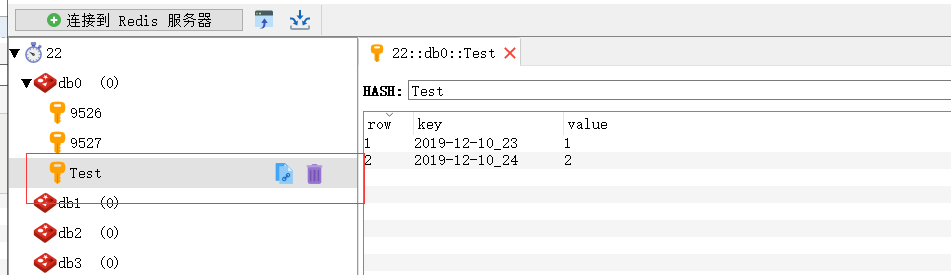
3、业务场景:用作计算次数
static void Main(string[] args)

{

RedisHelper redis = null;

redis = RedisHelper.Instance;

string RedisServer = "127.0.0.1:6379";

redis.Init(RedisServer);

string key = DateTime.Now.ToString("yyyy-MM-dd");

redis.HashIncrement("Test", key + "_" + "");

redis.HashIncrement("Test", key + "_" + "");

}
4、HGetAll
 IDictionary<string, string> dicInfo = redis.HGetAll("");

            foreach (string item in dicInfo.Keys)

            {

            }
5、设置redis的key时效
  static void Main(string[] args)

        {

            RedisHelper redis = null;

            redis = RedisHelper.Instance;

            string RedisServer = "127.0.0.1:6379";

            redis.Init(RedisServer);

            string KEY = "";

            if (!redis.KeyExists(KEY))

            {

                redis.HSet(KEY, "", "");

            }

            var a = redis.HGet(KEY, "");//获取值 55

            TimeSpan sp = new TimeSpan(, , );//设置key值的时效为2分钟,2分钟后会自动删除redis里key及数据

            RedisHelper.Instance.KeyExpire(KEY, sp);

        }
6、leftPush和rightPush
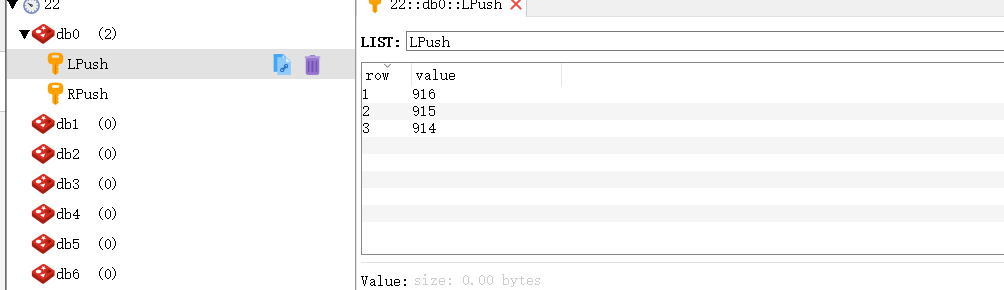
redis对list操作分为左和右两种
lPush将数据添加到key对应的现有数据的左边,也就是头部,rPush是将现有数据添加到现有数据的右边,也就是尾部,可以根据业务的不同进行对应的添加
 static void Main(string[] args)

        {

            RedisHelper redis = null;

            redis = RedisHelper.Instance;

            string RedisServer = "127.0.0.1:6379";

            redis.Init(RedisServer);

            //string KEY = "RPush";

            //RedisHelper.Instance.RPush(KEY, "914");//每次新增的数据都在尾部

            //RedisHelper.Instance.RPush(KEY, "915");

            //RedisHelper.Instance.RPush(KEY, "916");

            string KEY = "LPush";

            RedisHelper.Instance.LPush(KEY, "");//每次新增的数据都在头部

            RedisHelper.Instance.LPush(KEY, "");

            RedisHelper.Instance.LPush(KEY, "");

        }

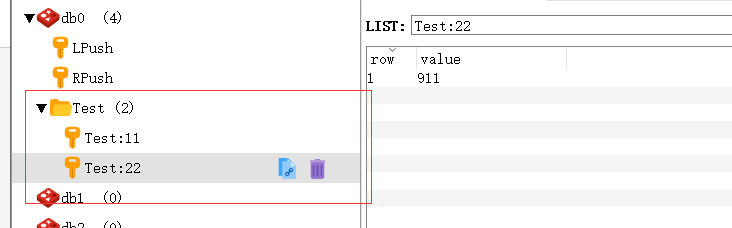
7、key值分组
static void Main(string[] args)

        {

            RedisHelper redis = null;

            redis = RedisHelper.Instance;

            string RedisServer = "127.0.0.1:6379";

            redis.Init(RedisServer);

            string KEY = "Test:11";

            redis.LPush(KEY, "");

            string KEY2 = "Test:22";

            redis.LPush(KEY2, "");

        }
8、ListRange使用(根据key值以及list的值删除)
 static void Main(string[] args)

        {

            RedisHelper redis = null;

            redis = RedisHelper.Instance;

            string RedisServer = "127.0.0.1:6379";

            redis.Init(RedisServer);

            string KEY = "LPush";

            // Redis Lrange 返回列表中指定区间内的元素,区间以偏移量 START 和 END 指定。

            //其中 0 表示列表的第一个元素, 1 表示列表的第二个元素,以此类推。 你也可以使用负数下标,

            //以 -1 表示列表的最后一个元素, -2 表示列表的倒数第二个元素,以此类推。

            string[] vals = RedisHelper.Instance.LRange(KEY, , -);//916,915,914

            string[] vals2 = RedisHelper.Instance.LRange(KEY, , -);//915,914

            string[] vals3 = RedisHelper.Instance.LRange(KEY, , -);//

            string[] vals4 = RedisHelper.Instance.LRange(KEY, , -);//

        }
9、ListRemove
 static void Main(string[] args)

        {

            RedisHelper redis = null;

            redis = RedisHelper.Instance;

            string RedisServer = "127.0.0.1:6379";

            redis.Init(RedisServer);

            string KEY = "LPush";

            RedisHelper.Instance.LRemove(KEY, "", ); //删除916这条数据

        }

10、redis分页查询
Redis中有一个经典的问题,在巨大的数据量的情况下,做类似于查找符合某种规则的Key的信息,这里就有两种方式,
一是keys命令,简单粗暴,由于Redis单线程这一特性,keys命令是以阻塞的方式执行的,keys是以遍历的方式实现的复杂度是 O(n),Redis库中的key越多,查找实现代价越大,产生的阻塞时间越长。
二是scan命令,以非阻塞的方式实现key值的查找,绝大多数情况下是可以替代keys命令的,可选性更强
  static void Main(string[] args)

        {

            RedisHelper redis = null;

            redis = RedisHelper.Instance;

            string RedisServer = "127.0.0.1:6379";

            redis.Init(RedisServer);

            string KEY = "";

            List<string> list = new List<string>() { "", "", "", "" };

            redis.SAdd(KEY, list);

            int PageIndex = ;

            int PageSize = ;

            //分页查询

            IList<string> values = RedisHelper.Instance.SScan(

               KEY,

               "*",

               PageIndex * PageSize,

               PageSize);

            long count = RedisHelper.Instance.SCard(KEY);//总条数

        }
11、分布式锁
 /// <summary>

        /// redis锁定key

        /// </summary>

        private static string LOCK_KEY = "FavoriteFunctionTask";

        /// <summary>

        /// redis排它锁key

        /// </summary>

        private static string EXCLUSIVE_LOCK = LOCK_KEY + "_LOCK";

        /// <summary>

        ///

        /// </summary>

        /// <param name="args"></param>

        static void Main(string[] args)

        {

            RedisHelper redis = null;

            redis = RedisHelper.Instance;

            string RedisServer = "127.0.0.1:6379";

            redis.Init(RedisServer);

            RedisHelper.Instance.LockAction(LOCK_KEY, db =>

            {

                //设置5分钟过时key

                if (string.IsNullOrEmpty(RedisHelper.Instance.StringGet(EXCLUSIVE_LOCK)))

                {

                    RedisHelper.Instance.StringSet(EXCLUSIVE_LOCK, "", TimeSpan.FromMinutes());

                }

            }, false);

        }
https://blog.csdn.net/weixin_34377919/article/details/88612882
Redis调用的更多相关文章
- 一个简单的redis调用类
能只能判断函数的调用规则,容错规则, 例如set函数 set($key, $value, $time = false) 根据time的真假来判断是否使用set,或者是setex函数 get函数 get ...
- Redis调用的流程(新手使用)
就用查省市为例,别人还没查就把所有都弄好,很浪费资源和时间,redis是为了存储常用的查询操作的[结果],以此来减少直接查询数据库的次数,以下内容仅供参考,请勿照抄.(如有说得不好之处,请指点.) 言 ...
- yii2:redis调用
参照手册,调用redis,报错,真坑: Yii::$app->redis 后改改用: Yii::getRedis();
- 使用redis调用lua脚本的方式对接口进行限流
java端实现: //初始化一个redis可执行的lua DefaultRedisScript<List> defaultRedisScript = new DefaultRedisScr ...
- Redis调用lua生成验证码
场景: 通过微信公众号拿验证码在APP上绑定,为了防止重复,尝试使用reids-lua的方法实现此功能 以下是 php 调用 redis.eval 方法传入的 lua 方法,当然这只是修改后的,保 ...
- 快速入门Redis调用Lua脚本及使用场景介绍
Redis 是一种非常流行的内存数据库,常用于数据缓存与高频数据存储.大多数开发人员可能听说过redis可以运行 Lua 脚本,但是可能不知道redis在什么情况下需要使用到Lua脚本. 一.阅读本文 ...
- .Net Core redis 调用报错 '6000 Redis requests per hour' 解决 6000 此调用限制
问题描述 redis 是一种基于内存,性能高效的 NoSQL 数据库,性能高主要就体现在数据交互耗时较短,能够段时快速的对用户的请求做出反应,所以在业务比较复杂或交互量需求大时,必然会超过 6000次 ...
- Redis总体 概述,安装,方法调用
1 什么是redis redis是一个key-value存储系统.和Memcached类似,它支持存储的value类型相对更多,包括string(字符串).list(链表).set(集合)和zset( ...
- redis在linux下安装并測试(在spring下调用)
官网帮助文档例如以下 Installation Download, extract and compile Redis with: $ wget http://download.redis.io/re ...
随机推荐
- Java IO流详解(六)——转换流
转换流也是一种处理流,它提供了字节流和字符流之间的转换.在Java IO流中提供了两个转换流:InputStreamReader 和 OutputStreamWriter,这两个类都属于字符流.其中I ...
- 分布式系统(二) --SOA 以及一些网络通信协议TCP/UDP SYN攻击
SOA(面向服务的架构):Service Oriented Architecture面向服务的架构.也就是把工程拆分成服务层.表现层两个工程.服务层中包含业务逻辑,只需要对外提供服务即可.表现层只需要 ...
- 用python计算一条射线到两个平面的交点
前两天,一个朋友找我(半个程序猿)用python帮他写数学模型,当时的我直接是懵逼的,当听到三维啥的时候,整个人就好了,最终在周末花了3个小时把逻辑理了一遍,给小伙伴一个满意的答复了,话不多说,我来整 ...
- JDBC 通过读取文件进行初始化
- 给服务添加路由--ingress
kind: NamespaceapiVersion: v1metadata: name: demo-webshell generateName: demo-webshell labels: ...
- 18 JavaScript字符串方法
indexOf():从头到尾进行检索.返回指定文本在字符串最后一次出现的索引,否则返回-1.可以指定第二个参数作为起始位置. lastIndexOf:从尾到头进行检索.返回指定文本最后出现的位置,否则 ...
- Java 数据脱敏 工具类
一.项目导入Apache的commons的Jar包. Jar包Maven下载地址:https://mvnrepository.com/artifact/org.apache.commons/commo ...
- 【PAT甲级】1064 Complete Binary Search Tree (30 分)
题意:输入一个正整数N(<=1000),接着输入N个非负整数(<=2000),输出完全二叉树的层次遍历. AAAAAccepted code: #define HAVE_STRUCT_TI ...
- 中国5G,如何避免重复投资?
前不久,工信部正式向中国移动.中国联通.中国电信发放5G商用牌照,此举意味着中国提前启动5G商用计划,随之而来的,将会是运营商.设备商大规模的投资.相关数据机构预测,三大运营商2019年预计会投入30 ...
- 关于Debug Assertion Failed问题
书上代码: #include<stdio.h> #include<stdlib.h> /* 提供malloc().free()函数 */ #include<string. ...