
ubuntu 更新源 或者 apt-get install 出错404 not found ,Failed to fetch
1.考虑是不是能上网
2.用apt-get update ,然后再试试apt-get install
如果apt-get update 也出现很多 404 not found 或者 failed to fetch ,就要考虑更换自己的源,百度搜 /etc/apt/sources.list
3.如果还不行,估计是Ubuntu版本太老了,没有维护的了。
比如我用11.04,sudo apt-get install open-vm-dkms 不行,sudo apt-get update 不行,就死活不行,猜测是版本太老了。?。
也可以参考该文
http://www.tuicool.com/articles/EjMJNz
转载如下:
关于ubuntu的sources.list总结
一、作用
文件/etc/apt/sources.list是一个普通可编辑的文本文件,保存了ubuntu软件更新的源服务器的地址。和sources.list功能一样的是/etc/apt/sources.list.d/*.list(*代表一个文件名,只能由字母、数字、下划线、英文句号组成)。sources.list.d目录下的*.list文件为在单独文件中写入源的地址提供了一种方式,通常用来安装第三方的软件。
deb http://archive.ubuntu.com/ubuntu/ trusty main restricted universe multiverse

deb http://archive.ubuntu.com/ubuntu/ trusty-security main restricted universe multiverse

deb http://archive.ubuntu.com/ubuntu/ trusty-updates main restricted universe multiverse

deb http://archive.ubuntu.com/ubuntu/ trusty-proposed main restricted universe multiverse

deb http://archive.ubuntu.com/ubuntu/ trusty-backports main restricted universe multiverse

deb-src http://archive.ubuntu.com/ubuntu/ trusty main restricted universe multiverse

deb-src http://archive.ubuntu.com/ubuntu/ trusty-security main restricted universe multiverse

deb-src http://archive.ubuntu.com/ubuntu/ trusty-updates main restricted universe multiverse

deb-src http://archive.ubuntu.com/ubuntu/ trusty-proposed main restricted universe multiverse

deb-src http://archive.ubuntu.com/ubuntu/ trusty-backports main restricted universe multiverse
如上是ubuntu官方sources.list文件内容,具体地含义如下:
每一行的开头是deb或者deb-src,分别表示直接通过.deb文件进行安装和通过源文件的方式进行安装。
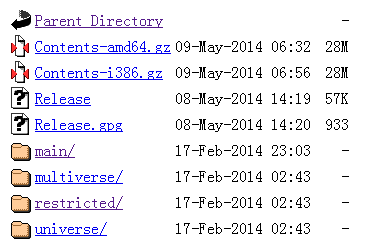
deb或者deb-src字段之后,是一段URL,之后是五个用空格隔开的字符串,分别对应相应的目录结构。在浏览器中输入http://archive.ubuntu.com/ubuntu/,并进入dists目录,可以发现有5个目录和前述sources.list文件中的第三列字段相对应。任选其中一个目录进入,可以看到和sources.list后四列相对应的目录结构。
更多内容可以使用man source.list获得。

二、源的选择
ubuntu官方有自身的软件源,直接从官方的软件源获取数据的速度比较慢。而通过国内的一些的源的镜像进行更新一般能够获得比官方源更快的速度,不过不同国内的源的下载速度也会不一样。 这里 给出了较为详细的ubuntu软件源列表,个人现在觉得选取ubuntu软件源的方法是首先选择位于相同地区的源,然后进行ping操作,时延不是太高即可。对比aliyun、sohu、ubuntu官方ping的数据,可以发现aliyun的源在时延上表现最好。


三、使用sudo apt-get install出现404 not found问题的原因和解决
最近在12.10上使用sudo apt-get install命令时,出现了404 not found的问题,此时ping archive.ubuntu.com可以ping通,在http://archive.ubuntu.com/ubuntu/dists/ 目录下已经没有quantal相关目录。具体原因是ubuntu对12.10的维护时间不超过一年,超过了相应的时间之后,对应的源的文件都转移到了http://old-releases.ubuntu.com/ubuntu/dists/ 目录下。ubuntu发布的版本可以从 这里 看到,从中一方面可以看到ubuntu数字版本号和英文名称的对应关系,也可以看到以04结尾的版本LTS标识,标识长期维护,这些版本的源在archive.ubuntu.com中呆的时间就比较长。
解决方法:
1)使用gedit将sources.list文件打开
sudo gedit /etc/apt/sources.list
2)进入替换界面(Search->Replace或者ctrl+H)进行替换操作
四、直接安装deb文件的方法
1)下载一个deb格式的软件kismet
curl https://www.kismetwireless.net/code/dists/quantal/kismet/binary-i386/kismet-2011.03.2.i386.deb >kismet-2011.03.2.i386.deb
2)安装kismet
dpkg -i kismet-2011.03.2.i386.deb
3)根据提示安装相关包
sudo apt-get install libnl2
五、参考材料
[1] repository - How do you tell apt to use files in /etc/apt/sources.list.d - Ask Ubuntu
[2] 源列表 - Ubuntu中文
[5] How do I install a .deb file via the command line askubuntu
ubuntu 更新源 或者 apt-get install 出错404 not found ,Failed to fetch的更多相关文章
- ubuntu更新源(Package has no installation candidate 的问题)
最近将公司的台式机安装了ubuntu16.04,安装之后,使用apt-get install openssh-server 发现出现:Package 'openssh-server' has no i ...
- ubuntu更新源列表
1. 备份源列表 sudo cp /etc/apt/sources.list /etc/apt/sources.list_backup 2.修改更新源 打开源列表 sudo gedit /etc/ap ...
- Ubuntu 更新源
1.首先备份Ubuntu12.04源列表 sudo cp /etc/apt/sources.list /etc/apt/sources.list.backup (备份下当前的源列表) 2.修改更新源 ...
- [转载] 老版本ubuntu 更新源
untu的普通版本支持的时间都有限,过了支持的时间,更新源都会被停用,比如ubuntu9.10原来的源都失效了(包括官方源,类似ustc的第 三方源,因为这些第三方源也是和官方源同步的).因此,直接用 ...
- Ubuntu更新源问题终于解决了
原文地址:http://chenrongya.blog.163.com/blog/static/8747419620143185103297/ 不同的网络状况连接以下源的速度不同, 建议在添加前手动验 ...
- Ubuntu 更新源 内核升级
cat /etc/apt/sources.listdeb http://mirrors.sohu.com/ubuntu/ precise main restricted universe multiv ...
- ubuntu更新源
源一定要找对应的版本 14.04对应 trusty deb http://mirrors.163.com/ubuntu/ trusty main restricted universe multive ...
- ubuntu更新源,简单两步搞定
1.启动器中打开Ubuntu软件中心 2.鼠标顶部面板点击编辑选择软件源(163.sohu) 搞定!
- Ubuntu 更新源失败[GPG error]
对于错误 GPG error: http://ppa.launchpad.net precise Release: The following signatures couldn't be verif ...
随机推荐
- Failed to connect to raw.githubusercontent.com port 443: Connection refused
问题:macOS安装Homebrew时总是报错(Failed to connect to raw.githubusercontent.com port 443: Connection refused) ...
- linux服务重启命令
/etc/init.d/sshd restart/etc/init.d/sshd reload systemctl status sshd.servicesystemctl restart sshd. ...
- Day 12:枚举值、枚举类
jdk1.5新特性之-----枚举 问题:某些方法所接收的数据必须是在固定范围之内的, 解决方案: 这时候我们的解决方案就是自定义一个类,然后是私有化构造函数,在自定义类中创建本类的对象对外使用. ...
- Python 操作csv和excel表格
1. 操作csv表格 使用的库 csv 1. csv文件里读取数据 代码 1. 以列表形式打开 import csv f = open('csv_test.csv', 'r') # 打开csv文件 c ...
- promise核心技术 2.两种回调函数 js中error的处理
抽空详细学习一下什么是回调函数(一个回调函数,也被称为高阶函数) 1.什么样的函数是回调函数 自己定义的(sittimeout不是自己定义的) 没有调用 自己执行 1.同步回调与异步回调函数 同步回调 ...
- POJ 2488:A Knight's Journey 深搜入门之走马观花
A Knight's Journey Time Limit: 1000MS Memory Limit: 65536K Total Submissions: 35342 Accepted: 12 ...
- 11. react 基础 使用charles 模拟接口数据
charles参考文档 charles官网 模拟数据 模拟 axios 请求的数据 eg: 1. 编写 axios 请求 axios.get('/api/xxx') .then(()=>{ale ...
- Dynamics CRM - 如何通过 C# Plugin 给 Contact的 主键(FullName)赋值
Contact 是 CRM 默认带有的 Entity,主键是 <FullName>,根据开发需求,与主键相关的字段都被设置成隐藏,包括了<Full Name>,<Firs ...
- //使用PDO连接mysql数据库
<?php //使用PDO连接mysql数据库 class pdo_con{ var $dsn = 'mysql:dbname=test; host:127.0.0.1'; va ...
- javascript编程中极易出现的错误(个人)
2018-08-10 1,setInterval打错字写成ser 2,document.getElementById().innerHTML;HTML需要全部大写 3,在for循环中定义一个i时要记住 ...