
Elasticsearch全文搜索引擎-PHP使用教程。
1、声明依赖关系:
比方说,你的项目中需要一个php版的elasticsearch框架。为了将它添加到你的项目中(下载),你所需要做的就是创建一个 composer.json 文件,其中描述了项目的依赖关系。注意文件要放在你执行composer命令的目录中
|
1
2
3
4
5
|
{ "require":{ "elasticsearch/elasticsearch":"~2.0" }} |
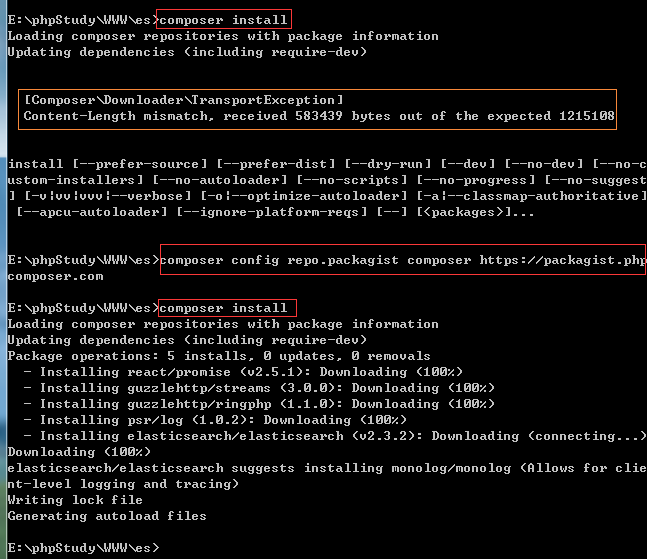
2、cmd切换到要下载elasticsearch框架的目录,然后执行命令:composer install
如有出错误信息:
[Composer\Downloader\TransportException]
Content-Length mismatch, received 583439 bytes out of the expected 1215108
解决办法:切换国内镜像地址,再执行操作
1、通过命令切换如下:(最终修改的是composer.json)
composer config -g repo.packagist composer https://packagist.phpcomposer.com
2、直接修改 composer.json (其实跟方法1是一样的。)
|
1
2
3
4
5
6
7
8
9
10
11
|
{ "require":{ "elasticsearch/elasticsearch":"~2.0" }, "repositories": { "packagist": { "type": "composer", "url": "https://packagist.phpcomposer.com" } }} |
PHP使用elasticsearch教程:
下面我们讲一下基本使用方法,需要获取更多使用教程和方法请看官方文档:https://www.elastic.co/guide/en/elasticsearch/client/php-api/current/_overview.html
想直接通过文件查看其他方法可以打开以下文件查看(基本使用的方法都在里面):
1、\elasticsearch\src\Elasticsearch\Client.php中的方法
2、\elasticsearch\Namespaces\IndicesNamespace.php中的方法
ThinkPHP中的模型(已测试过):
|
1
2
3
4
5
6
7
8
9
10
11
12
13
14
15
16
17
18
19
20
21
22
23
24
25
26
27
28
29
30
31
32
33
34
35
36
37
38
39
40
41
42
43
44
45
46
47
48
49
50
51
52
53
54
55
56
57
58
59
60
61
62
63
64
65
66
67
68
69
70
71
72
73
74
75
76
77
78
79
80
81
82
83
84
85
86
87
88
89
90
91
92
93
94
95
96
97
98
99
100
101
102
103
104
105
106
107
108
109
110
111
112
113
114
115
116
117
118
119
120
121
122
123
124
125
126
127
128
129
130
131
132
133
134
135
136
137
138
139
140
141
142
143
144
145
146
147
148
149
150
151
152
153
154
155
156
157
158
159
160
161
162
163
164
165
166
167
168
169
170
171
172
173
174
175
176
177
178
179
180
181
182
183
184
185
186
187
188
189
190
191
192
193
194
195
196
197
198
199
200
201
202
203
204
205
206
207
|
<?php/** * Elasticsearch检索引擎模型 */namespace app\index\model;use Elasticsearch\ClientBuilder; class Elasticsearch{ //配置 private $config = [ 'hosts' => ['http://127.0.0.1:9200'] ]; private $api; public function __construct() { #include(APP_PATH .'/vendor/autoload.php'); #require_once EXTEND_PATH . 'org/elasticsearch/autoload.php'; import('org.elasticsearch.autoload', EXTEND_PATH); $this->api = ClientBuilder::create()->setHosts($this->config['hosts'])->build(); } /************************************************************* /** * 索引一个文档 * 说明:索引没有被创建时会自动创建索引 */ public function addOne() { $params = []; $params['index'] = 'xiaochuan'; $params['type'] = 'cat'; $params['id'] = '20180407001'; # 不指定就是es自动分配 $params['body'] = array('name' => '小川编程'); return $this->api->index($params); } /** * 索引多个文档 * 说明:索引没有被创建时会自动创建索引 */ public function addAll() { $params = []; for($i = 1; $i < 21; $i++) { $params['body'][] = [ 'index' => [ '_index' => 'test_index'.$i, '_type' => 'cat_test', '_id' => $i, ] ]; $params['body'][] = [ 'name' => '小川编程'.$i, 'content' => '内容'.$i ]; } return $this->api->bulk($params); } /** * 获取一个文档 */ public function getOne() { $params = []; $params['index'] = 'xiaochuan'; $params['type'] = 'cat'; $params['id'] = '20180407001'; return $this->api->get($params); } /** * 搜索文档 */ public function search() { $params = []; $params['index'] = 'xiaochuan'; $params['type'] = 'cat'; $params['body']['query']['match']['name'] = '小川编程'; return $this->api->search($params); } /** * 删除文档 * 说明:文档删除后,不会删除对应索引。 */ public function delete() { $params = []; $params['index'] = 'xiaochuan'; $params['type'] = 'cat'; $params['id'] = '20180407001'; return $this->api->delete($params); } /************************************************************* /** * 创建索引 */ public function createIndex() { $params = []; $params['index'] = 'xiaochuan'; return $this->api->indices()->create($params); } /** * 删除索引:匹配单个 | 匹配多个 * 说明: 索引删除后,索引下的所有文档也会被删除 */ public function deleteIndex() { $params = []; $params['index'] = 'test_index'; # 删除test_index单个索引 #$params['index'] = 'test_index*'; # 删除以test_index开始的所有索引 return $this->api->indices()->delete($params); } /************************************************************* /** * 设置索引配置 */ public function setIndexConfig() { $params = []; $params['index'] = 'xiaochuan'; $params['body']['index']['number_of_replicas'] = 0; $params['body']['index']['refresh_interval'] = -1; return $this->api->indices()->putSettings($params); } /** * 获取索引配置 */ public function getIndexConfig() { # 单个获取条件写法 $params['index'] = 'xiaochuan'; # 多个获取条件写法 //$params['index'] = ['xiaochuan', 'test_index']; return $this->api->indices()->getSettings($params); } /** * 设置索引映射 */ public function setIndexMapping() { # 设置索引和类型 $params['index'] = 'xiaochuan'; $params['type'] = 'cat'; # 向现有索引添加新类型 $myTypeMapping = array( '_source' => array( 'enabled' => true ), 'properties' => array( 'first_name' => array( 'type' => 'string', 'analyzer' => 'standard' ), 'age' => array( 'type' => 'integer' ) ) ); $params['body']['cat'] = $myTypeMapping; # 更新索引映射 $this->api->indices()->putMapping($params); } /** * 获取索引映射 */ public function getIndexMapping() { # 获取所有索引和类型的映射 $ret = $this->api->indices()->getMapping(); /* # 获取索引为:xiaochuan的映射 $params['index'] = 'xiaochuan'; $ret = $this->api->indices()->getMapping($params); # 获取类型为:cat的映射 $params['type'] = 'cat'; $ret = $this->api->indices()->getMapping($params); # 获取(索引为:xiaochuan和 类型为:cat)的映射 $params['index'] = 'xiaochuan'; $params['type'] = 'cat' $ret = $this->api->indices()->getMapping($params); # 获取索引为:xiaochuan和test_index的映射 $params['index'] = ['xiaochuan', 'test_index']; $ret = $this->api->indices()->getMapping($params); */ return $ret; }} |
其他形式用法测试:
test.php
|
1
2
3
4
5
6
7
8
9
10
11
12
13
14
15
16
17
18
19
20
21
22
23
24
25
26
27
28
29
30
31
32
33
34
35
36
37
38
39
40
41
42
43
44
45
46
47
48
49
50
51
52
53
54
55
56
57
58
59
60
61
62
63
64
65
66
67
68
69
70
71
72
73
74
|
<?php require_once('vendor/autoload.php'); use Elasticsearch\ClientBuilder; function get_conn(){ $host = 'localhost'; $dbname = 'mraz'; $user = 'root'; $passwd = '111111'; $conn = new PDO("mysql:dbname=$dbname;host=$host",$user,$passwd); return $conn; } function create_index(){ //Elastic search php client $client = Elasticsearch\ClientBuilder::create()->build(); $sql = "SELECT * FROM emp"; $conn = get_conn(); $stmt = $conn->query($sql); $rtn = $stmt->fetchAll(); //delete index which already created $params = array(); $params['index'] = 'emp_index'; $client->indices()->delete($params); //create index on log_date,src_ip,dest_ip $rtnCount = count($rtn); for($i=0;$i<$rtnCount;$i++){ $params = array(); $params['body'] = array( 'id' => $rtn[$i]['id'], 'fdName' => $rtn[$i]['fdName'], 'fdAge' => $rtn[$i]['fdAge'], 'fdStatus' => $rtn[$i]['fdStatus'] ); $params['index'] = 'emp_index'; $params['type'] = 'emp_type'; //Document will be indexed to log_index/log_type/autogenerate_id $client->index($params); } echo 'create index done!'; } function search(){ //Elastic search php client $client = Elasticsearch\ClientBuilder::create()->build(); $params = array(); $params['index'] = 'emp_index'; $params['type'] = 'emp_type'; $params['body']['query']['match']['fdStatus'] = '1'; $params['body']['sort'] = array('fdAge'=>array('order'=>'desc')); $params['size'] = 3; $params['from'] = 1; $rtn = $client->search($params); var_dump($rtn); } set_time_limit(0); // create_index(); search(); ?> |
1)创建:
|
1
2
3
4
5
6
7
|
include('./vendor/autoload.php'); $elastic = new Elasticsearch\Client(); $index['index'] = 'log'; //索引名称 $index['type'] = 'ems_run_log'; //类型名称 $data['body']['settings']['number_of_shards'] = 5; //主分片数量 $data['body']['settings']['number_of_replicas'] = 0; //从分片数量 $elastic->indices()->create($index); |
2)插入索引数据:
|
1
2
3
4
5
6
7
8
9
10
11
12
|
include('./vendor/autoload.php'); $elastic = new Elasticsearch\Client(); $index['index'] = 'log'; //索引名称 $index['type'] = 'ems_run_log'; //类型名称 $index['id'] = 1 //不指定id,系统会自动生成唯一id $index['body'] = array( 'mac' => 'fcd5d900beca', 'customer_id' => 3, 'product_id' => 5, 'version' => 2 ); $elastic->index($index); |
3)查询:
|
1
2
3
4
5
6
7
8
9
10
|
include('./vendor/autoload.php'); $elastic = new Elasticsearch\Client(); $index['index'] = 'log'; //索引名称 $index['type'] = 'ems_run_log'; //类型名称 $index['body']['query']['match']['mac'] = 'fcd5d900beca'; $index['size'] = 10; $index['from'] = 200; $elastic->search($index); #相当于sql语句:select*from ems_run_log where mac='fcd5d900beca' limit 200,10; |
|
1
2
3
4
5
6
7
8
9
10
11
12
13
|
include('./vendor/autoload.php'); $elastic = new Elasticsearch\Client(); $index['index'] = 'log'; //索引名称 $index['type'] = 'ems_run_log'; //类型名称 $index['body']['query']['bool']['must'] = array( array('match' => array('mac' => 'fcd5d900beca')), array('match' => array('product_id' => 20)) ); $index['size'] = 10; $index['from'] = 200; $elastic->search($index); #相当于sql语句:select*from ems_run_log where mac='fcd5d900beca' and product_id=20 limit 200,10; |
|
1
2
3
4
5
6
7
8
9
10
11
12
13
|
include('./vendor/autoload.php'); $elastic = new Elasticsearch\Client(); $index['index'] = 'log'; //索引名称 $index['type'] = 'ems_run_log'; //类型名称 $index['body']['query']['bool']['should'] = array( array('match' => array('mac' => 'fcd5d900beca')), array('match' => array('product_id' => 20)) ); $index['size'] = 10; $index['from'] = 200; $elastic->search($index); #当于sql语句:select*from ems_run_log where mac='fcd5d900beca' or product_id=20 limit 200,10; |
Elasticsearch全文搜索引擎-PHP使用教程。
用Composer来生成php版的elasticsearch框架:
如果你还没有安装Composer的话请看:Composer安装教程文章。
1、声明依赖关系:
比方说,你的项目中需要一个php版的elasticsearch框架。为了将它添加到你的项目中(下载),你所需要做的就是创建一个 composer.json 文件,其中描述了项目的依赖关系。注意文件要放在你执行composer命令的目录中
|
1
2
3
4
5
|
{ "require":{ "elasticsearch/elasticsearch":"~2.0" }} |
2、cmd切换到要下载elasticsearch框架的目录,然后执行命令:composer install
如有出错误信息:
[Composer\Downloader\TransportException]
Content-Length mismatch, received 583439 bytes out of the expected 1215108
解决办法:切换国内镜像地址,再执行操作
1、通过命令切换如下:(最终修改的是composer.json)
composer config -g repo.packagist composer https://packagist.phpcomposer.com
2、直接修改 composer.json (其实跟方法1是一样的。)
|
1
2
3
4
5
6
7
8
9
10
11
|
{ "require":{ "elasticsearch/elasticsearch":"~2.0" }, "repositories": { "packagist": { "type": "composer", "url": "https://packagist.phpcomposer.com" } }} |
PHP使用elasticsearch教程:
下面我们讲一下基本使用方法,需要获取更多使用教程和方法请看官方文档:https://www.elastic.co/guide/en/elasticsearch/client/php-api/current/_overview.html
想直接通过文件查看其他方法可以打开以下文件查看(基本使用的方法都在里面):
1、\elasticsearch\src\Elasticsearch\Client.php中的方法
2、\elasticsearch\Namespaces\IndicesNamespace.php中的方法
ThinkPHP中的模型(已测试过):
|
1
2
3
4
5
6
7
8
9
10
11
12
13
14
15
16
17
18
19
20
21
22
23
24
25
26
27
28
29
30
31
32
33
34
35
36
37
38
39
40
41
42
43
44
45
46
47
48
49
50
51
52
53
54
55
56
57
58
59
60
61
62
63
64
65
66
67
68
69
70
71
72
73
74
75
76
77
78
79
80
81
82
83
84
85
86
87
88
89
90
91
92
93
94
95
96
97
98
99
100
101
102
103
104
105
106
107
108
109
110
111
112
113
114
115
116
117
118
119
120
121
122
123
124
125
126
127
128
129
130
131
132
133
134
135
136
137
138
139
140
141
142
143
144
145
146
147
148
149
150
151
152
153
154
155
156
157
158
159
160
161
162
163
164
165
166
167
168
169
170
171
172
173
174
175
176
177
178
179
180
181
182
183
184
185
186
187
188
189
190
191
192
193
194
195
196
197
198
199
200
201
202
203
204
205
206
207
|
<?php/** * Elasticsearch检索引擎模型 */namespace app\index\model;use Elasticsearch\ClientBuilder; class Elasticsearch{ //配置 private $config = [ 'hosts' => ['http://127.0.0.1:9200'] ]; private $api; public function __construct() { #include(APP_PATH .'/vendor/autoload.php'); #require_once EXTEND_PATH . 'org/elasticsearch/autoload.php'; import('org.elasticsearch.autoload', EXTEND_PATH); $this->api = ClientBuilder::create()->setHosts($this->config['hosts'])->build(); } /************************************************************* /** * 索引一个文档 * 说明:索引没有被创建时会自动创建索引 */ public function addOne() { $params = []; $params['index'] = 'xiaochuan'; $params['type'] = 'cat'; $params['id'] = '20180407001'; # 不指定就是es自动分配 $params['body'] = array('name' => '小川编程'); return $this->api->index($params); } /** * 索引多个文档 * 说明:索引没有被创建时会自动创建索引 */ public function addAll() { $params = []; for($i = 1; $i < 21; $i++) { $params['body'][] = [ 'index' => [ '_index' => 'test_index'.$i, '_type' => 'cat_test', '_id' => $i, ] ]; $params['body'][] = [ 'name' => '小川编程'.$i, 'content' => '内容'.$i ]; } return $this->api->bulk($params); } /** * 获取一个文档 */ public function getOne() { $params = []; $params['index'] = 'xiaochuan'; $params['type'] = 'cat'; $params['id'] = '20180407001'; return $this->api->get($params); } /** * 搜索文档 */ public function search() { $params = []; $params['index'] = 'xiaochuan'; $params['type'] = 'cat'; $params['body']['query']['match']['name'] = '小川编程'; return $this->api->search($params); } /** * 删除文档 * 说明:文档删除后,不会删除对应索引。 */ public function delete() { $params = []; $params['index'] = 'xiaochuan'; $params['type'] = 'cat'; $params['id'] = '20180407001'; return $this->api->delete($params); } /************************************************************* /** * 创建索引 */ public function createIndex() { $params = []; $params['index'] = 'xiaochuan'; return $this->api->indices()->create($params); } /** * 删除索引:匹配单个 | 匹配多个 * 说明: 索引删除后,索引下的所有文档也会被删除 */ public function deleteIndex() { $params = []; $params['index'] = 'test_index'; # 删除test_index单个索引 #$params['index'] = 'test_index*'; # 删除以test_index开始的所有索引 return $this->api->indices()->delete($params); } /************************************************************* /** * 设置索引配置 */ public function setIndexConfig() { $params = []; $params['index'] = 'xiaochuan'; $params['body']['index']['number_of_replicas'] = 0; $params['body']['index']['refresh_interval'] = -1; return $this->api->indices()->putSettings($params); } /** * 获取索引配置 */ public function getIndexConfig() { # 单个获取条件写法 $params['index'] = 'xiaochuan'; # 多个获取条件写法 //$params['index'] = ['xiaochuan', 'test_index']; return $this->api->indices()->getSettings($params); } /** * 设置索引映射 */ public function setIndexMapping() { # 设置索引和类型 $params['index'] = 'xiaochuan'; $params['type'] = 'cat'; # 向现有索引添加新类型 $myTypeMapping = array( '_source' => array( 'enabled' => true ), 'properties' => array( 'first_name' => array( 'type' => 'string', 'analyzer' => 'standard' ), 'age' => array( 'type' => 'integer' ) ) ); $params['body']['cat'] = $myTypeMapping; # 更新索引映射 $this->api->indices()->putMapping($params); } /** * 获取索引映射 */ public function getIndexMapping() { # 获取所有索引和类型的映射 $ret = $this->api->indices()->getMapping(); /* # 获取索引为:xiaochuan的映射 $params['index'] = 'xiaochuan'; $ret = $this->api->indices()->getMapping($params); # 获取类型为:cat的映射 $params['type'] = 'cat'; $ret = $this->api->indices()->getMapping($params); # 获取(索引为:xiaochuan和 类型为:cat)的映射 $params['index'] = 'xiaochuan'; $params['type'] = 'cat' $ret = $this->api->indices()->getMapping($params); # 获取索引为:xiaochuan和test_index的映射 $params['index'] = ['xiaochuan', 'test_index']; $ret = $this->api->indices()->getMapping($params); */ return $ret; }} |
其他形式用法测试:
test.php
|
1
2
3
4
5
6
7
8
9
10
11
12
13
14
15
16
17
18
19
20
21
22
23
24
25
26
27
28
29
30
31
32
33
34
35
36
37
38
39
40
41
42
43
44
45
46
47
48
49
50
51
52
53
54
55
56
57
58
59
60
61
62
63
64
65
66
67
68
69
70
71
72
73
74
|
<?php require_once('vendor/autoload.php'); use Elasticsearch\ClientBuilder; function get_conn(){ $host = 'localhost'; $dbname = 'mraz'; $user = 'root'; $passwd = '111111'; $conn = new PDO("mysql:dbname=$dbname;host=$host",$user,$passwd); return $conn; } function create_index(){ //Elastic search php client $client = Elasticsearch\ClientBuilder::create()->build(); $sql = "SELECT * FROM emp"; $conn = get_conn(); $stmt = $conn->query($sql); $rtn = $stmt->fetchAll(); //delete index which already created $params = array(); $params['index'] = 'emp_index'; $client->indices()->delete($params); //create index on log_date,src_ip,dest_ip $rtnCount = count($rtn); for($i=0;$i<$rtnCount;$i++){ $params = array(); $params['body'] = array( 'id' => $rtn[$i]['id'], 'fdName' => $rtn[$i]['fdName'], 'fdAge' => $rtn[$i]['fdAge'], 'fdStatus' => $rtn[$i]['fdStatus'] ); $params['index'] = 'emp_index'; $params['type'] = 'emp_type'; //Document will be indexed to log_index/log_type/autogenerate_id $client->index($params); } echo 'create index done!'; } function search(){ //Elastic search php client $client = Elasticsearch\ClientBuilder::create()->build(); $params = array(); $params['index'] = 'emp_index'; $params['type'] = 'emp_type'; $params['body']['query']['match']['fdStatus'] = '1'; $params['body']['sort'] = array('fdAge'=>array('order'=>'desc')); $params['size'] = 3; $params['from'] = 1; $rtn = $client->search($params); var_dump($rtn); } set_time_limit(0); // create_index(); search(); ?> |
1)创建:
|
1
2
3
4
5
6
7
|
include('./vendor/autoload.php'); $elastic = new Elasticsearch\Client(); $index['index'] = 'log'; //索引名称 $index['type'] = 'ems_run_log'; //类型名称 $data['body']['settings']['number_of_shards'] = 5; //主分片数量 $data['body']['settings']['number_of_replicas'] = 0; //从分片数量 $elastic->indices()->create($index); |
2)插入索引数据:
|
1
2
3
4
5
6
7
8
9
10
11
12
|
include('./vendor/autoload.php'); $elastic = new Elasticsearch\Client(); $index['index'] = 'log'; //索引名称 $index['type'] = 'ems_run_log'; //类型名称 $index['id'] = 1 //不指定id,系统会自动生成唯一id $index['body'] = array( 'mac' => 'fcd5d900beca', 'customer_id' => 3, 'product_id' => 5, 'version' => 2 ); $elastic->index($index); |
3)查询:
|
1
2
3
4
5
6
7
8
9
10
|
include('./vendor/autoload.php'); $elastic = new Elasticsearch\Client(); $index['index'] = 'log'; //索引名称 $index['type'] = 'ems_run_log'; //类型名称 $index['body']['query']['match']['mac'] = 'fcd5d900beca'; $index['size'] = 10; $index['from'] = 200; $elastic->search($index); #相当于sql语句:select*from ems_run_log where mac='fcd5d900beca' limit 200,10; |
|
1
2
3
4
5
6
7
8
9
10
11
12
13
|
include('./vendor/autoload.php'); $elastic = new Elasticsearch\Client(); $index['index'] = 'log'; //索引名称 $index['type'] = 'ems_run_log'; //类型名称 $index['body']['query']['bool']['must'] = array( array('match' => array('mac' => 'fcd5d900beca')), array('match' => array('product_id' => 20)) ); $index['size'] = 10; $index['from'] = 200; $elastic->search($index); #相当于sql语句:select*from ems_run_log where mac='fcd5d900beca' and product_id=20 limit 200,10; |
|
1
2
3
4
5
6
7
8
9
10
11
12
13
|
include('./vendor/autoload.php'); $elastic = new Elasticsearch\Client(); $index['index'] = 'log'; //索引名称 $index['type'] = 'ems_run_log'; //类型名称 $index['body']['query']['bool']['should'] = array( array('match' => array('mac' => 'fcd5d900beca')), array('match' => array('product_id' => 20)) ); $index['size'] = 10; $index['from'] = 200; $elastic->search($index); #当于sql语句:select*from ems_run_log where mac='fcd5d900beca' or product_id=20 limit 200,10; |
|
1
2
3
4
5
6
7
8
9
10
11
12
13
|
include('./vendor/autoload.php'); $elastic = new Elasticsearch\Client(); $index['index'] = 'log'; //索引名称 $index['type'] = 'ems_run_log'; //类型名称 $index['body']['query']['bool']['must_not'] = array( array('match' => array('mac' => 'fcd5d900beca')), array('match' => array('product_id' => 20)) ); $index['size'] = 10; $index['from'] = 200; $elastic->search($index); #相当于sql语句:select*from ems_run_log where mac!='fcd5d900beca' and product_id!=20 limit 200,10; |
|
1
2
3
4
5
6
7
8
9
10
11
12
|
include('./vendor/autoload.php'); $elastic = new Elasticsearch\Client(); $index['index'] = 'log'; //索引名称 $index['type'] = 'ems_run_log'; //类型名称 $index['body']['query']['range'] = array( 'id' => array('gte' => 20,'lt' => 30); ); $index['size'] = 10; $index['from'] = 200; $elastic->search($index); #相当于sql语句:select*from ems_run_log where id>=20 and id<30 limit 200,10; |
4)删除文档:
|
1
2
3
4
5
6
|
include('./vendor/autoload.php'); $elastic = new Elasticsearch\Client(); $index['index'] = 'test'; //索引名称 $index['type'] = 'ems_test'; //类型名称 $index['id'] = 2; $elastic->delete($index); |
|
1
2
3
4
5
6
7
8
9
10
11
12
13
|
include('./vendor/autoload.php'); $elastic = new Elasticsearch\Client(); $index['index'] = 'log'; //索引名称 $index['type'] = 'ems_run_log'; //类型名称 $index['body']['query']['bool']['must_not'] = array( array('match' => array('mac' => 'fcd5d900beca')), array('match' => array('product_id' => 20)) ); $index['size'] = 10; $index['from'] = 200; $elastic->search($index); #相当于sql语句:select*from ems_run_log where mac!='fcd5d900beca' and product_id!=20 limit 200,10; |
|
1
2
3
4
5
6
7
8
9
10
11
12
|
include('./vendor/autoload.php'); $elastic = new Elasticsearch\Client(); $index['index'] = 'log'; //索引名称 $index['type'] = 'ems_run_log'; //类型名称 $index['body']['query']['range'] = array( 'id' => array('gte' => 20,'lt' => 30); ); $index['size'] = 10; $index['from'] = 200; $elastic->search($index); #相当于sql语句:select*from ems_run_log where id>=20 and id<30 limit 200,10; |
4)删除文档:
|
1
2
3
4
5
6
|
include('./vendor/autoload.php'); $elastic = new Elasticsearch\Client(); $index['index'] = 'test'; //索引名称 $index['type'] = 'ems_test'; //类型名称 $index['id'] = 2; $elastic->delete($index); |
Elasticsearch全文搜索引擎-PHP使用教程。的更多相关文章
- 【Elasticsearch全文搜索引擎实战】之Head插件实践
简介 Elasticsearch是一个基于Lucene的搜索服务器.它提供了一个分布式多用户能力的全文搜索引擎,基于RESTful web接口.Elasticsearch是用Java开发的,并作为Ap ...
- ElasticSearch全文搜索引擎
一.ElasticSearch简介 1.1 什么是ElasticSearch ElasticSearch简称ES,其中Elastic 从名字里我们可以知道,ES的特点就在于灵活的搜索,其实E ...
- net core 3.1使用ElasticSearch 全文搜索引擎
ElasticSearch 是一个开源的搜索引擎,建立在一个全文搜索引擎库 Apache Lucene 基础之上. Lucene 可以说是当下最先进.高性能.全功能的搜索引擎库,无论是开源还是私有. ...
- ElasticSearch全文搜索引擎(A)
文章:[Elasticsearch] 全文搜索 (一) - 基础概念和match查询 全文检索,是从最初的字符串匹配和简单的布尔逻辑检索技术,演进到能对超大文本.语音.图像.活动影像等非结构化数据进行 ...
- 【Elasticsearch全文搜索引擎实战】之Kibana搭建
1. Kibana介绍 Kibana是一个针对Elasticsearch的开源分析及可视化平台,用来搜索.查看交互存储在Elasticsearch索引中的数据.使用Kibana,可以通过各种图表进行高 ...
- 【Elasticsearch全文搜索引擎实战】之集群搭建及配置
文中Elasticsearch版本为6.0.1 1. 环境配置 把环境配置放在第一节来讲,是因为很多人按官网的Getting Started安装运行会有各种错误.其实都是因为一些配置不正确引起的. 首 ...
- 3.高并发教程-基础篇-之分布式全文搜索引擎elasticsearch的搭建
高并发教程-基础篇-之分布式全文搜索引擎elasticsearch的搭建 如果大家看了我的上一篇<2.高并发教程-基础篇-之nginx+mysql实现负载均衡和读写分离>文章,如果能很好的 ...
- 全文搜索引擎 Elasticsearch 入门教程
全文搜索属于最常见的需求,开源的 Elasticsearch (以下简称 Elastic)是目前全文搜索引擎的首选. 它可以快速地储存.搜索和分析海量数据.维基百科.Stack Overflow.Gi ...
- 全文搜索引擎Elasticsearch入门实践
全文搜索引擎Elasticsearch入门实践 感谢阮一峰的网络日志全文搜索引擎 Elasticsearch 入门教程 安装 首先需要依赖Java环境.Elasticsearch官网https://w ...
随机推荐
- Node.js之EventEmiter
参考: 1. Node.js之EventEmiter讲解 2. Node.js之events事件 3. 在线运行node.js代码 Node.js主要API使用异步事件驱动模型,异步I/O操作完成时, ...
- python中metaclass的工作原理
class TMetaclass(type): def __new__(cls, name, bases, attrs): print(cls, name, bases, attrs) return ...
- python之字符串,列表,字典,元组,集合内置方法总结
目录 数字类型的内置方法 整型/浮点型 字符串类型的内置方法 列表的内置方法 字典的内置方法 元组的内置方法 集合类型内置方法 布尔类型 数据类型总结 数字类型的内置方法 整型/浮点型 加 + 减 - ...
- js去后台传递的值
function test(){ var param = [[${list}]];//以集合为例 } 如果list里面是实体类那么就需要重写toString,或者转为json
- win7/10获取本地wifi密码明文
win7 单击右下角无线网图标,选择已连接的无线网 右击无线网名称,选择属性 点击标题栏的安全,再点击显示字符,即可显示wifi密码明文 win10 控制面板[查看方式选类别]-查看网络状态和任务 点 ...
- HBase查询速度慢原因排查
问题:通过HBase访问服务在HBase中查询 ASSET_NORMAL 表速度很慢 如下,查询一条数据需要2.970s时间: 如下,统计总条数需要14.675s时间: HBase访问服务部署了3个节 ...
- ch6 列表和导航条
为列表添加定制的项目符号 可使用list-style-image属性:缺点是对项目符号图像的位置的控制能力不强. 常用的方法:使用list-style-type来关闭项目符号,将定制的项目符号作为背景 ...
- luogu P3358 最长k可重区间集问题
网络流建图好难,这题居然是网络流(雾,一般分析来说,有限制的情况最大流情况可以拆点通过capacity来限制,比如只使用一次,把一个点拆成入点出点,capacity为1即可,这题是限制最大k重复,可以 ...
- IdentityServer4专题之七:Authorization Code认证模式
(1)identityserver4授权服务器端 public static class Config { public static IEnumerable<IdentityResource& ...
- java中二进制反码补码的理解
7句真言 1,二进制最高位是符号位 0正数 1负数 2,正数的原码,反码,补码都一样 3负数的原码反码 补码 (符号位不变,其他的位数取反 0->1 1->0) 4 0的反码补码都是0 5 ...