
[运维] 如何解决 nginx: [emerg] bind() to 0.0.0.0:80 failed (13: Permission denied)
环境:
虚拟机 linux centos 7 64
当时正在配置 nginx , 由于解压后的 nginx 默认安装位置是在 /usr/local/ 目录下, 而这个目录是 root 用户才有权限操作的目录, 作为开发人员的 dev 用户是无法操作这里面的内容的, 但是又不能把所有的东西都交给 root 用户去操作, 所用当我尝试着用 dev 用户去启动 nginx 服务器的时候, 系统报错

由于 nginx 的默认端口为 80, 所以我需要修改一下默认端口,
首先, 修改 /usr/local/nginx 目录的操作权限, 让 dev 用户也可以操作这个文件夹
我们先来查看 dev 用户所对应的组,,,
id [user name]

然后修改 dev 用户对这个文件夹的权限
chown -R gz_dev:gz_dev /usr/local/nginx
前一个 gz_dev 是用户名, 后一个 gz_dev 是用户所在的组, 后面的目录就是要开放给用户操作的目录, 成功后用 gz_dev 用户进入 /nginx/conf 目录下, 修改 nginx.conf 配置文件中的端口
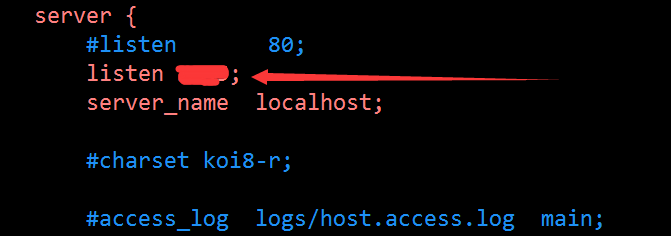
把原来的注释掉, 然后新配置一个端口号

OK , 现在dev 用户也可以操作 nginx 服务器了~
[运维] 如何解决 nginx: [emerg] bind() to 0.0.0.0:80 failed (13: Permission denied)的更多相关文章
- 解决Mac nginx问题 [emerg] 54933#0: bind() to 0.0.0.0:80 failed (13: Permission denied)
brew services restart nginx Stopping nginx... (might take a while) ==> Successfully stopped nginx ...
- Ubuntu nginx: [emerg] bind() to 0.0.0.0:80 failed (13: Permission denied)
在Ubuntu 12中启动刚安装好的Nginx,报错: nginx: [emerg] bind() to 0.0.0.0:80 failed (13: Permission denied) 原因如下: ...
- php fpm安装curl后,nginx出现connect() to unix:/var/run/php5-fpm.sock failed (13: Permission denied)的错误
这里选择直接apt-get安装,因为比起自己编译简单多了,不需要自己配置什么 #sudo apt-get install curl libcurl3 libcurl3-dev php5-curl 安装 ...
- nginx: [emerg] bind() to 0.0.0.0:80 failed (13: Permission denied)
启动nginx时报这个错 , 要么用root用户启动 , 要么在配置文件nginx.conf中将server下的listen端口改掉 , 因为在linux中端口号小于1024都是需要root权限的
- 解决nginx报错:nginx: [emerg] bind() to 0.0.0.0:8088 failed (13: Permission denied)
报错描述: nginx: [emerg] bind() to 0.0.0.0:8088 failed (13: Permission denied) 通过ansible远程给主机更换端口并重新启动ng ...
- Starting nginx: nginx: [emerg] bind() to 0.0.0.0:8088 failed (13: Permission denied) nginx 启动失败
Starting nginx: nginx: [emerg] bind() to 0.0.0.0:8088 failed (13: Permission denied) nginx 启动失败 ...
- nginx: [emerg] open() "/var/run/nginx.pid" failed (13: Permission denied)
现象 1.centos6.9 用rpm包安装nginx 2.修改Nginx的多个配置文件和配置项 3.service nginx restart 报错: nginx: [emerg] open() & ...
- nginx bind() to 0.0.0.0:**** failed (13: Permission denied)
nginx 启动失败,日志里面报错信息如下: Starting nginx: nginx: [emerg] bind() to 0.0.0.0:**** failed (13: Permission ...
- 解决Nginx的connect() to 127.0.0.1:8080 failed (13: Permission denied) while connect
在进行Nginx+Tomcat 负载均衡的时候遇到了这个权限问题,在error.log日志中.我们能够看到例如以下: connect() to 127.0.0.1:8080 failed (13: P ...
随机推荐
- nmon +java nmon Alalizy agent 动态交互监控
下载地址:1. Download and install nmon. - for linux platform, you can download form: http://nmon.sourcefo ...
- Service Worker,Web Worker,WebSocket的对比
Service Worker 处理网络请求的后台服务.适用于离线和后台同步数据或推送信息.不能直接和dom交互.通过postMessage方法交互. Web Worker 模拟多线程,允许复杂计算功能 ...
- 7_6 带宽(UVa140)<回溯法:最优性剪枝>
给定一个图(V,E),其中V为顶点的集合,E为边的集合,属于VxV.给定V中元素的一种排序,那么顶点v的带宽定义如下:在当前给定的排序中,与v距离最远的且与v有边相连的顶点与v的距离.给定排序的带宽定 ...
- java双亲委派模型
Java类加载器(ClassLoader) 双亲委派模式要求除了顶层的启动类加载器外,其余的类加载器都应当有自己的父类加载器,请注意双亲委派模式中的父子关系并非通常所说的类继承关系,而是采用组合关系来 ...
- 【C语言】用指针描述数组,实现选择法排序
#include <stdio.h> int main() { ], t; int i, j, max; printf("请输入10个数:\n"); ; i <= ...
- 【C语言】用函数实现两个数排序(指针作函数参数)
原理就不讲了,这里用来理解指针的使用方法 #include <stdio.h> void fun(int* a,int* b) { int t; if(*a>=*b) { t = * ...
- 【做题笔记】P2251 质量检测
一看题就知道是线段树裸题了.可是,对于每个 \(i\) ,对应的 \(Q\) 序列的下标是多少呢?应该查询的区间又是什么呢? 找规律: \(i\ \ \ \ \ \ \ \ m\) \(1\ \Rig ...
- JEECG用户录入时用户账号长度修改
JEECG用户账号默认长度为10字符,但实际运用中很大可能大于10字符. 解决方法: 1.找到\webpage\system\user\user.jsp文件 <input id="us ...
- 解决:执行python脚本,提示错误:/usr/bin/python^M: 解释器错误: 没有那个文件或目录。
执行python脚本,提示错误: /usr/bin/python^M: 解释器错误: 没有那个文件或目录. 产生错误原因: \r字符被显示为^M,这时候只需要删除这个字符就可以了. Linux环境下: ...
- 【记录】win10 专业版系统激活
系统:win 10 专业版 使用工具:HEU_KMS_Activator_CH_v11.2.0.zip(期限为 天,之后需再次激活) 下载链接: https://pan.baidu.com/s/16z ...