
峰哥说技术:07-SpringBoot 正好Thymeleaf视图
Spring Boot深度课程系列
峰哥说技术—2020庚子年重磅推出、战胜病毒、我们在行动

07 峰哥说技术:SpringBoot 正好Thymeleaf视图
Spring Boot视图介绍
虽然现在慢慢在流行前后端分离开发,但是还是有一些公司在做前后端不分的开发,而在前后端不分的开发中,我们就会需要后端页面模板(实际上,即使前后端分离,也会在一些场景下需要使用页面模板,例如邮件发送模板)。
早期的 Spring Boot 中还支持使用 Velocity 作为页面模板,现在的 Spring Boot 中已经不支持 Velocity 了,页面模板主要支持 Thymeleaf 和 Freemarker ,其中Thymeleaf是官方推荐的视图技术。当然,作为 Java 最基本的页面模板 Jsp ,Spring Boot 也是支持的,只是使用比较麻烦。下面针对这三种模板技术进行介绍。
整合Thymeleaf模板
Thymeleaf 是新一代 Java 模板引擎,它类似于 Velocity、FreeMarker 等传统 Java 模板引擎,但是与传统 Java 模板引擎不同的是,Thymeleaf 支持 HTML 原型。
它既可以让前端工程师在浏览器中直接打开查看样式,也可以让后端工程师结合真实数据查看显示效果,同时,SpringBoot 提供了 Thymeleaf 自动化配置解决方案,因此在 SpringBoot 中使用 Thymeleaf 非常方便。
事实上, Thymeleaf 除了展示基本的 HTML ,进行页面渲染之外,也可以作为一个 HTML 片段进行渲染,例如我们在做邮件发送时,可以使用 Thymeleaf 作为邮件发送模板。
另外,由于 Thymeleaf 模板后缀为 .html,可以直接被浏览器打开,因此,预览时非常方便。
实施步骤
1)创建工程,添加Thymeleaf依赖和web依赖。如下图所示:
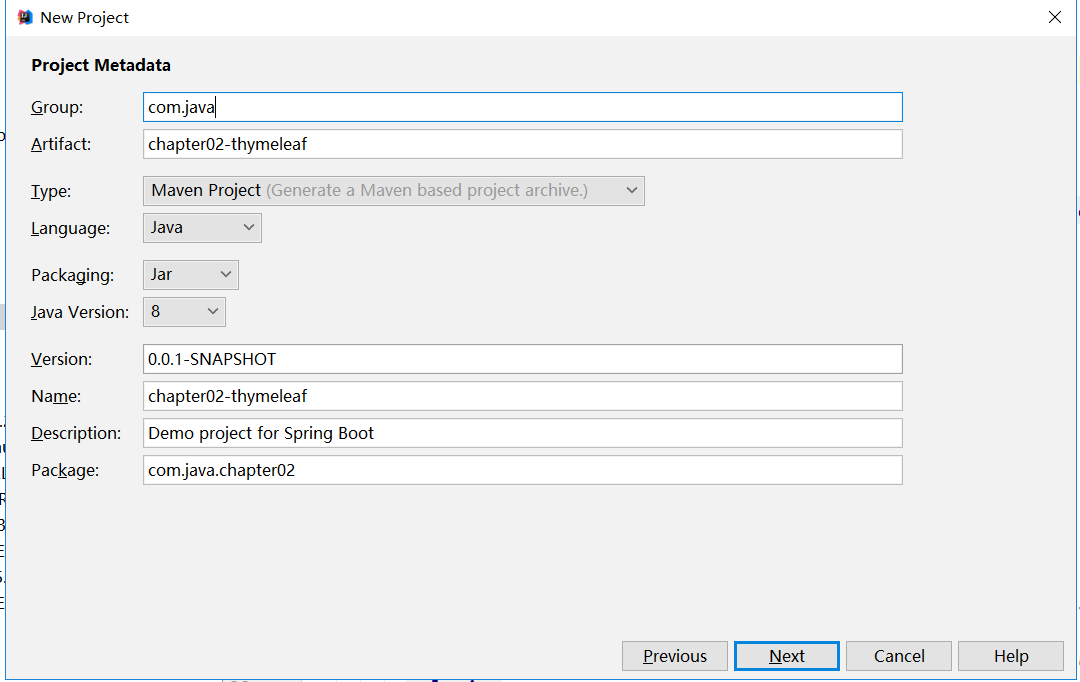
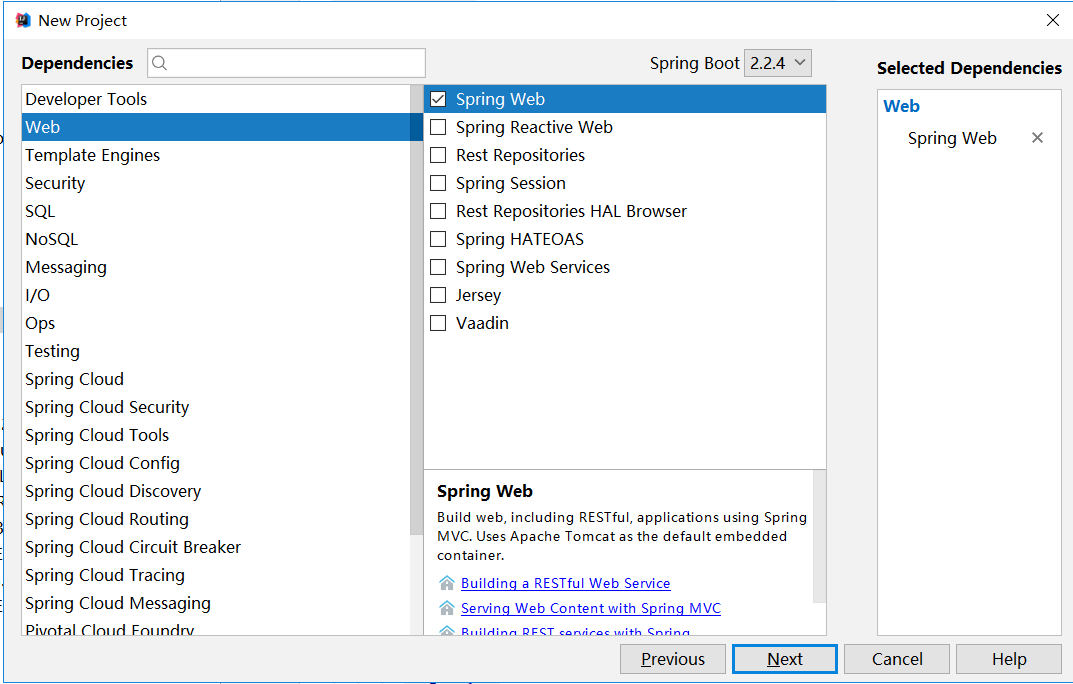
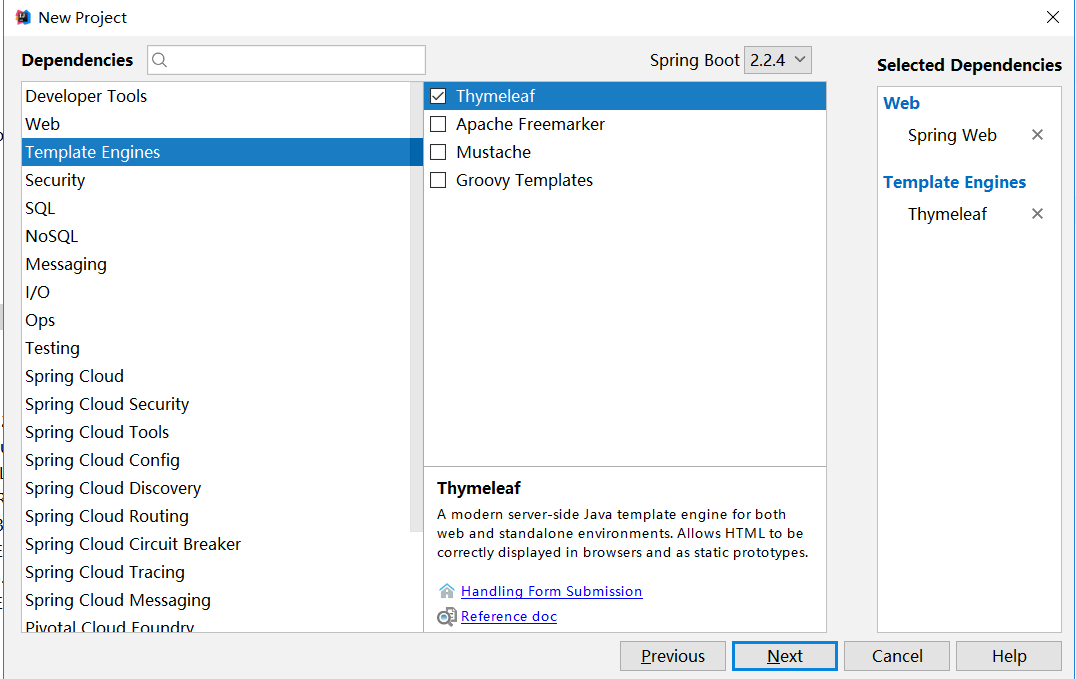
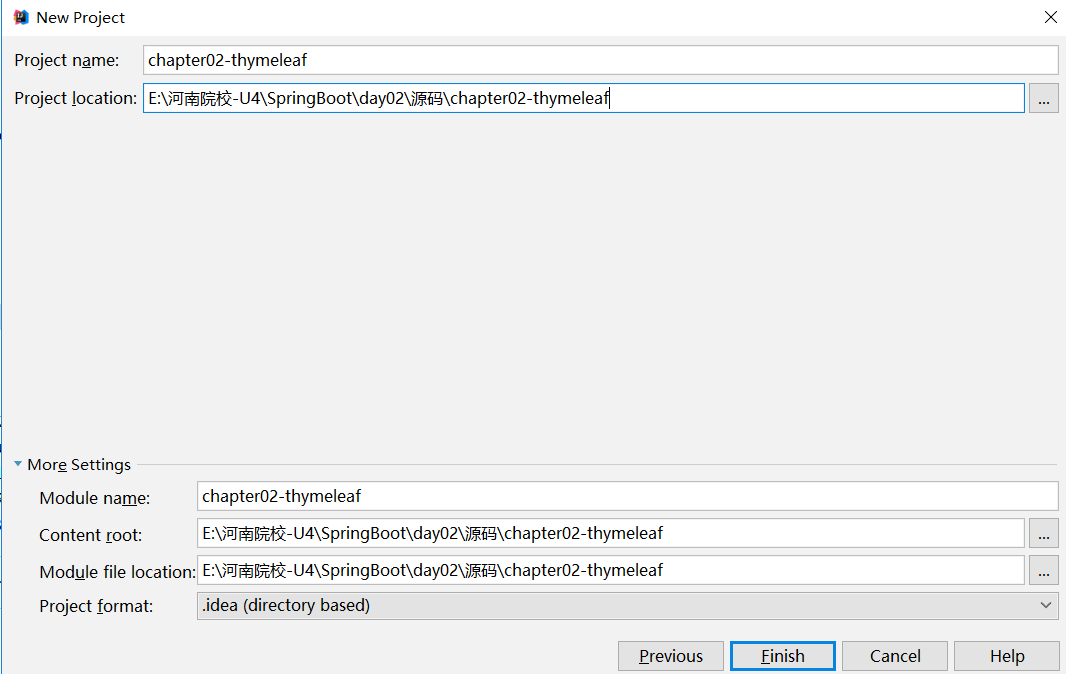
pom.xml中添加依赖如下:
|
<dependency> |
由于我们对于启动器的使用经验不足,带着大家看看thymeleaf启动器,然后通过该启动器的学习,教会大家遇到问题的时候随机应变,从而灵活的掌握怎么对默认的属性进行配置,达到举一反三的效果。那么我们可以打开ThymeleafProperties类,查看源代码,然后基于源代码进行分析。
|
@ConfigurationProperties( public ThymeleafProperties() { //剩余省略... } |
首先通过 @ConfigurationProperties 注解,将 application.properties 前为 spring.thymeleaf 的配置和这个类中的属性绑定。前三个 static 变量定义了默认的编码格式、视图解析器的前缀、后缀等。从前三行配置中,可以看出来,Thymeleaf 模板的默认位置在 resources/templates 目录下,默认的后缀是 html 。这些配置,如果开发者不自己提供,则使用 默认的,如果自己提供,则在 application.properties 中以 spring.thymeleaf开始相关的配置。
2)创建包entity,编写Book类
|
package com.java.chapter02.entity; public class Book { public Book() { public Book(Integer id, String name, String author) { //getter和setter省略... |
3)编写IndexController
|
package com.java.chapter02.controller; import com.java.chapter02.entity.Book; import java.util.ArrayList; @Controller list.add(book1); |
4)在templates文件夹下面,编写页面index.html,实现隔行变色。
|
<!DOCTYPE html > |
这里要注意的是要导入thymeleaf命名空间,里面的循环标签和jsp的JSTL有所区别,请大家注意。在 Thymeleaf 中,通过 th:each 指令来遍历一个集合,数据的展示通过 th:text 指令来实现。index是迭代本行的索引。Th:class是设置样式,index.odd是索引是偶数行的。如果是偶数行那么就使用样式odd。Book就是每次迭代的变量。其他的和jsp中用法差不多,不多解释。
5)测试
在浏览器中输入:http://localhost:8080/index,最后的结果如下,大家可以测试一下。

如果大家对thymeleaf语法感兴趣,其实非常简单,还要部分没有讲解到的地方可以参考下面的链接进行学习,链接地址如下: https://www.cnblogs.com/msi-chen/p/10974009.html#_label1_9。
峰哥说技术:07-SpringBoot 正好Thymeleaf视图的更多相关文章
- 峰哥说技术:10-Spring Boot静态资源处理
Spring Boot深度课程系列 峰哥说技术—2020庚子年重磅推出.战胜病毒.我们在行动 10 峰哥说技术:Spring Boot静态资源处理 今天我们聊聊关于 Spring Boot 中关于静 ...
- 峰哥说技术:08-Spring Boot整合FreeMarker视图
Spring Boot深度课程系列 峰哥说技术—2020庚子年重磅推出.战胜病毒.我们在行动 08 峰哥说技术:Spring Boot整合FreeMarker视图 前面带着大家整合了Thymelea ...
- 峰哥说技术:09-Spring Boot整合JSP视图
Spring Boot深度课程系列 峰哥说技术—2020庚子年重磅推出.战胜病毒.我们在行动 09 峰哥说技术:Spring Boot整合JSP视图 一般来说我们很少推荐大家在Spring boot ...
- 峰哥说技术:06-手撸Spring Boot自定义启动器,解密Spring Boot自动化配置原理
Spring Boot深度课程系列 峰哥说技术—2020庚子年重磅推出.战胜病毒.我们在行动 06 峰哥说技术:手撸Spring Boot自定义启动器,解密Spring Boot自动化配置原理 Sp ...
- 峰哥说技术: 05-Spring Boot条件注解注解
Spring Boot深度课程系列 峰哥说技术—2020庚子年重磅推出.战胜病毒.我们在行动 05 峰哥说技术 Spring Boot条件注解 @EnableAutoConfiguration开启自 ...
- 峰哥说技术:04-Spring Boot基本配置
Spring Boot深度课程系列 峰哥说技术—2020庚子年重磅推出.战胜病毒.我们在行动 04 Spring Boot基本配置 1)容器的相关配置 在Spring Boot中可以内置Tomcat. ...
- 峰哥说技术:03-Spring Boot常用注解解读
Spring Boot深度课程系列 峰哥说技术—2020庚子年重磅推出.战胜病毒.我们在行动 03 Spring Boot常用注解解读 在Spring Boot中使用了大量的注解,我们下面对一些常用的 ...
- 峰哥说技术:02-第一个Spring Boot应用程序
Spring Boot深度课程系列 峰哥说技术—2020庚子年重磅推出.战胜病毒.我们在行动 02第一个Spring Boot应用程序 1.版本要求 集成开发环境:IntelliJ IDEA 2017 ...
- 峰哥说技术:01-Spring Boot介绍
Spring Boot深度课程系列 峰哥说技术—2020庚子年重磅推出.战胜病毒.我们在行动 Spring Boot介绍 A.Spring Boot是什么? 由于Spring是一个轻量级的企业开发框架 ...
随机推荐
- android 圆环进度view
新建RoundProgressBar class RoundProgressBar : View { private val paint = Paint() var max = 100 //最大进度 ...
- 项目引入nacos 日志不显示问题
禁用nacos的日志即可解决 idea当中 添加vm options参数即可 -Dnacos.logging.default.config.enabled=false 打包后的启动命令 java - ...
- EX_KMP算法总结
EX_KMP算法总结 By viv 2014-8-9 0:30 吐槽1:字符串神马的我最讨厌了,但不学不行啊.TAT 吐槽2:写这东西差点错过CF(codeforces). 今天学了ex_kmp,故总 ...
- 树莓派搭建钓鱼wifi热点
我们连接的公共wifi其实是非常不安全的网络,骇客可以利用wifi路由设备进行中间人攻击,劫持DNS伪造钓鱼网站.接下来我会做个简单的实验,伪造中国电信的路由ChinaNet并发射出热点wifi等待别 ...
- Java 的 ArrayList 的底层数据结构
1. 数据结构--ArrayList源码摘要 ublic class ArrayList<E> extends AbstractList<E> implements List& ...
- linux下文件夹归置方式
/bin:二进制可执行命令./dev:设备特殊文件./etc:系统管理和配置文件./etc/rc.d:启动的配 置文件和脚本./home:用户主目录的基点,比如用户user的主目录就是/home/us ...
- [LC] 92. Reverse Linked List II
Reverse a linked list from position m to n. Do it in one-pass. Note: 1 ≤ m ≤ n ≤ length of list. Exa ...
- MOOC(7)- case依赖、读取json配置文件进行多个接口请求-解决用例间依赖问题(17)
最最重要,处理case依赖.字段依赖 # -*- coding: utf-8 -*- # @Time : 2020/2/13 21:14 # @File : data_depend_17.py # @ ...
- firefox上网慢
由于Chromium浏览器,打字的时候经常会跳字母,所以就换了firefox浏览器,但是FF上网的时候特别慢,而且大部分时间是花费在解析域名上.因此到网上找了许多资料,最终解决方法如下. 1.安装dn ...
- 合并cookie,提取json数据
发送的第3个请求需要前两个请求的cookie,需要对cookie进行合并 发送的请求数据来自于json数据中的某个键值. 这里是删除所有的对话主题目录,每一个目录有一个id,发起删除对话主题目录的请求 ...