
RadioButton之互斥选择和Toast显示
前言:
RadioButton用来单选并且用Toast来进行提示所选内容
RadioButton标签单独写的时候不能出现互斥现象,代码如下
 <RadioButton

         android:layout_height="wrap_content"

         android:layout_width="wrap_content"

         android:text="男"

         android:id="@+id/nan"/>

 <RadioButton

         android:layout_height="wrap_content"

         android:layout_width="wrap_content"

         android:text="女"

         android:id="@+id/nv"/>
效果:
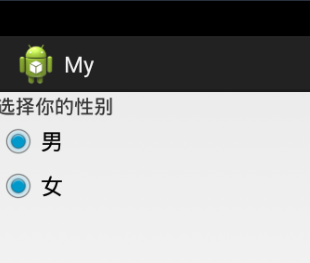
此时在屏幕中并不会互斥的选择,这是和我们意愿不符合,这是应该把这两个标签加在<RadioGroup><RadioGroup/>中,来实现可以互斥选择的效果
代码如下
  <RadioGroup

         android:layout_height="wrap_content"

         android:layout_width="wrap_content">

         <RadioButton

         android:layout_height="wrap_content"

         android:layout_width="wrap_content"

         android:text="男"

         android:id="@+id/nan"/>

         <RadioButton

         android:layout_height="wrap_content"

         android:layout_width="wrap_content"

         android:text="女"

         android:id="@+id/nv"/>

     </RadioGroup>
这样就可以实现互斥选择了
接下来实现当选择男是提示你选择男,
在RadioAcivity中的代码为
 public class RadioActivity extends Activity {

     private RadioButton nan, nv;

     @Override

     protected void onCreate(Bundle savedInstanceState) {

         // TODO Auto-generated method stub

         super.onCreate(savedInstanceState);

         setContentView(R.layout.radio);

         nan = (RadioButton) findViewById(R.id.nan);

         nv = (RadioButton) findViewById(R.id.nv);

         nan.setOnCheckedChangeListener(new CompoundButton.OnCheckedChangeListener() {

             @Override

             public void onCheckedChanged(CompoundButton buttonView,

                     boolean isChecked) {

                 // TODO Auto-generated method stu

                 if (isChecked) {

                     Toast.makeText(RadioActivity.this,

                             "您选择的是:" + nan.getText(), 1).show();

                 }

             }

         });

         nv.setOnCheckedChangeListener(new CompoundButton.OnCheckedChangeListener() {

             @Override

             public void onCheckedChanged(CompoundButton buttonView,

                     boolean isChecked) {

                 // TODO Auto-generated method stu

                 if (isChecked) {

                     Toast.makeText(RadioActivity.this, "您选择的是:" + nv.getText(),

                             1).show();

                 }

             }

         });

     }

 }
我们知道RadioButton和CheckBox都为CompoundButton的子类,按钮有按钮的监听器,RadioButton也有自己的监听器,在初始化控件后,开始设置监听器(setCheckedChangeLintener),如12行和25行,我们使用匿名类来实现监听事件,因为onCheckedChangeListener是在CompoundButton下定义的,所以实例化onCheckedChangeListener对象,要加外部类名【此知识点是Java内部类知识点】,然后重写onCheckedChanged方法,这方法有两个参数一个是 Compound buttonView 一个是boolean isChecked当我们点过RadioButton时,isChecked为true
接下来就是用Toast来显示,注意第一个参数不是this 而是RadioActivity.this
RadioButton之互斥选择和Toast显示的更多相关文章
- 延长Toast显示时间
---恢复内容开始--- 由于Toast的显示时间只有两种: Toast.LENGTH_SHORT: 2秒 Toast.LENGTH_LONG: 3.5秒 而且是写死的,没给开发者自定义时间的权利,所 ...
- android 自定义Toast显示风格
1.创建一个自己想要显示Toast风格的XML如下代码(toast_xml.xml): <?xml version="1.0" encoding="utf-8&qu ...
- 设置Toast显示位置
设置Toast显示位置 两个方法可以设置显示位置: 方法一:setGravity(int gravity, int xOffset, int yOffset)三个参数分别表示(起点位置,水平向右位移, ...
- Android:剖析源码,随心所欲控制Toast显示
前言 Toast相信大家都不会陌生吧,如果对于Toast不甚了解,可以参考我的上一篇博客<Android:谈一谈安卓应用中的Toast情节>,里面有关于Toast基础比较详细的介绍.但是如 ...
- IE 选择文字后 显示小箭头 加速按钮
IE - 工具 - Internet选项 - 高级 - 不选择<在选择是显示加速按钮>选项就可以了.
- [Unity3D]Unity3D游戏开发之在3D场景中选择物体并显示轮廓效果
大家好,我是秦元培,欢迎大家关注我的博客,我的博客地址是blog.csdn.net/qinyuanpei. 在<仙剑奇侠传>.<古剑奇谭>等游戏中,常常须要玩家在一个3D场景中 ...
- 开发技巧01——改变Toast显示位置
1.获得Toast对象——Toast toast = Toast.makeText(this, "Top Left!", Toast.LENGTH_SHORT); 2.Toast对 ...
- ListView中RadioButton实现单项选择
1:FragmentHack5.java public class FragmentHack5 extends Fragment { View view; ListView lvCountries; ...
- 小米手机Toast显示带应用名称问题解决方法
近期为了适配刘海屏,向公司申购了一步小米8的手机,然后测试人员那边测出来一堆适配的问题,其中有一个每一个Toast会显示app的名称+显示的内容,然后网上查找了一下解决方法记录一下,顺便封装了Toas ...
随机推荐
- 使用eclipse创建一个简单的Java Web应用程序
关于Java JDK/JRE.Tomcat的配置等等都没什么好说的,主要记录一下使用Eclipse创建web工程时的一些点以及说一说自己用IDEA的创建失败的过程(IDEA没运行成功...暂时不想弄了 ...
- Vue源码(下篇)
上一篇是mount之前的添加一些方法,包括全局方法gloal-api,XXXMixin,initXXX,然后一切准备就绪,来到了mount阶段,这个阶段主要是 解析template 创建watcher ...
- linux编译C
1. 编译单个源文件 为了进行测试,你可以创建"Hello World"程序: #include #include int main(int argc, char **argv) ...
- mathematica练习程序(第一章 Mathematica的基本量)
虽然过去有用Mathematica解过一些问题,不过对这个语言并没有系统学习过. 所以最近想重新把Mathematica系统的学一遍. 偶然在B站上找到了这样一组教程:https://www.bili ...
- 【C++】【STL】【map】基础知识干货
1.map简介 map是一种关联式容器,主要用于对数据一对一的映射. 2.map的构造 (1)头文件:#include<map> (2)定义:map<第一关键字,第二关键字> ...
- Day1-XDoj-1062
题目描述 一天,lw梦见自己在打dota,然而对面是一个加强过的卡尔!于是,他每次都被n个技能瞬间秒杀.愤怒的lw决定买BKB,来加强生存力. 由于加强过的卡尔是电脑操作的,他每次看见lw时,只会以1 ...
- vue通过路由传值及在页面刷新后如何保存值
1.普通的路由跳转 方式一:通过routerLinkTo方式,转为a标签的跳转,to里面相当于a标签的href路径 如下: 方式二:通过this.$router.push方式: 如下: 2.带参数的路 ...
- MyEclipse 8.6.1 制作绿色版
我们先在这个目录下新建一个文件: MyEclipse 10.6.bat , 文件内容如下: start eclipse\eclipse.exe -vm jre\bin\javaw.exe 接下来只需要 ...
- Jquery选择器大全汇总
一.选择器 1.三个基本选择器,$("#ID") .$(".className") .$("tagName") 2.其他选择器 //htm ...
- docker-jenkins SSH Publishers时踩的坑
source相对路径问题,不是 /var/jenkins_home/workspace/build-renren/target/renren-fast.war 或环境变量,而是 target/re ...