
Centos7安装mysql5.7.21
1、卸载系统自带的 MariaDB
[root@CentOS ~]# rpm -qa | grep mariadb

mariadb-libs-5.5.-.el7.x86_64

[root@CentOS ~]# rpm -e --nodeps mariadb-libs-5.5.-.el7.x86_64
2、下载 mysql5.7.21 安装包
[root@CentOS local]# wget https://dev.mysql.com/get/Downloads/MySQL-5.7/mysql-5.7.21-linux-glibc2.12-x86_64.tar.gz
3、创建 mysql 用户组和 mysql 用户
[root@CentOS local]# useradd mysql
4、解压安装包,并将解压好的文件夹重命名为mysql
[root@CentOS local]# tar -zxvf mysql-5.7.-linux-glibc2.-x86_64.tar.gz
mysql-5.7.-linux-glibc2.-x86_64/bin/myisam_ftdump
mysql-5.7.-linux-glibc2.-x86_64/bin/myisamchk
mysql-5.7.-linux-glibc2.-x86_64/bin/myisamlog
mysql-5.7.-linux-glibc2.-x86_64/bin/myisampack
mysql-5.7.-linux-glibc2.-x86_64/bin/mysql
mysql-5.7.-linux-glibc2.-x86_64/bin/mysql_client_test_embedded
mysql-5.7.-linux-glibc2.-x86_64/bin/mysql_config_editor
mysql-5.7.-linux-glibc2.-x86_64/bin/mysql_embedded
mysql-5.7.-linux-glibc2.-x86_64/bin/mysql_install_db
mysql-5.7.-linux-glibc2.-x86_64/bin/mysql_plugin
......(略去内容).....
[root@CentOS local]# mv mysql-5.7.-linux-glibc2.-x86_64 mysql
5、将 mysql 添加为系统服务
[root@CentOS local]# cp mysql/support-files/mysql.server /etc/init.d/mysql
[root@CentOS local]# chkconfig --add mysql
6、初始化数据库
[root@CentOS mysql]# mkdir data
[root@CentOS mysql]# ./bin/mysqld --initialize --user=mysql --basedir=/usr/local/mysql --datadir=/usr/local/mysql/data
--24T11::.265873Z [Warning] TIMESTAMP with implicit DEFAULT value is deprecated. Please use --explicit_defaults_for_timestamp server option (see documentation for more details).
--24T11::.343129Z [Warning] InnoDB: New log files created, LSN=
--24T11::.473269Z [Warning] InnoDB: Creating foreign key constraint system tables.
--24T11::.541782Z [Warning] No existing UUID has been found, so we assume that this is the first time that this server has been started. Generating a new UUID: 63b1ed0c--11e8-aa97-000c29847b2d.
--24T11::.542867Z [Warning] Gtid table is not ready to be used. Table 'mysql.gtid_executed' cannot be opened.
--24T11::.543383Z [Note] A temporary password is generated for root@localhost: =u>yyVorV7g%
[root@CentOS mysql]#
例如在 /usr/local/mysql 目录下创建用于保存数据的data 目录,初始化数据库后获得的临时密码为:=u>yyVorV7g%
7、启动mysql服务,使用临时密码登录mysql
[root@CentOS mysql]# systemctl start mysql # 使用 service mysql start 也可以
[root@CentOS mysql]# ps -ef | grep mysql
root : ? :: /bin/sh /usr/local/mysql/bin/mysqld_safe --datadir=/usr/local/mysql/data --pid-file=/usr/local/mysql/data/CentOS.pid
mysql : ? :: /usr/local/mysql/bin/mysqld --basedir=/usr/local/mysql --datadir=/usr/local/mysql/data --plugin-dir=/usr/local/mysql/lib/plugin --user=mysql --log-error=CentOS.err --pid-file=/usr/local/mysql/data/CentOS.pid
root : pts/ :: grep --color=auto mysql
[root@CentOS mysql]# ./bin/mysql -u root -p
Enter password: # 这里输入刚获取的临时密码
Welcome to the MySQL monitor. Commands end with ; or \g.
Your MySQL connection id is
Server version: 5.7. Copyright (c) , , Oracle and/or its affiliates. All rights reserved. Oracle is a registered trademark of Oracle Corporation and/or its
affiliates. Other names may be trademarks of their respective
owners. Type 'help;' or '\h' for help. Type '\c' to clear the current input statement. mysql>
8、修改登录密码
mysql> SET PASSWORD FOR 'root'@'localhost' = PASSWORD(''); # 将 root 登录密码修改为123456
Query OK, rows affected, warning (0.00 sec)
mysql>
9、将 mysql 服务设置为开机启动
[root@CentOS mysql]# chkconfig mysql on
10、设置任何远程主机都可以访问数据库
[root@CentOS bin]# ./mysql -u root -p
Enter password:
Welcome to the MySQL monitor. Commands end with ; or \g.
Your MySQL connection id is
Server version: 5.7. MySQL Community Server (GPL) Copyright (c) , , Oracle and/or its affiliates. All rights reserved. Oracle is a registered trademark of Oracle Corporation and/or its
affiliates. Other names may be trademarks of their respective
owners. Type 'help;' or '\h' for help. Type '\c' to clear the current input statement. mysql> grant all privileges on *.* to 'root' @'%' identified by ''; # 设置任何远程主机都可以访问
Query OK, rows affected, warning (0.00 sec) mysql> flush privileges; # 刷新权限
Query OK, rows affected (0.00 sec) mysql>
11、开放 3306 端口(mysql 默认端口)
[root@CentOS bin]# firewall-cmd --zone=public --add-port=/tcp --permanent # 添加 端口
success
[root@CentOS bin]# firewall-cmd --reload # 重新载入
success
[root@CentOS bin]#
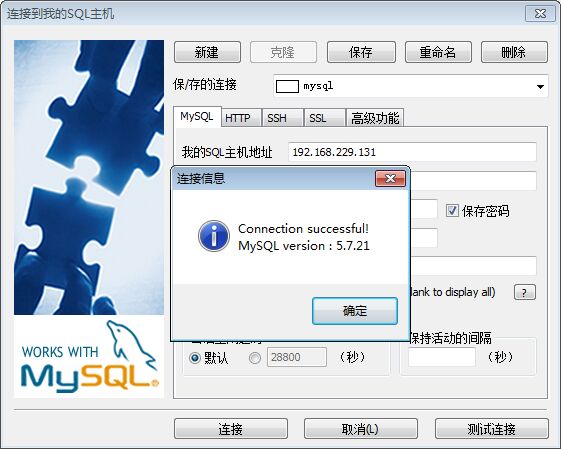
12、使用 Sqlyog 客户端进行测试

Centos7安装mysql5.7.21的更多相关文章
- Centos7安装Mysql5.7方法总结 - 实操手册
Centos7.x版本下针对Mysql的安装和使用多少跟之前的Centos6之前版本有所不同的,废话就不多赘述了,下面介绍下在centos7.x环境里安装mysql5.7的几种方法:一.yum方式安装 ...
- Centos7 安装 MySQL5.7
Centos7 安装 MySQL5.7 一.环境介绍 1.安装包版本介绍 MySQL 有三种安装方式:RPM安装.二进制包安装.源码包安装.我们这篇文章以二进制方式安装MySQL 软件名称 版本 系统 ...
- centos7安装mysql5.7.19及配置远程连接
centos7安装mysql5.7.19及配置远程连接------https://blog.csdn.net/Lh19931122/article/details/77996213
- CENTOS7上安装MYSQL5.7.21流程
1系统约定安装文件下载目录:/data/softwareMysql目录安装位置:/usr/local/mysql数据库保存位置:/data/mysql日志保存位置:/data/log/mysql 2下 ...
- Linux学习第三步(Centos7安装mysql5.7数据库)
版本:mysql-5.7.16-1.el7.x86_64.rpm-bundle.tar 前言:在linux下安装mysql不如windows下面那么简单,但是也不是很难.本文向大家讲解了如何在Cent ...
- Centos7安装mysql-5.7.19
Centos7安装Mysql 一 mysql下载 地址: https://dev.mysql.com/downloads/mysql/#downloads 二 在centos7上创建安装文件存放.解压 ...
- centos7安装mysql5.7修改设置密码策略
centos7操作系统在安装mysql5.7社区版之后会有默认密码,通过grep命令在mysqld.log文件中即可找到,如下所示: 标识位置即在初始化安装时mysql的默认密码,然后通过mysql ...
- centos7安装MySQL5.7无法设置密码问题
前言 在使用centos7系统yum方式安装MySQL5.7后 不知道默认密码是多少 知道后没办法修改? 一.找到MySQL密码 service mysqld start vim /var/log/ ...
- linux下安装mysql5.7.21
下载 wget https://dev.mysql.com/get/Downloads/MySQL-5.7/mysql-5.7.21-linux-glibc2.12-x86_64.tar.gz 解压 ...
随机推荐
- Duilib程序添加托盘图标显示
转载:https://www.zhaokeli.com/article/8266.html 温馨提示:技术类文章有它的时效性,请留意文章更新时间以及软件的版本 功能描述 实现点击关闭后,程序最小化到托 ...
- Hibernate(九)--N+1问题
1.在利用Hibernate操作数据库的时候,如果在实体类上设置了表的双向关联.这可能会出现Hibernate N+1的问题. 1.1.一对多: 在一方,查找得到了 n 个对象,那么又需要将 n 个对 ...
- Centos7 安装编译nginx-1.9.6过程
一.安装环境准备 使用编译安装nginx最好都先安装下这些依赖包 安装nginx需要的依赖库 yum install -y gcc patch libffi-devel python-devel zl ...
- 设计模式课程 设计模式精讲 7-3 建造者模式源码解析(jdk+guava+spring+mybaties)
1 源码解析 1.1 jdk解析 1.2 guava解析 1.3 spring解析 1.4 mybaties解析 1 源码解析 1.1 jdk解析 String public StringBuilde ...
- OSI参考模型对网络排错的指导
问题 当我们遇到网络故障的时候,比如连不上网.打开浏览器无法正常访问等问题的时候,我们应该怎么排查呢? 我们首先想到的是物理层,因为在OSI参考模型中物理层是在最低端.最基础. 物理层排查 主要查看连 ...
- 【剑指Offer面试编程题】题目1391:顺时针打印矩阵--九度OJ
题目描述: 输入一个矩阵,按照从外向里以顺时针的顺序依次打印出每一个数字,例如,如果输入如下矩阵: 1 2 3 4 5 6 7 8 9 10 11 12 13 14 15 16 则依次打印出数字1,2 ...
- oracle中 lob类型
LOB大型对象(大数据字段类型) 分为:-BLOB: Binary 二进制大型对象 ,适用于存非文本型数据(程序,图像,影音) -CLOB:Character 字符型大型对象,适用于存储文本型数据( ...
- video-player
1. VLC 2. MPlayer 3. FFmpeg 4. 显示媒体信息 5. 视频播放器软件比较 1. VLC https://www.videolan.org/vlc/ https://en.w ...
- Python 多进程 multiprocessing.Pool类详解
Python 多进程 multiprocessing.Pool类详解 https://blog.csdn.net/SeeTheWorld518/article/details/49639651
- 「Luogu2264」情书
传送门 Luogu 解题思路 字符串模拟SB题,STL随便搞. 详情见代码. 细节注意事项 STL总得会吧. 参考代码 #include <algorithm> #include < ...