
ffmpeg 学习:000-概述和库的组成
背景
ffmpeg bin工具 可能无法满足产品的使用,于是需要通过传参调用ffmpeg库,即在通过更底层的方式使用它。
FFmpeg 介绍
FFmpeg是领先的多媒体框架,能够解码,编码,转码,复用,解复用,流,过滤和播放人类和机器创造的任何东西。它支持最多种类的编码格式。无论他们是由某个标准委员会,社区或公司设计的。
它也非常便于携带:FFmpeg在各种构建环境,机器体系结构和配置下编译,运行并通过Linux,Mac OS X,Microsoft Windows,BSD,Solaris等测试基础架构FATE。
它包含:
1.库:可供应用程序使用的libavcodec,libavutil,libavformat,libavfilter,libavdevice,libswscale和libswresample支持类库。
2.工具:ffmpeg,ffplay和ffprobe应用程序可供最终用户用于转码和播放。
FFmpeg Tools
ffmpeg用于在不同格式之间转换多媒体文件的命令行工具;
ffplay 基于SDL和FFmpeg库的简单媒体播放器;
ffprobe个简单的多媒体流分析器;
FFmpeg Libraries for developers:
libavutil是一个包含简化编程功能的库,包括随机数生成器,数据结构,数学例程,核心多媒体实用程序等等。
The libavutil library is a utility library to aid portable multimedia programming. It contains safe portable string functions, random number generators, data structures, additional mathematics functions, cryptography and multimedia related functionality (like enumerations for pixel and sample formats). It is not a library for code needed by both libavcodec and libavformat.
The goals for this library is to be:
Modular
It should have few interdependencies and the possibility of disabling individual parts during./configure.Small
Both sources and objects should be small.Efficient
It should have low CPU and memory usage.Useful
It should avoid useless features that almost no one needs.
libswscale是一个执行高度优化的图像缩放和色彩空间/像素格式转换操作的库。
The libswscale library performs highly optimized image scaling and colorspace and pixel format conversion operations.
Specifically, this library performs the following conversions:
Rescaling : is the process of changing the video size. Several rescaling options and algorithms are available. This is usually a lossy process.
Pixel format conversion : is the process of converting the image format and colorspace of the image, for example from planar YUV420P to RGB24 packed. It also handles packing conversion, that is converts from packed layout (all pixels belonging to distinct planes interleaved in the same buffer), to planar layout (all samples belonging to the same plane stored in a dedicated buffer or "plane").
This is usually a lossy process in case the source and destination colorspaces differ.
libswresample是一个库,用于执行高度优化的音频重采样,重新矩阵化和采样格式转换操作。
The libswresample library performs highly optimized audio resampling, rematrixing and sample format conversion operations.
Specifically, this library performs the following conversions:
- Resampling: is the process of changing the audio rate, for example from a high sample rate of 44100Hz to 8000Hz. Audio conversion from high to low sample rate is a lossy process. Several resampling options and algorithms are available.
- Format conversion: is the process of converting the type of samples, for example from 16-bit signed samples to unsigned 8-bit or float samples. It also handles packing conversion, when passing from packed layout (all samples belonging to distinct channels interleaved in the same buffer), to planar layout (all samples belonging to the same channel stored in a dedicated buffer or "plane").
Rematrixing: is the process of changing the channel layout, for example from stereo to mono. When the input channels cannot be mapped to the output streams, the process is lossy, since it involves different gain factors and mixing.
Various other audio conversions (e.g. stretching and padding) are enabled through dedicated options.
libavcodec是一个包含音频/视频编解码器解码器和编码器的库。
The libavcodec library provides a generic encoding/decoding framework and contains multiple decoders and encoders for audio, video and subtitle streams, and several bitstream filters.
The shared architecture provides various services ranging from bit stream I/O to DSP optimizations, and makes it suitable for implementing robust and fast codecs as well as for experimentation.
libavformatis a library containing demuxers and muxers for multimedia container formats.
he libavformat library provides a generic framework for multiplexing and demultiplexing (muxing and demuxing) audio, video and subtitle streams. It encompasses multiple muxers and demuxers for multimedia container formats.
It also supports several input and output protocols to access a media resource.
libavdevice是一个包含输入和输出设备的库,用于抓取并渲染许多常见的多媒体输入/输出软件框架,包括Video4Linux,Video4Linux2,VfW和ALSA。
The libavdevice library provides a generic framework for grabbing from and rendering to many common multimedia input/output devices, and supports several input and output devices, including Video4Linux2, VfW, DShow, and ALSA.
libavfilter是一个包含媒体过滤器的库。
The libavfilter library provides a generic audio/video filtering framework containing several filters, sources and sinks.
FFmpeg中的数据结构
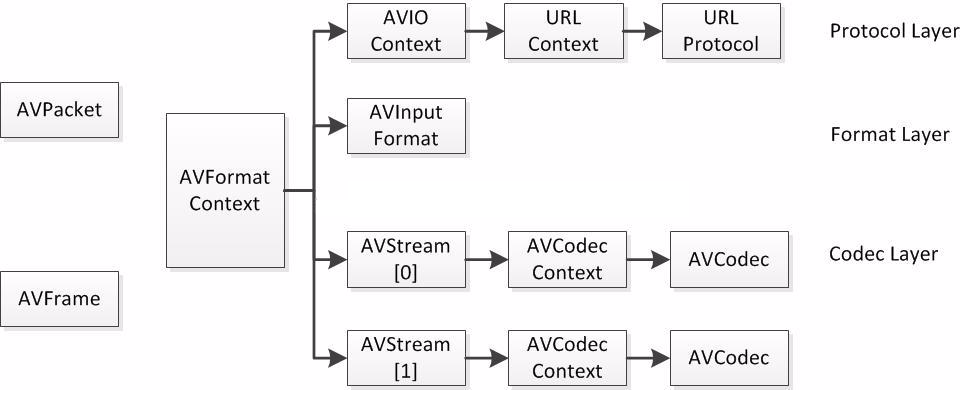
- AVFormatContext 封装格式上下文结构体,也是统领全局的结构体,保存了视频文件封装 格式相关信息。
- iformat:输入视频的AVInputFormat
- nb_streams :输入视频的AVStream 个数
- streams :输入视频的AVStream []数组
- duration :输入视频的时长(以微秒为单位)
- bit_rate :输入视频的码率
- AVInputFormat 每种封装格式(例如FLV, MKV, MP4, AVI)对应一个该结构体。
- name:封装格式名称
- long_name:封装格式的长名称
- extensions:封装格式的扩展名
- id:封装格式ID
- 一些封装格式处理的接口函数
- AVStream 视频文件中每个视频(音频)流对应一个该结构体。
- id:序号
- codec:该流对应的AVCodecContext
- time_base:该流的时基
- r_frame_rate:该流的帧率
- AVCodecContext编码器上下文结构体,保存了视频(音频)编解码相关信息。
- codec:编解码器的AVCodec
- width, height:图像的宽高(只针对视频)
- pix_fmt:像素格式(只针对视频)
- sample_rate:采样率(只针对音频)
- channels:声道数(只针对音频)
- sample_fmt:采样格式(只针对音频)
- AVCodec 每种视频(音频)编解码器(例如H.264解码器)对应一个该结构体。
- name:编解码器名称
- long_name:编解码器长名称
- type:编解码器类型
- id:编解码器ID
- 一些编解码的接口函数
- AVPacket 存储一帧压缩编码数据。
- pts:显示时间戳
- dts :解码时间戳
- data :压缩编码数据
- size :压缩编码数据大小
- stream_index :所属的AVStream
- AVFrame存储一帧解码后像素(采样)数据。
- data:解码后的图像像素数据(音频采样数据)。
- linesize:对视频来说是图像中一行像素的大小;对音频来说是音频帧的大小。
- width, height:图像的宽高(只针对视频)。
- key_frame:是否为关键帧(只针对视频) 。
- pict_type:帧类型(只针对视频) 。例如I,P,B。
参考资料:https://blog.csdn.net/leixiaohua1020/article/details/11693997
ffmpeg 学习:000-概述和库的组成的更多相关文章
- ffmpeg学习笔记-Linux下编译Android动态库
Android平台要使用ffmpeg就需要编译生成动态库,这里采用Ubuntu编译Android动态库 文件准备 要编译生成Android需要以下文件 NDK ffmpeg源代码 NDK下载 NDK可 ...
- FFmpeg学习5:多线程播放视音频
在前面的学习中,视频和音频的播放是分开进行的.这主要是为了学习的方便,经过一段时间的学习,对FFmpeg的也有了一定的了解,本文就介绍了 如何使用多线程同时播放音频和视频(未实现同步),并对前面的学习 ...
- FFmpeg学习起步 —— 环境搭建
下面是我搭建FFmpeg学习环境的步骤. 一.在Ubuntu下 从http://www.ffmpeg.org/download.html下载最新的FFmpeg版本,我的版本是ffmpeg-2.7.2. ...
- FFMPEG学习----打印视频信息
FFMPEG学习资料少之又少,在此推荐雷神的博客: http://blog.csdn.net/leixiaohua1020 在这里,我们把打印视频里的相关信息作为学习FFMPEG的 Hello Wor ...
- ffmpeg 学习:001-搭建开发环境
介绍 由于命令行的ffmpeg工具无法满足产品的性能要求,需要对视频流进行兼容.所以需要调试有关的参数. FFmpeg全名是Fast Forward MPEG(Moving Picture Exper ...
- Google之Chromium浏览器源码学习——base公共通用库(二)
上次提到Chromium浏览器中base公共通用库中的内存分配器allocator,其中用到了三方库tcmalloc.jemalloc:对于这两个内存分配器,个人建议,对于内存,最好是自己维护内存池: ...
- 从Theano到Lasagne:基于Python的深度学习的框架和库
从Theano到Lasagne:基于Python的深度学习的框架和库 摘要:最近,深度神经网络以“Deep Dreams”形式在网站中如雨后春笋般出现,或是像谷歌研究原创论文中描述的那样:Incept ...
- IOS学习:常用第三方库(GDataXMLNode:xml解析库)
IOS学习:常用第三方库(GDataXMLNode:xml解析库) 解析 XML 通常有两种方式,DOM 和 SAX: DOM解析XML时,读入整个XML文档并构建一个驻留内存的树结构(节点树),通过 ...
- FFmpeg 学习(五):FFmpeg 编解码 API 分析
在上一篇文章 FFmpeg学习(四):FFmpeg API 介绍与通用 API 分析 中,我们简单的讲解了一下FFmpeg 的API基本概念,并分析了一下通用API,本文我们将分析 FFmpeg 在编 ...
- FFmpeg 学习(七):FFmpeg 学习整理总结
一.FFmpeg 播放视频的基本流程整理 播放流程: video.avi(Container) -> 打开得到 Video_Stream -> 读取Packet -> 解析到 Fra ...
随机推荐
- idea2018.3.6,离线使用maven的方法
(1)想办法拷贝联网电脑上已经下载好的仓库文件夹mavenRepository到离线环境的电脑上: (2)idea中按照如下图中配置: (3)打开 User settings file中设置的sett ...
- android studio 导入主题设置,代码风格(附带eclipse 主题代码样式)
在这里我最想说的,android studio默认主题样式,太low.不适合长时间写代码,看代码颜色不好识别,相对于背景的代码样式,我都不想吐槽了.还是网上下载主题代码样式导入样式.在这里我推荐 Su ...
- 缓存ViewState减少网络传输
在维护 asp.net webform系统时,某些系统将控件及页面数据都存储在viewstate中,导致在频宽不够时,影响页面加载速度,此时可将viewstate 存储在服务端,减少网络传输. 重写 ...
- centos 下安装nginx
安装make: yum -y install gcc automake autoconf libtool make 安装g++: yum install gcc gcc-c++ cd /usr/loc ...
- 二分查找及几种变体的Python实现
1. 在不重复的有序数组中,查找等于给定值的元素 循环法 def search(lst, target): n = len(lst) if n == 0: return -1 low = 0 high ...
- UITextField的快速基本使用代码块
概述 UITextField在界面中显示可编辑文本区域的对象. 您可以使用文本字段来使用屏幕键盘从用户收集基于文本的输入.键盘可以配置许多不同类型的输入,如纯文本,电子邮件,数字等等.文本字段使用目标 ...
- Lesson 16 The modern city
What is the author's main argument about the modern city? In the organization of industrial life the ...
- 笔记-mongodb-用户及角色
笔记-mongodb-用户及角色 1. users 其实mongodb支持多种验证方式,本文只提及最简单也最常用的方式. 1.1. Authentication Database When ...
- 从零构建以太坊(Ethereum)智能合约到项目实战——第25章 Embark FrameWork
P109 .1-Embark Framework 开发入门篇P110 .2-Embark Framework 去中心化存储 (IPFS)
- 2019 深信服 下棋(DFS+回溯)
链接:https://www.nowcoder.com/questionTerminal/a0feb0696e2043a5b3b0779fa861b64a?f=discussion来源:牛客网 8x8 ...