
Python之turtle库-小猪佩奇
Python之turtle库-小猪佩奇
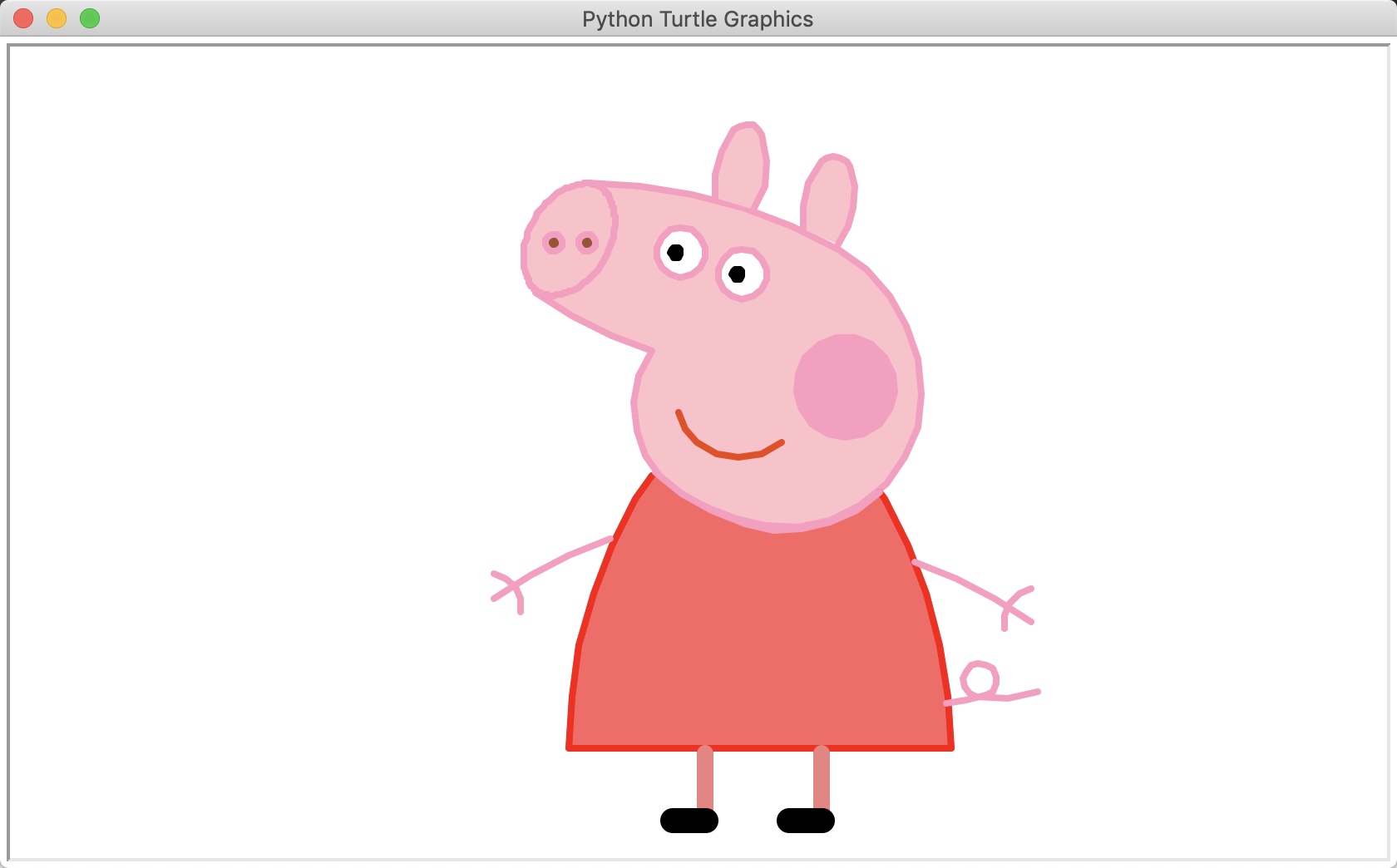
#!/usr/bin/env python

# coding: utf-8

# Python turtle库官方文档:https://docs.python.org/2/library/turtle.html

import turtle as t

t.begin_fill()

t.pensize(4)

t.hideturtle()

t.colormode(255)

t.color((255, 155, 192), "pink")

t.setup(840, 500)

t.speed(10)

# 鼻子

t.pu()

t.goto(-100, 100)

t.pd()

t.seth(-30)

t.begin_fill()

a = 0.4

for i in range(120):

    if 0 <= i < 30 or 60 <= i < 90:

        a = a + 0.08

        t.lt(3)  # 向左转3度

        t.fd(a)  # 向前走a的步长

    else:

        a = a - 0.08

        t.lt(3)

        t.fd(a)

t.end_fill()

t.pu()

t.seth(90)

t.fd(25)

t.seth(0)

t.fd(10)

t.pd()

t.pencolor(255, 155, 192)

t.seth(10)

t.begin_fill()

t.circle(5)

t.color(160, 82, 45)

t.end_fill()

t.pu()

t.seth(0)

t.fd(20)

t.pd()

t.pencolor(255, 155, 192)

t.seth(10)

t.begin_fill()

t.circle(5)

t.color(160, 82, 45)

t.end_fill()

# 头

t.color((255, 155, 192), "pink")

t.pu()

t.seth(90)

t.fd(41)

t.seth(0)

t.fd(0)

t.pd()

t.begin_fill()

t.seth(180)

t.circle(300, -30)

t.circle(100, -60)

t.circle(80, -100)

t.circle(150, -20)

t.circle(60, -95)

t.seth(161)

t.circle(-300, 15)

t.pu()

t.goto(-100, 100)

t.pd()

t.seth(-30)

a = 0.4

for i in range(60):

    if 0 <= i < 30 or 60 <= i < 90:

        a = a + 0.08

        t.lt(3)  # 向左转3度

        t.fd(a)  # 向前走a的步长

    else:

        a = a - 0.08

        t.lt(3)

        t.fd(a)

t.end_fill()

# 耳朵

t.color((255, 155, 192), "pink")

t.pu()

t.seth(90)

t.fd(-7)

t.seth(0)

t.fd(70)

t.pd()

t.begin_fill()

t.seth(100)

t.circle(-50, 50)

t.circle(-10, 120)

t.circle(-50, 54)

t.end_fill()

t.pu()

t.seth(90)

t.fd(-12)

t.seth(0)

t.fd(30)

t.pd()

t.begin_fill()

t.seth(100)

t.circle(-50, 50)

t.circle(-10, 120)

t.circle(-50, 56)

t.end_fill()

# 眼睛

t.color((255, 155, 192), "white")

t.pu()

t.seth(90)

t.fd(-20)

t.seth(0)

t.fd(-95)

t.pd()

t.begin_fill()

t.circle(15)

t.end_fill()

t.color("black")

t.pu()

t.seth(90)

t.fd(12)

t.seth(0)

t.fd(-3)

t.pd()

t.begin_fill()

t.circle(3)

t.end_fill()

t.color((255, 155, 192), "white")

t.pu()

t.seth(90)

t.fd(-25)

t.seth(0)

t.fd(40)

t.pd()

t.begin_fill()

t.circle(15)

t.end_fill()

t.color("black")

t.pu()

t.seth(90)

t.fd(12)

t.seth(0)

t.fd(-3)

t.pd()

t.begin_fill()

t.circle(3)

t.end_fill()

# 腮

t.color((255, 155, 192))

t.pu()

t.seth(90)

t.fd(-95)

t.seth(0)

t.fd(65)

t.pd()

t.begin_fill()

t.circle(30)

t.end_fill()

# 嘴

t.color(239, 69, 19)

t.pu()

t.seth(90)

t.fd(15)

t.seth(0)

t.fd(-100)

t.pd()

t.seth(-80)

t.circle(30, 40)

t.circle(40, 80)

# 身体

t.color("red", (255, 99, 71))

t.pu()

t.seth(90)

t.fd(-20)

t.seth(0)

t.fd(-78)

t.pd()

t.begin_fill()

t.seth(-130)

t.circle(100, 10)

t.circle(300, 30)

t.seth(0)

t.fd(230)

t.seth(90)

t.circle(300, 30)

t.circle(100, 3)

t.color((255, 155, 192), (255, 100, 100))

t.seth(-135)

t.circle(-80, 63)

t.circle(-150, 24)

t.end_fill()

# 手

t.color((255, 155, 192))

t.pu()

t.seth(90)

t.fd(-40)

t.seth(0)

t.fd(-27)

t.pd()

t.seth(-160)

t.circle(300, 15)

t.pu()

t.seth(90)

t.fd(15)

t.seth(0)

t.fd(0)

t.pd()

t.seth(-10)

t.circle(-20, 90)

t.pu()

t.seth(90)

t.fd(30)

t.seth(0)

t.fd(237)

t.pd()

t.seth(-20)

t.circle(-300, 15)

t.pu()

t.seth(90)

t.fd(20)

t.seth(0)

t.fd(0)

t.pd()

t.seth(-170)

t.circle(20, 90)

# 脚

t.pensize(10)

t.color((240, 128, 128))

t.pu()

t.seth(90)

t.fd(-75)

t.seth(0)

t.fd(-180)

t.pd()

t.seth(-90)

t.fd(40)

t.seth(-180)

t.color("black")

t.pensize(15)

t.fd(20)

t.pensize(10)

t.color((240, 128, 128))

t.pu()

t.seth(90)

t.fd(40)

t.seth(0)

t.fd(90)

t.pd()

t.seth(-90)

t.fd(40)

t.seth(-180)

t.color("black")

t.pensize(15)

t.fd(20)

# 尾巴

t.pensize(4)

t.color((255, 155, 192))

t.pu()

t.seth(90)

t.fd(70)

t.seth(0)

t.fd(95)

t.pd()

t.seth(0)

t.circle(70, 20)

t.circle(10, 330)

t.circle(70, 30)

t.end_fill()
Python之turtle库-小猪佩奇的更多相关文章
- python 用turtle 画小猪佩奇
from turtle import * def nose(x,y):#鼻子 penup()#提起笔 goto(x,y)#定位 pendown()#落笔,开始画 setheading(-30)#将乌龟 ...
- *【Python】【demo实验31】【练习实例】【使用turtle画小猪佩奇】
如下图小猪佩奇: 要求使用turtle画小猪佩奇: 源码: # encoding=utf-8 # -*- coding: UTF-8 -*- # 使用turtle画小猪佩奇 from turtle i ...
- Python使用turtle库与random库绘制雪花
记录Python使用turtle库与random库绘制雪花,代码非常容易理解,画着玩玩还是可以的. 完整代码如下: 效果图如下:
- Python中turtle库的使用
Turtle图形库 Turtle库是Python内置的图形化模块,属于标准库之一,位于Python安装目录的lib文件夹下,常用函数有以下几种: 画笔控制函数 penup():抬起画笔: pendow ...
- python使用turtle库绘制奥运五环
效果图: #奥运五环 import turtle turtle.setup(1.0,1.0) #设置窗口大小 turtle.title("奥运五环") #蓝圆 turtle.pen ...
- 第四章 python的turtle库的运用
我们可以尝试用python的自带turtle库绘制一条蟒蛇 首先我们设计一下蟒蛇的基本形状 我们先把这段蟒蛇绘制的实例代码贴出来,各位可以在自己的本地运行一下看看效果,然后我们再继续分析代码: 1 # ...
- 使用Python的turtle库实现七段数码管绘制
七段数码管绘制:七段数码管是由7段数码管拼接而成,每段有亮或不亮两种情况,改进的七段数码管还包括一个小数点位置.七段数码管能形成2=128种状态,其中部分状态能够显示易于人们理解的数字或字母含义.因此 ...
- Python:turtle库的使用及图形绘制
目录 一.绘制一个八边形 二.绘制一个八角图形 三.简述问题 四.循环程序设计 五.绘制一个自己喜欢的图形 一.绘制一个八边形 使用turtle库,绘制一个八边形 代码: from turtle im ...
- Python 实现画一个小猪佩奇
===================================== 看到 佩奇的广告片刷红,为了迎接猪年,咱们也来用Python 画板实现一个效果吧 from turtle import* ...
随机推荐
- ubuntu vim设置显示行号
打开vim的配置文件 /etc/vim/vimrc sudo vim /etc/vim/vimrc 然后找到 #set number ,把注释取消就行了 如果没有,就自己加一行
- MYSQL 配置远程连接
例如,你想myuser使用mypassword从任何主机连接到mysql服务器的话. GRANT ALL PRIVILEGES ON *.* TO 'myuser'@'%'IDENTIFIED BY ...
- ACM_平面、空间分割问题(递推dp)
折线分割平面 Time Limit: 2000/1000ms (Java/Others) Problem Description: 我们看到过很多直线分割平面的题目,今天的这个题目稍微有些变化,我们要 ...
- Java socket2
通过socket对象可以获取通信对方的socket信息 客户端: import java.net.*; import java.io.*; public class TestServer { publ ...
- [转]ASP.net MVC 2 自定义模板来显示数据
本文转自:http://blog.163.com/liaojunbo@126/blog/static/1394892972012113104653651/ 在ASP.net MVC 2中,一个很有意思 ...
- laravel 淘宝 NPM 镜像
淘宝 NPM 镜像:http://npm.taobao.org/ 这是一个完整 npmjs.org 镜像,你可以用此代替官方版本(只读),同步频率目前为 10分钟 一次以保证尽量与官方服务同步. 当前 ...
- Quartz2D知识点聚合案例
Quartz2D知识点聚合 基本 //画图片 UIImage *image = [UIImage imageNamed:@"阿狸头像"]; [image drawInRect:re ...
- Farseer.net轻量级开源框架 中级篇:SQL执行报告
导航 目 录:Farseer.net轻量级开源框架 目录 上一篇:Farseer.net轻量级开源框架 中级篇: 数据库切换 下一篇:Farseer.net轻量级开源框架 中级篇: 探究ORM(M ...
- (转)Nutz | Nutz项目整合Spring实战
http://blog.csdn.net/evan_leung/article/details/54767143 Nutz项目整合Spring实战 前言 Github地址 背景 实现步骤 加入spri ...
- Ryubook_1_switch_hub_部署执行
一.环境: mininet.ovs.Ryu. 二.实验过程: 1.搭建拓扑: 执行sudo mn --topo single,3 --mac --switch ovsk --controller re ...