
大数据学习——实现多agent的串联,收集数据到HDFS中
采集需求:比如业务系统使用log4j生成的日志,日志内容不断增加,需要把追加到日志文件中的数据实时采集到hdfs,使用agent串联
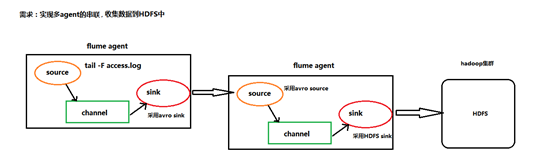
根据需求,首先定义以下3大要素
第一台flume agent
l 采集源,即source——监控文件内容更新 : exec ‘tail -F file’
l 下沉目标,即sink——数据的发送者,实现序列化 : avro sink
l Source和sink之间的传递通道——channel,可用file channel 也可以用 内存channel
第二台flume agent
l 采集源,即source——接受数据。并实现反序列化 : avro source
l 下沉目标,即sink——HDFS文件系统 : HDFS sink
l Source和sink之间的传递通道——channel,可用file channel 也可以用 内存channel
配置文件编写:
在mini1的conf下
vi execsource-avrosink.conf
# Name the components on this agent

a1.sources = r1

a1.sinks = k1

a1.channels = c1

# Describe/configure the source

a1.sources.r1.type = exec

a1.sources.r1.command = tail -F /root/logs/test.log

# Describe the sink

a1.sinks.k1.type = avro

a1.sinks.k1.channel = c1

a1.sinks.k1.hostname = mini2

a1.sinks.k1.port =

a1.sinks.k1.batch-size =

# Use a channel which buffers events in memory

a1.channels.c1.type = memory

a1.channels.c1.capacity =

a1.channels.c1.transactionCapacity =

# Bind the source and sink to the channel

a1.sources.r1.channels = c1

a1.sinks.k1.channel = c1
在mini2造数据

while true; do date >>test.log ;sleep .5s; done
在mini2的conf下
avro-sink.conf
a1.sources = r1

a1.sinks =s1

a1.channels = c1

##source中的avro组件是一个接收者服务

a1.sources.r1.type = avro

a1.sources.r1.bind = 0.0.0.0

a1.sources.r1.port =

a1.sinks.s1.type=hdfs

a1.sinks.s1.hdfs.path=/flumedata

a1.sinks.s1.hdfs.filePrefix = access_log

a1.sinks.s1.hdfs.batchSize=

a1.sinks.s1.hdfs.fileType = DataStream

a1.sinks.s1.hdfs.writeFormat =Text

a1.sinks.s1.hdfs.rollSize =

a1.sinks.s1.hdfs.rollCount =

a1.sinks.s1.hdfs.rollInterval =

a1.sinks.s1.hdfs.round = true

a1.sinks.s1.hdfs.roundValue =

a1.sinks.s1.hdfs.roundUnit = minute

a1.channels.c1.type = memory

a1.channels.c1.capacity =

a1.channels.c1.transactionCapacity =

a1.sources.r1.channels = c1

a1.sinks.s1.channel = c1
启动
在mini2先启动 bin/flume-ng agent -c conf -f conf/avro-sink.conf -n a1 -Dflume.root.logger=INFO,console
在mini1再启动 bin/flume-ng agent -c conf -f conf/execsource-avrosink.conf -n a1 -Dflume.root.logger=INFO,console
结果

大数据学习——实现多agent的串联,收集数据到HDFS中的更多相关文章
- 大数据学习——有两个海量日志文件存储在hdfs
有两个海量日志文件存储在hdfs上, 其中登陆日志格式:user,ip,time,oper(枚举值:1为上线,2为下线):访问之日格式为:ip,time,url,假设登陆日志中上下线信息完整,切同一上 ...
- 大数据学习day35----flume01-------1 agent(关于agent的一些问题),2 event,3 有关agent和event的一些问题,4 transaction(事务控制机制),5 flume安装 6.Flume入门案例
具体见文档,以下只是简单笔记(内容不全) 1.agent Flume中最核心的角色是agent,flume采集系统就是由一个个agent连接起来所形成的一个或简单或复杂的数据传输通道.对于每一个Age ...
- 大数据学习系列之四 ----- Hadoop+Hive环境搭建图文详解(单机)
引言 在大数据学习系列之一 ----- Hadoop环境搭建(单机) 成功的搭建了Hadoop的环境,在大数据学习系列之二 ----- HBase环境搭建(单机)成功搭建了HBase的环境以及相关使用 ...
- 大数据学习系列之五 ----- Hive整合HBase图文详解
引言 在上一篇 大数据学习系列之四 ----- Hadoop+Hive环境搭建图文详解(单机) 和之前的大数据学习系列之二 ----- HBase环境搭建(单机) 中成功搭建了Hive和HBase的环 ...
- 大数据学习系列之六 ----- Hadoop+Spark环境搭建
引言 在上一篇中 大数据学习系列之五 ----- Hive整合HBase图文详解 : http://www.panchengming.com/2017/12/18/pancm62/ 中使用Hive整合 ...
- 大数据学习系列之七 ----- Hadoop+Spark+Zookeeper+HBase+Hive集群搭建 图文详解
引言 在之前的大数据学习系列中,搭建了Hadoop+Spark+HBase+Hive 环境以及一些测试.其实要说的话,我开始学习大数据的时候,搭建的就是集群,并不是单机模式和伪分布式.至于为什么先写单 ...
- 大数据学习系列之九---- Hive整合Spark和HBase以及相关测试
前言 在之前的大数据学习系列之七 ----- Hadoop+Spark+Zookeeper+HBase+Hive集群搭建 中介绍了集群的环境搭建,但是在使用hive进行数据查询的时候会非常的慢,因为h ...
- 大数据学习之Linux进阶02
大数据学习之Linux进阶 1-> 配置IP 1)修改配置文件 vi /sysconfig/network-scripts/ifcfg-eno16777736 2)注释掉dhcp #BOOTPR ...
- 大数据学习之Linux基础01
大数据学习之Linux基础 01:Linux简介 linux是一种自由和开放源代码的类UNIX操作系统.该操作系统的内核由林纳斯·托瓦兹 在1991年10月5日首次发布.,在加上用户空间的应用程序之后 ...
随机推荐
- vue文件中style标签的几个标识符
.vue文件中style标签的几个标识符 在人生就要绝望的时候, 被编辑器所提示的一个scopedSlots所拯救. 卧槽, 写到最后才发现这个属性的具体卵用. 详情见最后解决办法. 问题背景 问题由 ...
- 题解报告:poj 1113 Wall(凸包)
Description Once upon a time there was a greedy King who ordered his chief Architect to build a wall ...
- 关于能ping通服务器但ssh登陆不上的问题
一般来说能ping通服务器说明网没问题 这是可以查看一下防火墙的设置和ip的屏蔽设置 /etc/init.d/iptables status 查看防火墙状态 vim /etc/hosts.allow ...
- mysql学习之通过文件创建数据库以及添加数据
转自:http://blog.163.com/wujicaiguai@126/blog/static/170171558201411311547655/ 1.# 创建数据库语句 create data ...
- Retrofit实现PUT网络请求,并修改Content-Type
@FormUrlEncoded @PUT(Constant.BOSS_HX_CHANGE_PHONE_INTERVIEW) Call<ResponseHxResultBean> handl ...
- empty 和 isset的区别和联系
empty 和 isset的区别和联系 要说它们的联系,其共同点就是empty()和isset()都是变量处理函数,作用是判断变量是否已经配置,正是由于它们在处理变量过程中有很大的相似性,才导致对它们 ...
- 使用gitblit 在windows平台搭建git服务器
1.下载jdk,安装并且配置好环境变量 2.下载gitblit 直接解压无需安装 3.配置gitblit 1.修改gitblit安装目录下的data文件下的gitblit.properties.将in ...
- 【转】JobScheduler
JobScheduler JobScheduler是Android L(API21)新增的特性,用于定义满足某些条件下执行的任务.它的宗旨是把一些不是特别紧急的任务放到更合适的时机批量处理,这样可以有 ...
- 【转】深入理解Android中的SharedPreferences
SharedPreferences作为Android中数据存储方式的一种,我们经常会用到,它适合用来保存那些少量的数据,特别是键值对数据,比如配置信息,登录信息等.不过要想做到正确使用SharedPr ...
- chrome inspect出现白屏的解决方案
点inspect后 弹出框,可是里面一片白色 PS:原效果不是这样,只是图找不到随便p的 原因可以看这个:http://www.cnblogs.com/slmk/p/7591126.html 大概意思 ...