
centos、mac的grafana安装和简单使用
1、安装:
参考官方文档安装说明:https://grafana.com/grafana/download
Redhat & Centos(64 Bit):
wget https://s3-us-west-2.amazonaws.com/grafana-releases/release/grafana-5.0.4-1.x86_64.rpm
sudo yum localinstall grafana-5.0.4-1.x86_64.rpm
Mac:
brew update
brew install grafana
brew reinstall grafana
安装成功提示:
To have launchd start grafana now and restart at login:
brew services start/restart grafana
Or, if you don't want/need a background service you can just run:
grafana-server --config=/usr/local/etc/grafana/grafana.ini --homepath /usr/local/share/grafana cfg:default.paths.logs=/usr/local/var/log/grafana cfg:default.paths.data=/usr/local/var/lib/grafana cfg:default.paths.plugins=/usr/local/var/lib/grafana/plugins
2、启动:
linux下加入开机启动
# /sbin/chkconfig --add grafana-server
启动
# service grafana-server start
重启:
sudo service grafana-server restart
mac下启动:
brew services start grafana
重启:
brew services restart grafana
3、访问登录:
访问地址 ip:3000 初始帐号密码 admin/admin
4、配置文件:
mac位置:/usr/local/etc/grafana/grafana.ini
mac下貌似默认没有ldap的配置文件,没有关系,在grafana.ini指定ldap.toml的位置,然后找个ldap.toml的模板,配置一下即可
linux的grafana的ldap配置文件位置:/etc/grafana/ldap.toml
linux位置:默认的配置文件是/etc/grafana/grafana.ini
5、Mac下grafana安装数据源插件open-falcon
官方推荐方法 :grafana-cli plugins install grafana-openfalcon-datasource,其实不行
使用命令查看可用插件列表:grafana-cli plugins list-remote,发先openfalcon为名字fastweb-openfalcon-datasource
grafana-cli plugins install fastweb-openfalcon-datasource
6、离线安装:http://docs.grafana.org/plugins/installation/
由于服务器所在网络无法访问外网,需要把下载好的插件导入后再安装
grafana-cli --pluginUrl https://local/<plugin-id>-<plugin-version>.zip plugins install <plugin-id>或者把插件直接解压到安装目录也可以,亲测可行:
mac下的插件目录:/usr/local/var/lib/grafana/plugins
log目录:/usr/local/var/log/grafana
linux的插件目录:/var/lib/grafana/plugins
log目录:/var/log/grafana
7、多说几句,这几个步奏都不难,说下Invite your team吧
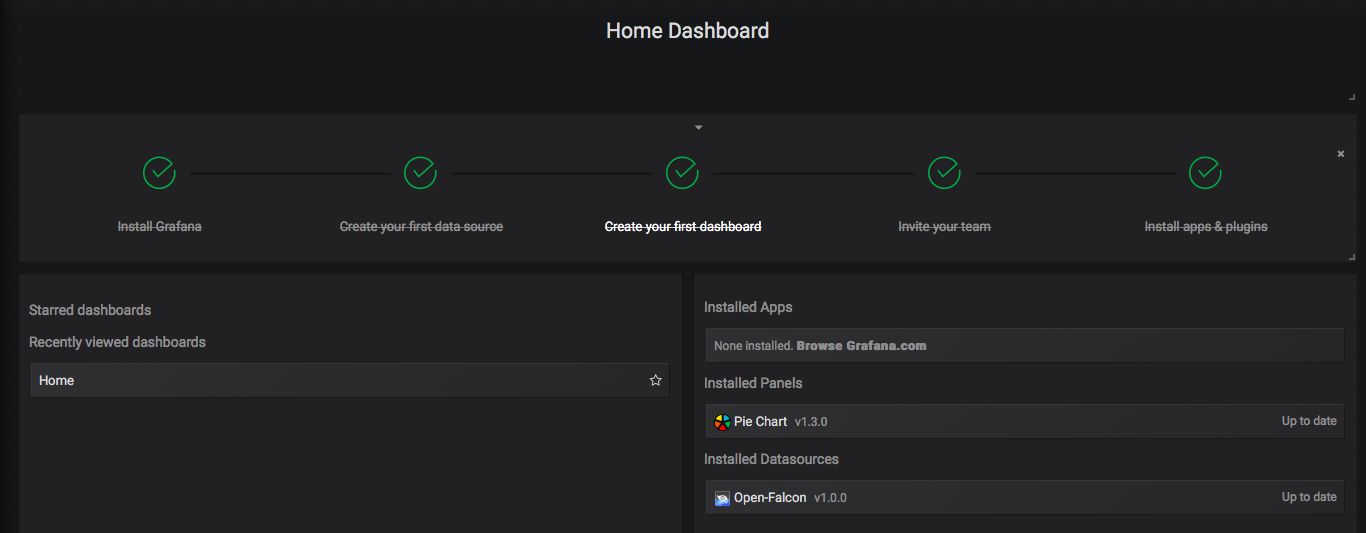
默认帐号admin/admin,然后可以发出邀请用户申请


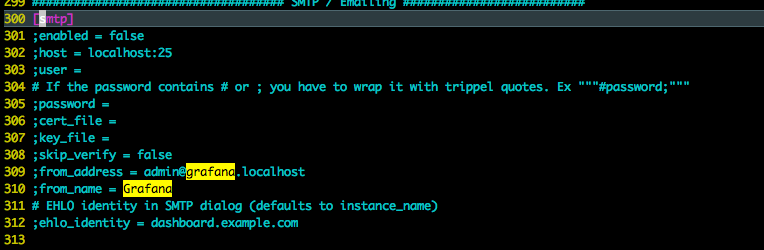
发出邮件邀请的前提当然需要开启grafana发邮件的功能,配置文件grafana.ini找smtp的配置,说下含义:
开启功能:enabled=true
邮件服务器地址:host
登录邮件服务器的帐号和密码 user、password
去除ssl验证:skip_verify=true
发件人地址:from_address
一切配置正确的话,被邀请人就会收到如下形式的邮件,根据链接提示完成信息填写,即算邀请成功:

前方高能,注意注意:
错误一:
t=2018-04-17T16:28:12+0800 lvl=eror msg="Async sent email 0 succeed, not send emails: xx@xxx err: x509: certificate is valid for *.xxx, xxx, not xx"
解决方法:skip_verify = true 去除校验
参考:https://github.com/grafana/grafana/issues/7189
错误二:
t=2018-04-17T16:33:10+0800 lvl=eror msg="Async sent email 0 succeed, not send emails: xx@xx err: gomail: could not send email 1: 553 Mail from must equal authorized user"
解决方法:配置from_address要和user一致
grafana5.x版本的Dashboard Features不再有Templating的概念,增加了Variables的概念
管理员拥有配置数据源、安装插件、邀请用户等操作,普通用户没有
参考:
1、https://blog.csdn.net/clevercode/article/details/78001654
2、https://blog.csdn.net/yajie_12/article/details/79005783
centos、mac的grafana安装和简单使用的更多相关文章
- mac下supervisor安装及简单配置
supervisor是一个用 Python 写的进程管理工具,可以很方便的用来启动.重启.关闭进程(守护进程).可以用他来管理自己的“服务程序”. 安装 首先安装Python,Mac系统好像自带. 执 ...
- Mac下使用安装MongoDB
1.安装方法1:Mac电脑上面安装很简单,直接下载需要的版本解压即可: 下载网址 https://www.mongodb.com/download-center?jmp=nav#community 方 ...
- mac与centos下redis的安装与配置
前言 最近在用redis,下面简单写一下mac和centos下redis的安装与配置方法. 安装 mac下面 安装命令:brew intall redis 运行命令:brew services sta ...
- GemFire 入门篇2:GemFire 8.2 在CentOS & Mac OS X的安装步骤
GemFire目前已经开源,开源项目的主页:http://geode.incubator.apache.org/,商业版本的主页:https://pivotal.io/big-data/pivotal ...
- Xamarin+Prism开发详解四:简单Mac OS 虚拟机安装方法与Visual Studio for Mac 初体验
Mac OS 虚拟机安装方法 最近把自己的电脑升级了一下SSD固态硬盘,总算是有容量安装Mac 虚拟机了!经过心碎的安装探索,尝试了国内外的各种安装方法,最后在youtube上找到了一个好方法. 简单 ...
- 【转】Mac系统中安装homebrew(类似redhat|Centos中的yum;类似Ubuntu中的apt-get)
Homebrew,Homebrew简称brew,是Mac OSX上的软件包管理工具,能在Mac中方便的安装软件或者卸载软件,可以说Homebrew就是mac下的apt-get.yum神器 Homebr ...
- [Protobuf] Mac系统下安装配置及简单使用
Mac下Protobuf安装 Protobuf源码Github地址: https://github.com/google/protobuf 配置环境教程: https://github.com/goo ...
- CentOS 7.2下安装Mono 5.0
微软Build2017大会期间.NET领域的.NET core之外,就是Visual Studio For Mac,大家都知道Visual Studio For Mac 是基于Mono运行的,Mono ...
- Grafana 安装使用
Grafana 安装使用 官方网址:https://grafana.com/ 官方文档:http://docs.grafana.org/ 安装 grafana 基于 RPM 的系统(CentOS,Fe ...
随机推荐
- flask_SQLAlchemy 中常用的过滤和执行器
常用的SQLAlchemy查询过滤器 过滤器 说明 filter() 把过滤器添加到原查询上,返回一个新查询 filter_by() 把等值过滤器添加到原查询上,返回一个新查询 limit 使用指定的 ...
- iview tabs里面放入 i-switch 注意slot不是写在 props里面
iview tabs里面放入 i-switch 注意slot不是写在 props里面 <Tabs value="name1"> <TabPane :label=& ...
- 【整理】解决vue不相关组件之间的数据传递----vuex的学习笔记,解决报错this.$store.commit is not a function
解决vue不相关组件之间的数据传递----vuex的学习笔记,解决报错this.$store.commit is not a function https://www.cnblogs.com/jaso ...
- Linux关闭命令行正在执行的程序
Ctrl + C 终止 是强制中断程序的执行,,进程已经终止. Ctrl + Z 是将任务中止(暂停的意思),但是此任务并没有结束,他仍然在进程中他只是维持挂起的状态,用户可以使用fg/bg ...
- Java任务执行计时
Long startTime = System.currentTimeMillis(); Long endTime = System.currentTimeMillis(); endTime-star ...
- [LOJ] 分块九题 2
https://loj.ac/problem/6278 区间修改,查询区间第k大. 块内有序(另存),块内二分. 还是用vector吧,数组拷贝排序,下标搞不来.. //Stay foolish,st ...
- mysql 建表规范
常用字段 CREATE TABLE `che`.`<table_name>` ( `id` int(11) NOT NULL AUTO_INCREMENT COMMENT '索引id', ...
- InsecureRequestWarning: Unverified HTTPS request is being made.解决方法
在前面添加: import requests from requests.packages.urllib3.exceptions import InsecureRequestWarning reque ...
- 【转】玩玩负载均衡---在window与linux下配置nginx
最近有些时间,开始接触负载均衡方面的东西,从硬件F5再到Citrix Netscalar.不过因为硬件的配置虽然不复杂,但昂贵的价格也让一般用户望而却步(十几万到几十万),所以只能转向nginx,sq ...
- 75. Spring Boot 定制URL匹配规则【从零开始学Spring Boot】
在之前有一篇文章说了,博客名称从原来的<从零开始学Spring Boot>更改为<Spring Boot常见异常汇总>,后来写了几篇文章之后发展,有些文章还是一些知识点,所以后 ...