
基于.Net Core的API框架的搭建(3)
5、加入缓存支持
我们希望为项目增加缓存支持,我们选择Redis做为缓存数据库。
首先,我们在Services目录增加一个缓存接口类ICacheService:
|
using System; using System.Collections.Generic; using System.Linq; using System.Threading.Tasks; namespace ChainStoreAPI.Services { public interface ICacheService { /// <summary> /// 验证缓存项是否存在 /// </summary> /// <param name="key">缓存Key</param> /// <returns></returns> bool Exists(string key); /// <summary> /// 验证缓存项是否存在(异步方式) /// </summary> /// <param name="key">缓存Key</param> /// <returns></returns> Task<bool> ExistsAsync(string key); /// <summary> /// 添加缓存 /// </summary> /// <param name="key">缓存Key</param> /// <param name="value">缓存Value</param> /// <returns></returns> bool Add(string key, object value); /// <summary> /// 添加缓存(异步方式) /// </summary> /// <param name="key">缓存Key</param> /// <param name="value">缓存Value</param> /// <returns></returns> Task<bool> AddAsync(string key, object value); /// <summary> /// 添加缓存 /// </summary> /// <param name="key">缓存Key</param> /// <param name="value">缓存Value</param> /// <param name="expiresSliding">滑动过期时长(如果在过期时间内有操作,则以当前时间点延长过期时间)</param> /// <param name="expiressAbsoulte">绝对过期时长</param> /// <returns></returns> bool Add(string key, object value, TimeSpan expiresSliding, TimeSpan expiressAbsoulte); /// <summary> /// 添加缓存(异步方式) /// </summary> /// <param name="key">缓存Key</param> /// <param name="value">缓存Value</param> /// <param name="expiresSliding">滑动过期时长(如果在过期时间内有操作,则以当前时间点延长过期时间)</param> /// <param name="expiressAbsoulte">绝对过期时长</param> /// <returns></returns> Task<bool> AddAsync(string key, object value, TimeSpan expiresSliding, TimeSpan expiressAbsoulte); /// <summary> /// 添加缓存 /// </summary> /// <param name="key">缓存Key</param> /// <param name="value">缓存Value</param> /// <param name="expiresIn">缓存时长</param> /// <param name="isSliding">是否滑动过期(如果在过期时间内有操作,则以当前时间点延长过期时间)</param> /// <returns></returns> bool Add(string key, object value, TimeSpan expiresIn, bool isSliding = false); /// <summary> /// 添加缓存(异步方式) /// </summary> /// <param name="key">缓存Key</param> /// <param name="value">缓存Value</param> /// <param name="expiresIn">缓存时长</param> /// <param name="isSliding">是否滑动过期(如果在过期时间内有操作,则以当前时间点延长过期时间)</param> /// <returns></returns> Task<bool> AddAsync(string key, object value, TimeSpan expiresIn, bool isSliding = false); /// <summary> /// 删除缓存 /// </summary> /// <param name="key">缓存Key</param> /// <returns></returns> bool Remove(string key); /// <summary> /// 删除缓存(异步方式) /// </summary> /// <param name="key">缓存Key</param> /// <returns></returns> Task<bool> RemoveAsync(string key); /// <summary> /// 批量删除缓存 /// </summary> /// <param name="key">缓存Key集合</param> /// <returns></returns> void RemoveAll(IEnumerable<string> keys); /// <summary> /// 批量删除缓存(异步方式) /// </summary> /// <param name="key">缓存Key集合</param> /// <returns></returns> Task RemoveAllAsync(IEnumerable<string> keys); /// <summary> /// 获取缓存 /// </summary> /// <param name="key">缓存Key</param> /// <returns></returns> T Get<T>(string key) where T : class; /// <summary> /// 获取缓存(异步方式) /// </summary> /// <param name="key">缓存Key</param> /// <returns></returns> Task<T> GetAsync<T>(string key) where T : class; /// <summary> /// 获取缓存 /// </summary> /// <param name="key">缓存Key</param> /// <returns></returns> object Get(string key); /// <summary> /// 获取缓存(异步方式) /// </summary> /// <param name="key">缓存Key</param> /// <returns></returns> Task<object> GetAsync(string key); /// <summary> /// 获取缓存集合 /// </summary> /// <param name="keys">缓存Key集合</param> /// <returns></returns> IDictionary<string, object> GetAll(IEnumerable<string> keys); /// <summary> /// 获取缓存集合(异步方式) /// </summary> /// <param name="keys">缓存Key集合</param> /// <returns></returns> Task<IDictionary<string, object>> GetAllAsync(IEnumerable<string> keys); /// <summary> /// 修改缓存 /// </summary> /// <param name="key">缓存Key</param> /// <param name="value">新的缓存Value</param> /// <returns></returns> bool Replace(string key, object value); /// <summary> /// 修改缓存(异步方式) /// </summary> /// <param name="key">缓存Key</param> /// <param name="value">新的缓存Value</param> /// <returns></returns> Task<bool> ReplaceAsync(string key, object value); /// <summary> /// 修改缓存 /// </summary> /// <param name="key">缓存Key</param> /// <param name="value">新的缓存Value</param> /// <param name="expiresSliding">滑动过期时长(如果在过期时间内有操作,则以当前时间点延长过期时间)</param> /// <param name="expiressAbsoulte">绝对过期时长</param> /// <returns></returns> bool Replace(string key, object value, TimeSpan expiresSliding, TimeSpan expiressAbsoulte); /// <summary> /// 修改缓存(异步方式) /// </summary> /// <param name="key">缓存Key</param> /// <param name="value">新的缓存Value</param> /// <param name="expiresSliding">滑动过期时长(如果在过期时间内有操作,则以当前时间点延长过期时间)</param> /// <param name="expiressAbsoulte">绝对过期时长</param> /// <returns></returns> Task<bool> ReplaceAsync(string key, object value, TimeSpan expiresSliding, TimeSpan expiressAbsoulte); /// <summary> /// 修改缓存 /// </summary> /// <param name="key">缓存Key</param> /// <param name="value">新的缓存Value</param> /// <param name="expiresIn">缓存时长</param> /// <param name="isSliding">是否滑动过期(如果在过期时间内有操作,则以当前时间点延长过期时间)</param> /// <returns></returns> bool Replace(string key, object value, TimeSpan expiresIn, bool isSliding = false); /// <summary> /// 修改缓存(异步方式) /// </summary> /// <param name="key">缓存Key</param> /// <param name="value">新的缓存Value</param> /// <param name="expiresIn">缓存时长</param> /// <param name="isSliding">是否滑动过期(如果在过期时间内有操作,则以当前时间点延长过期时间)</param> /// <returns></returns> Task<bool> ReplaceAsync(string key, object value, TimeSpan expiresIn, bool isSliding = false); } } |
然后,在增加实现类之前,先引入Redis的依赖项:

选择Microsoft.Extensions.Caching.Redis,版本选择2.1.2,安装一下。
在Services\Impl目录增加Redis的缓存实现类RedisCacheService:
|
using Microsoft.Extensions.Caching.Redis; using Newtonsoft.Json; using StackExchange.Redis; using System; using System.Collections.Generic; using System.Linq; using System.Text; using System.Threading.Tasks; namespace ChainStoreAPI.Services.Impl { public class RedisCacheService : ICacheService { protected IDatabase _cache; private ConnectionMultiplexer _connection; private readonly string _instance; /// <summary> /// 构造函数 /// </summary> /// <param name="options"></param> /// <param name="database"></param> public RedisCacheService(RedisCacheOptions options, int database = 0) { _connection = ConnectionMultiplexer.Connect(options.Configuration); _cache = _connection.GetDatabase(database); _instance = options.InstanceName; } /// <summary> /// 为Key添加实例名 /// </summary> /// <param name="key"></param> /// <returns></returns> public string GetKeyForRedis(string key) { return _instance + ":" + key; } #region 验证缓存项是否存在 /// <summary> /// 验证缓存项是否存在 /// </summary> /// <param name="key">缓存Key</param> /// <returns></returns> public bool Exists(string key) { if (key == null) { throw new ArgumentNullException(nameof(key)); } return _cache.KeyExists(GetKeyForRedis(key)); } public async Task<bool> ExistsAsync(string key) { bool result = await Task.Run(() => Exists(key)); return result; } #endregion #region 添加缓存 /// <summary> /// 添加缓存 /// </summary> /// <param name="key">缓存Key</param> /// <param name="value">缓存Value</param> /// <returns></returns> public bool Add(string key, object value) { if (key == null) { throw new ArgumentNullException(nameof(key)); } return _cache.StringSet(GetKeyForRedis(key), Encoding.UTF8.GetBytes(JsonConvert.SerializeObject(value))); } /// <summary> /// 添加缓存 /// </summary> /// <param name="key">缓存Key</param> /// <param name="value">缓存Value</param> /// <param name="expiresSliding">滑动过期时长(如果在过期时间内有操作,则以当前时间点延长过期时间,Redis中无效)</param> /// <param name="expiressAbsoulte">绝对过期时长</param> /// <returns></returns> public bool Add(string key, object value, TimeSpan expiresSliding, TimeSpan expiressAbsoulte) { if (key == null) { throw new ArgumentNullException(nameof(key)); } return _cache.StringSet(GetKeyForRedis(key), Encoding.UTF8.GetBytes(JsonConvert.SerializeObject(value)), expiressAbsoulte); } /// <summary> /// 添加缓存 /// </summary> /// <param name="key">缓存Key</param> /// <param name="value">缓存Value</param> /// <param name="expiresIn">缓存时长</param> /// <param name="isSliding">是否滑动过期(如果在过期时间内有操作,则以当前时间点延长过期时间,Redis中无效)</param> /// <returns></returns> public bool Add(string key, object value, TimeSpan expiresIn, bool isSliding = false) { if (key == null) { throw new ArgumentNullException(nameof(key)); } return _cache.StringSet(GetKeyForRedis(key), Encoding.UTF8.GetBytes(JsonConvert.SerializeObject(value)), expiresIn); } public async Task<bool> AddAsync(string key, object value) { bool result = await Task.Run(() => Add(key, value)); return result; } public async Task<bool> AddAsync(string key, object value, TimeSpan expiresSliding, TimeSpan expiressAbsoulte) { bool result = await Task.Run(() => Add(key, value, expiresSliding, expiressAbsoulte)); return result; } public async Task<bool> AddAsync(string key, object value, TimeSpan expiresIn, bool isSliding = false) { bool result = await Task.Run(() => Add(key, value, expiresIn, isSliding)); return result; } #endregion #region 删除缓存 /// <summary> /// 删除缓存 /// </summary> /// <param name="key">缓存Key</param> /// <returns></returns> public bool Remove(string key) { if (key == null) { throw new ArgumentNullException(nameof(key)); } return _cache.KeyDelete(GetKeyForRedis(key)); } /// <summary> /// 批量删除缓存 /// </summary> /// <param name="key">缓存Key集合</param> /// <returns></returns> public void RemoveAll(IEnumerable<string> keys) { if (keys == null) { throw new ArgumentNullException(nameof(keys)); } keys.ToList().ForEach(item => Remove(item)); } public async Task<bool> RemoveAsync(string key) { bool result = await Task.Run(() => Remove(key)); return result; } public async Task RemoveAllAsync(IEnumerable<string> keys) { await Task.Run(() => RemoveAll(keys)); } #endregion #region 获取缓存 /// <summary> /// 获取缓存 /// </summary> /// <param name="key">缓存Key</param> /// <returns></returns> public T Get<T>(string key) where T : class { if (key == null) { throw new ArgumentNullException(nameof(key)); } var value = _cache.StringGet(GetKeyForRedis(key)); if (!value.HasValue) { return default(T); } return JsonConvert.DeserializeObject<T>(value); } /// <summary> /// 获取缓存 /// </summary> /// <param name="key">缓存Key</param> /// <returns></returns> public object Get(string key) { if (key == null) { throw new ArgumentNullException(nameof(key)); } var value = _cache.StringGet(GetKeyForRedis(key)); if (!value.HasValue) { return null; } return JsonConvert.DeserializeObject(value); } /// <summary> /// 获取缓存集合 /// </summary> /// <param name="keys">缓存Key集合</param> /// <returns></returns> public IDictionary<string, object> GetAll(IEnumerable<string> keys) { if (keys == null) { throw new ArgumentNullException(nameof(keys)); } var dict = new Dictionary<string, object>(); keys.ToList().ForEach(item => dict.Add(item, Get(GetKeyForRedis(item)))); return dict; } public async Task<T> GetAsync<T>(string key) where T : class { T result = await Task.Run(() => Get(key)) as T; return result; } public async Task<object> GetAsync(string key) { object result = await Task.Run(() => Get(key)); return result; } public async Task<IDictionary<string, object>> GetAllAsync(IEnumerable<string> keys) { IDictionary<string, object> result = await Task.Run(() => GetAll(keys)); return result; } #endregion #region 修改缓存 /// <summary> /// 修改缓存 /// </summary> /// <param name="key">缓存Key</param> /// <param name="value">新的缓存Value</param> /// <returns></returns> public bool Replace(string key, object value) { if (key == null) { throw new ArgumentNullException(nameof(key)); } if (Exists(key)) if (!Remove(key)) return false; return Add(key, value); } /// <summary> /// 修改缓存 /// </summary> /// <param name="key">缓存Key</param> /// <param name="value">新的缓存Value</param> /// <param name="expiresSliding">滑动过期时长(如果在过期时间内有操作,则以当前时间点延长过期时间)</param> /// <param name="expiressAbsoulte">绝对过期时长</param> /// <returns></returns> public bool Replace(string key, object value, TimeSpan expiresSliding, TimeSpan expiressAbsoulte) { if (key == null) { throw new ArgumentNullException(nameof(key)); } if (Exists(key)) if (!Remove(key)) return false; return Add(key, value, expiresSliding, expiressAbsoulte); } /// <summary> /// 修改缓存 /// </summary> /// <param name="key">缓存Key</param> /// <param name="value">新的缓存Value</param> /// <param name="expiresIn">缓存时长</param> /// <param name="isSliding">是否滑动过期(如果在过期时间内有操作,则以当前时间点延长过期时间)</param> /// <returns></returns> public bool Replace(string key, object value, TimeSpan expiresIn, bool isSliding = false) { if (key == null) { throw new ArgumentNullException(nameof(key)); } if (Exists(key)) if (!Remove(key)) return false; return Add(key, value, expiresIn, isSliding); } public async Task<bool> ReplaceAsync(string key, object value) { bool result = await Task.Run(() => Replace(key, value)); return result; } public async Task<bool> ReplaceAsync(string key, object value, TimeSpan expiresSliding, TimeSpan expiressAbsoulte) { bool result = await Task.Run(() => Replace(key, value, expiresSliding, expiressAbsoulte)); return result; } public async Task<bool> ReplaceAsync(string key, object value, TimeSpan expiresIn, bool isSliding = false) { bool result = await Task.Run(() => Replace(key, value, expiresIn, isSliding)); return result; } #endregion /// <summary> /// 释放 /// </summary> public void Dispose() { if (_connection != null) _connection.Dispose(); GC.SuppressFinalize(this); } } } |
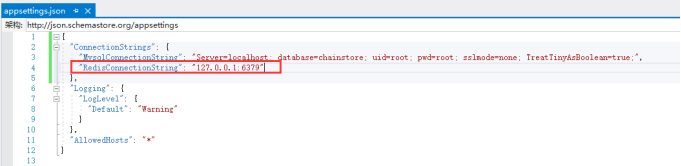
在配置文件appsettings.json中加入Redis的链接字符串:
|
"RedisConnectionString": "127.0.0.1:6379" |
然后打开Startup.cs,引入缓存服务类:

当然,现在我们需要安装好Redis并启动:

运行run.bat即可:

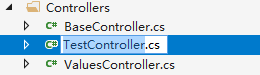
我们将控制器TestController.cs重命名为MemberController.cs:
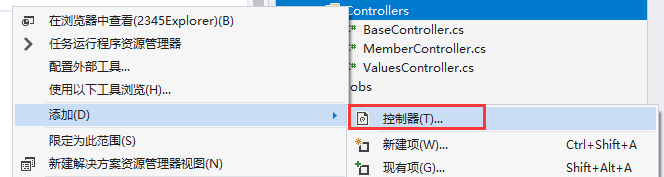
再新增测试控制器,将来我们的测试代码都在这里面实现:
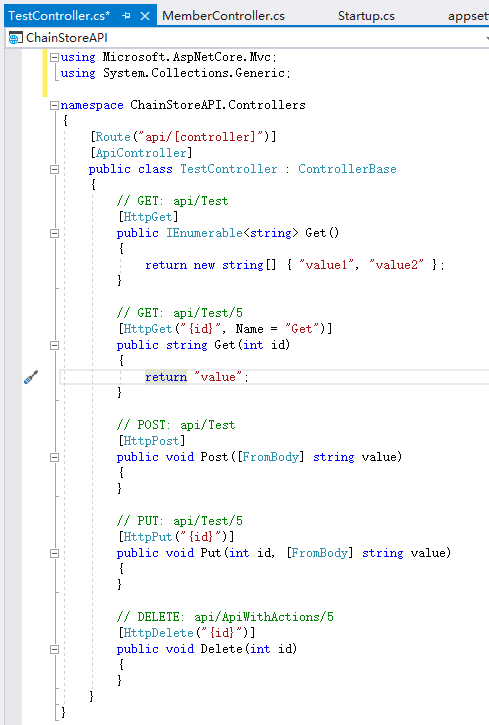
我们只保留Get方法,其他全删除:
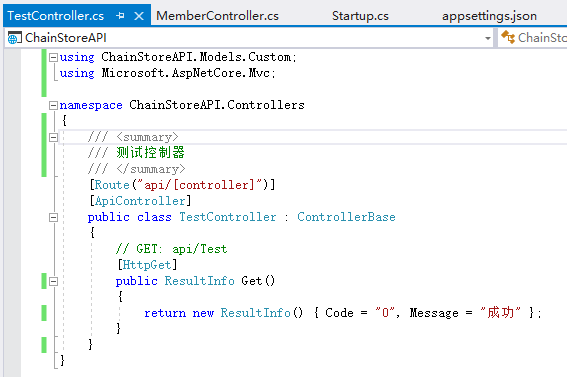
修改BaseController,加入缓存支持:

这样,我们就可以在所有继承BaseController的控制器中使用缓存了。
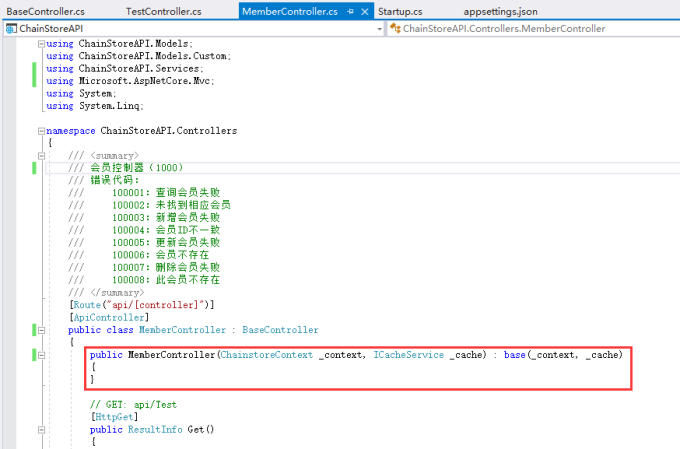
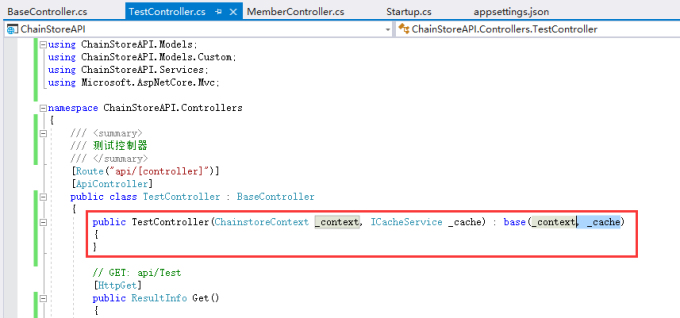
修改MemberController和TestController的构造函数:
下面我们在测试控制器中写代码测试一下缓存的写入和读取:
|
// GET: api/Test [HttpGet] public ResultInfo Get() { cache.Add("test", "这是一个测试字符串"); string value = cache.Get<string>("test"); return new ResultInfo() { Code = "0", Message = "成功", Data = value }; } |
运行看一下效果:

打开RedisDesktopManager看一下Redis数据库中是否写入:

基于.Net Core的API框架的搭建(3)的更多相关文章
- 基于.Net Core的API框架的搭建(1)
目标 我们的目标是要搭建一个API控制器的项目,API控制器提供业务服务. 一.开发框架搭建 1.开发前准备 开发前,我们需要下载如下软件,安装过程略: (1) 开发工具:VS2017 (2) 数据库 ...
- 基于.Net Core的API框架的搭建(2)
4.加入数据库支持 下面我们为项目加入数据库支持,修改appsettings.json: 然后我们要生成实体类,打开VS工具->NuGet包管理器->程序包管理器控制台: 输入命令: Sc ...
- 基于.Net Core的API框架的搭建(4)
6.加入日志功能 日志我们选用log4net,首先引入程序包: 选择2.0.8版本安装.然后在项目根目录新增log4net的配置文件log4net.config: <?xml version=& ...
- 基于.NET CORE微服务框架 -surging的介绍和简单示例 (开源)
一.前言 至今为止编程开发已经11个年头,从 VB6.0,ASP时代到ASP.NET再到MVC, 从中见证了.NET技术发展,从无畏无知的懵懂少年,到现在的中年大叔,从中的酸甜苦辣也只有本人自知.随着 ...
- 基于.NET CORE微服务框架 -谈谈surging API网关
1.前言 对于最近surging更新的API 网关大家也有所关注,也收到了不少反馈提出是否能介绍下Api网关,那么我们将在此篇文章中剥析下surging的Api 网关 开源地址:https://git ...
- 基于DotNet Core的RPC框架(一) DotBPE.RPC快速开始
0x00 简介 DotBPE.RPC是一款基于dotnet core编写的RPC框架,而它的爸爸DotBPE,目标是实现一个开箱即用的微服务框架,但是它还差点意思,还仅仅在构思和尝试的阶段.但不管怎么 ...
- 基于.net core 2.0+mysql+AceAdmin搭建一套快速开发框架
前言 .net core已经出来一段时间了,相信大家对.net core的概念已经很清楚了,这里就不再赘述.笔者目前也用.net core做过一些项目,并且将以前framework下的一些经验移植到了 ...
- Ocelot——初识基于.Net Core的API网关
前言 前不久看到一篇<.NET Core 在腾讯财付通的企业级应用开发实践>,给现在研究.Net Core及想往微服务方向发展的人来了一剂强心针.于是我也就立刻去下Ocelot的源码及去阅 ...
- 一个轻量级的基于 .NET Core 的 ORM 框架 HSQL
HSQL 是一种轻量级的基于 .NET Core 的数据库对象关系映射「ORM」框架 HSQL 是一种可以使用非常简单且高效的方式进行数据库操作的一种框架,通过简单的语法,使数据库操作不再成为难事.目 ...
随机推荐
- Linux网络设置
==========================网络设置========================== 1.IP地址 临时:ifconfig 192.168.124.129 永久: vi / ...
- runOnUiThread在子进程中更新主进程UI
package com.pingyijinren.test; import android.support.v7.app.AppCompatActivity; import android.os.Bu ...
- Codeforces Educational Round 21
A =w= B qwq C wvw D(multiset) 题意: 有n(n<=1e5)个数,希望通过把一个位置y的数字放到位置x上这个操作,使得新序列的某个前缀和等于总和的一半,问这样的操作是 ...
- mysql性能调优——Query优化
上节谈了关于mysql锁定机制的优化方案,下面来谈一下Query优化——Mysql Query Optimizer 当Mysql Query Optimizer接受到从Query Parser过来的Q ...
- Ubuntu 16.04安装基于nethogs衍生的网络监控软件(应用实时网速监控)
基于nethogs衍生的网络监控软件有如下所列举的: nettop显示数据包类型,按数据包的大小或数量排序. ettercap是以太网的网络嗅探器/拦截器/记录器 darkstat通过主机,协议等方式 ...
- Servlet自动刷新页面
以下内容引用自http://wiki.jikexueyuan.com/project/servlet/auto-refresh.html: 假设一个Web页面,显示了现场比赛得分或股票市场状况或货币兑 ...
- neutron dhcp
neutron dhcp 采用dnsmasq服务来实现.和传统的 dhcp 一样, dhcp请求也分为4步 The client sends a discover ("I'm a clien ...
- rsyslog trouble shooting
openstack,swift的log不输出了.trouble shooting过程 , 发现我们的程序 /var/log/swift/proxy.log等总是不输出log. 因为log rsyslo ...
- 我的arcgis培训照片4 来自http://www.cioiot.com/successview-549-1.html
- 【Web API系列教程】1.1 — ASP.NET Web API入门
前言 HTTP不仅仅服务于web页面.同一时候也是构建暴露服务和数据的API的强大平台.HTTP有着简单.灵活和无处不在的特点.你能想到的差点儿全部平台都包括有一个HTTP库.所以HTTP服务能够遍及 ...