
Spring框架系列(一)--Spring MVC基础知识
Web项目开发过程中一般都是使用MVC(Model-View-Controller)模式,早先的Struts2到Spring MVC,再到现在Spring Boot,都是相似的思
路。Spring Boot用多了就真的不想回到SSM或者SSH框架(虽然公司还在用Spring MVC),写这篇随笔,算是自己对Spring MVC内容的复习吧。
工作流程
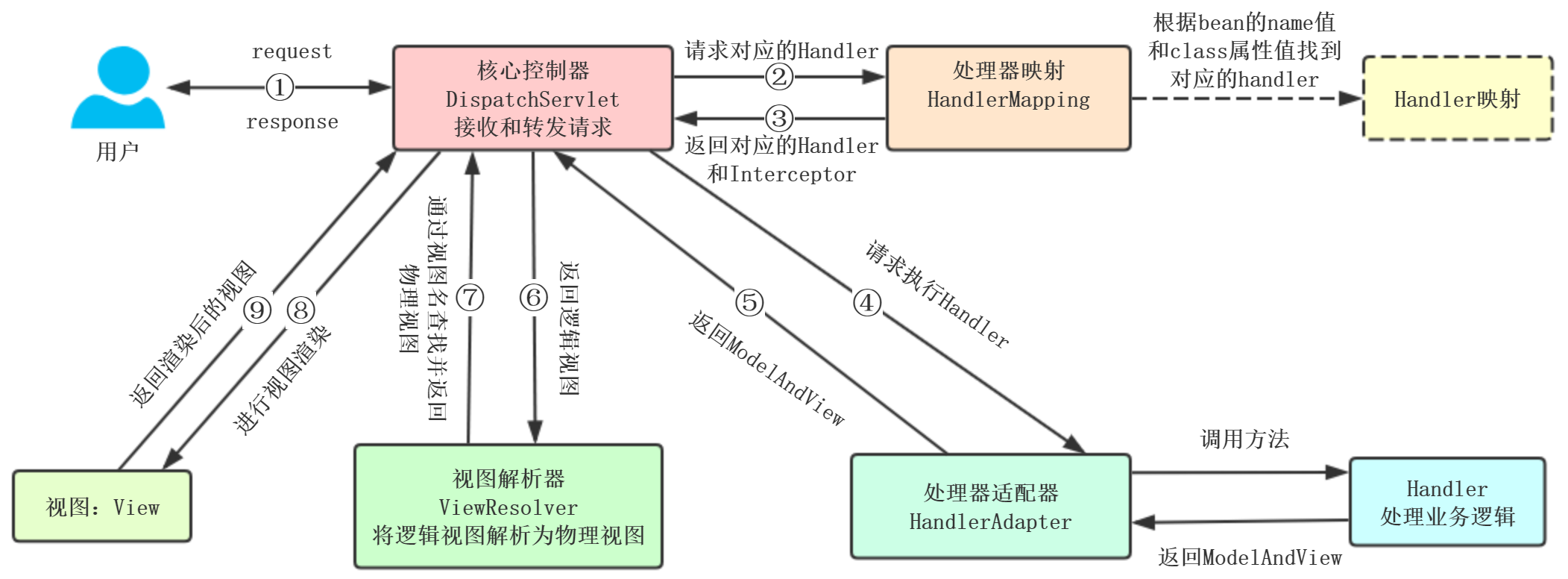
DispatchServlet的配置方式
1、web.xml
2、通过将其配置在Servlet容器中(Tomcat7+版本要求)
/**

 * AbstractAnnotationConfigDispatcherServletInitializer的拓展类会自动配置DispatchServlet和

 * Spring ApplicationContext(应用上下文位于应用程序的Servlet上下文之中)

 */

public class SpittrWebAppInitializer extends AbstractAnnotationConfigDispatcherServletInitializer {

    /**

     * 返回带有@Configuration注解的类用来定义ContextLoaderListener创建的应用上下文中的bean

     * @return

     */

    @Override

    protected Class<?>[] getRootConfigClasses() {

        return new Class[]{RootConfig.class};

    }

    /**

     * 返回带有@Configuration注解的类用来定义DispatchServlet创建的应用上下文中的bean

     * @return

     */

    @Override

    protected Class<?>[] getServletConfigClasses() {

        return new Class[]{WebConfig.class};

    }

    /**

     * 将一个或多个路径映射到DispatchServlet上。"/"表示使用应用默认的Servlet,会理所有请求

     * @return

     */

    @Override

    protected String[] getServletMappings() {

        return new String[] {"/"};

    }

}
配置DispatchServlet
public class WebConfig  extends WebMvcConfigurerAdapter{

//通常包含视图解析器配置

//静态资源处理

//。。。。。

}
WebConfig
DispatchServlet启动的时候,会创建Spring应用上下文,加载声明的bean,Spring Web应用中,通常还有另一个应用上下文,由
ContextLoaderListener创建
DispatchServlet:加载包含Web组件的bean,如控制器、视图解析器、处理器映射
ContextLoaderListener:加载应用中的其他bean,通常是驱动应用后端的中间层和数据层组件
常用注解
以下URL测试都是使用restlet client,也可以使用postman等工具
1、@EnableWebMvc:在配置类中开启Web MVC的配置支持,如一些ViewResolver或者MessageConverter等,不使用注解,需要重写
WebMvcConfigurerAdapter方法用于对SpringMVC的配置。
2、@RequestParam:
参数:name、value、defaultValue、required
分别代表:参数名、值、默认值(如果没有这个参数,给默认值),参数必须有,否则400错误(如果有defaultValue就不会有问题)
请求URL:http://localhost:8080/test5?id=1001&name&sex1=1
@RequestMapping(value = "/test5", method = RequestMethod.GET)

    public String test5(@RequestParam int id, @RequestParam(value = "name", defaultValue = "zhangsan", required = true) String name) {

        System.out.println("test2 id: " + id + " name: " + name );

        return "index";

    }
test2 id: 1001 name: zhangsan
name和value没有区别,value别名是name,name别名是value
public @interface RequestParam {

    @AliasFor("name")

    String value() default "";

    @AliasFor("value")

    String name() default "";

    boolean required() default true;

    String defaultValue() default "\n\t\t\n\t\t\n\ue000\ue001\ue002\n\t\t\t\t\n";

}
如果参数名一致,可以选择不使用@RequestParam
URL:localhost:8080/test?name=sam
public String test(HttpServletRequest request,  String name, ModelMap modelMap) {

    modelMap.put("name", "sam");

    log.info("param is {}", name);

    return "home";

}
PS:我们使用@RequestParam只是因为能够提供name,required、defaultValue属性,否则可以选择不使用
3、@RequestMapping:
包含参数:value、method、params、headers、consumes、produces
1).直接使用默认:http://host:port/path?id=1001
@RequestMapping("test1")

public String test1(@RequestParam("id") String id) {

    System.out.println("test1 id: " + id);

    return "index";

}
test1 id: 1001
2).value、method:
value:指定请求的实际地址,或者使用URI Template模式
method:请求的方法类型,支持以下类型,可选择多种
public enum RequestMethod {

    GET,

    HEAD,

    POST,

    PUT,

    PATCH,

    DELETE,

    OPTIONS,

    TRACE;

    private RequestMethod() {

    }

}
@ResponseBody

@RequestMapping(value = "/test1", method = RequestMethod.GET)

//    @RequestMapping(value = "/test1", method = {RequestMethod.GET, RequestMethod.POST})

public String test1(@RequestParam("id") String id) {

    System.out.println("test1 id: " + id);

    return "index";

}
3).params、headers:
params: 指定request中必须包含某些参数值才能进入方法
headers: 指定request中必须包含某些指定的header值才能进入方法
@ResponseBody

@RequestMapping(value = "/test3", method = RequestMethod.GET, params = {"id=1001", "name", "!sex"}, headers = {"Accept"})
public String test3(@RequestParam int id, @RequestParam("name") String name, @RequestParam("abc") String addr) {
 System.out.println("test2 id: " + id + " name: " + name + " addr: " + addr);
 return "index";
}
params={"id=1001", "name", "!sex"}表示参数中,id必须为1001,必须包含name,不能包含sex,否则返回400 Bad Request状态码
headers = {"Accept"}表示请求头包含accept信息
4).consumes、produces
@RequestMapping(value = "/test1", method = RequestMethod.GET, params = {"!id", "name", "!sex"}

                    , headers = {"Accept"}, consumes = MediaType.APPLICATION_JSON_VALUE, produces = MediaType.APPLICATION_JSON_UTF8_VALUE)

    @ResponseBody

    public String test1(HttpServletRequest request, @RequestParam(value = "name", required = false) String name, ModelMap modelMap) {

        modelMap.put("name", "sam");

        log.info("param is {}", name);

        return name;

    }
consumes = MediaType.APPLICATION_JSON_VALUE表示request的content-type必须为application/json
produces = MediaType.APPLICATION_JSON_UTF8_VALUE表示response的content-type为application/json,编码为utf-8
4、@PathVariable:
参数:name、value、required,没有了defaultValue
请求URL:http://localhost:8080/test2/id/1001/name/sam
@ResponseBody

@RequestMapping(value = "/test2/id/{id}/name/{name}", method = RequestMethod.GET)

public String test4(@PathVariable("id") int id, @PathVariable("name") String name) {

    System.out.println("test2 id: " + id + " name: " + name);

    return "index";

}
test2 id: 1001 name: sam
到此时:我们可以看到@PathVariable和@RequestParam的区别


@PathVariable会把URL template变量映射到参数中,而@RequestParam中相当于request.getParameter("name"),去获取请求中的参数
5、表单验证@Valid:都在javax.validation.constraints包里面
public class Login {

    @NotNull

    @IsMobile

    private String mobile;

    @NotNull

    @Length(min=32)

    private String password;

}
public Result<String> doLogin(HttpServletResponse response, @Valid LoginVo loginVo) {

    log.info(loginVo.toString());

    //登录

    String token = userService.login(response, loginVo);

    return Result.success(token);

}
6、@ResponseBody:支持将返回值放在response内,而不是一个页面,通常用户返回json/xml数据
@ResponseBody

public String test3() {

    return "id";//这时候返回到页面的是String,而不是解析到id.html等类似的页面

}
6、@RequestBody:允许request的参数在request体中,而不是在直接连接在地址后面。例如通过ajax传递的json参数

@RequestMapping(value = "/test1", method = RequestMethod.GET, params = {"!id", "name", "!sex"}

                    , headers = {"Accept"}, consumes = MediaType.APPLICATION_JSON_VALUE, produces = MediaType.APPLICATION_JSON_UTF8_VALUE)

    @ResponseBody

    public String test1(HttpServletRequest request, @RequestBody String addr, @RequestParam(value = "name", required = false) String name, ModelMap modelMap) {

        modelMap.put("name", "sam");

        log.info("param is {} and {}", name, addr);

        return name;

    }
通过@RequestBody才能在get请求中得到Body中的参数,因为get请求默认只能读取URL中的参数
7、@RestController:相当于@Controller和@ResponseBody的组合,注解在类上,该Controller的所有方法都默认加上了@ResponseBody。
@Controller

@ResponseBody

public @interface RestController {

    String value() default "";

}
9、@RequestHeader:把Request请求header部分的值绑定到方法的参数上
请求URL:http://localhost:8080/test6
@ResponseBody

@RequestMapping(value = "/test6", method = RequestMethod.GET)

public String test6(@RequestHeader("Accept-Encoding") String encoding) {

    System.out.println("test2 contentType: " + encoding + " date: "  );

    return "index";

}
test2 contentType: gzip, deflate, br date:
10、@CookieValue
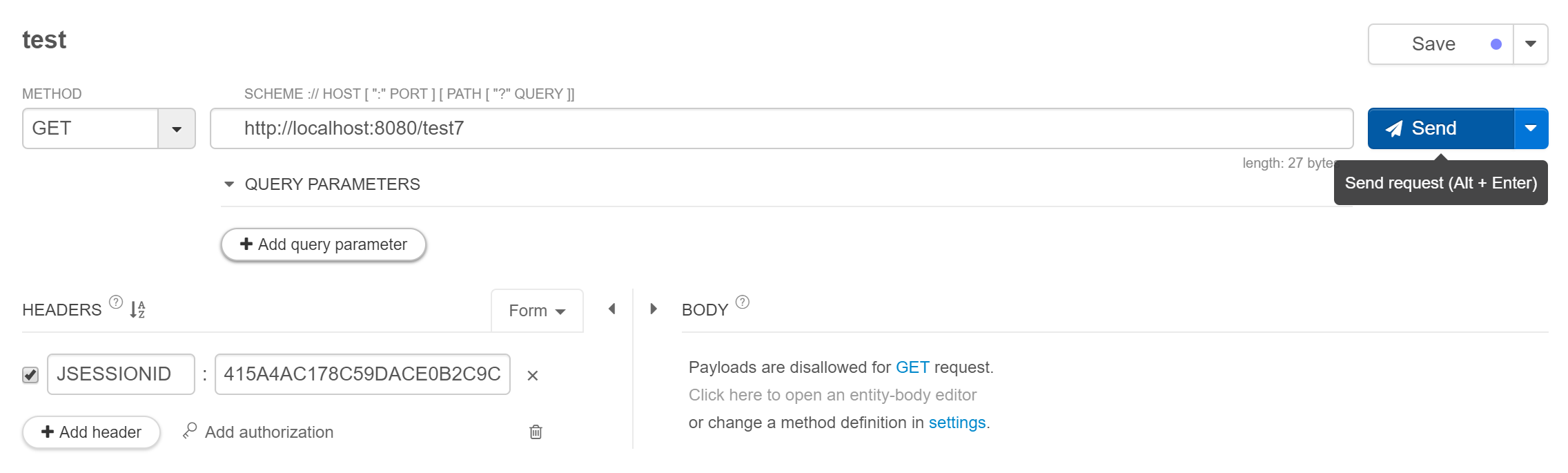
@ResponseBody

@RequestMapping(value = "/test7", method = RequestMethod.GET)

public String test7(@CookieValue("JSESSIONID") String cookie) {

    System.out.println("test2 cookie: " + cookie + " date: "  );

    return "index";

}
test2 cookie: 3E3E78E5E977EDBAEA388D8829BA2764
视图解析器
Spring自带13个视图解析器,常用的有:
InternalResourceViewResolver:一般用于JSP,在视图名称上面添加前缀和后缀,进而确定页面的物理地址,Prefix和suffix
FreeMarkerViewResolver和VelocityViewResolver分别对应FreeMaker和Velocity模板视图
注解部分参考:https://www.cnblogs.com/leskang/p/5445698.html
Spring框架系列(一)--Spring MVC基础知识的更多相关文章
- Spring框架系列(2) - Spring简单例子引入Spring要点
上文中我们简单介绍了Spring和Spring Framework的组件,那么这些Spring Framework组件是如何配合工作的呢?本文主要承接上文,向你展示Spring Framework组件 ...
- Spring框架系列(6) - Spring IOC实现原理详解之IOC体系结构设计
在对IoC有了初步的认知后,我们开始对IOC的实现原理进行深入理解.本文将帮助你站在设计者的角度去看IOC最顶层的结构设计.@pdai Spring框架系列(6) - Spring IOC实现原理详解 ...
- Spring框架系列(11) - Spring AOP实现原理详解之Cglib代理实现
我们在前文中已经介绍了SpringAOP的切面实现和创建动态代理的过程,那么动态代理是如何工作的呢?本文主要介绍Cglib动态代理的案例和SpringAOP实现的原理.@pdai Spring框架系列 ...
- Spring框架系列(7) - Spring IOC实现原理详解之IOC初始化流程
上文,我们看了IOC设计要点和设计结构:紧接着这篇,我们可以看下源码的实现了:Spring如何实现将资源配置(以xml配置为例)通过加载,解析,生成BeanDefination并注册到IoC容器中的. ...
- Spring框架系列(8) - Spring IOC实现原理详解之Bean实例化(生命周期,循环依赖等)
上文,我们看了IOC设计要点和设计结构:以及Spring如何实现将资源配置(以xml配置为例)通过加载,解析,生成BeanDefination并注册到IoC容器中的:容器中存放的是Bean的定义即Be ...
- Spring框架系列(9) - Spring AOP实现原理详解之AOP切面的实现
前文,我们分析了Spring IOC的初始化过程和Bean的生命周期等,而Spring AOP也是基于IOC的Bean加载来实现的.本文主要介绍Spring AOP原理解析的切面实现过程(将切面类的所 ...
- Spring框架系列(10) - Spring AOP实现原理详解之AOP代理的创建
上文我们介绍了Spring AOP原理解析的切面实现过程(将切面类的所有切面方法根据使用的注解生成对应Advice,并将Advice连同切入点匹配器和切面类等信息一并封装到Advisor).本文在此基 ...
- Spring框架系列(12) - Spring AOP实现原理详解之JDK代理实现
上文我们学习了SpringAOP Cglib动态代理的实现,本文主要是SpringAOP JDK动态代理的案例和实现部分.@pdai Spring框架系列(12) - Spring AOP实现原理详解 ...
- Spring框架系列(七)--Spring常用注解
Spring部分: 1.声明bean的注解: @Component:组件,没有明确的角色 @Service:在业务逻辑层使用(service层) @Repository:在数据访问层使用(dao层) ...
随机推荐
- HFile存储格式
Table of Contents HFile存储格式 Block块结构 HFile存储格式 HFile是參照谷歌的SSTable存储格式进行设计的.全部的数据记录都是通过它来完毕持久化,其内部主要採 ...
- 第二天,初步slide第一版和家的照片墙
今天基本完成任务, 1. 写了昨天的总结, 2. 完成slides的第一个完整版. 3. 家里布置了照片墙. 4. 其他的 未完成: 1. 框架搭建:Creasy没来. 领导力:为公司利益早起,任务说 ...
- 三星手机root后开启调试模式
背景说明:三星手机高版本的手机进行root后也无法安装xposed,无法开启debuggable,使用androistdio无法进行调试. 1 .连接ddms无法显示正在运行的进程. 2.安装mpro ...
- Android系统优化
这些事实上就是优化rom 的一些实用小技巧. 认为非常多还是实用的. Build.prop (编辑 /system/build.prop 文件(须要root, 能够用文件管理器或者其它root exp ...
- tf.float32 implicity
简介 | TensorFlow https://tensorflow.google.cn/programmers_guide/low_level_intro 我们来构建一个简单的计算图.最基本的指 ...
- 单条insert
ugc_l = browser.find_elements_by_class_name('ugc-item') try: myl = [{'statistics': i.text.replace('阅 ...
- Hibernate- Criteria 简易
package cn.demo; import java.util.List; import org.hibernate.Criteria; import org.hibernate.Session; ...
- luogu3942将军令
https://www.zybuluo.com/ysner/note/1302132 题面 在大小为\(n\)的树上选择尽量少的点,使得所有未选择的点距离选择了的点小于等于\(k\). \(n\leq ...
- AT2004 Anticube
https://www.zybuluo.com/ysner/note/1304774 题面 给定\(n\)个数\(s_i\),要求从中选出最多的数,满足任意两个数之积都不是完全立方数. \(n\leq ...
- navicat导入.sql文件出错2006-MySQLserver has gone away
方式一(验证无误): 找到mysql安装目录下的my.ini配置文件,加入以下代码: max_allowed_packet=500M wait_timeout=288000 interactive_t ...