
ExtJS 4 MVC Viewport和card布局
http://ext4all.com/post/a-little-bit-strange-navigation
效果图:

app/view/Viewport.js
Ext.define('App.view.Viewport', {

    extend: 'Ext.container.Viewport',

    layout: 'border',

    items: [

        {

            itemId: 'menu',

            region: 'west',

            collapsible: true,

            title: 'Menu',

            width: 200,

            items: [

                {

                    xtype: 'panel',

                    height: 110,

                    padding: '10 10 25 10',

                    width: 200,

                    collapsible: true,

                    title: 'Company Information',

                    items: [

                        {

                            xtype: 'button',

                            height: 27,

                            style: 'margin-left:30px;margin-top:12px;\n',

                            width: 128,

                            text: 'Company',

                            action: 'company-view'

                        }

                    ]

                },

                {

                    xtype: 'panel',

                    height: 110,

                    padding: '10 10 25 10',

                    width: 200,

                    collapsible: true,

                    title: 'Department Information',

                    items: [

                        {

                            xtype: 'button',

                            height: 27,

                            style: 'margin-left:30px;margin-top:12px;\n',

                            width: 128,

                            text: 'Department',

                            action: 'department-view'

                        }

                    ]

                },

                {

                    xtype: 'panel',

                    height: 110,

                    padding: '10 10 25 10',

                    width: 200,

                    collapsible: true,

                    title: 'Designation Information',

                    items: [

                        {

                            xtype: 'button',

                            height: 27,

                            style: 'margin-left:30px;margin-top:12px;',

                            width: 128,

                            text: 'Designation',

                            action: 'designation-view'

                        }

                    ]

                }

            ],

            margins: '5 0 5 5'

        },

        {

            itemId: 'cards',

            region: 'center',

            margins: '5 5 5 5',

            border: false,

            layout: 'card',

            defaults: { bodyPadding: 10 },

            items: [

                {

                    title: 'Company Information',

                    itemId: 'company-view',

                    html: 'Company Information Details'

                },

                {

                    title: 'Department Information',

                    itemId: 'department-view',

                    html: 'Department Information Details'

                },

                {

                    title: 'Designation Information',

                    itemId: 'designation-view',

                    html: 'Designation Information Details'

                }

            ]

        }

    ]

});
app/controller/Main.js
Ext.define('App.controller.Main', {

    extend: 'Ext.app.Controller',

    refs: [ //配置要建立对页面上的视图的引用的数组

        {

            ref: 'cards',//名称的引用

            selector: 'viewport > #cards' //Ext.ComponentQuery 查找组件

        }

    ],

    init: function () {

        this.control({

            'viewport > #menu button': {

                click: function (button) {

                    this.getCards().getLayout().setActiveItem(button.action);

                }

            }

        });

    }

});
app.js
Ext.Loader.setConfig({ enabled: true });

Ext.application({

    name: 'App',

    appFolder: 'app',

    controllers: [

        'Main'

    ],

    autoCreateViewport: true

});
index.html
<!DOCTYPE html PUBLIC "-//W3C//DTD XHTML 1.0 Transitional//EN" "http://www.w3.org/TR/xhtml1/DTD/xhtml1-transitional.dtd">

<html xmlns="http://www.w3.org/1999/xhtml">

<head>

    <title></title>

    <script src="../../ext-4.0.2/bootstrap.js" type="text/javascript"></script>

    <link href="../../ext-4.0.2/resources/css/ext-all.css" rel="stylesheet" type="text/css" />

    <script src="app.js" type="text/javascript"></script>


</head>

<body>

</body>

</html>
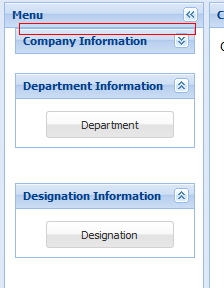
注意:目前发现 只有引入 ext -4.0.2的版本是没有问题。当引用了最新版本的4.2的时候 发现 左侧的 三个面板在点击面板的收缩和展开的按钮出现bug。
当时使用4.2以下的版本的时候,记得要设置 Ext.Loader.setConfig({enabled:true});
正常的左侧:
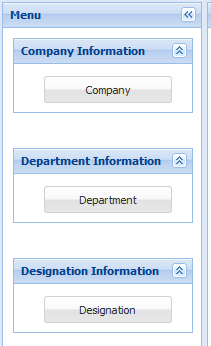
当点击收缩的时候 顶部的空白 被顶上去了
代码下载:
ExtJS 4 MVC Viewport和card布局的更多相关文章
- ExtJS 布局-Card 布局(Card layout)
更新记录: 2022年6月1日 开始. 2022年6月6日 发布. 1.说明 卡片布局类似牌堆,每次只有一个子组件可见,子组件几乎填满了整个容器.卡片布局常用于向导(Wizard)和选项卡(Tabs) ...
- ExtJS 4.2 教程-08:布局系统详解
ExtJS 4.2 系列教程导航目录: ExtJS 4.2 教程-01:Hello ExtJS ExtJS 4.2 教程-02:bootstrap.js 工作方式 ExtJS 4.2 教程-03:使用 ...
- 无废话ExtJs 入门教程十六[页面布局:Layout]
无废话ExtJs 入门教程十六[页面布局:Layout] extjs技术交流,欢迎加群(201926085) 首先解释什么是布局: 来自百度词典的官方解释:◎ 布局 bùjú: [distributi ...
- card布局解决复杂操作的布局问题
一直不是很待见直接使用card布局,直到对于一些稍微复杂点的业务, 通过border布局和弹窗体的方式解决特别费劲之后,才想起了card布局, 发现card布局真是一个很好的解决办法. 那个使用起来很 ...
- ExtJS 4 MVC 创建 Viewport
http://ext4all.com/post/extjs-4-mvc-with-viewport 效果图: 结构图: 没有用到Model层,直接在view里面写上 默认的 json的数据 中间Pan ...
- ExtJS 4 MVC架构讲解
大规模客户端应用通常不好实现不好组织也不好维护,因为功能和人力的不断增加,这些应用的规模很快就会超出掌控能力,ExtJS 4 带来了一个新的应用架构,不但可以组织代码,还可以减少实现的内容新的应用架构 ...
- Extjs 6 MVC开发模式(二)
1.Extjs MVC开发模式 在JS的开发过程中,大规模的JS脚本难以组织和维护,这一直是困扰前端开发人员的头等问题.Extjs为了解决这种问题,在Extjs4.x版本中引入了MVC开发模式,开始将 ...
- Extjs 6 MVC开发模式(一)
1.Extjs就绪函数 1)导入Extjs的CSS <link rel="stylesheet" type="text/css" href="r ...
- MVC学习系列5--Layout布局页和RenderSection的使用
我们开发网站项目的时候,都会遇到这样的问题:就是页面怎么统一风格,有一致的外观,在之前ASP.NET的时代,我们有两种选择,一个是使用MasterPage页,一个是手动,自己在每个页面写CSS样式,但 ...
随机推荐
- [NOIP2002] 提高组 洛谷P1034 矩形覆盖
题目描述 在平面上有 n 个点(n <= 50),每个点用一对整数坐标表示.例如:当 n=4 时,4个点的坐标分另为:p1(1,1),p2(2,2),p3(3,6),P4(0,7),见图一. 这 ...
- ES6__数据结构 Map
/* 数据结构 Map */ /* * 字典:是用来存储不重复的key的hash结构.不同于集合(Set)的是,字典使用的是[键,值]的形式来储存数据的. *javaScript 的对象(Object ...
- 指针与数组的对比(——选自:C++内存管理技术内幕)
数组: 数组要么是在静态存储区上创建(如全局数组),要么是在栈上创建的.数组名代表着 段连续的内存,其地址和容量在生命周期内是不会改变的,而只能改变其数组内容. 指针: 指针是一种指针类型的变量,变量 ...
- BZOJ 3884 拓展欧拉定理
3884: 上帝与集合的正确用法 Time Limit: 5 Sec Memory Limit: 128 MBSubmit: 4142 Solved: 1907[Submit][Status][D ...
- Edit Distance(动态规划,难)
Given two words word1 and word2, find the minimum number of steps required to convert word1 to word2 ...
- [Bzoj5177][Jsoi2013]贪心的导游(主席树)
5177: [Jsoi2013]贪心的导游 Time Limit: 40 Sec Memory Limit: 512 MBSubmit: 32 Solved: 15[Submit][Status] ...
- Spring Boot使用Feign客户端调用远程服务时出现:timed-out and no fallback available,failed and no fallback available的问题解决
timed-out and no fallback available: 这个错误基本是出现在Hystrix熔断器,熔断器的作用是判断该服务能不能通,如果通了就不管了,调用在指定时间内超时时,就会通过 ...
- CSS浮动通俗讲解
首先要知道,div是块级元素,在页面中独占一行,自上而下排列,也就是传说中的流.如下图: 可以看出,即使div1的宽度很小,页面中一行可以容下div1和div2,div2也不会排在div1后边,因为d ...
- Ansible 详细用法说明(二)
setup:获取指定主机的facts. ===================================facts就是变量,内建变量 .每个主机的各种信息,cpu颗数.内存大小等.会存在fact ...
- Zookeeper开发常见问题
背景与目的 Zookeeper开发过程中遇到一些常见问题,为了后续开发不犯同样的错误,总结一下此类问题,并进行分析和解决. 适合人员 主要适合zookeeper开发.测试及运维相关人员. 问题与解决 ...