
微信小程序授权获取用户详细信息openid
小程序获取用户的头像昵称openid之类
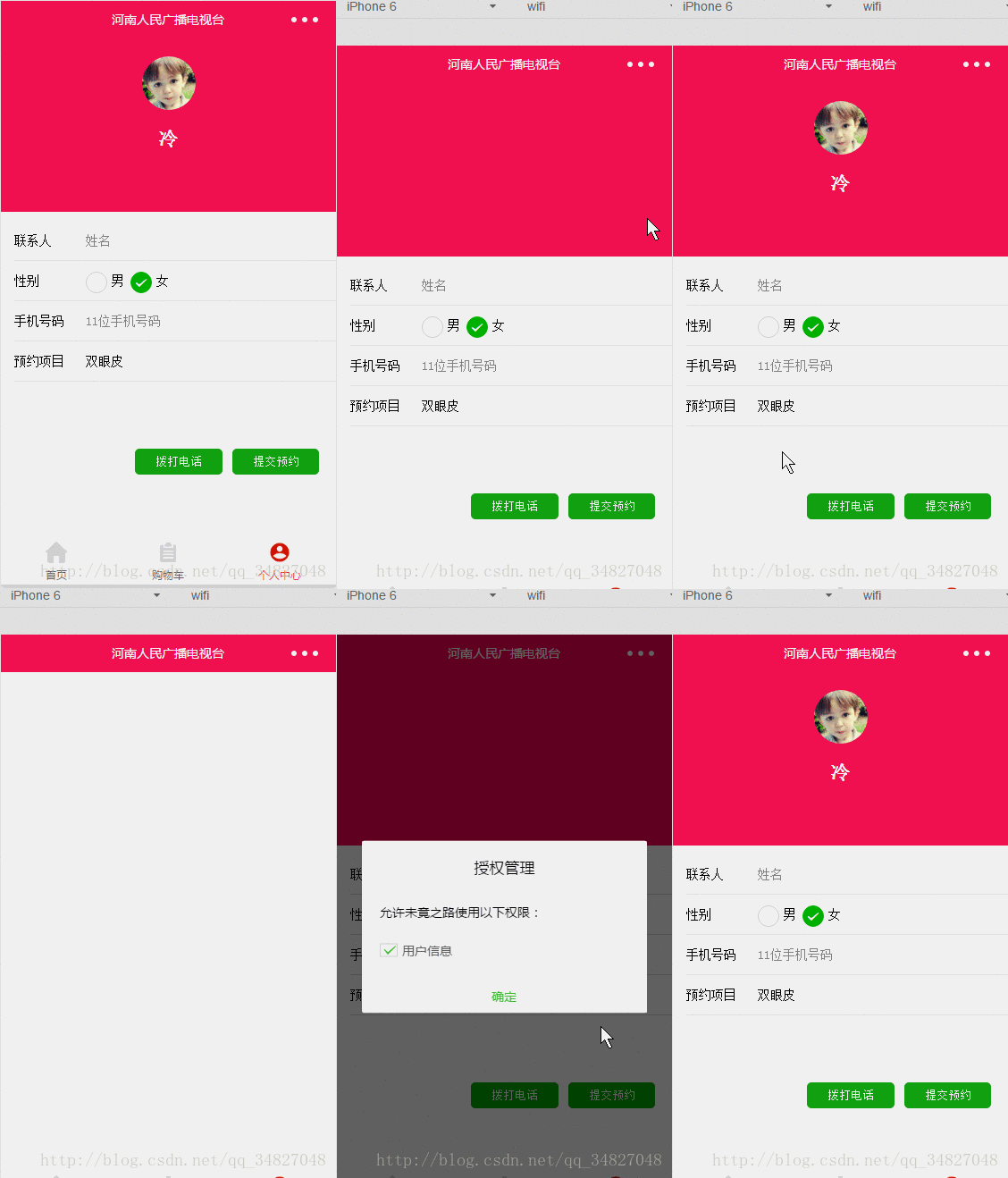
- 第一种使用wx.getUserInfo直接获取微信头像,昵称
wx.getUserInfo({

     success: function (res) {

      that.setData({

          nickName: res.userInfo.nickName,

         avatarUrl: res.userInfo.avatarUrl,

      })

      },

})- 第二种
我们在使用小程序wx.login API进行登录的时候,直接使用wx.getUserInfo是不能获取更多的信息的,如微信用户的openid。
官方提示,需要发送获取到的code进行请求到微信的后端API,
根据文档,只需要进行一个get请求到如下地址即可:

https://api.weixin.qq.com/sns/jscode2session?appid=APPID&secret=SECRET&

js_code=JSCODE&grant_type=authorization_code

appid和secret在微信小程序后台可以看到,

js_code为使用wx.login登录时获取到的code参数数据,

grant_type这个不用改动。- js文件
 var openId = (wx.getStorageSync('openId'))

        if (openId) {

          wx.getUserInfo({

            success: function (res) {

              that.setData({

                nickName: res.userInfo.nickName,

                avatarUrl: res.userInfo.avatarUrl,

              })

            },

            fail: function () {

              // fail

              console.log("获取失败!")

            },

            complete: function () {

              // complete

              console.log("获取用户信息完成!")

            }

          })

        } else {

          wx.login({

            success: function (res) {

              console.log(res.code)

              if (res.code) {

                wx.getUserInfo({

                  withCredentials: true,

                  success: function (res_user) {

                    wx.request({

                     //后台接口地址

                      url: 'https://....com/wx/login',

                      data: {

                        code: res.code,

                        encryptedData: res_user.encryptedData,

                        iv: res_user.iv

                      },

                      method: 'GET',

                      header: {

                        'content-type': 'application/json'

                      },

                      success: function (res) {

                        // this.globalData.userInfo = JSON.parse(res.data);

                        that.setData({

                          nickName: res.data.nickName,

                          avatarUrl: res.data.avatarUrl,

                        })

                        wx.setStorageSync('openId', res.data.openId);

                      }

                    })

                  }, fail: function () {

                    wx.showModal({

                      title: '警告通知',

                      content: '您点击了拒绝授权,将无法正常显示个人信息,点击确定重新获取授权。',

                      success: function (res) {

                        if (res.confirm) {

                          wx.openSetting({

                            success: (res) => {

                              if (res.authSetting["scope.userInfo"]) {////如果用户重新同意了授权登录

                                wx.login({

                                  success: function (res_login) {

                                    if (res_login.code) {

                                      wx.getUserInfo({

                                        withCredentials: true,

                                        success: function (res_user) {

                                          wx.request({

                                           url: 'https://....com/wx/login',

                                            data: {

                                              code: res_login.code,

                                              encryptedData: res_user.encryptedData,

                                              iv: res_user.iv

                                            },

                                            method: 'GET',

                                            header: {

                                              'content-type': 'application/json'

                                            },

                                            success: function (res) {

                                              that.setData({

                                                nickName: res.data.nickName,

                                                avatarUrl: res.data.avatarUrl,

                                              })

                                              wx.setStorageSync('openId', res.data.openId);

                                            }

                                          })

                                        }

                                      })

                                    }

                                  }

                                });

                              }

                            }, fail: function (res) {

                            }

                          })

                        }

                      }

                    })

                  }, complete: function (res) {

                  }

                })

              }

            }

          })

        }

  },

  globalData: {

    userInfo: null

}- 后台是php 框架是laravel5.4版本
官方文档:

https://mp.weixin.qq.com/debug/wxadoc/dev/api/signature.html

微信官方提供了多种编程语言的示例代码(点击下载)。每种语言类型的接口名字均一致。调用方式可以参照示例。
下载之后在php文件中引入:
<?php
namespace App\Http\Controllers\Admin;
use Illuminate\Http\Request;
use App\Http\Controllers\Controller;
use App\Models\User;
use App\Models\Wechatuser;
include_once app_path('/Http/Controllers/Admin/PHP/wxBizDataCrypt.php');
// 获取微信用户信息
public function getWxLogin(Request $request)
{
// require_once ROOTPATH . "./PHP/wxBizDataCrypt.php";
$code = $request->get('code');
$encryptedData = $request->get('encryptedData');
$iv = $request->get('iv');
$appid = "***" ;
$secret = "***";
$URL = "https://api.weixin.qq.com/sns/jscode2session?appid=$appid&secret=$secret&js_code=$code&grant_type=authorization_code";
$apiData=file_get_contents($URL);
// var_dump($code,'wwwwwwww',$apiData['errscode']);
// $ch = curl_init();
// curl_setopt($ch, CURLOPT_URL, $URL);
// curl_setopt($ch, CURLOPT_RETURNTRANSFER, 1);
// curl_setopt($ch, CURLOPT_HEADER, 0);
// $output = curl_exec($ch);
// curl_close($ch)
if(!isset($apiData['errcode'])){
$sessionKey = json_decode($apiData)->session_key;
$userifo = new \WXBizDataCrypt($appid, $sessionKey);
$errCode = $userifo->decryptData($encryptedData, $iv, $data );
if ($errCode == 0) {
return ($data . "\n");
} else {
return false;
}
}
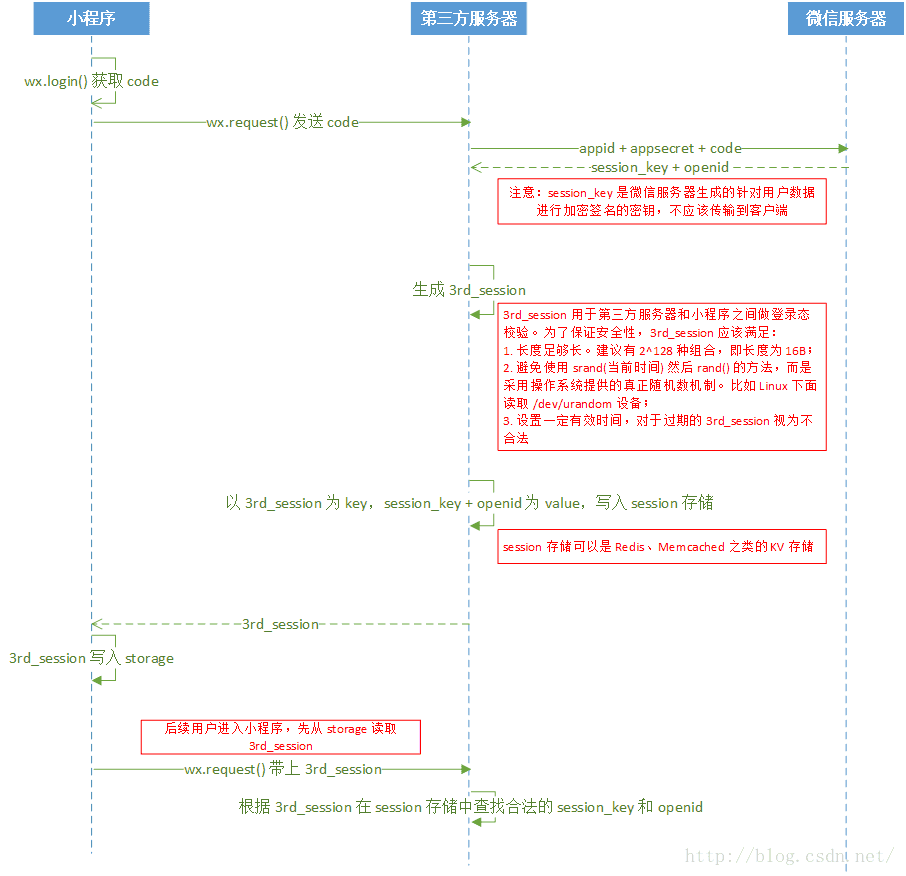
}官方文档的登录流程图,整个登录流程基本如下图所示:
微信小程序授权获取用户详细信息openid的更多相关文章
- nodejs+koa+uniapp实现微信小程序登陆获取用户手机号及openId
nodejs+koa+uniapp实现微信小程序登陆获取用户手机号及openId 前言: 我准备用nodejs+koa+uniapp实现一款餐饮点单小程序,以及nodejs+koa+vue实现后端管理 ...
- 微信小程序授权 获取用户的openid和session_key【后端使用java语言编写】,我写的是get方式,目的是测试能否获取到微信服务器中的数据,后期我会写上post请求方式。
在这里给大家分享下我的心得,1.写代码前一定要对整个流程有个了解.我就是因为在先不了解整个过程中去ctrl+c+v他人的博客代码,花费很多无用的时间去处理还不知道能不能跑的起来的代码. 2.本人比较喜 ...
- 微信小程序open-data获取用户的信息样式设置
效果图 wxml代码 <view class="userinfo"> <!-- 用户头像 --> <view class="userinfo ...
- 【微信小程序】获取用户地理位置权限,二次请求授权,逆解析获取地址
摘要:微信小程序内获取用户地理位置信息授权,被拒绝后二次获取,获取权限后逆解析得到用户所在省市区等.. 场景:商城类小程序,在首页时需展示附近门店,即用户刚进入小程序时就需要获取到用户位置信息 ste ...
- 微信小程序后台获取用户的opeid
1.微信小程序后台获取登录用户的openid,首先微信小程序将code传给后台服务器 wx.login({ success: function (res) { var code = res.code ...
- 微信小程序之获取用户位置权限(拒绝后提醒)
微信小程序获取用户当前位置有三个方式: 1. wx.getLocation(多与wx.openLocation一起用) 获取当前的精度.纬度.速度.不需要授权.当type设置为gcj02 返回可用于w ...
- 微信小程序怎么获取用户输入
能够获取用户输入的组件,需要使用组件的属性bindchange将用户的输入内容同步到 AppService. <input id="myInput" bindchange=& ...
- 微信小程序授权获取手机号
wxml: <text>pages/logins/logins.wxml</text> // <button open-type="getPhoneNumber ...
- 吐血记录微信小程序授权获取Unionid及linux下使用bouncycastle解密用户数据 遇到的坑
背景 公司小程序上线了,发现系统无法拿到一些用户的UniondID.但是上线前的测试一切都是正常的. 坑1 经排查,发现一些用户通过下面的接口无法得到unionid https://api.weixi ...
随机推荐
- firemonkey EDit 改变颜色
PS:本来不应该有多难,结果折腾了半天, firemonkey EDit Canvas 按需绘颜色 procedure TForm.EditPaint(Sender: TObject; Canvas ...
- java或判断优化小技巧
写业务代码的时候,我们经常要做条件判断,有的时候条件判断的或判断长达20多个.reg.equals("1") || reg.equals("2") || reg ...
- Day2------字符编码
复习: 系统启动流程:bios------->找到启动介质---------->把系统加载到内存------------>CPU执行 字符编码 一.字符串------------&g ...
- Linux运维主流架构简单剖析
随着IT运维的不断发展,尤其的Linux的飞速发展,越来越多的企业开始使用Linux操作系统平台,例如CentOS.RedHat.Ubuntu.Fedora等等,成千上亿个网站涌现在当今互联网,互联网 ...
- 关于java中的值传递与引用传递遇到的问题
来源于:https://www.nowcoder.com/test/question/done?tid=14302398&qid=25373#summary 下列java程序的输出结果为___ ...
- 手把手 git建立仓库,远程推拉及常用git命令和部分Linux命令集锦
方法一:直接在GitHub上建立一个项目,然后git clone (git address name): 此时已经建立好了一个git仓库: cd 文件夹 > 添加文件进去 >git add ...
- 网络通信 --> Linux 五种IO模型
Linux 五种IO模型 聊聊Linux 五种IO模型
- 源码实现 --> itoa函数实现
itoa函数实现 itoa()函数的功能是将一个整数转换为一个字符串 例如12345,转换之后的字符串为"12345",-123转换之后为"-123",欢迎大家 ...
- bug单的生命周期
测试工程师发现了软件的缺陷(bug),那修复bug的整个流程是怎么样的呢? 1.发现bug 2.和开发确认是否是bug 3.如果是bug则提bug单到测试经理,如果不是则放过 4.测试经理把bug单走 ...
- PHP 引用是个坑,请慎用
去年我参加了很多次会议,其中八次会议里我进行了相关发言,这其中我多次谈到了 PHP 的引用问题,因为很多人对它的理解有所偏差.在深入讨论这个问题之前,我们先回顾一下引用的基本概念,明确什么是" ...