
springboot 的部分细节
Application.properties 中
#指定端口号

server.port=

#指定访问路径必须以/crud/xxx  开始

server.servlet.context-path=/crud

#指定编码格式

server.tomcat.uri-encoding=UTF-

#指定日期格式

spring.mvc.date-format=yyyy-MM-dd

# 禁用缓存

spring.thymeleaf.cache=false

# 国际化配置文件(包名.基础名)

spring.messages.basename=i18n.login
pom 文件中需要加上自己需要的依赖:如
    <!--引入jquery-webjar-->

        <dependency>

            <groupId>org.webjars</groupId>

            <artifactId>jquery</artifactId>

            <version>3.3.</version>

        </dependency>

        <!--引入bootstrap-->

        <dependency>

            <groupId>org.webjars</groupId>

            <artifactId>bootstrap</artifactId>

            <version>4.0.</version>

        </dependency>
静态页面不要放在静态文件夹下,会得不到模板引擎的解析需要放在
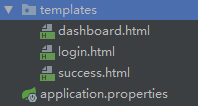
首先就是要访问我们的首页,这是可以指定的首先可以写一个方法这时有两种方法
(1)不推荐 在controller中写上一个方法
 @RequestMapping({"/","/index.html"})

    public String index(){

    //模板引擎会自动进行拼写自动加上.html

        return "login";

    }
(2)加上视图映射 viewControlle
手动写上一个配置类使用视图映射
因为WebMvcConfigurerAdapter 在Spring5.0已被废弃所以 博主推荐的两种方式https://blog.csdn.net/lenkvin/article/details/79482205
1 直接实现WebMvcConfigurer (官方推荐)
@Configuration

public class WebMvcConfg implements WebMvcConfigurer {

    //todo

}
2 直接继承WebMvcConfigurationSupport
@Configuration

public class WebMvcConfg extends WebMvcConfigurationSupport {

        //todo

}
使用第一种方法
说下默认映射的文件夹有:
classpath:/META-INF/resources
classpath:/resources
classpath:/static
classpath:/public
上面这几个都是静态资源的映射路径,优先级顺序为:META-INF/resources > resources > static > public
我们可以通过修改spring.mvc.static-path-pattern来修改默认的映射**
具体信息https://www.cnblogs.com/java-synchronized/p/7091723.html
对login.html 页面的修改
th:text是对标签体中的修改
th:text="#{login.password}
而复选框是字节数的没有标签体 所以使用
[[#{login.remember}]]

注册国际化标准i18N
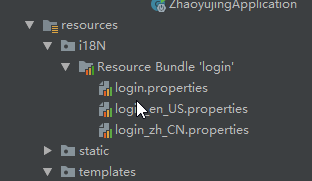
别忘了在配置文件中加上
# 国际化配置文件(包名.基础名)

spring.messages.basename=i18n.login
放行静态资源
registry.addInterceptor(new LoginHandlerInterceptor()).addPathPatterns("/**").excludePathPatterns("/login.html","/","/webjars/**","/user/login","/static/**");
=====================================================================================================================================
springboot的数据库的错误
当我使用springboot 的快速启动导入了jdbc mybatis 出现这种错误
Error starting ApplicationContext. To display the conditions report re-run your application with 'debug' enabled.

-- ::50.757 ERROR  --- [           main] o.s.b.d.LoggingFailureAnalysisReporter   :

***************************

APPLICATION FAILED TO START

***************************

Description:

Failed to configure a DataSource: 'url' attribute is not specified and no embedded datasource could be configured.

Reason: Failed to determine a suitable driver class

Action:

Consider the following:

    If you want an embedded database (H2, HSQL or Derby), please put it on the classpath.

    If you have database settings to be loaded from a particular profile you may need to activate it (no profiles are currently active).
《https://www.jianshu.com/p/836d455663da 解释详细连接》
问题原因: Mybatis没有找到合适的加载类,其实是大部分spring - datasource - url没有加载成功,分析原因如下所示.
DataSourceAutoConfiguration会自动加载.
没有配置spring - datasource - url 属性.
spring - datasource - url 配置的地址格式有问题.
配置 spring - datasource - url的文件没有加载.
方案一 (解决原因1)
排除此类的autoconfig。启动以后就可以正常运行。
@SpringBootApplication(exclude= {DataSourceAutoConfiguration.class})
方案二 (解决原因2)
在application.properties/或者application.yml文件中没有添加数据库配置信息.
spring:

  datasource:

    url: jdbc:mysql://localhost:3306/read_data?useUnicode=true&characterEncoding=UTF-8&useSSL=false

    username: root

    password:

    driver-class-name: com.mysql.jdbc.Driver
方案三 (解决原因3)
在spring xml配置文件中引用了数据库地址 所以需要对:等进行转义处理.但是在application.properties/或者application.yml文件并不需要转义,错误和正确方法写在下面了.
//错误示例

spring.datasource.url = jdbc:mysql\://192.168.0.20\:1504/f_me?setUnicode=true&characterEncoding=utf8

//正确示例

spring.datasource.url = jdbc:mysql://192.168.0.20:1504/f_me?setUnicode=true&characterEncoding
方案四 (解决原因4)
yml或者properties文件没有被扫描到,需要在pom文件中<build></build>添加如下.来保证文件都能正常被扫描到并且加载成功.
<!-- 如果不添加此节点mybatis的mapper.xml文件都会被漏掉。 -->

<resources>

    <resource>

        <directory>src/main/java</directory>

        <includes>

            <include>**/*.yml</include>

            <include>**/*.properties</include>

            <include>**/*.xml</include>

        </includes>

        <filtering>false</filtering>

    </resource>

    <resource>

        <directory>src/main/resources</directory>

        <includes>

            <include>**/*.yml</include>

            <include>**/*.properties</include>

            <include>**/*.xml</include>

        </includes>

        <filtering>false</filtering>

    </resource>

</resources>
springboot 的部分细节的更多相关文章
- 简明易懂,将细节隐藏,面向新手树立web开发概念——学完Java基础语法,超快速上手springboot+mybatiJavaWeb开发
简明易懂,将细节隐藏,面向新手树立web开发概念 --学完Java基础语法,超快速上手JavaWeb开发 Web本质(先忽视各种协议) Web应用可以理解为浏览器和服务器之间的交互. 我们可以看一个简 ...
- SpringBoot的学习【3.HelloWorld配置细节】
/** * @SpringBootApplication用来标注主程序类. */ @SpringBootApplication public class First { public static v ...
- 【源码解析】自动配置的这些细节不知道,别说你会 springboot
spring-boot 相对于 spring,很重要的一个特点就是自动配置,使约定大于配置思想成功落地.xxx-spring-boot-starter 一系列引导器能够开箱即用,或者只需要很少的配置( ...
- mybatis整合springboot 以及需要注意的细节
具体怎么整合的网上有很多优秀的博客介绍,这里就直接引用一篇个人觉得非常详细的教程: https://blog.csdn.net/winter_chen001/article/details/77249 ...
- SpringBoot实例
7player 7号球员 -- Show Time !跳至内容 首发 左边锋 技术流 外援 教练 7号 基于SpringBoot + Mybatis实现SpringMVC Web项目[原创] 目录 [ ...
- springboot 学习笔记(一)
引子 最近在搞一个项目,走在科技前沿的师兄, 摒弃了公司老套的框架模式, 采用了springboot搭建新应用.看到如此简洁的代码 , 深受诱惑.趁周末闲余之时, 背晒阳光, 学起了springboo ...
- SpringBoot Quickstart
SpringBoot Intro SpringBoot是顺应现在微服务(MicroServices)理念而产生的一个微框架(同类微框架可供选择的还有Dropwizard), 用来构建基于Spring框 ...
- 使用validator-api来验证spring-boot的参数
作为服务端开发,验证前端传入的参数的合法性是一个必不可少的步骤,但是验证参数是一个基本上是一个体力活,而且冗余代码繁多,也影响代码的可阅读性,所以有没有一个比较优雅的方式来解决这个问题? 这么简单的问 ...
- springboot(十四):springboot整合shiro-登录认证和权限管理
这篇文章我们来学习如何使用Spring Boot集成Apache Shiro.安全应该是互联网公司的一道生命线,几乎任何的公司都会涉及到这方面的需求.在Java领域一般有Spring Security ...
随机推荐
- 《前端之路》之四 JavaScript 的闭包、作用域、作用域链
04:JavaScript 的闭包 一.定义: 常规定义: 闭包的定义: 有权利访问外部函数作用域的函数. 通俗定义: 1.函数内部包含了函数.然后内部函数可以访问外部函数的作用域. 2.内部函数可以 ...
- 【Android Studio安装部署系列】十六、Android studio在layout目录下新建子目录
版权声明:本文为HaiyuKing原创文章,转载请注明出处! 概述 一般用于分类显示不同模块的layout布局文件. 在res/layout文件夹下创建子目录 res/layout鼠标右键——New— ...
- springboot~application.properties和application.yml的使用
在springboot框架里进行项目开始时,我们在resource文件夹里可以存放配置文件,而格式可以有两种,properties和yml,前者是扁平的k/v格式,而后者是yml的树型结构,我们建议使 ...
- 从大数据技术变迁猜一猜AI人工智能的发展
目前大数据已经成为了各家互联网公司的核心资产和竞争力了,其实不仅是互联网公司,包括传统企业也拥有大量的数据,也想把这些数据发挥出作用.在这种环境下,大数据技术的重要性和火爆程度相信没有人去怀疑. 而A ...
- Java Web开发模式
一 Java Web开发模式的变迁 1 最初的Java web服务器端编程技术是Servlet,利用Servlet就可以开发出一个Web应用程序. 2 为了解决Servlet缺陷,SUN推出了JSP技 ...
- DSAPI 菜单渲染
在本节,将演示DSAPI.菜单渲染功能.本功能支持对WINFORM菜单项的任意细节进行处理,使用配色方案进行渲染,默认配色方案为Visual Studio2012的黑色主题风格. 我们先来看一下未使用 ...
- ___Html页面使用Ajax做数据显示
<!DOCTYPE html><html xmlns="http://www.w3.org/1999/xhtml"><head> <met ...
- ## 本篇文章对linux常用的一些命令做一下总结,如有需要补充以及不懂得地方,请在下方留言 适合于linux初学者,以及对命令掌握不牢的用来备忘
本篇文章对linux常用的一些命令做一下总结,如有需要补充以及不懂得地方,请在下方留言 适合于linux初学者,以及对命令掌握不牢的用来备忘一,磁盘管理1.显示当前目录位置 pwd2.切换目录 cd ...
- Java基础差,需要怎么补
本文首发于本博客 猫叔的博客,转载请申明出处 感谢sugar的提问:Java基础差,需要怎么补? 欢迎关注公众号:Java猫说 我整体的总结了一下,大致分为以下的几个点说一下: 1.善于使用搜索引擎 ...
- 2019/1.7 js面向对象笔记
面向对象 1.构造函数里的属性怎么看?看this,谁前面有this谁就是属性. num不是属性,是私有作用域下的私有变量. 2.如何查找面向对象中的this 1.构造函数的this指向实例对象 2.如 ...