
前端技术之_CSS详解第五天
前端技术之_CSS详解第五天
一、行高和字号
1.1 行高
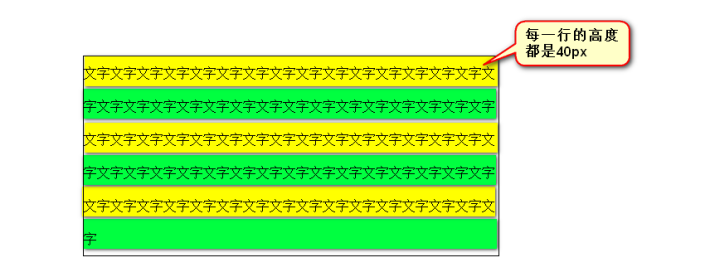
CSS中,所有的行,都有行高。盒模型的padding,绝对不是直接作用在文字上的,而是作用在“行”上的。
<!DOCTYPE html PUBLIC "-//W3C//DTD XHTML 1.0 Transitional//EN" "http://www.w3.org/TR/xhtml1/DTD/xhtml1-transitional.dtd">
<html xmlns="http://www.w3.org/1999/xhtml" xml:lang="en">
<head>
    <meta http-equiv="Content-Type" content="text/html;charset=UTF-8">
    <title>Document</title>
    <style type="text/css">
        *{
            margin: 0;
            padding: 0;
        }
        p{
            width: 500px;
            border: 1px solid black;
            margin: 100px;
            line-height: 40px;
        }
    </style>
</head>
<body>
    <p>文字文字文字文字文字文字文字文字文字文字文字文字文字文字文字文字文字文字文字文字文字文字文字文字文字文字文字文字文字文字文字文字文字文字文字文字文字文字文字文字文字文字文字文字文字文字文字文字文字文字文字文字文字文字文字文字文字文字文字文字文字文字文字文字文字文字文字文字文字文字文字文字文字文字文字文字文字文字</p>
</body>
</html>
line-height: 40px;
<!DOCTYPE html PUBLIC "-//W3C//DTD XHTML 1.0 Transitional//EN" "http://www.w3.org/TR/xhtml1/DTD/xhtml1-transitional.dtd">
<html xmlns="http://www.w3.org/1999/xhtml" xml:lang="en">
<head>
    <meta http-equiv="Content-Type" content="text/html;charset=UTF-8">
    <title>Document</title>
    <style type="text/css">
        *{
            margin:;
            padding:;
        }
        p{
            width: 500px;
            border: 1px solid black;
            margin: 100px;
            line-height: 25px;
            font-size: 14px;
        }
    </style>
</head>
<body>
    <p>国国国国国国国国国国国国国国国国国国国国国国国</p>
</body>
</html>
文字,是在自己的行里面居中的。比如,现在文字字号14px,行高是24px。那么:
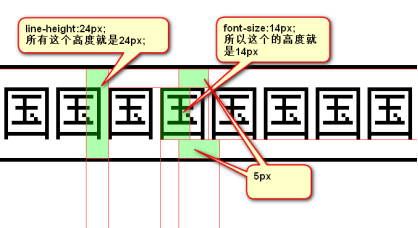
为了严格保证字在行里面居中,我们的工程师有一个约定: 行高、字号,一般都是偶数。这样,它们的差,就是偶数,就能够被2整除。
1.2 单行文本垂直居中
<!DOCTYPE html PUBLIC "-//W3C//DTD XHTML 1.0 Transitional//EN" "http://www.w3.org/TR/xhtml1/DTD/xhtml1-transitional.dtd">
<html xmlns="http://www.w3.org/1999/xhtml" xml:lang="en">
<head>
    <meta http-equiv="Content-Type" content="text/html;charset=UTF-8">
    <title>Document</title>
    <style type="text/css">
        *{
            margin:;
            padding:;
        }
        p{
            width: 600px;
            height: 60px;
            background-color: yellow;
            margin: 100px;
            font-size: 16px;
            line-height: 60px;
        }
    </style>
</head>
<body>
    <p>文字文字文字文字文字文字文字文字文字</p>
</body>
</html>
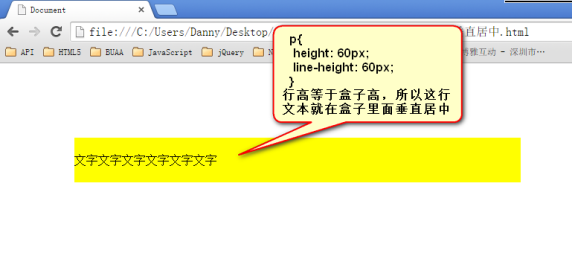
文本在行里面居中
公式:
1 行高:盒子高;
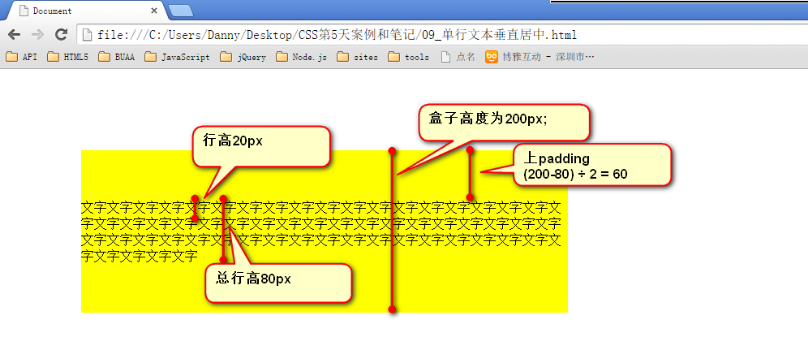
需要注意的是,这个小技巧,行高=盒子高。 只适用于单行文本垂直居中!!不适用于多行。
如果想让多行文本垂直居中,需要设置盒子的padding:
1.3 font属性
● 使用font属性,能够将字号、行高、字体,能够一起设置。
<!DOCTYPE html PUBLIC "-//W3C//DTD XHTML 1.0 Transitional//EN" "http://www.w3.org/TR/xhtml1/DTD/xhtml1-transitional.dtd">
<html xmlns="http://www.w3.org/1999/xhtml" xml:lang="en">
<head>
    <meta http-equiv="Content-Type" content="text/html;charset=UTF-8">
    <title>Document</title>
    <style type="text/css">
        *{
            margin:;
            padding:;
        }
        p{
            font:14px/24px "宋体";
        }
    </style>
</head>
<body>
    <p>文字文字文字文字文字文字文字文字文字文字文字文字文字文字文字文字文字文字文字文字文字文字文字文字文字文字文字文字文字文字文字文字文字文字文字文字文字文字文字文字文字文字文字文字文字文字文字文字文字文字文字文字文字文字文字文字文字文字文字文字</p>
</body>
</html>
1 font: 14px/24px “宋体”;
1 font-size:14px;

2 line-height:24px;

3 font-family:"宋体";
等价于三行语句:
font-family就是“字体”。family是“家庭”、“伐木累”的意思。
<!DOCTYPE html PUBLIC "-//W3C//DTD XHTML 1.0 Transitional//EN" "http://www.w3.org/TR/xhtml1/DTD/xhtml1-transitional.dtd">
<html xmlns="http://www.w3.org/1999/xhtml" xml:lang="en">
<head>
    <meta http-equiv="Content-Type" content="text/html;charset=UTF-8">
    <title>Document</title>
    <style type="text/css">
        body{
            font: 24px/48px "Arial","Microsoft YaHei","SimSun";
        }
    </style>
</head>
<body>
    哈abcdefghijklmn哈
    <span>我是span</span>
</body>
</html>
● 网页中不是所有字体都能用哦,因为这个字体要看用户的电脑里面装没装,比如你设置:
1 font-family: "华文彩云";
如果用户电脑里面没有这个字体,那么就会变成宋体。
页面中,中文我们只使用: 微软雅黑、宋体、黑体。 如果页面中,需要其他的字体,那么需要切图。
英语:Arial 、 Times New Roman
● 为了防止用户电脑里面,没有微软雅黑这个字体。就要用英语的逗号,隔开备选字体,就是说如果用户电脑里面,没有安装微软雅黑字体,那么就是宋体:
1 font-family: "微软雅黑","宋体";
备选字体可以有无数个,用逗号隔开。
● 我们要将英语字体,放在最前面,这样所有的中文,就不能匹配英语字体,就自动的变为后面的中文字体:
1 font-family: "Times New Roman","微软雅黑","宋体";
● 所有的中文字体,都有英语别名,我们也要知道:
微软雅黑的英语别名:
1 font-family: "Microsoft YaHei";
1 font-family: "SimSun";
宋体的英语别名:
font属性能够将font-size、line-height、font-family合三为一:
1 font:12px/30px "Times New Roman","Microsoft YaHei","SimSun";
● 行高可以用百分比,表示字号的百分之多少。一般来说,都是大于100%的,因为行高一定要大于字号。
1 font:12px/200% “宋体”
1 font:12px/24px “宋体”;
等价于
反过来,比如:
1 font:16px/48px “宋体”;
1 font:16px/300% “宋体”
等价于
二、超级链接的美化
超级链接就是a标签。
2.1 伪类
<!DOCTYPE html PUBLIC "-//W3C//DTD XHTML 1.0 Transitional//EN" "http://www.w3.org/TR/xhtml1/DTD/xhtml1-transitional.dtd">
<html xmlns="http://www.w3.org/1999/xhtml" xml:lang="en">
<head>
    <meta http-equiv="Content-Type" content="text/html;charset=UTF-8">
    <title>Document</title>
    <style type="text/css">
        a:link{
            color:red;
        }
        a:visited{
            color:orange;
        }
        a:hover{
            color:green;
        }
        a:active{
            color:black;
        }
    </style>
</head>
<body>
    <a href="http://www.563.com/" target="_blank">点击我去363</a>
    <a href="http://www.163.com/" target="_blank">点击我去网易</a>
</body>
</html>
也就是说,同一个标签,根据用户的某种状态不同,有不同的样式。这就叫做“伪类”。
类就是工程师加的,比如div属于box类,很明确,就是属于box类。但是a属于什么类?不明确。因为要看用户有没有点击、有没有触碰。所以,就叫做“伪类”。
伪类用冒号来表示。
a标签有4种伪类,要求背诵:
1  a:link{
2  color:red;
3  }
4  a:visited{
5  color:orange;
6  }
7  a:hover{
8  color:green;
9  }
10  a:active{
11  color:black;
12  }
:visited 表示, 用户访问过了这个链接的样式。 是英语“访问过的”的意思。:link 表示, 用户没有点击过这个链接的样式。 是英语“链接”的意思。
:hover 表示, 用户鼠标悬停的时候链接的样式。 是英语“悬停”的意思。
:active 表示, 用户用鼠标点击这个链接,但是不松手,此刻的样式。 是英语“激活”的意思。
|
a:link
|
a:visited
|
a:hover
|
a:active
|
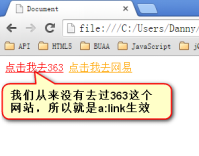
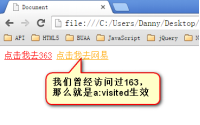
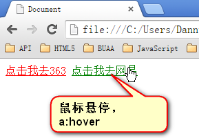
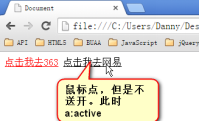
记住,这四种状态,在css中,必须按照固定的顺序写:
a:link 、a:visited 、a:hover 、a:active
如果不按照顺序,那么将失效。“爱恨准则”love hate。必须先爱,后恨。
2.2 超级链接的美化
a标签在使用的时候,非常的难。因为不仅仅要控制a这个盒子,也要控制它的伪类。
我们一定要将a标签写在前面,:link、:visited、:hover、:active这些伪类写在后面。
<!DOCTYPE html PUBLIC "-//W3C//DTD XHTML 1.0 Transitional//EN" "http://www.w3.org/TR/xhtml1/DTD/xhtml1-transitional.dtd">
<html xmlns="http://www.w3.org/1999/xhtml" xml:lang="en">
<head>
    <meta http-equiv="Content-Type" content="text/html;charset=UTF-8">
    <title>Document</title>
    <style type="text/css">
        *{
            margin:;
            padding:;
        }
        .nav{
            width: 960px;
            height: 50px;
            border: 1px solid red;
            margin: 100px auto;
        }
        .nav ul{
            /*去掉小圆点*/
            list-style: none;
        }
        .nav ul li{
            float: left;
            width: 120px;
            height: 50px;
            text-align: center;
            line-height: 50px;
        }
        .nav ul li a{
            display: block;
            width: 120px;
            height: 50px;
        }
        .nav ul li a:link , .nav ul li a:visited{
            text-decoration: none;
            background-color: purple;
            color:white;
        }
        .nav ul li a:hover{
            background-color: orange;
        }
    </style>
</head>
<body>
    <div class="nav">
        <ul>
            <li><a href="#">网站栏目</a></li>
            <li><a href="#">网站栏目</a></li>
            <li><a href="#">网站栏目</a></li>
            <li><a href="#">网站栏目</a></li>
            <li><a href="#">网站栏目</a></li>
            <li><a href="#">网站栏目</a></li>
            <li><a href="#">网站栏目</a></li>
            <li><a href="#">网站栏目</a></li>
        </ul>
    </div>
</body>
</html>
a标签中,描述盒子; 伪类中描述文字的样式、背景。
1     .nav ul li a{
2     display: block;
3     width: 120px;
4     height: 40px;
5     }
6    .nav ul li a:link ,.nav ul li a:visited{
7     text-decoration: none;
8
9     color:white;
10     }
11     .nav ul li a:hover{
12
13     font-weight: bold;
14     color:yellow;
15     }
记住,所有的a不继承text、font这些东西。因为a自己有一个伪类的权重。
最标准的,就是把link、visited、hover都要写。但是前端开发工程师在大量的实践中,发现不写link、visited浏览器也挺兼容。所以这些“老油条”们,就把a标签简化了:
<!DOCTYPE html PUBLIC "-//W3C//DTD XHTML 1.0 Transitional//EN" "http://www.w3.org/TR/xhtml1/DTD/xhtml1-transitional.dtd">
<html xmlns="http://www.w3.org/1999/xhtml" xml:lang="en">
<head>
    <meta http-equiv="Content-Type" content="text/html;charset=UTF-8">
    <title>Document</title>
    <style type="text/css">
        *{
            margin:;
            padding:;
        }
        .nav{
            width: 960px;
            height: 50px;
            border: 1px solid red;
            margin: 100px auto;
        }
        .nav ul{
            /*去掉小圆点*/
            list-style: none;
        }
        .nav ul li{
            float: left;
            width: 120px;
            height: 50px;
            text-align: center;
            line-height: 50px;
        }
        .nav ul li a{
            display: block;
            width: 120px;
            height: 50px;
            text-decoration: none;
            background-color: purple;
            color:white;
        }
        .nav ul li a:hover{
            background-color: orange;
        }
    </style>
</head>
<body>
    <div class="nav">
        <ul>
            <li><a href="#">网站栏目</a></li>
            <li><a href="#">网站栏目</a></li>
            <li><a href="#">网站栏目</a></li>
            <li><a href="#">网站栏目</a></li>
            <li><a href="#">网站栏目</a></li>
            <li><a href="#">网站栏目</a></li>
            <li><a href="#">网站栏目</a></li>
            <li><a href="#">网站栏目</a></li>
        </ul>
    </div>
</body>
</html>
a:link、a:visited都是可以省略的,简写在a标签里面。也就是说,a标签涵盖了link、visited的状态。
1     .nav ul li a{
2     display: block;
3     width: 120px;
4     height: 50px;
5     text-decoration: none;
7     color:white;
8     }
9     .nav ul li a:hover{
11     }
三、background系列属性
3.1 background-color属性
背景颜色属性。
<!DOCTYPE html PUBLIC "-//W3C//DTD XHTML 1.0 Transitional//EN" "http://www.w3.org/TR/xhtml1/DTD/xhtml1-transitional.dtd">
<html xmlns="http://www.w3.org/1999/xhtml" xml:lang="en">
<head>
    <meta http-equiv="Content-Type" content="text/html;charset=UTF-8">
    <title>Document</title>
    <style type="text/css">
        div{
            width: 180px;
            height: 40px;
            border: 1px solid #000;
            margin-bottom: 20px;
        }
        .box1{
            background-color: red;
        }
        .box2{
            background-color: rgb(255,0,0);
        }
        .box3{
            background-color: #ff0000;
        }

    </style>
</head>
<body>
    <div class="box1"></div>
    <div class="box2"></div>
    <div class="box3"></div>
</body>
</html>
css2.1中,颜色的表示方法有哪些?一共有三种:单词、rgb表示法、十六进制表示法
3.1.1 用英语单词来表示
能够用英语单词来表述的颜色,都是简单颜色。
红色:
background-color: red;
3.1.2 用rgb方法来表示
红色:
<!DOCTYPE html PUBLIC "-//W3C//DTD XHTML 1.0 Transitional//EN" "http://www.w3.org/TR/xhtml1/DTD/xhtml1-transitional.dtd">
<html xmlns="http://www.w3.org/1999/xhtml" xml:lang="en">
<head>
    <meta http-equiv="Content-Type" content="text/html;charset=UTF-8">
    <title>Document</title>
    <style type="text/css">
        div{
            width: 180px;
            height: 40px;
            border: 1px solid #000;
            margin-bottom: 20px;
        }
        .box1{
            background-color: rgb(255,0,0);
        }
        .box2{
            background-color: rgb(0,255,0);
        }
        .box3{
            background-color: rgb(0,0,0);
        }
        .box4{
            background-color: rgb(255,255,255);
        }
        .box5{
            background-color: rgb(255,255,0);
        }
        .box6{
            background-color: rgb(255,0,255);
        }
        .box7{
            background-color: rgb(111,222,123);
        }
        .box8{
            background-color: rgb(111,222,153);
        }
        .box9{
            background-color: rgb(55,55,55);
        }
    </style>
</head>
<body>
    <div class="box1"></div>
    <div class="box2"></div>
    <div class="box3"></div>
    <div class="box4"></div>
    <div class="box5"></div>
    <div class="box6"></div>
    <div class="box7"></div>
    <div class="box8"></div>
    <div class="box9"></div>
</body>
</html>
background-color: rgb(255,0,0);
用逗号隔开,r、g、b的值,每个值的取值范围0~255,一共256个值。rgb表示三原色“红”red、“绿”green、“蓝”blue。光学显示器,每个像素都是由三原色的发光原件组成的,靠明亮度不同调成不同的颜色的。
如果此项的值,是255,那么就说明是纯色:
绿色:
background-color: rgb(0,255,0);
蓝色:
background-color: rgb(0,0,255);
黑色:
background-color: rgb(0,0,0);
白色:光学显示器,每个元件都不发光,黑色的。
background-color: rgb(255,255,255);
颜色可以叠加,比如黄色就是红色和绿色的叠加:
background-color: rgb(255,255,0);
再比如:
background-color: rgb(111,222,123);
就是红、绿、蓝三种颜色的不同比例叠加。
3.1.3 十六进制表示法
<!DOCTYPE html PUBLIC "-//W3C//DTD XHTML 1.0 Transitional//EN" "http://www.w3.org/TR/xhtml1/DTD/xhtml1-transitional.dtd">
<html xmlns="http://www.w3.org/1999/xhtml" xml:lang="en">
<head>
    <meta http-equiv="Content-Type" content="text/html;charset=UTF-8">
    <title>Document</title>
    <style type="text/css">
        div{
            width: 180px;
            height: 40px;
            border: 1px solid #000;
            margin-bottom: 20px;
        }
        .box1{
            background-color: #ff0000;
        }
        .box2{
            background-color: #00ff00;
        }
        .box3{
            background-color: #00f;
        }
        .box4{
            background-color: #111;
        }
        .box5{
            background-color: #222;
        }
        .box6{
            background-color: #333;
        }
        .box7{
            background-color: #444;
        }
        .box8{
            background-color: #555;
        }
        .box9{
            background-color: #666;
        }
    </style>
</head>
<body>
    <div class="box1"></div>
    <div class="box2"></div>
    <div class="box3"></div>
    <div class="box4"></div>
    <div class="box5"></div>
    <div class="box6"></div>
    <div class="box7"></div>
    <div class="box8"></div>
    <div class="box9"></div>
</body>
</html>
红色:
background-color: #ff0000;
#ff0000所有用#开头的值,都是16进制的。
16进制表示法,也是两位两位看,看r、g、b,但是没有逗号隔开。
ff就是10进制的255 ,00 就是10进制的0,00就是10进制的0。所以等价于rgb(255,0,0);
怎么换算的?我们介绍一下
我们现在看一下10进制中的基本数字(一共10个):
0、1、2、3、4、5、6、7、8、9
16进制中的基本数字(一共16个):
0、1、2、3、4、5、6、7、8、9、a、b、c、d、e、f
16进制对应表:
十进制数 十六进制数
0 0
1 1
2 2
3 3
……
10 a
11 b
12 c
13 d
14 e
15 f
16 10
17 11
18 12
19 13
……
43 2b
……
255 ff
十六进制中,13 这个数字表示什么?
表示1个16和3个1。 那就是19。 这就是位权的概念,开头这位表示多少个16,末尾这位表示多少个1。
小练习:
16进制中28等于10进制多少?
答:2*16+8 = 40。
16进制中的2b等于10进制多少?
答:2*16+11 = 43。
16进制中的af等于10进制多少?
答:10 * 16 + 15 = 175
16进制中的ff等于10进制多少?
答:15*16 + 15 = 255
所以,#ff0000就等于rgb(255,0,0)
background-color: #123456;
等价于:
background-color: rgb(18,52,86);
所以,任何一种十六进制表示法,都能够换算成为rgb表示法。也就是说,两个表示法的颜色数量,一样。
十六进制可以简化为3位,所有#aabbcc的形式,能够简化为#abc;
比如:
background-color:#ff0000;
等价于
background-color:#f00;
比如:
background-color:#112233;
等价于
background-color:#123;
只能上面的方法简化,比如
background-color:#222333;
要记住:
1 #000   黑
2 #fff    白
3 #f00   红
4 #333   灰
5 #222   深灰
6 #ccc   浅灰
3.2 background-image
用于给盒子加上背景图片:
<!DOCTYPE html PUBLIC "-//W3C//DTD XHTML 1.0 Transitional//EN" "http://www.w3.org/TR/xhtml1/DTD/xhtml1-transitional.dtd">
<html xmlns="http://www.w3.org/1999/xhtml" xml:lang="en">
<head>
    <meta http-equiv="Content-Type" content="text/html;charset=UTF-8">
    <title>Document</title>
    <style type="text/css">
        div{
            width: 500px;
            height: 500px;
            border: 1px solid #000;
            background-image:url(images/wuyifan.jpg);
            padding: 100px;
        }
    </style>
</head>
<body>
    <div>文字文字文字文字文字文字文字文字文字文字</div>
</body>
</html>
1 background-image:url(images/wuyifan.jpg);

images/wuyifan.jpg 就是相对路径。url()表示网址,uniform resouces locator 同意资源定位符
背景天生是会被平铺满的。
padding的区域有背景图。
3.3 background-repeat属性
设置背景图是否重复的,重复方式的。
<!DOCTYPE html PUBLIC "-//W3C//DTD XHTML 1.0 Transitional//EN" "http://www.w3.org/TR/xhtml1/DTD/xhtml1-transitional.dtd">
<html xmlns="http://www.w3.org/1999/xhtml" xml:lang="en">
<head>
    <meta http-equiv="Content-Type" content="text/html;charset=UTF-8">
    <title>Document</title>
    <style type="text/css">
        div{
            width: 500px;
            height: 500px;
            background-image: url(images/wuyifan.jpg);
            background-repeat:repeat-x;
            border: 1px solid #000;
        }
    </style>
</head>
<body>
    <div>文字文字文字文字文字文字文字文字文字文字</div>
</body>
</html>
repeat表示“重复”。
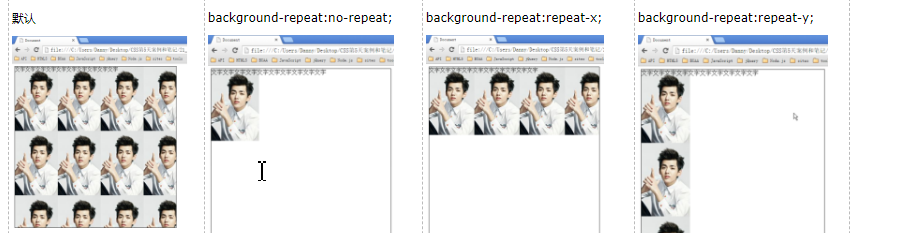
1 background-repeat:no-repeat;   不重复

2 background-repeat:repeat-x;    横向重复

3 background-repeat:repeat-y;    纵向重复
也就是说,background-repeat属性,有三种值:
<!DOCTYPE html PUBLIC "-//W3C//DTD XHTML 1.0 Transitional//EN" "http://www.w3.org/TR/xhtml1/DTD/xhtml1-transitional.dtd">
<html xmlns="http://www.w3.org/1999/xhtml" xml:lang="en">
<head>
    <meta http-equiv="Content-Type" content="text/html;charset=UTF-8">
    <title>Document</title>
    <style type="text/css">
        *{
            margin:;
            padding:;
        }
        body{
            background-image: url(images/dibanzhuan.jpg);
        }
        .nav{
            width: 960px;
            height: 40px;
            margin: 100px auto;
        }
        .nav ul{
            list-style: none;
        }
        .nav ul li{
            float: left;
            text-align: center;
            line-height: 40px;
            width: 120px;
            height: 40px;
        }
        .nav ul li a{
            display: block;
            width: 120px;
            height: 40px;
            background-image: url(images/bg2.png);
            background-repeat: repeat-x;
            text-decoration: none;
            color:white;
        }
        .nav ul li a:hover{
            color:black;
            background-image: url(images/bg3.png);
        }
    </style>
</head>
<body>
    <div class="nav">
        <ul>
            <li><a href="">网页栏目</a></li>
            <li><a href="">网页栏目</a></li>
            <li><a href="">网页栏目</a></li>
            <li><a href="">网页栏目</a></li>
            <li><a href="">网页栏目</a></li>
            <li><a href="">网页栏目</a></li>
            <li><a href="">网页栏目</a></li>
            <li><a href="">网页栏目</a></li>
        </ul>
    </div>
</body>
</html>
3.4 background-position属性
3.4.1 属性的意思
<!DOCTYPE html PUBLIC "-//W3C//DTD XHTML 1.0 Transitional//EN" "http://www.w3.org/TR/xhtml1/DTD/xhtml1-transitional.dtd">
<html xmlns="http://www.w3.org/1999/xhtml" xml:lang="en">
<head>
    <meta http-equiv="Content-Type" content="text/html;charset=UTF-8">
    <title>Document</title>
    <style type="text/css">
        div{
            width: 300px;
            height: 300px;
            border: 1px solid #000;
            background-image: url(images/wuyifan.jpg);
            background-repeat: no-repeat;
            background-position:-50px -120px;
        }
    </style>
</head>
<body>
    <div></div>
</body>
</html>
背景定位属性,是最难的属性。一定要好好学。
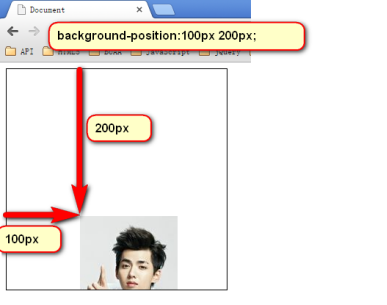
position就是“位置”的意思。background-position就是背景定位属性。
1 background-position:向右移动量 向下移动量;
定位属性可以是负数:
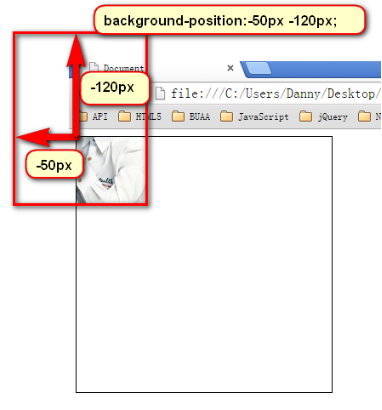
3.4.2 css精灵
原理:
<!DOCTYPE html PUBLIC "-//W3C//DTD XHTML 1.0 Transitional//EN" "http://www.w3.org/TR/xhtml1/DTD/xhtml1-transitional.dtd">
<html xmlns="http://www.w3.org/1999/xhtml" xml:lang="en">
<head>
    <meta http-equiv="Content-Type" content="text/html;charset=UTF-8">
    <title>Document</title>
    <style type="text/css">
        div{
            width: 150px;
            height: 60px;
            border: 1px solid #000;
            background-image: url(images/1.jpg);
            background-repeat: no-repeat;
            background-position: -100px -220px;
        }
    </style>
</head>
<body>
    <div></div>
</body>
</html>
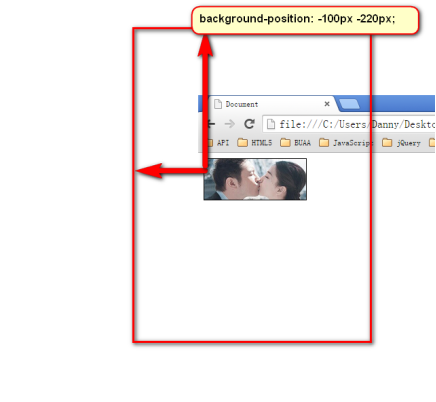
“css精灵”,英语css sprite,所以也叫做“css雪碧”技术。是一种CSS图像合并技术,该方法是将小图标和背景图像合并到一张图片上,然后利用css的背景定位来显示需要显示的图片部分。
css精灵有什么优点,就是减少了http请求。比如4张小图片,原本需要4个http请求。但是用了css精灵,小图片变为了一张图,http请求只有1个了。
淘宝网的精灵图:
<!DOCTYPE html PUBLIC "-//W3C//DTD XHTML 1.0 Transitional//EN" "http://www.w3.org/TR/xhtml1/DTD/xhtml1-transitional.dtd">
<html xmlns="http://www.w3.org/1999/xhtml" xml:lang="en">
<head>
    <meta http-equiv="Content-Type" content="text/html;charset=UTF-8">
    <title>Document</title>
    <style type="text/css">
        span{
            display: block;
            background-image: url(images/taobao.png);
            background-repeat: no-repeat;
            border: 1px solid #000;
        }
        .kuang{
            width: 19px;
            height: 20px;
            background-position: -110px -98px;
        }
        .tbzc{
            width: 78px;
            height: 15px;
            background-position: -146px -68px;
        }
        .mao{
            width: 32px;
            height: 11px;
            background-position: -146px -119px;
        }
    </style>
</head>
<body>
    <span class="kuang"></span>
    <span class="tbzc"></span>
    <span class="mao"></span>
</body>
</html>

用fireworks精确控制精灵:
<!DOCTYPE html PUBLIC "-//W3C//DTD XHTML 1.0 Transitional//EN" "http://www.w3.org/TR/xhtml1/DTD/xhtml1-transitional.dtd">
<html xmlns="http://www.w3.org/1999/xhtml" xml:lang="en">
<head>
    <meta http-equiv="Content-Type" content="text/html;charset=UTF-8">
    <title>Document</title>
    <style type="text/css">
        div{
            width: 110px;
            height: 140px;
            border: 1px solid #000;
            background-image: url(images/3.jpg);
            background-repeat: no-repeat;
            background-position: -161px -45px;
        }
    </style>
</head>
<body>
    <div></div>
</body>
</html>

3.4.3 用单词描述
1 background-position: 描述左右的词儿 描述上下的词儿;
描述上下的词儿: top 、center、bottom描述左右的词儿: left、 center、right
所以:
1 background-position: right bottom;
右下角:
左下角:
1 background-position: left bottom;
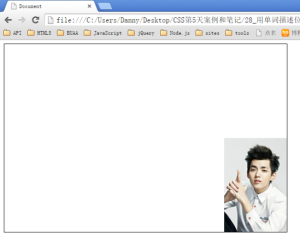
用图:
1) 大背景图居中
<!DOCTYPE html PUBLIC "-//W3C//DTD XHTML 1.0 Transitional//EN" "http://www.w3.org/TR/xhtml1/DTD/xhtml1-transitional.dtd">
<html xmlns="http://www.w3.org/1999/xhtml" xml:lang="en">
<head>
    <meta http-equiv="Content-Type" content="text/html;charset=UTF-8">
    <title>Document</title>
    <style type="text/css">
        body{
            background-image:url(images/anhei.jpg);
            background-repeat: no-repeat;
            background-position: center top;
        }
    </style>
</head>
<body>

</body>
</html>
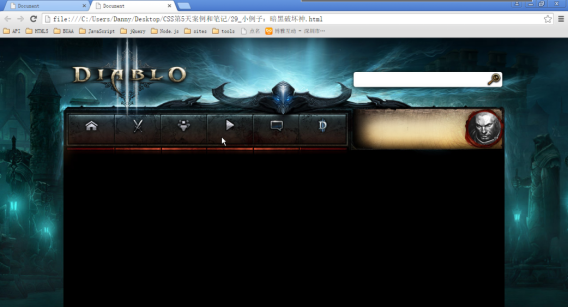
2) 通栏banner
<!DOCTYPE html PUBLIC "-//W3C//DTD XHTML 1.0 Transitional//EN" "http://www.w3.org/TR/xhtml1/DTD/xhtml1-transitional.dtd">
<html xmlns="http://www.w3.org/1999/xhtml" xml:lang="en">
<head>
    <meta http-equiv="Content-Type" content="text/html;charset=UTF-8">
    <title>Document</title>
    <style type="text/css">
        *{
            margin:;
            padding:;
        }
        div{
            height: 465px;
            background-image: url(images/banner.jpg);
            background-repeat: no-repeat;
            background-position: center top;
        }
    </style>
</head>
<body>
    <div></div>
</body>
</html>

3.5 background-attachment
背景是否固定。
<!DOCTYPE html PUBLIC "-//W3C//DTD XHTML 1.0 Transitional//EN" "http://www.w3.org/TR/xhtml1/DTD/xhtml1-transitional.dtd">
<html xmlns="http://www.w3.org/1999/xhtml" xml:lang="en">
<head>
    <meta http-equiv="Content-Type" content="text/html;charset=UTF-8">
    <title>Document</title>
    <style type="text/css">
        body{
            background-image: url(images/1.jpg);
            background-attachment: fixed;
        }
        .header{
            width: 980px;
            height: 100px;
            background-color: blue;
            margin: 100px auto;
        }
    </style>
</head>
<body>
    <div class="header"></div>
    <p>sdfsdf</p>
    <p>sdfssdfasdfdf</p>
    <p>sdfsdasdfadsff</p>
    <p>sdfsdf</p>
    <p>sdfsdf</p>
    <p>sdfsdf</p>
    <p>sdfssdfasdfdf</p>
    <p>sdfsdasdfadsff</p>
    <p>sdfsdf</p>
    <p>sdfsdf</p>
    <p>sdfsdf</p>
    <p>sdfssdfasdfdf</p>
    <p>sdfsdasdfadsff</p>
    <p>sdfsdf</p>
    <p>sdfsdf</p>
    <p>sdfsdf</p>
    <p>sdfssdfasdfdf</p>
    <p>sdfsdasdfadsff</p>
    <p>sdfsdf</p>
    <p>sdfsdf</p>
    <p>sdfsdf</p>
    <p>sdfssdfasdfdf</p>
    <p>sdfsdasdfadsff</p>
    <p>sdfsdf</p>
    <p>sdfsdf</p>
    <p>sdfsdf</p>
    <p>sdfssdfasdfdf</p>
    <p>sdfsdasdfadsff</p>
    <p>sdfsdf</p>
    <p>sdfsdf</p>
    <p>sdfsdf</p>
    <p>sdfssdfasdfdf</p>
    <p>sdfsdasdfadsff</p>
    <p>sdfsdf</p>
    <p>sdfsdf</p>
    <p>sdfsdf</p>
    <p>sdfssdfasdfdf</p>
    <p>sdfsdasdfadsff</p>
    <p>sdfsdf</p>
    <p>sdfsdf</p>
    <p>sdfsdf</p>
    <p>sdfssdfasdfdf</p>
    <p>sdfsdasdfadsff</p>
    <p>sdfsdf</p>
    <p>sdfsdf</p>
    <p>sdfsdf</p>
    <p>sdfssdfasdfdf</p>
    <p>sdfsdasdfadsff</p>
    <p>sdfsdf</p>
    <p>sdfsdf</p>
    <p>sdfsdf</p>
    <p>sdfssdfasdfdf</p>
    <p>sdfsdasdfadsff</p>
    <p>sdfsdf</p>
    <p>sdfsdf</p>
    <p>sdfsdf</p>
    <p>sdfssdfasdfdf</p>
    <p>sdfsdasdfadsff</p>
    <p>sdfsdf</p>
    <p>sdfsdf</p>
    <p>sdfsdf</p>
    <p>sdfssdfasdfdf</p>
    <p>sdfsdasdfadsff</p>
    <p>sdfsdf</p>
    <p>sdfsdf</p>
    <p>sdfsdf</p>
    <p>sdfssdfasdfdf</p>
    <p>sdfsdasdfadsff</p>
    <p>sdfsdf</p>
    <p>sdfsdf</p>
    <p>sdfsdf</p>
    <p>sdfssdfasdfdf</p>
    <p>sdfsdasdfadsff</p>
    <p>sdfsdf</p>
    <p>sdfsdf</p>
    <p>sdfsdf</p>
    <p>sdfssdfasdfdf</p>
    <p>sdfsdasdfadsff</p>
    <p>sdfsdf</p>
    <p>sdfsdf</p>
    <p>sdfsdf</p>
    <p>sdfssdfasdfdf</p>
    <p>sdfsdasdfadsff</p>
    <p>sdfsdf</p>
    <p>sdfsdf</p>
    <p>sdfsdf</p>
    <p>sdfssdfasdfdf</p>
    <p>sdfsdasdfadsff</p>
    <p>sdfsdf</p>
    <p>sdfsdf</p>
    <p>sdfsdf</p>
    <p>sdfssdfasdfdf</p>
    <p>sdfsdasdfadsff</p>
    <p>sdfsdf</p>
    <p>sdfsdf</p>
    <p>sdfsdf</p>
    <p>sdfssdfasdfdf</p>
    <p>sdfsdasdfadsff</p>
    <p>sdfsdf</p>
    <p>sdfsdf</p>
    <p>sdfsdf</p>
    <p>sdfssdfasdfdf</p>
    <p>sdfsdasdfadsff</p>
    <p>sdfsdf</p>
    <p>sdfsdf</p>
    <p>sdfsdf</p>
    <p>sdfssdfasdfdf</p>
    <p>sdfsdasdfadsff</p>
    <p>sdfsdf</p>
    <p>sdfsdf</p>
    <p>sdfsdf</p>
    <p>sdfssdfasdfdf</p>
    <p>sdfsdasdfadsff</p>
    <p>sdfsdf</p>
    <p>sdfsdf</p>
    <p>sdfsdf</p>
    <p>sdfssdfasdfdf</p>
    <p>sdfsdasdfadsff</p>
    <p>sdfsdf</p>
    <p>sdfsdf</p>
    <p>sdfsdf</p>
    <p>sdfssdfasdfdf</p>
    <p>sdfsdasdfadsff</p>
    <p>sdfsdf</p>
    <p>sdfsdf</p>
    <p>sdfsdf</p>
    <p>sdfssdfasdfdf</p>
    <p>sdfsdasdfadsff</p>
    <p>sdfsdf</p>
    <p>sdfsdf</p>
    <p>sdfsdf</p>
    <p>sdfssdfasdfdf</p>
    <p>sdfsdasdfadsff</p>
    <p>sdfsdf</p>
    <p>sdfsdf</p>
    <p>sdfsdf</p>
    <p>sdfssdfasdfdf</p>
    <p>sdfsdasdfadsff</p>
    <p>sdfsdf</p>
    <p>sdfsdf</p>
    <p>sdfsdf</p>
    <p>sdfssdfasdfdf</p>
    <p>sdfsdasdfadsff</p>
    <p>sdfsdf</p>
    <p>sdfsdf</p>
    <p>sdfsdf</p>
    <p>sdfssdfasdfdf</p>
    <p>sdfsdasdfadsff</p>
    <p>sdfsdf</p>
    <p>sdfsdf</p>
    <p>sdfsdf</p>
    <p>sdfssdfasdfdf</p>
    <p>sdfsdasdfadsff</p>
    <p>sdfsdf</p>
    <p>sdfsdf</p>
</body>
</html>
1 background-attachment:fixed;
背景就会被固定住,不会被滚动条滚走。
3.6 background综合属性
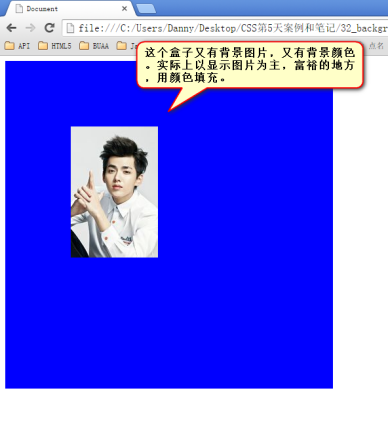
background属性和border一样,是一个综合属性:
<!DOCTYPE html PUBLIC "-//W3C//DTD XHTML 1.0 Transitional//EN" "http://www.w3.org/TR/xhtml1/DTD/xhtml1-transitional.dtd">
<html xmlns="http://www.w3.org/1999/xhtml" xml:lang="en">
<head>
    <meta http-equiv="Content-Type" content="text/html;charset=UTF-8">
    <title>Document</title>
    <style type="text/css">
        div{
            width: 500px;
            height: 500px;
            background: blue url(images/wuyifan.jpg) no-repeat 100px 100px;
        }
        span{
            display: block;
            width: 59px;
            height: 60px;
            background: url(images/taobao.png) no-repeat 0 -133px;
        }
    </style>
</head>
<body>
    <div></div>
    <span></span>
</body>
</html>
1 background:red url(1.jpg) no-repeat 100px 100px fixed;
2 background-image:url(1.jpg);
3 background-repeat:no-repeat;
4 background-position:100px 100px;
5 background-attachment:fixed;
等价于:
可以任意省略部分:
1 background: red;
1 background: blue url(images/wuyifan.jpg) no-repeat 100px 100px;
精灵的使用:
1 background: url(images/taobao.png) no-repeat 0 -133px;
预告一下,CSS3课程中,将学习更多background属性:
background-origin、background-clip、background-size(在CSS2.1背景图片是不能调整尺寸,IE9开始兼容)、
多背景。
前端技术之_CSS详解第五天的更多相关文章
- 前端技术之_CSS详解第一天
前端技术之_CSS详解第一天 一html部分 略.... 二.列表 列表有3种 2.1 无序列表 无序列表,用来表示一个列表的语义,并且每个项目和每个项目之间,是不分先后的. ul就是英语unorde ...
- 前端技术之_CSS详解第三天
前端技术之_CSS详解第三天 二.权重问题深入 2.1 同一个标签,携带了多个类名,有冲突: <!DOCTYPE html PUBLIC "-//W3C//DTD XHTML 1.0 ...
- 前端技术之_CSS详解第四天
前端技术之_CSS详解第四天 一.第三天的小总结 盒模型box model,什么是盒子? 所有的标签都是盒子.无论是div.span.a都是盒子.图片.表单元素一律看做文本. 盒模型有哪些组成: wi ...
- 前端技术之_CSS详解第六天--完结
前端技术之_CSS详解第六天--完结 一.复习第五天的知识 a标签的伪类4个: a:link 没有被点击过的链接 a:visited 访问过的链接 a:hover 悬停 a:active 按下鼠标不松 ...
- 前端技术之_CSS详解第二天
前端技术之_CSS详解第二天 1.css基础选择器 html负责结构,css负责样式,js负责行为. css写在head标签里面,容器style标签. 先写选择器,然后写大括号,大括号里面是样式. & ...
- spring事务详解(五)总结提高
系列目录 spring事务详解(一)初探事务 spring事务详解(二)简单样例 spring事务详解(三)源码详解 spring事务详解(四)测试验证 spring事务详解(五)总结提高 一.概念 ...
- Keepalived详解(五):Keepalived集群中MASTER和BACKUP角色选举策略【转】
一.Keepalived集群中MASTER和BACKUP角色选举策略 在keepalived集群中,其实并没有严格意义上的主.备节点,虽然可以在keepalived配置文件中设置state选项为MAS ...
- MySql详解(五)
MySql详解(五) MySql库的管理 一.创建库 create database [if not exists] 库名[ character set 字符集名]; 二.修改库 alter data ...
- 开源项目MultiChoiceAdapter详解(五)——可扩展的MultiChoiceBaseAdapter
上次写到了开源项目MultiChoiceAdapter详解(四)——MultiChoiceBaseAdapter的使用,其实我们仍旧可以不使用ActionMode的,所以这里就写一个自己扩展的方法. ...
随机推荐
- Cocos2D iOS之旅:如何写一个敲地鼠游戏(一):高清屏显示和UIKit
大熊猫猪·侯佩原创或翻译作品.欢迎转载,转载请注明出处. 如果觉得写的不好请告诉我,如果觉得不错请多多支持点赞.谢谢! hopy ;) 免责申明:本博客提供的所有翻译文章原稿均来自互联网,仅供学习交流 ...
- 并发编程之ThreadLocal、Volatile、synchronized、Atomic关键字扫盲
前言 对于ThreadLocal.Volatile.synchronized.Atomic这四个关键字,我想一提及到大家肯定都想到的是解决在多线程并发环境下资源的共享问题,但是要细说每一个的特点.区别 ...
- findViewById中NullPointerException的错误
最近在弄一个对话框的登录时,发现一个总是报NullPointerException的错误,折腾了两小时,一直没有发现细小的区别..先上图,一边说明原因 首先是 Activity类中定义的findVie ...
- 《java入门第一季》之根据小案例体会泛型
泛型在哪些地方使用呢? * 看API,如果类,接口,抽象类后面跟的有<E>就说要使用泛型.一般来说就是在集合中使用. 下面根据案例,加深体会泛型的作用. 案例一: import java. ...
- 详解ebs接口之客户配置文件导入(二)
------------------------------------ -- 1a. Setup the Org_id ------------------------------------ ex ...
- AngularJS进阶(三十六)AngularJS项目开发技巧之利用Service&Promise&Resolve解决图片预加载问题(后记)
AngularJS项目开发技巧之利用Service&Promise&Resolve解决图片预加载问题(后记) 前言 在"AngularJS项目开发技巧之图片预加载" ...
- 获取request参数的工具类
package cn.edu.hactcm.util; import java.io.File; import java.io.FileOutputStream; import java.io.IOE ...
- XBMC源代码分析 2:Addons(皮肤Skin)
前文已经对XBMC源代码的整体架构进行了分析: XBMC源代码分析 1:整体结构以及编译方法 从这篇文章开始,就要对XBMC源代码进行具体分析了.首先先不分析其C++代码,分析一下和其皮肤相关的代码. ...
- android 开源图表库MPChart最简单使用方法示例教程Demo--折线图 柱状图
转载请注明本文出处:http://blog.csdn.net/wingichoy/article/details/50428246 MPChart是android上一款强大的图表开源库,他可以轻松的绘 ...
- 【一天一道LeetCode】#24. Swap Nodes in Pairs
一天一道LeetCode系列 (一)题目 Given a linked list, swap every two adjacent nodes and return its head. For exa ...