
第3章 springboot接口返回json 3-2 Jackson的基本演绎法
    @JsonIgnore

    private String password;
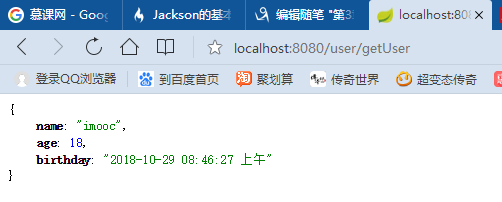
    @JsonFormat(pattern="yyyy-MM-dd hh:mm:ss a",locale="zh", timezone="GMT+8")

    private Date birthday;

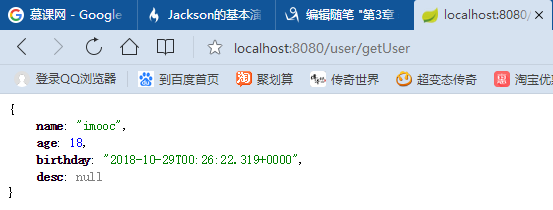
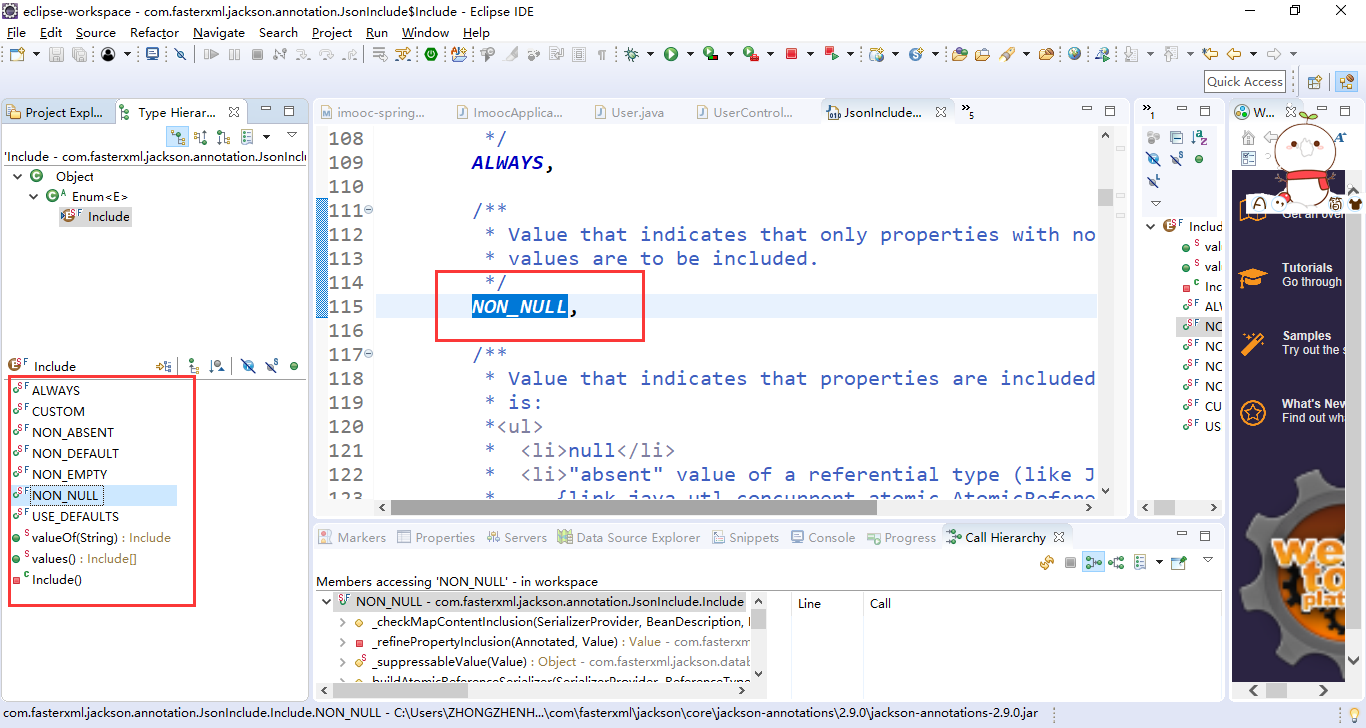
    @JsonInclude(Include.NON_NULL)

    private String desc;
/imooc-springboot-starter/src/main/java/com/imooc/controller/UserController.java
package com.imooc.controller;

import java.util.Date;

//import org.springframework.stereotype.Controller;

import org.springframework.web.bind.annotation.RequestMapping;

//import org.springframework.web.bind.annotation.ResponseBody;

import org.springframework.web.bind.annotation.RestController;

import com.imooc.pojo.LeeJSONResult;

import com.imooc.pojo.User;

//@Controller

@RestController // @RestControler = @Controller + @ResponseBody

@RequestMapping("/user")

public class UserController {

    //@RequestMapping("/hello")

    @RequestMapping("/getUser")

    //@ResponseBody

    public User hello() {

      //public User getUser() {

        User u = new User();

        u.setName("imooc");

        u.setAge(18);

        u.setBirthday(new Date());

        u.setPassword("imooc");

        //u.setDesc(null);

        u.setDesc("hello imooc~~");

        return u;

    }

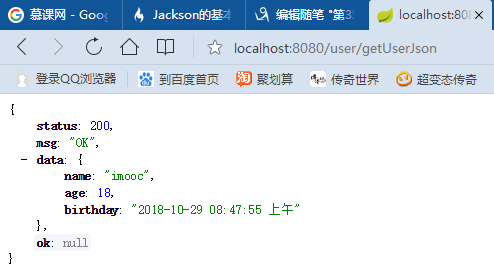
    @RequestMapping("/getUserJson")

    //@ResponseBody

    public LeeJSONResult hello1() {

      //public LeeJsonResult getUserJson() {

        User u = new User();

        u.setName("imooc");

        u.setAge(18);

        u.setBirthday(new Date());

        u.setPassword("imooc");

        //u.setDesc(null);

        u.setDesc("hello imooc~~");

        return LeeJSONResult.ok(u);

    }

}
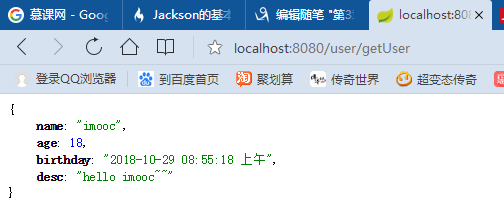
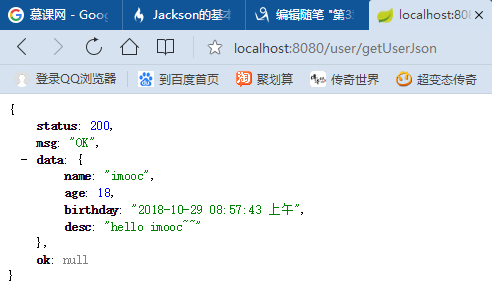
/imooc-springboot-starter/src/main/java/com/imooc/pojo/User.java
package com.imooc.pojo;

import java.util.Date;

import com.fasterxml.jackson.annotation.JsonFormat;

import com.fasterxml.jackson.annotation.JsonIgnore;

import com.fasterxml.jackson.annotation.JsonIgnoreProperties;

import com.fasterxml.jackson.annotation.JsonInclude;

import com.fasterxml.jackson.annotation.JsonInclude.Include;

@JsonIgnoreProperties

public class User {

    private String name;

    @JsonIgnore

    private String password;

    private Integer age;

    @JsonFormat(pattern="yyyy-MM-dd hh:mm:ss a",locale="zh", timezone="GMT+8")

    private Date birthday;

    @JsonInclude(Include.NON_NULL)

    private String desc;

    public String getName() {

        return name;

    }

    public void setName(String name) {

        this.name = name;

    }

    public Integer getAge() {

        return age;

    }

    public void setAge(Integer age) {

        this.age = age;

    }

    public Date getBirthday() {

        return birthday;

    }

    public void setBirthday(Date birthday) {

        this.birthday = birthday;

    }

    public String getDesc() {

        return desc;

    }

    public void setDesc(String desc) {

        this.desc = desc;

    }

    public String getPassword() {

        return password;

    }

    public void setPassword(String password) {

        this.password = password;

    }

}
第3章 springboot接口返回json 3-2 Jackson的基本演绎法的更多相关文章
- 第3章 springboot接口返回json 3-1 SpringBoot构造并返回一个json对象
数据的使用主要还是以JSON为主,我们不会去使用XML. 这个时候我们先不使用@RestController,我们使用之前SpringMVC的那种方式,就是@Controller. @Respons ...
- C#调用接口返回json数据中含有双引号 或其他非法字符的解决办法
这几天,调用别人接口返回json数据含有特殊符号(双引号),当转换成json对象总是报错, json字符格式如下 { "BOXINFO":[ { ", "ITE ...
- java通过url调用远程接口返回json数据
java通过url调用远程接口返回json数据,有用户名和密码验证, 转自 https://blog.csdn.net/wanglong1990421/article/details/78815856 ...
- 上手spring boot项目(四)之springboot如何返回json数据
在springboot整合thymeleaf中,经常会在HTML页面中接收来自服务器的json数据,然后处理json数据并在页面上渲染.那么如何在服务器中返回json类型的数据呢? 1.使用@Resp ...
- 接口返回json
use Mojolicious::Lite; use JSON qw/encode_json decode_json/; # /foo?user=sri get '/api' => sub { ...
- 【Golang 接口自动化04】 解析接口返回JSON串
前言 上一次我们一起学习了如何解析接口返回的XML数据,这一次我们一起来学习JSON的解析方法. JSON(Javascript Object Notation)是一种轻量级的数据交换语言,以文字为基 ...
- 2.SpringBoot之返回json数据
一.创建一个springBoot个项目 操作详情参考:1.SpringBoo之Helloword 快速搭建一个web项目 二.编写实体类 /** * Created by CR7 on 2017-8- ...
- SpringBoot之返回json数据
一.创建一个springBoot个项目 二.编写实体类 /** * 返回Json数据实体类 */ public class User { private int id; private String ...
- SpringBoot 02_返回json数据
在SpringBoot 01_HelloWorld的基础上来返回json的数据,现在前后端分离的情况下多数都是通过Json来进行交互,下面就来利用SpringBoot返回Json格式的数据. 1:新建 ...
随机推荐
- pythoncook 随记
第一章 数据结构与算法 1 赋值多个变量 *2 collections deque 构造固定大小队列,插入删除比list快3 查找最大和最小元素的N个元素 heapq nlargest() nsmal ...
- The tag handler class for "c:forEach" (org.apache.taglibs.standard.tag.rt.core.ForEachTag) was not found on the Java Build Path
.tag出现如上错误 <%@ page language="java" contentType="text/html; charset=GB18030" ...
- C#下利用正则表达式实现字符串搜索功能的方法(转)
关键字:正则表达式.元字符.字符串.匹配: 1.正则表达式简介:正则表达式提供了功能强大.灵活而又高效的方法来处:.NET框架正则表达式并入了其他正则表达式实现的: 2.字符串搜索:正则表达式语言由两 ...
- Spring_总结_01_Spring概述
一.前言 从今天开始,重新总结一下Spring的相关知识,主要是结合<Spring实战(第四版)>和 <JavaEE开发的颠覆者——SpringBoot实战>这两本书以及官方文 ...
- UVALive 3635 Pie(二分法)
简单的二分法应用,循环1000次精度就满足要求了. #include<iostream> #include<cstdio> #include<cstdlib> #i ...
- redis3.2.11 安装
wget http://download.redis.io/releases/redis-3.2.11.tar.gz [root@hdp01 src]# .tar.gz -C /opt/ [root@ ...
- DataTable:数据库到程序的桥梁
DataTable:是一个临时保存数据的网格虚拟表(表示内存中数据的一个表.).DataTable是ADO dot net 库中的核心对象,它无须代码就可以简单的绑定数据库,它具有微软风格的用户界面. ...
- Codeforces 808F. Card Game
题目大意 一个物品有三个属性 : 价值,键值,等级. 你不能选取等级高于\(level\)的物品,键值之和为质数的两个数字不共存. 问最低的等级使得可以选出价值之和超过\(k\)的物品. \(n\le ...
- LoadRunner常见错误代码解决方案
一.LoadRunner26377错误 通常不是长度的问题,如果长度有问题就都出错了.应该是服务器返回的数据问题,导致没有找到这个参数. 26377错误的成因很多,总结最直接的结果就是No match ...
- VC 6.0下载 VC 6.0英文版下载 Visual C++ 6.0 英文企业版 集成SP6完美版(最新更新地址,百度网盘)
下载地址1:Visual.C++.6.EN 下载地址2:Visual.C++.6.EN 更新下载地址可用(百度网盘)Visual.C++.6.EN 转载请注明出处,有技术问题,欢迎互相交流,或者留言.