
在xcode中设置include和lib路径
最近刚刚开始玩xcode,对着教程学编程时很少要动到项目设置,但昨天晚上想使用freetype验证上篇博文的问题,就需要设置include和lib路径了。
首先我下了freetype的源码,并在本地编译安装:
$ cd freetype-2.6

$ ./configuration

$ make check

$ make install
很顺利。
直接新建一个命令行的project,贴入代码 - 编译,就会得到如下编译错误:

找不到头文件,应该是没有把ft2build.h所在的路径添加到include path中来,找到代码的Build Settings,找到Header Search Paths,把freetype相关头文件所在路径加进去,如下:
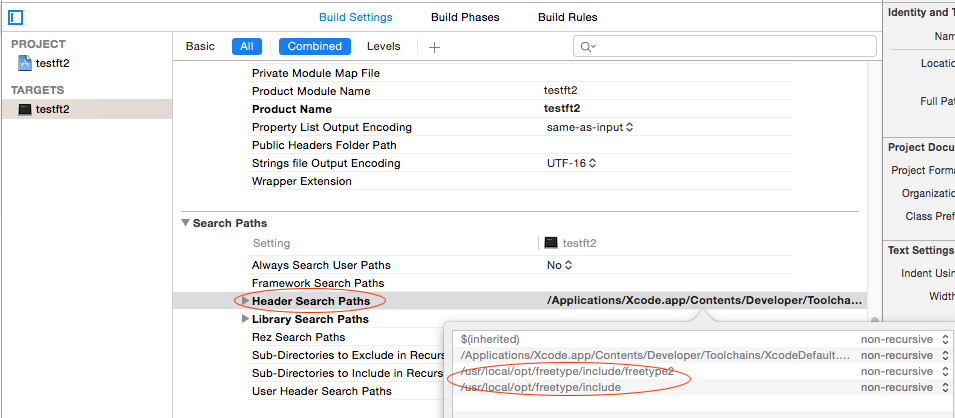
很显然下面那行Library Search Paths也是需要的:
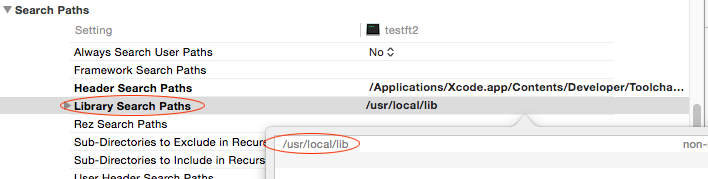
再次编译,发现还是有链接错误:
Undefined symbols for architecture x86_64:

  "_FT_Init_FreeType", referenced from:

      _main in main.o

  "_FT_New_Face", referenced from:

      _main in main.o

  "_FT_Set_Pixel_Sizes", referenced from:

      _main in main.o

ld: symbol(s) not found for architecture x86_64

clang: error: linker command failed with exit code  (use -v to see invocation)
一定是没有指定freetype的lib文件。这个设置和VisualStudio下的不太一样,需要直接设置链接参数。我去/usr/local/lib下找到多个和freetype相关的文件:
libfreetype..dylib

libfreetype.a

libfreetype.dylib

libfreetype.la
经过反复试验,应该填-lfreetype:
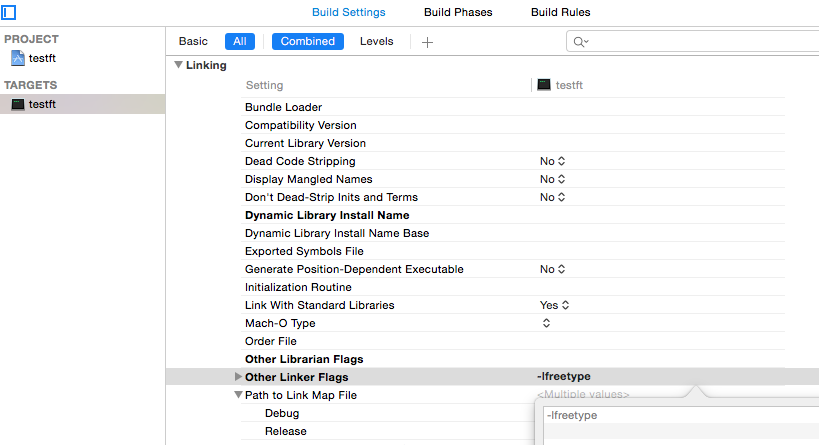
写几行使用freetype的代码,终于可以编过了!
#import <Foundation/Foundation.h>

#import <ft2build.h>

#include FT_FREETYPE_H

int main(int argc, const char * argv[]) {

    @autoreleasepool {

        FT_Library  library;

        FT_Face     face;

        int error = ;

        if (FT_Init_FreeType(&library)){

            printf("1\n");

            return ; /* leave it uninitialized */

        }

        error = FT_New_Face( library, "/System/Library/Fonts/Apple Color Emoji.ttf", , &face );

        if(error){

            printf("2:error=%d\n", error);

            return ;

        }

        error = FT_Set_Pixel_Sizes(face, , );

        if (error) {

            printf("3:error=%d\n", error);

        }

        // insert code here...

        NSLog(@"Hello, World!");

    }

    return ;

}
在xcode中设置include和lib路径的更多相关文章
- XCode中设置字体大小
XCode中设置字体大小 1)打开Preferences,快捷键是“Command + ,”(注意,是三个键,按住command键,然后再快速地按“+”和“,”两个键即可) 2)选择“Fonts &a ...
- 如何找出Xcode中不同版本Swift的路径
我们知道Xcode中可能包含不知一个Swift的版本,那么我们如何找到它们对应的路径呢? 熟悉unix shell命令的童鞋都知道有一个find指令,在我们已知Xcode路径时,我们可以在其中找到Sw ...
- (转)Xcode 中设置部分文件ARC支持
ARC是什么 ARC是iOS 5推出的新功能,全称叫 ARC(Automatic Reference Counting).简单地说,就是代码中自动加入了retain/release,原先需要手动添加的 ...
- Xcode 中设置部分文件ARC支持
ARC是什么 ARC是iOS 5推出的新功能,全称叫 ARC(Automatic Reference Counting).简单地说,就是代码中自动加入了retain/release,原先需要手动添加的 ...
- gdal库中设置prj4库全路径的用法
作者:朱金灿 来源:http://blog.csdn.net/clever101 gdal库实现投影转换之类的功能实际上底层都是调用prj4库的功能.如果gdal使用非静态的方式集成prj4库,实际上 ...
- ios开发xcode中设置代码块
在开发中有很多重复的代码,很多开发者把常用的代码做成代码块提高开发效率. 在xcode里选中代码块的时候总是很不容易,点击选中的代码(文字),不要移动和松开鼠标左键,当竖线变成像拉长了的x(我也不知道 ...
- 删除xcode中的描述文件的路径
打开Finder commend + shift +g 进入文件夹 : ~/Library/MobileDevice/Provisioning Profiles 删除即可
- Xcode中设置按钮在十分钟之内禁用
btn.enabled=NO;` NSTimer * notificationTimer = [NSTimer scheduledTimerWithTimeInterval:10*60.0 targe ...
- Xcode 常用设置
1.main 文件注释 1)main 文件注释修改路径 /Applications/Xcode.app/Contents/Developer/Library/Xcode/Templates/Proje ...
随机推荐
- Tstrings类简单介绍及实例
用TStrings保存文件;var S: TStrings;begin S := TStringList.Create(); { ... } S.SaveToFile('config.txt' ...
- C#子线程执行完后通知主线程
其实这个比较简单,子线程怎么通知主线程,就是让子线程做完了自己的事儿就去干主线程的转回去干主线程的事儿. 那么怎么让子线程去做主线程的事儿呢,我们只需要把主线程的方法传递给子线程就行了,那么传递方法就 ...
- 短连接时出现connection reset问题的原因
网上摘取的感觉有用的文章,保存下来,让大家学习交流! 在使用HttpClient调用后台resetful服务时,“Connection reset”是一个比较常见的问题,有同学跟我私信说被这个问题困扰 ...
- HasnMap的一种遍历方式:Map.Entry 和 Map.entrySet()
1.Map.Entry 和 Map.entrySet()分别是什么? Map.entrySet():根据名字便可知道,这是一个集合,是一个映射项的set. Map.Entry<k,v>: ...
- Smooks:xml-to-java
引言: Smooks是一个开源的Java框架,用于处理“数据事件流”.它常常被认为是一个转换框架并以此被用于好几个产品和项目中,包括JBoss ESB(以及其它ESB).然而究其核心,Smooks未提 ...
- poj2001Trie树模板
#include<iostream> #include<cstdio> #include<cstdlib> #include<cstring> #inc ...
- 1068 Find More Coins (30)(30 分)
Eva loves to collect coins from all over the universe, including some other planets like Mars. One d ...
- LOJ2719 「NOI2018」冒泡排序
「NOI2018」冒泡排序 题目描述 最近,小S 对冒泡排序产生了浓厚的兴趣.为了问题简单,小 S 只研究对 1 到n 的排列的冒泡排序. 下面是对冒泡排序的算法描述. 输入:一个长度为n 的排列p[ ...
- JS上传图片-通过FileReader获取图片的base64
下面文章,我想要的是: FileReader这个对象,可以借助FileReader来获取上传图片的base64,就可以在客户端显示该图片了.同时,还可以把该图片的base64发送到服务端,保存起来. ...
- [IBM]掌握Ajax,Ajax中的高级请求和响应
掌握 Ajax, Ajax 中的高级请求和响应 http://www.ibm.com/developerworks/cn/xml/wa-ajaxintro1.html http://www.ibm.c ...