
【阿圆实验】Alertmanager HA 高可用配置
注意:没有使用supervisor进程管理器的,只参考配置,忽略和supervisor相关命令。并且alertmanager的版本不得低于0.15.2,低版本alert不支持集群配置。
一.alertmanager高可用
这里使用的是supervisor配置,也可以把配置集合成命令行方式,在服务器运行配置。记得加&,后台运行。
1.配置alertmanager集群
1.1 修改各节点alertmanager.yml
cd /data/yy-monitor-server/etc
vim alertmanager.yml
# The root route on which each incoming alert enters.route: routes: group_wait: 15s group_interval: 15s |
1.2 修改启动文件
根目录下运行 vim /etc/supervisord.d/yy-monitor-server.ini
[program:alertmanager]priority = 3user = yycommand = /usr/bin/alertmanager --cluster.listen-address="10.22.0.1002:12001" # 当前节点ip和自定义的端口号 --log.level=debug |
其他节点配置:
[program:alertmanager]priority = 3user = yycommand = /usr/bin/alertmanager --cluster.listen-address="10.22.0.1001:12002" # 当前节点ip和自定义的端口号: --cluster.peer=10.22.0.1002:12001 # 选择一个节点加入集群 --log.level=debug |
重启配置,否则不能生效:
systemctl restart supervisord
supervisorctl restart alertmanager
2.查看日志
cd /data/yy-monitor-server/log
tail -f alermanager.log
level=debug ts=2018-08-28T08:58:44.75092899Z caller=cluster.go:287 component=cluster memberlist="2018/08/28 16:58:44 [DEBUG] memberlist: Initiating push/pull sync with: 10.22.0.1001:12002\n"level=debug ts=2018-08-28T08:59:21.675338872Z caller=cluster.go:287 component=cluster memberlist="2018/08/28 16:59:21 [DEBUG] memberlist: Stream connection from=10.22.0.1001:42736\n"level=debug ts=2018-08-28T08:59:44.754235616Z caller=cluster.go:287 component=cluster memberlist="2018/08/28 16:59:44 [DEBUG] memberlist: Initiating push/pull sync with: 10.22.0.1000:12003\n" |
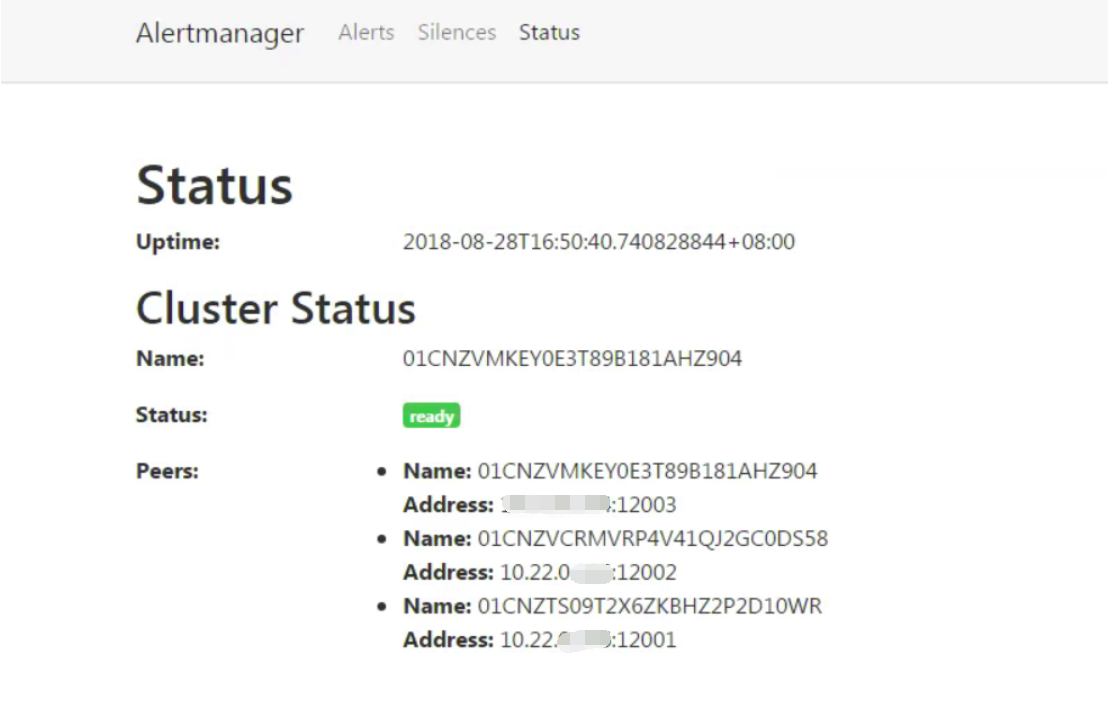
启动完成后访问任意Alertmanager节点http://localhost:9093/#/status,可以查看当前Alertmanager集群的状态。
3.修改各节点prometheus.yml
cd /data/yy-monitor-server/etc
vi prometheus.yml
global: scrape_interval: 5s scrape_timeout: 5s evaluation_interval: 5s # The labels to add to any time series or alerts when communicating with # external systems (federation, remote storage, Alertmanager). external_labels: dc: europe1# Alertmanager configurationalerting: alert_relabel_configs: - source_labels: [dc] regex: (.+)\d+ target_label: dc alertmanagers: - static_configs: - targets:: ['10.22.0.1000:9093','10.22.0.1001:9093', '10.22.0.1002:9093'] |
global: scrape_interval: 5s scrape_timeout: 5s evaluation_interval: 5s# Note that this is different only by the trailing number. external_labels: dc: europe2# Alertmanager configurationalerting: alert_relabel_configs: - source_labels: [dc] regex: (.+)\d+ target_label: dc alertmanagers: - static_configs: - targets:: ['10.22.0.1000:9093','10.22.0.1001:9093', '10.22.0.1002:9093'] |
global: scrape_interval: 5s scrape_timeout: 5s evaluation_interval: 5s external_labels: dc: europe3# Alertmanager configurationalerting: alert_relabel_configs: - source_labels: [dc] regex: (.+)\d+ target_label: dc alertmanagers: - static_configs: - targets:: ['10.22.0.1000:9093','10.22.0.1001:9093', '10.22.0.1002:9093'] |
2.重启prometheus:
# supervisorctl restart prometheusprometheus: stoppedprometheus: started |
二. Alertmanager代理配置
1.nginx配置
选取一台主机做配置(如:10.22.0.1002)
cd /data/yy-monitor-server/etc
vi nginx.conf
# Alertmanager upstream alert{ server 10.22.0.1002:9093; server 10.22.0.1001:9093; server 10.22.0.1000:9093; } server{ # alertmanager location /alertmanager/ { proxy_pass http://alert/; } } |
重启nginx
# supervisorctl restart nginxnginx: stoppednginx: started |
2.验证配置
停止其中两台服务:
1002 # supervisorctl stop alertmanageralertmanager: stopped1001 # supervisorctl stop alertmanageralertmanager: stopped |
访问ui正常,配置代理成功。
附录:https://github.com/prometheus/alertmanager#high-availability
To create a highly available cluster of the Alertmanager the instances need to be configured to communicate with each other. This is configured using the --cluster.* flags.
--cluster.listen-addressstring: cluster listen address (default "0.0.0.0:9094")--cluster.advertise-addressstring: cluster advertise address--cluster.peervalue: initial peers (repeat flag for each additional peer)--cluster.peer-timeoutvalue: peer timeout period (default "15s")--cluster.gossip-intervalvalue: cluster message propagation speed (default "200ms")--cluster.pushpull-intervalvalue: lower values will increase convergence speeds at expense of bandwidth (default "1m0s")--cluster.settle-timeoutvalue: maximum time to wait for cluster connections to settle before evaluating notifications.--cluster.tcp-timeoutvalue: timeout value for tcp connections, reads and writes (default "10s")--cluster.probe-timeoutvalue: time to wait for ack before marking node unhealthy (default "500ms")--cluster.probe-intervalvalue: interval between random node probes (default "1s")
The chosen port in the cluster.listen-address flag is the port that needs to be specified in the cluster.peer flag of the other peers.
To start a cluster of three peers on your local machine use goreman and the Procfile within this repository.
goreman start
To point your Prometheus 1.4, or later, instance to multiple Alertmanagers, configure them in your prometheus.yml configuration file, for example:
alerting:

  alertmanagers:

  - static_configs:

    - targets:

      - alertmanager1:9093

      - alertmanager2:9093

      - alertmanager3:9093
Important: Do not load balance traffic between Prometheus and its Alertmanagers, but instead point Prometheus to a list of all Alertmanagers. The Alertmanager implementation expects all alerts to be sent to all Alertmanagers to ensure high availability.
【阿圆实验】Alertmanager HA 高可用配置的更多相关文章
- HA高可用配置
HA 即 (high available)高可用,又被叫做双机热备,用于关键性业务. 简单理解就是,有两台机器A和B,正常是A提供服务,B待命闲置,当A宕机或服务宕掉,会切换至B机器继续提供服务. 下 ...
- hadoop2.5.0 HA高可用配置
hadoop2.5.0 HA配置 1.修改hadoop中的配置文件 进入/usr/local/src/hadoop-2.5.0-cdh5.3.6/etc/hadoop目录,修改hadoop-env.s ...
- CentOS7+Hadoop2.7.2(HA高可用+Federation联邦)+Hive1.2.1+Spark2.1.0 完全分布式集群安装
1 2 2.1 2.2 2.3 2.4 2.5 2.6 2.7 2.8 2.9 2.9.1 2.9.2 2.9.2.1 2.9.2.2 2.9.3 2.9.3.1 2.9.3.2 2.9.3.3 2. ...
- 【阿圆实验】Grafana HA高可用方案
一.实现Grafana高可用 1.Grafana实现高可用性有两步: >>使用共享数据库存储仪表板,用户和其他持久数据>>决定如何存储会话数据. 2.Grafana高可用部署图 ...
- springcloud-07-eureka HA的高可用配置
单机版的eureka, 运行时间稍长, 就会在管理界面出现红色的警告, 为了消除这个警告, 可以使用eureka的高可用配置: 只需要写一个工程配置不同的配置文件, 然后启动多实例即可: 请参照单机版 ...
- Hadoop HA高可用集群搭建(Hadoop+Zookeeper+HBase)
声明:作者原创,转载注明出处. 作者:帅气陈吃苹果 一.服务器环境 主机名 IP 用户名 密码 安装目录 master188 192.168.29.188 hadoop hadoop /home/ha ...
- 大数据技术之HA 高可用
HDFS HA高可用 1.1 HA概述 1)所谓HA(High Available),即高可用(7*24小时不中断服务). 2)实现高可用最关键的策略是消除单点故障.HA严格来说应该分成各个组件的HA ...
- ResourceManager高可用配置
ResourceManager高可用配置 1. yarn-site.xml配置 <property> <name>yarn.resourcemanager.cluster-id ...
- HA高可用的搭建
HA 即 (high available)高可用,又被叫做双机热备,用于关键性业务. 简单理解就是,有两台机器A和B,正常是A提供服务,B待命闲置,当A宕机或服务宕掉,会切换至B机器继续提供服务.常用 ...
随机推荐
- linux find 实例 ***
使用选项:find [路径] <表达式> [操作] 1.name选项,按名称查找查找当前目录下的manage.py 文件:find . -name ‘manage.py’ 2.atime/ ...
- java代码,用continue写出偶数
总结:不满足条件时,输出当前==== package com.b; import java.util.Scanner; //用continue写出偶数的代码是: public class twe { ...
- js生成邀请码(1)
<!DOCTYPE html PUBLIC "-//W3C//DTD HTML 4.01//EN" "http://www.w3.org/TR/html4/stri ...
- Striker-一款功能较多的web渗透工具
项目地址:https://github.com/UltimateHackers/Striker 首先下载项目,并打开 ┌─[root@sch01ar]─[/sch01ar] └──╼ #git clo ...
- PowerDesigner生成sql脚本时去掉双引号并把字段名设为大写
Database菜单—Edit Current RDBMS 找到Script---sql—Format--- CaseSensitivityUsingQuote,把它设置为NO 这样再用sql pre ...
- 2016.3.7 Word2007编号设置
1.点击下图红圈出的下拉箭头 2.点击下图新建样式按钮 3.在弹出窗口中,设置名称AAA(方便稍后的查找修改),样式类型改为列表,点击编号 4.在弹出的窗口中以此设置各级标题的编号样式,保存后设置成功 ...
- sql 的积累
sql的积累 By:山高似水深 原创 转载注明出处 .REVERSE() 反转 例如: Hive 可用 2016年12月3日11:31:59 2.instr(str,'.')位置 结果:得出在str中 ...
- java之类的封装
类和对象成员变量,成员函数特殊的成员变量和成员函数 函数重载 构造函数 静态变量 静态函数面向对象:封装 继承 多态封装 Encapsulation为什么需要封装?外界无法直接操作对象的具体的属性(安 ...
- 给Activity切换过程添加动画效果
首先,在资源文件中定义一些动画效果 例如: <scale android:duration="@android:integer/config_mediumAnimTime" ...
- cocos打包到ios与android上音频推荐
首先贴一张官方对于ios与android上音频格式的推荐: 这里只给出了推荐格式,一般我们在实际运用中会使用如下方式: 一.IOS与安卓各一套:音乐:都使用MP3 音效:ios用caf Andr ...