
ABP微服务系列学习-搭建自己的微服务结构(四)
上篇我们实现了认证服务和网关服务,基本我们的基础服务已经完成了,接下来我们才需要做服务的数据迁移。
这里我们需要使用EF的CodeFirst模式。通过DotnetCli的命令去操作:
dotnet ef migrations add init
修改项目
编辑我们每个服务的EfCore项目的项目文件,添加Microsoft.EntityFrameworkCore.Tools的依赖,也可以通过VS的nuget包管理器安装。只有添加了这个依赖,我们才能使用dotnet ef命令。
在项目文件中添加如下内容:
<ItemGroup>

  <PackageReference Include="Microsoft.EntityFrameworkCore.Tools" Version="7.0.1">

    <IncludeAssets>runtime; build; native; contentfiles; analyzers; buildtransitive</IncludeAssets>

  </PackageReference>

</ItemGroup>
只添加这个依赖还不行,若直接运行dotnet ef命令的话,会提示我们需要实现一个DbContextFactory类。
所以我们在每个服务的EFCore项目中都添加一个DbContextFactory类,类结构如下,每个服务对应修改一下名字即可
using System.IO;

using JetBrains.Annotations;

using Microsoft.EntityFrameworkCore;

using Microsoft.EntityFrameworkCore.Design;

using Microsoft.Extensions.Configuration;

using Volo.Abp;

namespace FunShow.AdministrationService.EntityFrameworkCore.EntityFrameworkCore

{

    /* This class is needed for EF Core console commands

    * (like Add-Migration and Update-Database commands)

    * */

    public class AdministrationServiceDbContextFactory : IDesignTimeDbContextFactory<AdministrationServiceDbContext>

    {

    	private readonly string _connectionString;

    	/* This constructor is used when you use EF Core tooling (e.g. Update-Database) */

        public AdministrationServiceDbContextFactory()

        {

        	_connectionString = GetConnectionStringFromConfiguration();

        }

        /* This constructor is used by DbMigrator application */

        public AdministrationServiceDbContextFactory([NotNull] string connectionString)

        {

            Check.NotNullOrWhiteSpace(connectionString, nameof(connectionString));

            _connectionString = connectionString;

        }

        public AdministrationServiceDbContext CreateDbContext(string[] args)

        {

        	AdministrationServiceEfCoreEntityExtensionMappings.Configure();

        var builder = new DbContextOptionsBuilder<AdministrationServiceDbContext>()

            .UseNpgsql(_connectionString, b =>

            {

            	b.MigrationsHistoryTable("__AdministrationService_Migrations");

            });

        	return new AdministrationServiceDbContext(builder.Options);

        }

        private static string GetConnectionStringFromConfiguration()

        {

            return BuildConfiguration()

            	.GetConnectionString(AdministrationServiceDbProperties.ConnectionStringName);

        }

        private static IConfigurationRoot BuildConfiguration()

        {

            var builder = new ConfigurationBuilder()

                .SetBasePath(

                Path.Combine(

                Directory.GetCurrentDirectory(),

                $"..{Path.DirectorySeparatorChar}FunShow.AdministrationService.HttpApi.Host"

                )

                )

                .AddJsonFile("appsettings.json", optional: false);

            return builder.Build();

        }

    }

}
然后我们就可以执行dotnet ef migrations add init生成数据迁移文件了。
实现DbMigrator迁移程序
使用DbMigrator迁移程序可以一次性执行多个服务的迁移任务,当然我们也可以每个服务单独去执行dotnet ef database update这个命令,如果不嫌麻烦的话。
同时DbMigrator程序可以添加一些初始化数据的DataSeeder。
在前面我们DbMigrator只是创建了个项目,并没有实现功能,接下来我们就需要实现DbMigrator了。
第一步当然是修改项目文件添加我们的项目依赖,我们需要添加每个服务的EntityFrameworkCore和Application.Contracts项目,以及Shared.Hosting项目,当然最重要是需要Microsoft.EntityFrameworkCore.Tools,不然无法执行迁移命令。完整项目文件内容如下:
<Project Sdk="Microsoft.NET.Sdk">

  <PropertyGroup>

    <OutputType>Exe</OutputType>

    <TargetFramework>net7.0</TargetFramework>

    <ImplicitUsings>enable</ImplicitUsings>

    <Nullable>enable</Nullable>

  </PropertyGroup>

  <ItemGroup>

    <PackageReference Include="Microsoft.Extensions.Hosting" Version="7.0.0" />

    <PackageReference Include="Microsoft.EntityFrameworkCore.Tools" Version="7.0.1" />

  </ItemGroup>

  <ItemGroup>

    <ProjectReference Include="..\FunShow.Shared.Hosting\FunShow.Shared.Hosting.csproj" />

    <ProjectReference Include="..\..\services\administration\src\FunShow.AdministrationService.Application.Contracts\FunShow.AdministrationService.Application.Contracts.csproj" />

    <ProjectReference Include="..\..\services\administration\src\FunShow.AdministrationService.EntityFrameworkCore\FunShow.AdministrationService.EntityFrameworkCore.csproj" />

    <ProjectReference Include="..\..\services\identity\src\FunShow.IdentityService.EntityFrameworkCore\FunShow.IdentityService.EntityFrameworkCore.csproj" />

    <ProjectReference Include="..\..\services\identity\src\FunShow.IdentityService.Application.Contracts\FunShow.IdentityService.Application.Contracts.csproj" />

    <ProjectReference Include="..\..\services\logging\src\FunShow.LoggingService.EntityFrameworkCore\FunShow.LoggingService.EntityFrameworkCore.csproj" />

    <ProjectReference Include="..\..\services\logging\src\FunShow.LoggingService.Application.Contracts\FunShow.LoggingService.Application.Contracts.csproj" />

  </ItemGroup>

  <ItemGroup>

    <None Remove="appsettings.json" />

    <Content Include="appsettings.json">

      <CopyToPublishDirectory>PreserveNewest</CopyToPublishDirectory>

      <CopyToOutputDirectory>Always</CopyToOutputDirectory>

    </Content>

    <None Remove="appsettings.secrets.json" />

    <Content Include="appsettings.secrets.json">

      <CopyToPublishDirectory>PreserveNewest</CopyToPublishDirectory>

      <CopyToOutputDirectory>Always</CopyToOutputDirectory>

    </Content>

  </ItemGroup>

</Project>
根据ABP的Console模板,我们需要添加一个HostedService文件和Module文件,当然也可以直接新建一个ABP的console模板来操作。
在module文件中添加DepensOn依赖
[DependsOn(

    typeof(FunShowSharedHostingModule),

    typeof(IdentityServiceEntityFrameworkCoreModule),

    typeof(IdentityServiceApplicationContractsModule),

    typeof(LoggingServiceEntityFrameworkCoreModule),

    typeof(LoggingServiceApplicationContractsModule),

    typeof(AdministrationServiceEntityFrameworkCoreModule),

    typeof(AdministrationServiceApplicationContractsModule)

)]

public class FunShowDbMigratorModule : AbpModule

{

}
实现DbMigrationService
DbMigrationService负责执行我们的数据迁移文件以及初始化种子数据。完整的内容如下:
using FunShow.AdministrationService.EntityFrameworkCore;

using FunShow.IdentityService;

using FunShow.IdentityService.EntityFrameworkCore;

using FunShow.LoggingService.EntityFrameworkCore;

using Microsoft.EntityFrameworkCore;

using Microsoft.Extensions.DependencyInjection;

using Microsoft.Extensions.Logging;

using Volo.Abp.Data;

using Volo.Abp.DependencyInjection;

using Volo.Abp.Domain.Repositories;

using Volo.Abp.EntityFrameworkCore;

using Volo.Abp.Identity;

using Volo.Abp.MultiTenancy;

using Volo.Abp.TenantManagement;

using Volo.Abp.Uow;

namespace FunShow.DbMigrator;

public class FunShowDbMigrationService : ITransientDependency

{

    private readonly ILogger<FunShowDbMigrationService> _logger;

    private readonly ITenantRepository _tenantRepository;

    private readonly IDataSeeder _dataSeeder;

    private readonly ICurrentTenant _currentTenant;

    private readonly IUnitOfWorkManager _unitOfWorkManager;

    public FunShowDbMigrationService(

        ILogger<FunShowDbMigrationService> logger,

        ITenantRepository tenantRepository,

        IDataSeeder dataSeeder,

        ICurrentTenant currentTenant,

        IUnitOfWorkManager unitOfWorkManager)

    {

        _logger = logger;

        _tenantRepository = tenantRepository;

        _dataSeeder = dataSeeder;

        _currentTenant = currentTenant;

        _unitOfWorkManager = unitOfWorkManager;

    }

    public async Task MigrateAsync(CancellationToken cancellationToken)

    {

        await MigrateHostAsync(cancellationToken);

        await MigrateTenantsAsync(cancellationToken);

        _logger.LogInformation("Migration completed!");

    }

    private async Task MigrateHostAsync(CancellationToken cancellationToken)

    {

        _logger.LogInformation("Migrating Host side...");

        await MigrateAllDatabasesAsync(null, cancellationToken);

        await SeedDataAsync();

    }

    private async Task MigrateTenantsAsync(CancellationToken cancellationToken)

    {

        _logger.LogInformation("Migrating tenants...");

        var tenants =

            await _tenantRepository.GetListAsync(includeDetails: true, cancellationToken: cancellationToken);

        var migratedDatabaseSchemas = new HashSet<string>();

        foreach (var tenant in tenants)

        {

            using (_currentTenant.Change(tenant.Id))

            {

                // Database schema migration

                var connectionString = tenant.FindDefaultConnectionString();

                if (!connectionString.IsNullOrWhiteSpace() && //tenant has a separate database

                    !migratedDatabaseSchemas.Contains(connectionString)) //the database was not migrated yet

                {

                    _logger.LogInformation($"Migrating tenant database: {tenant.Name} ({tenant.Id})");

                    await MigrateAllDatabasesAsync(tenant.Id, cancellationToken);

                    migratedDatabaseSchemas.AddIfNotContains(connectionString);

                }

                //Seed data

                _logger.LogInformation($"Seeding tenant data: {tenant.Name} ({tenant.Id})");

                await SeedDataAsync();

            }

        }

    }

    private async Task MigrateAllDatabasesAsync(

        Guid? tenantId,

        CancellationToken cancellationToken)

    {

        using (var uow = _unitOfWorkManager.Begin(requiresNew: true, isTransactional: false))

        {

            await MigrateDatabaseAsync<AdministrationServiceDbContext>(cancellationToken);

            await MigrateDatabaseAsync<IdentityServiceDbContext>(cancellationToken);

            await MigrateDatabaseAsync<LoggingServiceDbContext>(cancellationToken);

            await uow.CompleteAsync(cancellationToken);

        }

        _logger.LogInformation(

            $"All databases have been successfully migrated ({(tenantId.HasValue ? $"tenantId: {tenantId}" : "HOST")}).");

    }

    private async Task MigrateDatabaseAsync<TDbContext>(

        CancellationToken cancellationToken)

        where TDbContext : DbContext, IEfCoreDbContext

    {

        _logger.LogInformation($"Migrating {typeof(TDbContext).Name.RemovePostFix("DbContext")} database...");

        var dbContext = await _unitOfWorkManager.Current.ServiceProvider

            .GetRequiredService<IDbContextProvider<TDbContext>>()

            .GetDbContextAsync();

        await dbContext

            .Database

            .MigrateAsync(cancellationToken);

    }

    private async Task SeedDataAsync()

    {

        await _dataSeeder.SeedAsync(

            new DataSeedContext(_currentTenant.Id)

                .WithProperty(IdentityDataSeedContributor.AdminEmailPropertyName,

                    IdentityServiceDbProperties.DefaultAdminEmailAddress)

                .WithProperty(IdentityDataSeedContributor.AdminPasswordPropertyName,

                    IdentityServiceDbProperties.DefaultAdminPassword)

        );

    }

}
MigrateDatabaseAsync方法负责执行我们之前生成的迁移文件,SeedDataAsync则负责执行初始化我们项目中的种子数据。
后续添加更多的服务,我们只需要在MigrateAllDatabasesAsync中添加我们服务对应的DBContext文件即可。
初始化种子数据
上面说了DbMigrationService可以负责执行初始化种子数据。
根据我们需要添加一个DataSeedContributor和DataSeeder类。
这里我们初始化一下OpenIddict的种子数据。
using System.Threading.Tasks;

using Volo.Abp.Data;

using Volo.Abp.DependencyInjection;

namespace FunShow.DbMigrator;

public class OpenIddictDataSeedContributor : IDataSeedContributor, ITransientDependency

{

    private readonly OpenIddictDataSeeder _openIddictDataSeeder;

    public OpenIddictDataSeedContributor(OpenIddictDataSeeder openIddictDataSeeder)

    {

        _openIddictDataSeeder = openIddictDataSeeder;

    }

    public async Task SeedAsync(DataSeedContext context)

    {

        await _openIddictDataSeeder.SeedAsync();

    }

}
主要是继承并实现IDataSeedContributor接口,这个接口会在DbMigrationService中获取并执行SeedAsync方法。
OpenIddictDataSeeder执行的初始化数据太多,这里就不贴代码了。主要就是读取配置文件的Applications和Resources初始化写进数据库。
编辑appsettings.json文件
在配置文件中添加数据库连接字符串和OpenIddict配置
{

  "ConnectionStrings": {

    "AdministrationService": "Host=localhost;Port=5432;User ID=postgres;password=myPassw0rd;Pooling=true;Database=FunShow_Administration;",

    "IdentityService": "Host=localhost;Port=5432;User ID=postgres;password=myPassw0rd;Pooling=true;Database=FunShow_Identity;",

    "LoggingService": "Host=localhost;Port=5432;User ID=postgres;password=myPassw0rd;Pooling=true;Database=FunShow_LoggingService;"

  },

  "OpenIddict": {

    "Applications": {

      "FunShow_Vue": {

        "RootUrl": "http://localhost:4200"

      },

      "WebGateway": {

        "RootUrl": "https://localhost:44325"

      }

    },

    "Resources": {

      "AccountService": {

        "RootUrl": "https://localhost:44322"

      },

      "IdentityService": {

        "RootUrl": "https://localhost:44388"

      },

      "AdministrationService": {

        "RootUrl": "https://localhost:44367"

      },

      "LoggingService": {

        "RootUrl": "https://localhost:45124"

      }

    }

  }

}
到这我们的DbMigrator迁移程序也实现完了,后续添加新服务也只需要添加修改对应的地方,然后执行程序即可。
执行之后我们会生成3个数据库,里面也包含我们的种子数据。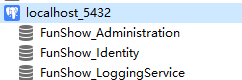
到这我们基本完成了微服务的搭建。
ABP微服务系列学习-搭建自己的微服务结构(四)的更多相关文章
- springcloud微服务架构搭建
SpringCloud微服务框架搭建 一.微服务架构 1.1什么是分布式 不同模块部署在不同服务器上 作用:分布式解决网站高并发带来问题 1.2什么是集群 多台服务器部署相同应用构成一个集群 作用:通 ...
- SprngCloud微服务框架搭建(一)
参照来源 :https://blog.csdn.net/forezp/article/details/70148833 1.简介 目前来说,SpringCloud是比较完整的微服务解决方案框架.不像其 ...
- Spring Cloud 微服务中搭建 OAuth2.0 认证授权服务
在使用 Spring Cloud 体系来构建微服务的过程中,用户请求是通过网关(ZUUL 或 Spring APIGateway)以 HTTP 协议来传输信息,API 网关将自己注册为 Eureka ...
- 【spring colud】spring cloud微服务项目搭建【spring boot2.0】
spring cloud微服务项目搭建 =================================== 示例版本: 1.spring boot 2.0版本 2.开发工具 IntellJ IDE ...
- 简单Spring Cloud 微服务框架搭建
微服务是现在比较流行的技术,对于程序猿而言,了解并搭建一个基本的微服务框架是很有必要滴. 微服务包含的内容非常多,一般小伙伴们可以根据自己的需求不断添加各种组件.框架. 一般情况下,基本的微服务框架包 ...
- java架构之路-(微服务专题)初步认识微服务与nacos初步搭建
历史演变: 以前我们都是一个war包,包含了很多很多的代码,反正我开始工作的时候做的就是这样的项目,一个金融系统,代码具体多少行记不清楚了,内部功能超多,但是实际能用到的不多,代码冗余超大,每次部署大 ...
- 十一、Docker搭建部署SpringCloud微服务项目Demo
环境介绍 技术选型:SpringCloud&SpringCloud Alibaba&Docker 微服务模块划分: 员工模块:ems-employees 部门模块:ems-depart ...
- SpringCloudAlibaba 微服务讲解(二)微服务环境搭建
微服务环境搭建 我们这次是使用的电商项目的商品.订单.用户为案例进行讲解 2.1 案例准备 2.1.1 技术选型 maven :3.3.9 数据库:mysql 持久层:SpringData JPA S ...
- (3)go-micro微服务项目搭建
目录 一 微服务项目介绍 二 go-micro安装 1.拉取micro镜像 2.生成项目目录 三 项目搭建 使用DDD模式开发项目: 四 最后 一 微服务项目介绍 账户功能是每一个系统都绕不开的一部分 ...
- springCloud 微服务框架搭建入门(很简单的一个案例不喜勿扰)
Spring cloud 实现服务注册及发现 服务注册与发现对于微服务系统来说非常重要.有了服务发现与注册,你就不需要整天改服务调用的配置文件了,你只需要使用服务的标识符,就可以访问到服务. clou ...
随机推荐
- view-design tabpane禁用后renderHeader失效问题
需求是这样的 在tabPane的renderHeader里面添加hover事件(使用组件自带的Poptip)能显示提示 其实这个不算是问题,设置disabled属性后,原本的元素上面添加了 ivu-t ...
- 嵌入式Linux Qt移植详细过程
嵌入式Linux下的Qt移植详细过程 开发说明 前段时间需要用开发板写一个下位机程序,是基于Linux系统,就想着用Qt来写,于是上网找教程看如何移植到开发板上.由于我不熟悉嵌入式Linux,加上网上 ...
- 云原生架构(二)环境搭建(Mac上安装Docker+Kubernetes+Istio一条龙)
一.背景 Istio 项目由 Google 和 IBM 的团队与 Lyft 的 Envoy 团队合作启动.它已经完全在 GitHub 上公开开发.目前已经是"Service Mesh服务网格 ...
- JVM常用调优参数
目录 JVM内存模型及常用参数 参数解释 垃圾收集器 Serial收集器(-XX:+UseSerialGC -XX:+UseSerialOldGC) Parallel Scavenge收集器(-XX: ...
- axios 中get 和post传参
axios中get和ppost传参的方式: params是添加到url的请求字符串中的,一般用于get请求. data是添加到请求体(body)中的, 一般用于post请求. 上面,只是一般情况. 其 ...
- 2022年8月20,第一组,周鹏,从1到m中随机取n个数,n<=m,显示出所有取法
static Random a1 =new Random(); static int m = a1.nextInt(20)+1;//随机取一个1到20的值 static int n = a1.next ...
- [深度学习] Python人脸识别库Deepface使用教程
deepface是一个Python轻量级人脸识别和人脸属性分析(年龄.性别.情感和种族)框架,提供非常简单的接口就可以实现各种人脸识别算法的应用.deepface官方仓库为deepface.deepf ...
- SQL Server登录初次提示状态码233,再次登录提示状态码18456
解决方案: 1.使用windows方式登录数据库,修改安全性属性为SQL Server 和Windows身份验证模式 2.打开SQL Server配置管理器,启动MSSQLSERVER协议 3.修改s ...
- Linux c 检测U盘挂载路径方法
思路: 1.使用df -h |grep mnt shell 命令查找到挂载路径信息 本代码是将结果存入文件中,再从文件中解析出路径信息.也可使用fopen直接从管道中读取信息 2.解析出信息最后的/m ...
- JS控制台打印星星,总有你要的那一款~呐~给你小心心哦~~~❤
用JS语句,在控制台中打印星星,你要的是哪一款呢~来认领吧~ 1.左直角星星 效果: 代码: let readline=require("readline-sync"); cons ...