
CV-部署芯片接续-CV全流程部署-TF版本
CV-部署芯片接续-CV全流程部署-TF版本
1 单个CNN算子
import cv2

import numpy as np

import tensorflow as tf

import os

from tensorflow.python.framework import graph_util

# 参考连接 https://blog.csdn.net/tensorflowforum/article/details/112352764 代码

# 参考连接 参数详解:https://blog.csdn.net/weixin_43529465/article/details/124721583

# https://blog.csdn.net/rain6789/article/details/78754516

class SingleCnn(tf.keras.Model):

    def __init__(self):

        super(SingleCnn, self).__init__()

        # filters=1 卷积核数目,相当于卷积核的channel

        self.conv = tf.keras.layers.Conv2D(filters=1,

                                           kernel_size=[1, 1],

                                           # valid表示不填充, same表示合理填充

                                           padding='valid',

                                        # data_format='channels_last',-> 表示HWC,输入可以定义批次

                                           data_format='channels_last',

                                           use_bias=False,

                                           kernel_initializer=tf.keras.initializers.he_uniform(seed=None),

                                           name="conv")

    def call(self, inputs):

        x = self.conv(inputs)

        return x

if __name__ == "__main__":

    # 图像数据

    imagefile = r"catanddog\cat\5.JPG"

    img = cv2.imread(imagefile)

    img = cv2.resize(img, (64, 64))

    img = np.expand_dims(img, axis=0)

    print(img.shape, type(img), img.dtype)

    img = img.astype(np.uint8)

    singlecnn = SingleCnn()

    output = singlecnn(img)
2 图片导入
    imagefile = r"catanddog\cat\5.JPG"

    img = cv2.imread(imagefile)

    img = cv2.resize(img, (64, 64))

    img = np.expand_dims(img, axis=0)

    print(img.shape, type(img), img.dtype)

    img = img.astype(np.uint8)
3 推理时报错
output = singlecnn(img)
Value for attr 'T' of uint8 is not in the list of allowed values: half, bfloat16, float, double, int32

	; NodeDef: {{node Conv2D}}; Op<name=Conv2D; signature=input:T, filter:T -> output:T; attr=T:type,allowed=[DT_HALF, DT_BFLOAT16, DT_FLOAT, DT_DOUBLE, DT_INT32]; attr=strides:list(int); attr=use_cudnn_on_gpu:bool,default=true; attr=padding:string,allowed=["SAME", "VALID", "EXPLICIT"]; attr=explicit_paddings:list(int),default=[]; attr=data_format:string,default="NHWC",allowed=["NHWC", "NCHW"]; attr=dilations:list(int),default=[1, 1, 1, 1]> [Op:Conv2D]

Call arguments received by layer 'conv' (type Conv2D):

  • inputs=tf.Tensor(shape=(1, 64, 64, 3), dtype=uint8)
已解决:
    # 未量化的model不支持int32和int8

    # img = img.astype(np.int32)

    img = tf.convert_to_tensor(img, np.float32)

    print(img.shape, type(img), img.dtype)
4 保存为PB文件
不是ckpt文件
    # =========== ckpt保存 with session的写法tf2 已不再使用 ===========

    # with tf.Session(graph=tf.Graph()) as sess:

    #     constant_graph = graph_util.convert_variables_to_constants(sess, sess.graph_def, ['op_to_store'])

    # 保存参考 https://zhuanlan.zhihu.com/p/146243327

    # save_format='tf' 代表保存pb

    singlecnn.save('./pbmodel/singlecnn.pb', save_format='tf')

    # 加载模型 验证可以加载

    new_model = tf.keras.models.load_model('./pbmodel/singlecnn.pb', compile=False)

    output_ = new_model(img)

    # print(output_.shape, output_[0][2:6][2:6])

    print(output_.shape)
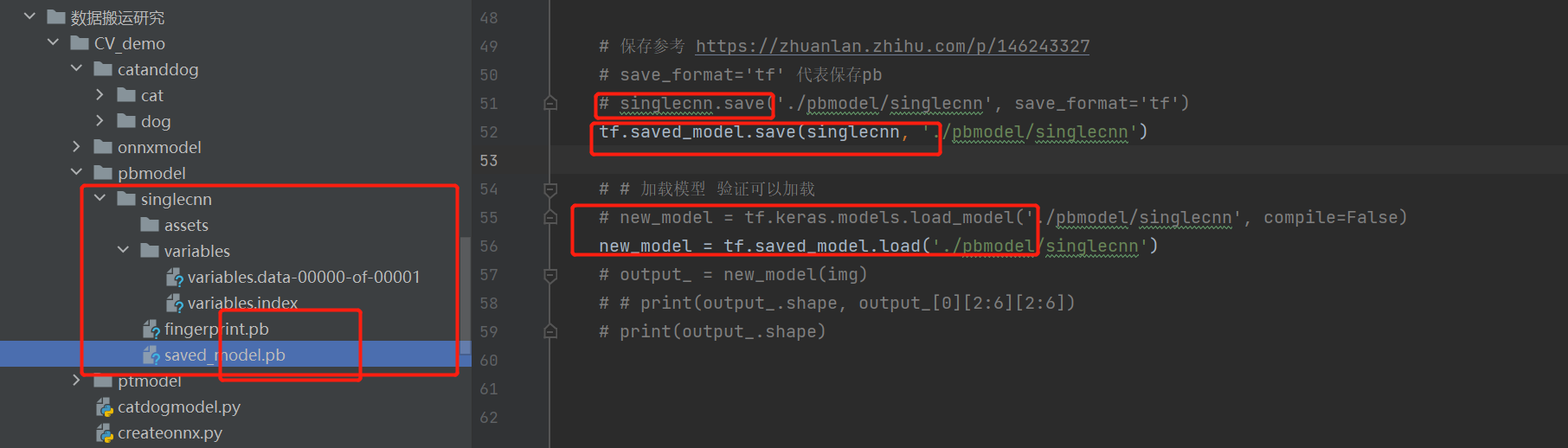
出现问题 保存的pb 文件是一个目录 里面有多个pb文件不知道 用哪个部署 尝试单独使用某一个pb部署 都会报错。
所以需要合一的pb文件。
tf.keras.saving.save_model | TensorFlow v2.11.0
pb是protocol(协议) buffer(缓冲)的缩写
CV-部署芯片接续-CV全流程部署-TF版本的更多相关文章
- camunda流程部署的一些简单操作
act_re_deployment:(流程部署对象表)存放流程部署的显示名和部署时间 act_re_procdef:(流程定义表)存放流程定义的属性信息 act_ge_bytearray:(资源文件表 ...
- Win2k8&&vCenter部署全流程
几个不同的组件 vCenter Server:对ESXi主机进行集中管理的服务器端软件,安装在windows server 2008R2或以上的操作系统里,通过SQL 2008R2 或以上版本的数据库 ...
- Activiti系列:带有serviceTask的或者定时启动任务的流程部署失败的原因分析
在将两个带有serviceTask任务的流程部署到数据库的时候发现无法导入,最终分析出如下问题: 1)流程1是打算让定时启动事件可以每小时触发一次 由于原来是用 R/2015-11-01T01:00: ...
- Activiti 流程部署方式 activi 动态部署(高级源码篇)
Activiti的流程 部署方式有很多种方式,我们可以根据activit工作流引擎提供的ap方式进行部署. 当然了实际需求决定你要使用哪一种api操作,后面的总结详细介绍了使用场景. 下面看一下部署方 ...
- 以太坊geth主网全节点部署
以太坊geth主网全节点部署 #环境 ubuntu 16.4 #硬盘500GB(目前占用200G) #客户端安装 # 查看下载页面最新版 # https://ethereum.github.io/go ...
- 【JBPM4】流程部署
示例代码: ProcessEngine processEngine = Configuration.getProcessEngine(); RepositoryService repositorySe ...
- Activiti 流程部署方式 activi 动态部署(高级源代码篇)
Activiti的流程 部署方式有非常多种方式,我们能够依据activit工作流引擎提供的ap方式进行部署. 当然了实际需求决定你要使用哪一种api操作,后面的总结具体介绍了使用场景. 以下看一下部署 ...
- Spring管理流程部署——Activiti
pom.xml <!-- activit jar 包 --> <dependency> <groupId>org.activiti</groupId> ...
- [转帖]从壹开始前后端分离【重要】║最全的部署方案 & 最丰富的错误分析
从壹开始前后端分离[重要]║最全的部署方案 & 最丰富的错误分析 https://www.cnblogs.com/laozhang-is-phi/p/beautifulPublish-most ...
- (四)Activiti之流程定义部署之ZIP方式和流程定义查询
一.流程定义部署之ZIP方式 上一章节我们使用classpath的方式加载流程定义文件,这里我们使用ZIP的方式. 1.1 用activiti插件生成bpmn和png图片之后,压缩到一个zip格式的压 ...
随机推荐
- 一个基于 gin+ grpc + etcd 等框架开发的小栗子
一.标准的项目结构 首先我们看一个标准的项目结构是什么样子的,github 上给出的一个示例:golang-standards/project-layout 二.服务注册与发现流程 三.示例代码 项目 ...
- 国外的SRE都是干啥工作的?薪资如何?
本文翻译自:https://www.flagship.io/glossary/site-reliability-engineer/,意译~ 众所周知,开发和 IT 运营之间因为屁股决定脑袋,存在巨大的 ...
- LeetCode-838 推多米诺
来源:力扣(LeetCode)链接:https://leetcode-cn.com/problems/push-dominoes 题目描述 n 张多米诺骨牌排成一行,将每张多米诺骨牌垂直竖立.在开始时 ...
- mysql查询重复的数据
---查询重复的数据 . UUID可以换成其他的需要去重的字段. 点击查看代码 select * FROM t_gzmx_reptile_receive_incre WHERE id NOT IN ( ...
- [转载]pytest报AttributeError: module ‘pytest‘ has no attribute ‘main‘
转自:https://blog.csdn.net/yinying12/article/details/110522989 pytest报AttributeError: module 'pytest' ...
- 关于centos8yum源失效问题
[CentOS8遇到错误]Error: Failed to download metadata for repo 'powertools'... 原因: CentOS Linux 8 已于 2021 ...
- python命令行开发--click
目录 前言 安装 快速上手 参考文档 前言 按照官方的介绍:Click 是一个利用很少的代码以可组合的方式创造优雅命令行工具接口的 Python 库. 它是高度可配置的,但却有合理默认值的" ...
- CodeGym自学笔记05——类名
1.Java 程序由类组成.每个类都存储在一个单独的文件中,其文件名称与类名一致.该文件的扩展名为 java. 2.当我们有许多类文件时,我们会将它们分组到文件夹和子文件夹中.此外,类还会被分组到包和 ...
- vue实现全部防抖
// 全局注册防抖 Vue.component("ElButton").mixin({ data() { return { debounce: false ...
- 使用a标签锚点实现顺滑效果
scroll-behavior:smooth;//使用该方法使用a标签锚点的时候会实现平滑 xxx.scrollIntoView({ behavior: "smooth" })