
IdentityServer4的最佳使用
简介
本人做微服务项目也有一段时间了,在微服务中让我感触颇深的就是这个IdentityServer4了,ID4(IdentityServer4的简称)中涉及的概念颇多,本文不谈概念(我怕读者没耐心看下去),在这分享下我个人的使用心得。
目录
1. ID4简介
2. ID4使用
ID4简介
相信大家都知道面向对象中的封装(把通用的功能封装起来,减少程序中大量重复代码),我们知道在一个单体系统中有很多的重复模块,例如:身份认证、权限控制检查等,在单体系统中,这些都可以使用aop统一在一个地方控制。而在分布式系统,每个系统都需要进行身份认证、权限检查等。这时,每个系统都得写一套同样的代码来进行这些控制,我们能不能像单体系统那样在一个地方进行这些流程呢?这时我们可以使用IdentityServer4来实现。
IdentityServer4是一个集成 身份认证和授权 的组件,使用OpenId Connect(身份识别框架) 和 Auth2.0(授权框架)来进行身份认证和授权的。
ID4使用
我这里只列出几个主要的类,其它,可以下载项目来看。关于如何使用,代码有点多,我比较懒,就没怎么讲解,感兴趣的小伙伴可以加个QQ:1983702356 来讨论下。
项目地址: https://github.com/MapleWithoutWords/IdentityServer4Demo
(注意:下载项目后,记得把数据库链接字符串改下)项目环境:
- .net core 2.2
- IdentityServer 2.5
- Mysql 8
项目结构:
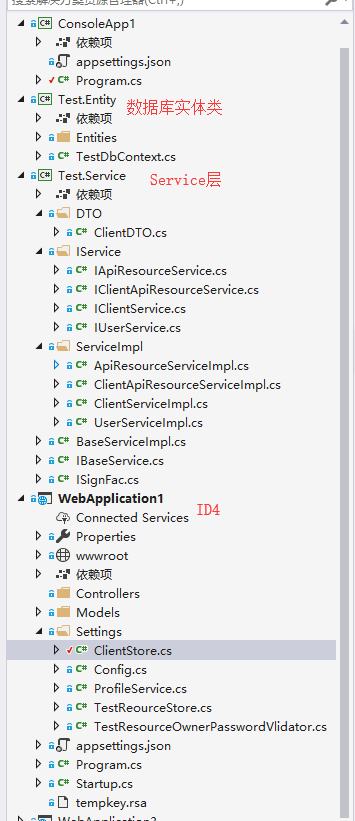
WEBAPPLICATION1 (IDENTITYSERVER4)项目,安装 INSTALL-PACKAGE IDENTITYSERVER4 -VERSION 2.5.0,
以下几个类比较关键
Config.cs。主要是获取身份资源
1
2
3
4
5
6
7
8
9
10
11
12
public class Config
{
public static IEnumerable<IdentityResource> GetIdentityResources()
{
return new List<IdentityResource>
{
new IdentityResources.OpenId(), //必须要添加,否则报无效的 scope 错误
new IdentityResources.Profile(),
new IdentityResources.Email()
};
}
}TestClientStore.cs 加载IdentityServer4的client
1
2
3
4
5
6
7
8
9
10
11
12
13
14
15
16
17
18
19
20
21
22
23
24
25
26
27
28
29
30
31
32
33
34
35
36
37
/// <summary>
/// 加载IdentityServer4的client
/// </summary>
public class TestClientStore : IClientStore
{
/// <summary>
/// Service层中的一个接口
/// </summary>
public IClientService ClientSvc { get; set; }
public TestClientStore(IClientService ClientSvc)
{
this.ClientSvc = ClientSvc;
}
public async Task<Client> FindClientByIdAsync(string clientId)
{
var dto = await ClientSvc.FindClientByIdAsync(clientId);
if (dto==null)
{
return null;
}
var scopes = dto.APIResources.Select(e => e.Name).ToList();
scopes.Add(IdentityServerConstants.StandardScopes.OpenId);
scopes.Add(IdentityServerConstants.StandardScopes.Profile);
return new Client
{
ClientId = dto.Client.Id,//API账号、客户端Id
AllowedGrantTypes = GrantTypes.ResourceOwnerPassword,
ClientSecrets =
{
new Secret(dto.Client.Secret.Sha256())//秘钥
},
AllowedScopes = scopes//这个账号支持访问哪些应用
};
}
}TestReourceStore.cs,加载IdentityServer的APIResource
1
2
3
4
5
6
7
8
9
10
11
12
13
14
15
16
17
18
19
20
21
22
23
24
25
26
27
28
29
30
31
32
33
34
35
36
37
38
39
/// <summary>
/// 加载IdentityServer的APIResource
/// </summary>
public class TestReourceStore : IResourceStore
{
public IApiResourceService resourceSvc { get; set; }
public TestReourceStore(IApiResourceService resourceSvc)
{
this.resourceSvc = resourceSvc;
}
public async Task<ApiResource> FindApiResourceAsync(string name)
{
var entity = await resourceSvc.GetByNameAsync(name);
return new ApiResource(entity.Name,entity.DisplayName);
}
public async Task<IEnumerable<ApiResource>> FindApiResourcesByScopeAsync(IEnumerable<string> scopeNames)
{
var list = await resourceSvc.GetDatasByNamesAsync(scopeNames);
return list.Select(e=>new ApiResource(e.Name,e.DisplayName));
}
public async Task<IEnumerable<IdentityResource>> FindIdentityResourcesByScopeAsync(IEnumerable<string> scopeNames)
{
return Config.GetIdentityResources().Where(e => scopeNames.Contains(e.Name)).ToList();
}
public async Task<Resources> GetAllResourcesAsync()
{
var list = await resourceSvc.GetNoramlAll();
var resouces = list.Select(e => new ApiResource(e.Name, e.DisplayName)).ToList();
return new Resources
{
ApiResources = resouces
};
}
}TestResourceOwnerPasswordValidator.cs,IdentityServer4登录验证
1
2
3
4
5
6
7
8
9
10
11
12
13
14
15
16
17
18
19
20
21
22
23
24
25
26
27
28
29
30
31
32
33
34
/// <summary>
/// IdentityServer4登录验证
/// </summary>
public class TestResourceOwnerPasswordValidator : IResourceOwnerPasswordValidator
{
public IUserService UserSvc { get; set; }
public TestResourceOwnerPasswordValidator(IUserService UserSvc)
{
this.UserSvc = UserSvc;
}
public async Task ValidateAsync(ResourceOwnerPasswordValidationContext context)
{
string account = context.UserName;
string pwd = context.Password;
var loginResult = await UserSvc.Login(account, pwd);
if (loginResult == null)
{
context.Result = new GrantValidationResult(TokenRequestErrors.InvalidGrant, "invalid custom credential");
return;
}
context.Result = new GrantValidationResult(
subject: context.UserName,
authenticationMethod: "custom",
claims: new Claim[] {
new Claim("Name",context.UserName),
new Claim("UserId",loginResult.Id),
new Claim("Roles","Admin,Contact"), //模拟获取登录用户的角色信息
new Claim("Premissions","List,Delete") //模拟获取登录用户的权限信息
});
}
}ProfileService.cs,用户信息
1
2
3
4
5
6
7
8
9
10
11
12
13
public class ProfileService : IProfileService
{
public async Task GetProfileDataAsync(ProfileDataRequestContext context)
{
var claims = context.Subject.Claims.ToList();
context.IssuedClaims = claims.ToList();
}
public async Task IsActiveAsync(IsActiveContext context)
{
context.IsActive = true;
}
}
- Startup类
1 |
public class Startup |
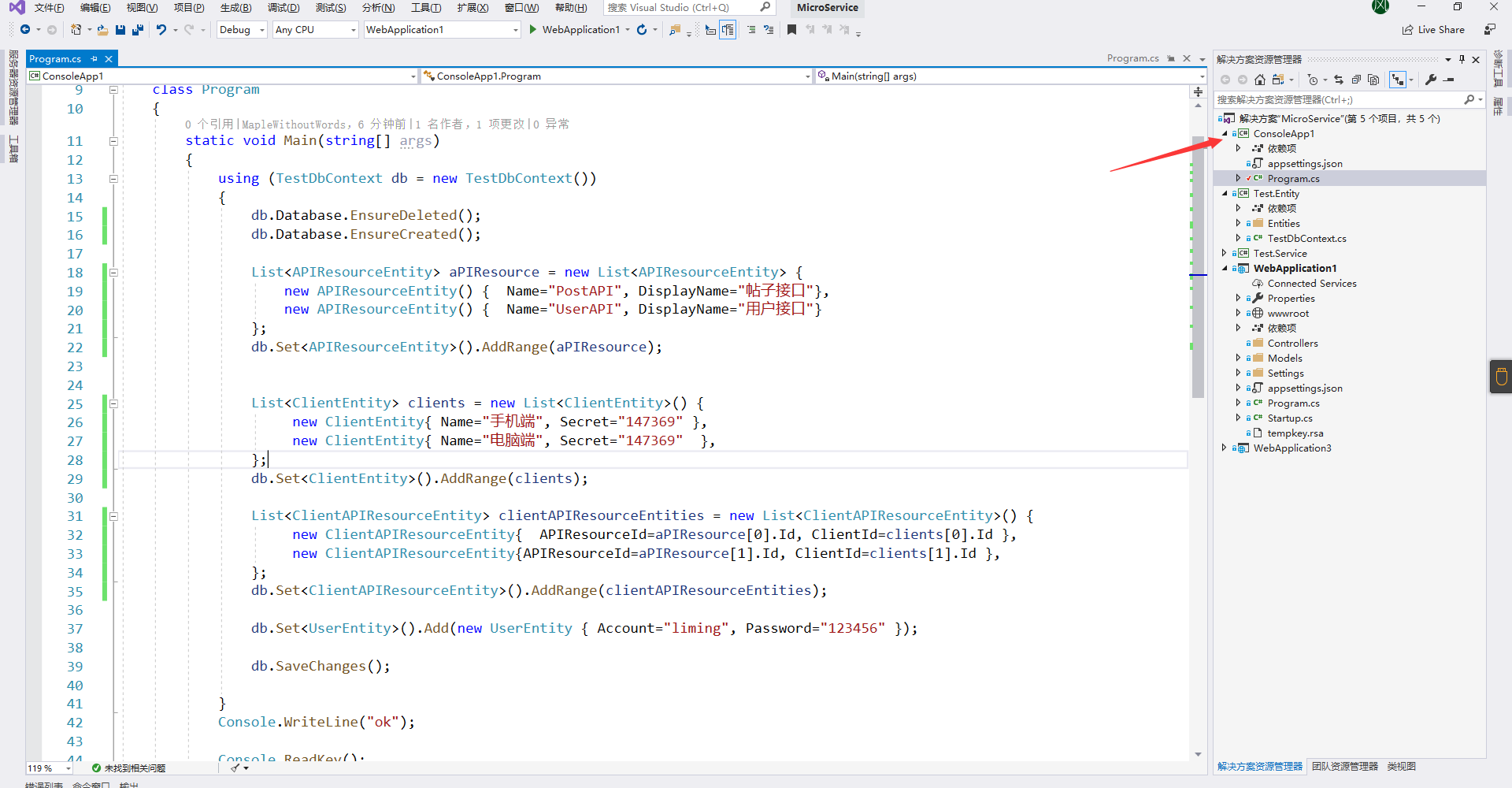
- WebApplication3 API项目,修改Startup,并添加一个控制器,在方法上打上一个标签
1
2
3
4
5
6
7
8
9
10
11
12
13
14
15
16
17
18
19
20
21
22
23
24
25
26
27
28
29
30
31
32
33
34
35
36
37
38
39
40
41
42
43
44
45
46
47
48
49
50
51
52
53
54
55
56
public class Startup
{
    public Startup(IConfiguration configuration)
    {
        Configuration = configuration;
    }

    public IConfiguration Configuration { get; }

    // This method gets called by the runtime. Use this method to add services to the container.
    public void ConfigureServices(IServiceCollection services)
    {
        services.AddAuthentication("Bearer")
                 .AddIdentityServerAuthentication(options =>
                 {
                     options.Authority = "http://localhost:9500";//identity server 地址
                     options.RequireHttpsMetadata = false;
                 });

        string conStr = Configuration["connectionString"];
        services.AddDbContext<TestDbContext>(options =>
        {
            options.UseMySql(conStr);
        });

        ///依赖注入Service层
        AddSigletons(services);
        services.AddMvc().SetCompatibilityVersion(CompatibilityVersion.Version_2_2);
    }

    public void AddSigletons(IServiceCollection services)
    {
        var assem = Assembly.Load("Test.Service");
        var list = assem.GetTypes().Where(e => e.IsAbstract == false && typeof(ISignFac).IsAssignableFrom(e));
        foreach (var instanType in list)
        {
            foreach (var item in instanType.GetInterfaces())
            {
                services.AddSingleton(item, instanType);
            }
        }
    }
    // This method gets called by the runtime. Use this method to configure the HTTP request pipeline.
    public void Configure(IApplicationBuilder app, IHostingEnvironment env)
    {
        if (env.IsDevelopment())
        {
            app.UseDeveloperExceptionPage();
        }
        app.UseAuthentication();

        app.UseMvc();
    }
}
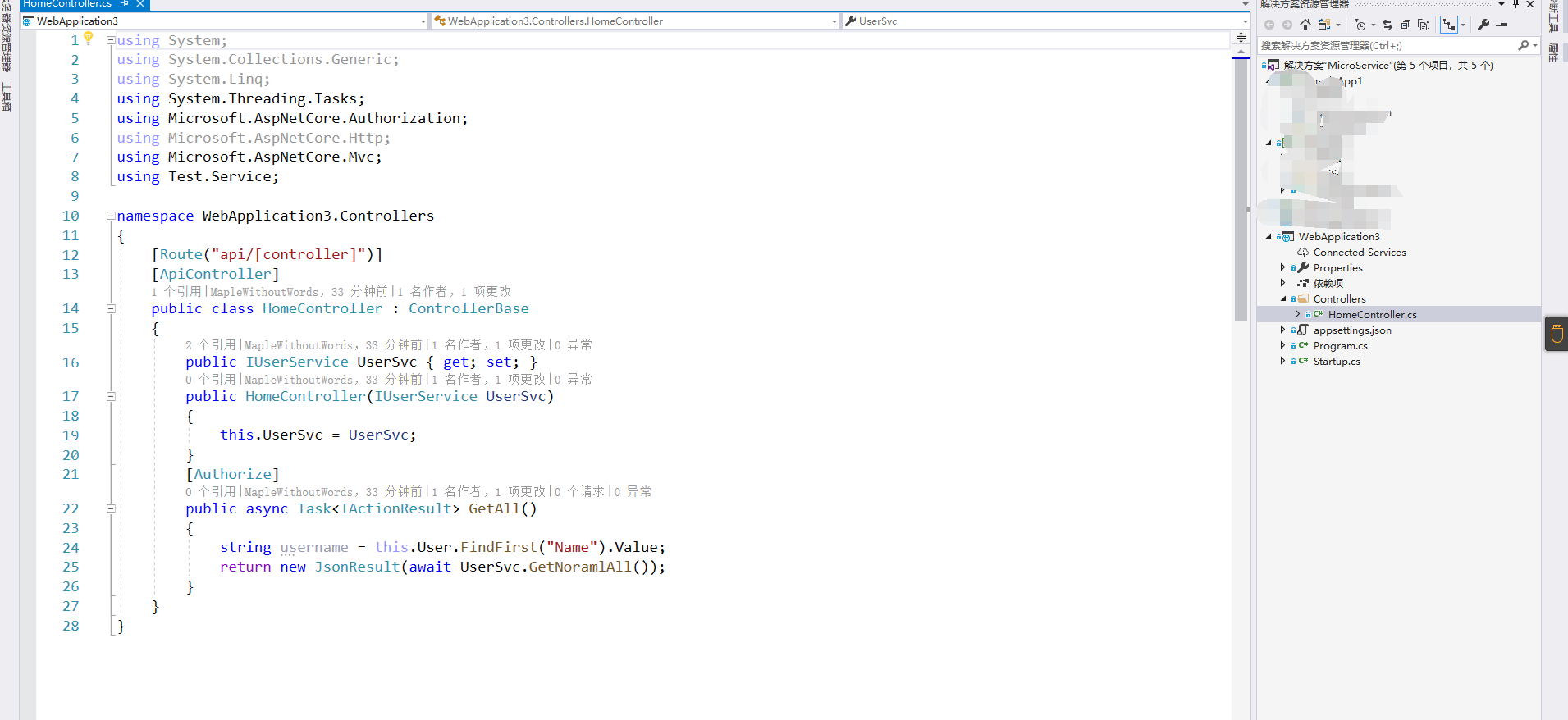
运行CONSOLEAPP1控制台项目, 生成数据库,添加几条数据
运行效果
在 WebApplication1 目录下运行cmd命令 dotnet run ,启动IdentitServer4,端口是9500


运行项目 WebApplication3 ,端口是5000
当我们直接调用 WebApplication3 API中的方法时,发现返回状态码为 401

请求Id4,复制返回的 access_token
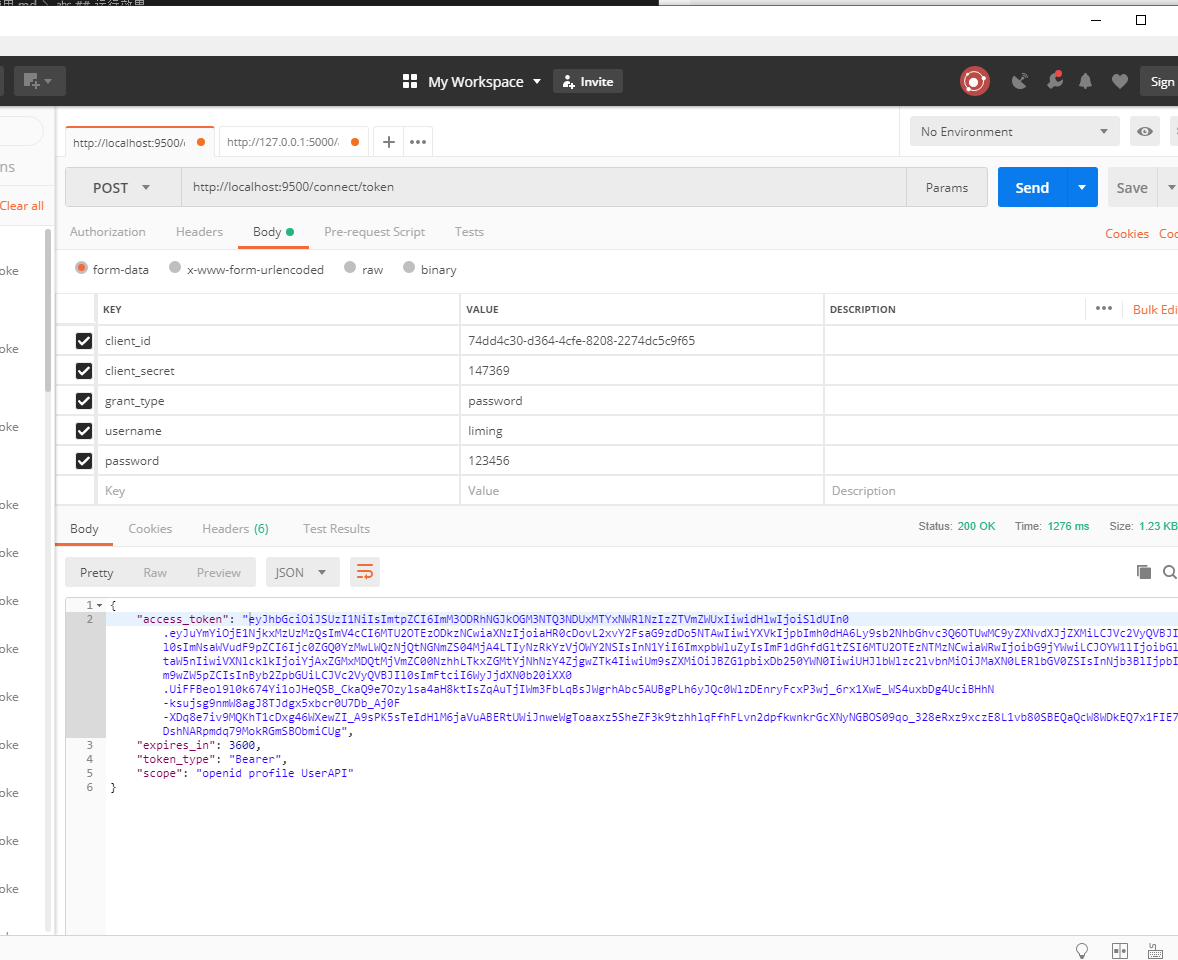
再请求WebApplication3 API,并在报文头带上token

结束语
个人认为我这种使用方式和其它使用方式最大的好处就是,可以写一个IdentityServer4的Client、APIResource增删改查,然后因为每次请求的时候都是从数据库读取数据的,如果数据被修改了,会立即生效。
IdentityServer4的最佳使用的更多相关文章
- IdentityServer4关于多客户端和API的最佳实践【含多类型客户端和API资源,以及客户端分组实践】【下】
经过前两篇文章你已经知道了关于服务器搭建和客户端接入相关的基本资料,本文主要讲述整个授权系统所服务的对象,以ProtectApi资源为演示 目标: 1)实现多资源服务器针对请求的token校验,接入I ...
- IdentityServer4实战 - 谈谈 JWT 的安全策略
一.前言 众所周知,IdentityServer4 默认支持两种类型的 Token,一种是 Reference Token,一种是 JWT Token .前者的特点是 Token 的有效与否是由 To ...
- ASP.NET Core身份认证服务框架IdentityServer4(2)-整体介绍
一.整体情况 现代应用程序看起来更像这个: 最常见的相互作用: 浏览器与Web应用程序的通信 Browser -> Web App Web应用程序与Web API通信 基于浏览器的应用程序与We ...
- IdentityServer4 中文文档 -1- (简介)背景
IdentityServer4 中文文档 -1- (简介)背景 原文:http://docs.identityserver.io/en/release/intro/big_picture.html 目 ...
- IdentityServer4 中文文档 -8- (快速入门)设置和概览
IdentityServer4 中文文档 -8- (快速入门)设置和概览 原文:http://docs.identityserver.io/en/release/quickstarts/0_overv ...
- IdentityServer4中文文档
欢迎IdentityServer4 IdentityServer4是ASP.NET Core 2的OpenID Connect和OAuth 2.0框架. 它在您的应用程序中启用以下功能: 认证即服务 ...
- 【IdentityServer4文档】- 启动和概览
启动和概览 有两种基本的方式来启动一个新的 IdentityServer 项目: 从空项目开始(从头开始) 从 Visual Studio 的 ASP.NET Identity 模板开始 假如您从头开 ...
- 【IdentityServer4文档】- 整体情况
整体概况 大多数现代应用程序看起来或多或少像这样: 最常见的交互是: 浏览器与 Web 应用程序进行通信 Web 应用程序与 Web API 进行通信(有时是Web应用程序自己发起,有时代表用户发起) ...
- IdentityServer4实战 - 谈谈 JWT Token 的安全策略
原文:IdentityServer4实战 - 谈谈 JWT Token 的安全策略 一.前言 众所周知,IdentityServer4 默认支持两种类型的 Token,一种是 Reference To ...
- asp.net core IdentityServer4 概述
概览 现代应用程序看上去大都是这样的: 最常见的交互是: 浏览器与Web应用程序通信 Web应用程序与Web API通信(有时是独立的,有时是代表用户的) 基于浏览器的应用程序与Web API通信 本 ...
随机推荐
- Docker 容器日志管理
Docker 日志分为两类: Docker 引擎日志(也就是 dockerd 运行时的日志), 容器的日志,容器内的服务产生的日志. 一 .Docker 引擎日志 Docker 引擎日志一般是交给了 ...
- 6.使用nexus3配置yum私有仓库
yum相较于rpm,能够更好地解决安装软件时的依赖包问题,使用yum安装更简单更方便.搭建本地YUM源服务器,可以避免升级安装软件时占用公网带宽:有了本地YUM源服务器,可以解决无法连接Interne ...
- 【原创】推流录屏软件OBS使用教程--录屏
之前有录屏需要,写了一篇关于ffmpeg录屏的文章,反响还不错,但是直接用ffmpeg门槛有些高,今天写一篇图形界面的录屏推流工具OBS的使用教程.这次先写OBS的录屏教程 下载安装 点击 OBS官网 ...
- 我操作MySQL的惊险一幕
背景 前几天因工作需要,组长给我安排了一个数据清洗的任务. 任务:把 A 表的数据洗到 B 表. 我的第一反应,什么是「洗」?洗数据是什么?洗钱我倒是知道. 不过我不能慌啊,于是问了问组长. 我:组长 ...
- Petrozavodsk Winter Training Camp 2016: Moscow SU Trinity Contest
题目列表 A.ABBA E.Elvis Presley G. Biological Software Utilities J. Burnished Security Updates A.ABBA 题意 ...
- Java程序设计(四)作业
要求:定义一个Java项目,项目名为"学号_姓名_题号",如:"20181101_张三_1",完成后将项目复制到桌面并压缩提交到邮箱82794085@qq.co ...
- 关于VirtualBox在新建虚拟机时-选择操作系统类型后没有64位的版本选项
今天笔者准备使用VirtualBox安装一台windows的虚拟时,在选项操作系统类型为Microsoft Windows后 发现下面的版本选择中,没有之前看到的64位选择,全是32位的,但实际昨天都 ...
- 220722 T1 分树 (模拟)
dfs一遍求出以每个节点为根的子树大小,然后枚举n的约数,对于每个约数i,统计sz[ ]是i的倍数的有多少个(开桶统计),如果有n/i个则答案+1. 这道题也就是个结论题,画图分析一下.复杂度O(n* ...
- Springboot集成阿里云短信
目录 1 前言 2 准备工作 2.1 了解流程 2.2 配置信息 2.3 短信签名和模板 2.3.1 签名 2.3.2 模板 2.3.3 存入数据库 3 SDK 4 集成Springboot 4.1 ...
- javaweb 导出文件名乱码的问题解决方案
fileName = new String(fileName.getBytes("ISO8859-1"), "UTF-8"); 或者 String finalF ...