
单点登录系统使用Spring Security的权限功能
背景
在配置中心增加权限功能
- 目前配置中心已经包含了单点登录功能,可以通过统一页面进行登录,登录完会将用户写入用户表
- RBAC的用户、角色、权限表CRUD、授权等都已经完成
- 希望不用用户再次登录,就可以使用SpringSecurity的权限控制
Spring Security
Spring Security最主要的两个功能:认证和授权
| 功能 | 解决的问题 | Spring Security中主要类 |
|---|---|---|
| 认证(Authentication) | 你是谁 | AuthenticationManager |
| 授权(Authorization) | 你可以做什么 | AuthorizationManager |
实现
在这先简单了解一下Spring Security的架构是怎样的,如何可以认证和授权的
过滤器大家应该都了解,这属于Servlet的范畴,Servlet 过滤器可以动态地拦截请求和响应,以变换或使用包含在请求或响应中的信息
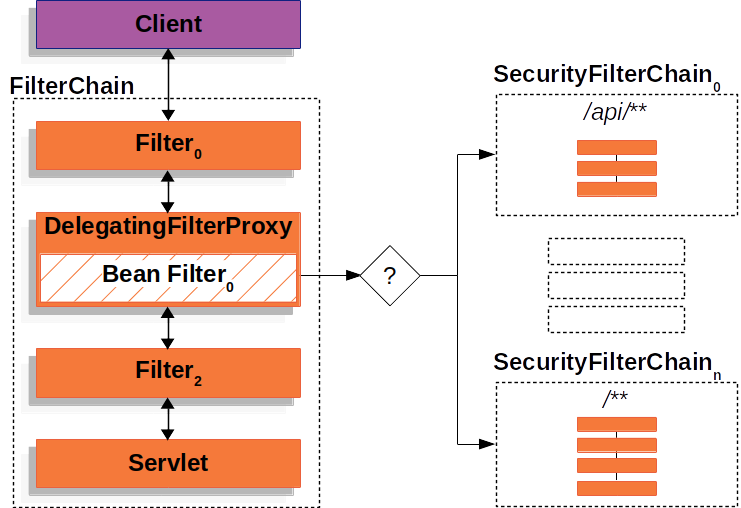
DelegatingFilterProxy是一个属于Spring Security的过滤器
通过这个过滤器,Spring Security就可以从Request中获取URL来判断是不是需要认证才能访问,是不是得拥有特定的权限才能访问。
已经有了单点登录页面,Spring Security怎么登录,不登录可以拿到权限吗
Spring Security官方文档-授权架构中这样说,GrantedAuthority(也就是拥有的权限)被AuthenticationManager写入Authentication对象,后而被AuthorizationManager用来做权限认证
The GrantedAuthority objects are inserted into the Authentication object by the AuthenticationManager and are later read by either the AuthorizationManager when making authorization decisions.
为了解决我们的问题,即使我只想用权限认证功能,也得造出一个Authentication,先看下这个对象:
Authentication
Authentication包含三个字段:
- principal,代表用户
- credentials,用户密码
- authorities,拥有的权限
有两个作用:
- AuthenticationManager的入参,仅仅是用来存用户的信息,准备去认证
- AuthenticationManager的出参,已经认证的用户信息,可以从SecurityContext获取
SecurityContext和SecurityContextHolder用来存储Authentication, 通常是用了线程全局变量ThreadLocal, 也就是认证完成把Authentication放入SecurityContext,后续在整个同线程流程中都可以获取认证信息,也方便了认证
继续分析
看到这可以得到,要实现不登录的权限认证,只需要手动造一个Authentication,然后放入SecurityContext就可以了,先尝试一下,大概流程是这样,在每个请求上
- 获取sso登录的用户
- 读取用户、角色、权限写入Authentication
- 将Authentication写入SecurityContext
- 请求完毕时将SecurityContext清空,因为是ThreadLocal的,不然可能会被别的用户用到
- 同时Spring Security的配置中是对所有的url都允许访问的
加了一个过滤器,代码如下:
import javax.servlet.*;

import javax.servlet.annotation.WebFilter;

import javax.servlet.http.HttpServletRequest;

import java.io.IOException;

import java.util.HashMap;

import java.util.List;

import java.util.Map;

import java.util.stream.Collectors;

@WebFilter( urlPatterns = "/*", filterName = "reqResFilter" )

public class ReqResFilter implements Filter{

	@Autowired

	private SSOUtils ssoUtils;

	@Autowired

	private UserManager userManager;

	@Autowired

	private RoleManager roleManager;

	@Override

	public void init( FilterConfig filterConfig ) throws ServletException{

	}

	@Override

	public void doFilter( ServletRequest servletRequest, ServletResponse servletResponse, FilterChain filterChain )

			throws IOException, ServletException{

		setAuthentication(servletRequest);

		filterChain.doFilter( servletRequest, servletResponse );

		clearAuthentication();

	}

	@Override

	public void destroy(){

	}

	private void setAuthentication( ServletRequest request ){

		Map<String, String> data;

		try{

			data = ssoUtils.getLoginData( ( HttpServletRequest )request );

		}

		catch( Exception e ){

			data = new HashMap<>();

			data.put( "name", "visitor" );

		}

		String username = data.get( "name" );

		if( username != null ){

			userManager.findAndInsert( username );

		}

		List<Role> userRole = userManager.findUserRole( username );

		List<Long> roleIds = userRole.stream().map( Role::getId ).collect( Collectors.toList() );

		List<Permission> rolePermission = roleManager.findRolePermission( roleIds );

		List<SimpleGrantedAuthority> authorities = rolePermission.stream().map( one -> new SimpleGrantedAuthority( one.getName() ) ).collect(

				Collectors.toList() );

		UsernamePasswordAuthenticationToken authenticationToken = new UsernamePasswordAuthenticationToken( username, "", authorities );

		SecurityContextHolder.getContext().setAuthentication( authenticationToken );

	}

	private void clearAuthentication(){

		SecurityContextHolder.clearContext();

	}

}
从日志可以看出,Principal: visitor,当访问未授权的接口被拒绝了
16:04:07.429 [http-nio-8081-exec-9] DEBUG org.springframework.security.access.intercept.aopalliance.MethodSecurityInterceptor - Previously Authenticated: org.springframework.security.authentication.UsernamePasswordAuthenticationToken@cc4c6ea0: Principal: visitor; Credentials: [PROTECTED]; Authenticated: true; Details: null; Granted Authorities: CHANGE_USER_ROLE, CHANGE_ROLE_PERMISSION, ROLE_ADD

...

org.springframework.security.access.AccessDeniedException: 不允许访问
结论
不登录是可以使用Spring Security的权限,从功能上是没有问题的,但存在一些别的问题
- 性能问题,每个请求都需要请求用户角色权限数据库,当然可以利用缓存优化
- 我们写的过滤器其实也是Spring Security做的事,除此之外,它做了更多的事,比如结合HttpSession, Remember me这些功能
我们可以采取另外一种做法,对用户来说只登录一次就行,我们仍然是可以手动用代码再去登录一次Spring Security的
如何手动登录Spring Security
How to login user from java code in Spring Security? 从这篇文章从可以看到,只要通过以下代码即可
	private void loginInSpringSecurity( String username, String password ){

		UsernamePasswordAuthenticationToken loginToken = new UsernamePasswordAuthenticationToken( username, password );

		Authentication authenticatedUser = authenticationManager.authenticate( loginToken );

		SecurityContextHolder.getContext().setAuthentication( authenticatedUser );

	}
和上面我们直接拿已经认证过的用户对比,这段代码让Spring Security来执行认证步骤,不过需要配置额外的AuthenticationManager和UserDetailsServiceImpl,这两个配置只是AuthenticationManager的一种实现,和上面的流程区别不大,目的就是为了拿到用户的信息和权限进行认证
import org.slf4j.Logger;

import org.slf4j.LoggerFactory;

import org.springframework.beans.factory.annotation.Autowired;

import org.springframework.security.core.GrantedAuthority;

import org.springframework.security.core.authority.SimpleGrantedAuthority;

import org.springframework.security.core.userdetails.UserDetails;

import org.springframework.security.core.userdetails.UserDetailsService;

import org.springframework.security.core.userdetails.UsernameNotFoundException;

import org.springframework.stereotype.Service;

import java.util.List;

import java.util.stream.Collectors;

@Service

public class UserDetailsServiceImpl implements UserDetailsService{

	private static final Logger logger = LoggerFactory.getLogger( UserDetailsServiceImpl.class );

	@Autowired

	private UserManager userManager;

	@Autowired

	private RoleManager roleManager;

	@Override

	public UserDetails loadUserByUsername( String username ) throws UsernameNotFoundException{

		User user = userManager.findByName( username );

		if( user == null ){

			logger.info( "登录用户[{}]没注册!", username );

			throw new UsernameNotFoundException( "登录用户[" + username + "]没注册!" );

		}

		return new org.springframework.security.core.userdetails.User( user.getUsername(), "", getAuthority( username ) );

	}

	private List<? extends GrantedAuthority> getAuthority( String username ){

		List<Role> userRole = userManager.findUserRole( username );

		List<Long> roleIds = userRole.stream().map( Role::getId ).collect( Collectors.toList() );

		List<Permission> rolePermission = roleManager.findRolePermission( roleIds );

		return rolePermission.stream().map( one -> new SimpleGrantedAuthority( one.getName() ) ).collect( Collectors.toList() );

	}

}
	@Override

	@Bean

	public AuthenticationManager authenticationManagerBean() throws Exception{

		DaoAuthenticationProvider daoAuthenticationProvider = new DaoAuthenticationProvider();

		daoAuthenticationProvider.setUserDetailsService( userDetailsService );

		daoAuthenticationProvider.setPasswordEncoder( NoOpPasswordEncoder.getInstance() );

		return new ProviderManager( daoAuthenticationProvider );

	}
结论
通过这样的方式,同样实现了权限认证,同时Spring Security会将用户信息和权限缓存到了Session中,这样就不用每次去数据库获取
总结
可以通过两种方式来实现不登录使用SpringSecurity的权限功能
- 手动组装认证过的Authentication直接写到SecurityContext,需要我们自己使用过滤器控制写入和清除
- 手动组装未认证过的Authentication,并交给Spring Security认证,并写入SecurityContext
附
Spring Security是如何配置的,因为只使用权限功能,所有允许所有的路径访问(我们的单点登录会限制接口的访问)
import org.springframework.beans.factory.annotation.Autowired;

import org.springframework.context.annotation.Bean;

import org.springframework.context.annotation.Configuration;

import org.springframework.security.authentication.AuthenticationManager;

import org.springframework.security.authentication.ProviderManager;

import org.springframework.security.authentication.dao.DaoAuthenticationProvider;

import org.springframework.security.config.annotation.method.configuration.EnableGlobalMethodSecurity;

import org.springframework.security.config.annotation.web.builders.HttpSecurity;

import org.springframework.security.config.annotation.web.configuration.EnableWebSecurity;

import org.springframework.security.config.annotation.web.configuration.WebSecurityConfigurerAdapter;

import org.springframework.security.core.userdetails.UserDetailsService;

import org.springframework.security.crypto.password.NoOpPasswordEncoder;

import org.springframework.web.cors.CorsConfiguration;

import org.springframework.web.cors.CorsConfigurationSource;

import org.springframework.web.cors.UrlBasedCorsConfigurationSource;

import java.util.Arrays;

import java.util.Collections;

@Configuration

@EnableWebSecurity

@EnableGlobalMethodSecurity(prePostEnabled = true)

public class WebSecurityConfig extends WebSecurityConfigurerAdapter{

	@Autowired

	private UserDetailsService userDetailsService;

	@Override

	protected void configure( HttpSecurity http ) throws Exception{

		http

				.cors()

				.and()

				.csrf()

				.disable()

				.sessionManagement()

				.and()

				.authorizeRequests()

				.anyRequest()

				.permitAll()

				.and()

				.exceptionHandling()

				.accessDeniedHandler( new SimpleAccessDeniedHandler() );

	}

	@Override

	@Bean

	public AuthenticationManager authenticationManagerBean() throws Exception{

		DaoAuthenticationProvider daoAuthenticationProvider = new DaoAuthenticationProvider();

		daoAuthenticationProvider.setUserDetailsService( userDetailsService );

		daoAuthenticationProvider.setPasswordEncoder( NoOpPasswordEncoder.getInstance() );

		return new ProviderManager( daoAuthenticationProvider );

	}

	@Bean

	public CorsConfigurationSource corsConfigurationSource(){

		CorsConfiguration configuration = new CorsConfiguration();

		configuration.setAllowedOrigins( Collections.singletonList( "*" ) );

		configuration.setAllowedMethods( Arrays.asList( "GET", "HEAD", "POST", "PUT", "DELETE", "OPTIONS" ) );

		configuration.setAllowCredentials( true );

		configuration.setAllowedHeaders( Collections.singletonList( "*" ) );

		configuration.setMaxAge( 3600L );

		UrlBasedCorsConfigurationSource source = new UrlBasedCorsConfigurationSource();

		source.registerCorsConfiguration( "/**", configuration );

		return source;

	}

}
参考
单点登录系统使用Spring Security的权限功能的更多相关文章
- Spring Boot中使用 Spring Security 构建权限系统
Spring Security是一个能够为基于Spring的企业应用系统提供声明式的安全访问控制解决方案的安全框架.它提供了一组可以在Spring应用上下文中配置的Bean,为应用系统提供声明式的安全 ...
- 第04项目:淘淘商城(SpringMVC+Spring+Mybatis)【第十天】(单点登录系统实现)
https://pan.baidu.com/s/1bptYGAb#list/path=%2F&parentPath=%2Fsharelink389619878-229862621083040 ...
- 使用Spring Security实现权限管理
使用Spring Security实现权限管理 1.技术目标 了解并创建Security框架所需数据表 为项目添加Spring Security框架 掌握Security框架配置 应用Security ...
- CAS实现的单点登录系统
单点登录(single sign on ),简称SSO. 纯属学习用,对来自网络的部分如果侵害了您的权力,请联系我.QQ:262800095 SSO的定义是在多个应用系统中,用户只需要登录一次就可以访 ...
- 开源单点登录系统CAS入门
一.什么是CAS CAS 是 Yale 大学发起的一个开源项目,旨在为 Web 应用系统提供一种可靠的单点登录方法,CAS 在 2004 年 12 月正式成为 JA-SIG 的一个项目.CAS 具有以 ...
- Spring Security控制权限
Spring Security控制权限 1,配置过滤器 为了在项目中使用Spring Security控制权限,首先要在web.xml中配置过滤器,这样我们就可以控制对这个项目的每个请求了. < ...
- CAS单点登录系统整合——注册的问题
最近一段时间在搞CAS单点登录系统,涉及到几个子系统的整合问题.对于注册,这里遇到了一个选择: 在子系统内完成注册,然后把信息同步到CAS系统: 在CAS系统中完成基本信息的注册,比如:用户名.邮箱. ...
- 单点登录系统(SSO)之CAS(中央认证服务)
SSO(Single Sign On)单点登录系统,是在多个系统中值要求只要登录一次,就可以用已登录的身份访问多个系统,去掉了每次访问不同的系统都要重新登录的弊端. CAS(中央/集中认证服务):Th ...
- 八幅漫画理解使用JSON Web Token设计单点登录系统
用jwt这种token的验证方式,是不是必须用https协议保证token不被其他人拦截? 是的.因为其实只是Base64编码而已,所以很容易就被解码了.如果你的JWT被嗅探到,那么别人就可以相应地解 ...
- 单点登录系统实现基于SpringBoot
今天的干货有点湿,里面夹杂着我的泪水.可能也只有代码才能让我暂时的平静.通过本章内容你将学到单点登录系统和传统登录系统的区别,单点登录系统设计思路,Spring4 Java配置方式整合HttpClie ...
随机推荐
- 8.第七篇 验证kube-apiserver及kubeconfig配置详解
文章转载自:https://mp.weixin.qq.com/s?__biz=MzI1MDgwNzQ1MQ==&mid=2247483818&idx=1&sn=7572b791 ...
- Centos7.6内核升级
文章转载自:https://mp.weixin.qq.com/s?__biz=MzI1MDgwNzQ1MQ==&mid=2247483766&idx=1&sn=4750fd4e ...
- 第二章:视图层 - 9:动态生成CSV文件
CSV (Comma Separated Values),以纯文本形式存储数字和文本数据的存储方式.纯文本意味着该文件是一个字符序列,不含必须像二进制数字那样的数据.CSV文件由任意数目的记录组成,记 ...
- 一文读懂Apache Geode缓存中间件
目录 一.对缓存中间件的诉求 1.1 我们为什么需要缓存中间件 1.2 缓存的分类 1.1.1 弱势缓存 1.1.2 强势缓存 二.什么是Apache Geode 2.1 Apache Geode的架 ...
- 整理一些Windows桌面运维常用的命令,并且整合成脚本
github地址:alittlemc/toy: 编写些脚本将运维经常所用到小玩意所集成在一起 (github.com) 持续更新! 前言 做过桌面运维的大佬们应该可以很明显感受到这份工作所需要的技能不 ...
- P7361 「JZOI-1」拜神 (字符串)
题意: 给一个串,\(Q\) 次询问区间 \([l,r]\) 中至少出现两次的子串的最大长度. 写LCT是什么东东 以下做法很经典: 先求出 SA 以及 height 数组,然后按 height 从大 ...
- 追求性能极致:Redis6.0的多线程模型
Redis系列1:深刻理解高性能Redis的本质 Redis系列2:数据持久化提高可用性 Redis系列3:高可用之主从架构 Redis系列4:高可用之Sentinel(哨兵模式) Redis系列5: ...
- C语言实现扫雷游戏(完整版)
头文件定义.函数声明 下面就是扫雷中使用到的所有函数,为了省事我把所有的代码都放在一个C文件中实现 宏定义中设置了游戏的界面布局,以及设置地雷的个数(这里默认的是10个地雷),界面是一个9*9的方格布 ...
- uoj131【NOI2015】品酒大会
题目链接 很容易想到p和q"r相似"就等价于在后缀数组中q与p之间的height值\(\ge r\),也就是说\(<r\)的那些height值会把排好序后的后缀分割成若干段, ...
- Vue中引入echarts。
1.安装 在终端vue项目的文件夹下运行npm install echarts --save安装依赖 可以使用npm install echarts@("这里可以写版本号") -- ...