
我的Vue之旅 10 Gin重写后端、实现页面详情页 Mysql + Golang + Gin
第三期 · 使用 Vue 3.1 + Axios + Golang + Mysql + Gin 实现页面详情页
使用 Gin 框架重写后端
Gin Web Framework (gin-gonic.com) 整体代码量相比传统http写法少了30%,简洁、可读性高。
C:.

│   go.mod

│   go.sum

│   init.go

│   main.go

│

├───controller

│       checkerror.go

│       comment.go

│       gameblog.go

│       gamelist.go

│       post.go

│       test.go

│

├───router

│       router.go

│

├───structs

│       comment.go

│       gameblog.go

│       gamelist.go

│       post.go

│

├───utils

│       mysql.go

│

└───variable

        variable.go
代码仓库
alicepolice/vue_gin (github.com)
utils/mysql.go 不要重复执行 sql.Open、sql.Close
前几期犯了一个错误, db, err := sql.Open(dbDriver, dbUser+":"+dbPass+"@/"+dbName) 获取到的db对象底层实现了一个连接池,实际上不需要重复去关闭和开启数据库,否则会非常耗时。
官方文档里也写了
返回的数据库对于多个 goroutine 并发使用是安全的,并维护自己的空闲连接池。因此,Open 函数应该只被调用一次。很少需要关闭数据库。
所以只需要调用一次,并存放至全局变量中。
package utils

import (

	"database/sql"

	"time"

	_ "github.com/go-sql-driver/mysql"

	"wolflong.com/vue_gin/variable"

)

func MySqlDB() {

	dbDriver := "mysql"

	dbUser := "root"

	dbPass := "sql2008"

	dbName := "vue"

	db, err := sql.Open(dbDriver, dbUser+":"+dbPass+"@/"+dbName)

	if err != nil {

		panic(err)

	}

	db.SetConnMaxLifetime(time.Minute * 3)

	db.SetMaxOpenConns(256)

	db.SetMaxIdleConns(256)

	variable.DB = db

}
package variable

import (

	"database/sql"

)

var DB *sql.DB
MySQL 建表
drop table if exists users;

drop table if exists comments;

create table users(

uid int primary key auto_increment,

name varchar(255)

);

create table comments(

id int primary key auto_increment,

uid int,

text mediumtext,

pid int,

date long

);

insert into users(uid,name) values

(1001,"西瓜炒芹菜"),

(1002,"玉米炖萝卜"),

(1003,"西红柿炒番茄");

INSERT INTO comments(id, uid, text, pid, date) VALUES (1, 1003, 'asdmoapsdasopdnopasdopasopdas localstorage', 100, 1666107328334);

INSERT INTO comments(id, uid, text, pid, date) VALUES (2, 1003, 'asdmoapsdasopdnopasdopasopdas localstorage', 100, 1666107328836);

INSERT INTO comments(id, uid, text, pid, date)  VALUES (3, 1003, 'asdmoapsdasopdnopasdopasopdas localstorage', 100, 1666107329459);

INSERT INTO comments(id, uid, text, pid, date)  VALUES (4, 1001, 'asdmoapsdasopdnopasdopasopdas localstorage', 100, 1666107331864);

INSERT INTO comments(id, uid, text, pid, date)  VALUES (5, 1001, 'asdmoapsdasopdnopasdopasopdas localstorage', 100, 1666107332720);

INSERT INTO comments(id, uid, text, pid, date)  VALUES (6, 1002, '你好', 100, 1666107337646);

select * from users;

select * from comments;

select * from game;

drop table if exists posts;

create table posts(

id int primary key auto_increment,

bgcolor varchar(7),

textcolor varchar(7),

headimg varchar(255),

videosrc varchar(255),

imgs mediumtext,

html mediumtext

);

insert into posts(id,bgcolor,textcolor,headimg,videosrc,imgs,html) values

(

100,

"#E8E1BC",

"#2f5b71",

"https://xiaonenglife.oss-cn-hangzhou.aliyuncs.com/static/pic/2022/11/20221109232741_head.png",

"https://www.youtube.com/embed/zGGTLStyKX0",

'["https://xiaonenglife.oss-cn-hangzhou.aliyuncs.com/static/pic/2022/11/20221109233251_1.png",

"https://xiaonenglife.oss-cn-hangzhou.aliyuncs.com/static/pic/2022/11/20221109233256_4.png",

"https://xiaonenglife.oss-cn-hangzhou.aliyuncs.com/static/pic/2022/11/20221109233253_2.png",

"https://xiaonenglife.oss-cn-hangzhou.aliyuncs.com/static/pic/2022/11/20221109233255_3.png",

"https://xiaonenglife.oss-cn-hangzhou.aliyuncs.com/static/pic/2022/11/20221109233258_5.png"]

',

'<div class="m-4 text-xl font-bold">

      A sound reverberated from beyond the ocean.

    </div>

    <div class="ml-4 mt-6">

      At the edge of a desolate island, pick up what the waves wash ashore to

      make instruments. Use those instruments to answer the echoes heard from

      beyond the ocean. In this hand-drawn world, enjoy a soothing soundscape

      formed by waves, footsteps and the sounds made from things washed up.

    </div>

    <img

      src="https://xiaonenglife.oss-cn-hangzhou.aliyuncs.com/static/pic/2022/11/20221109231919_play.gif"

      class="w-full mt-6 px-4"

    />

    <div class="ml-4 mt-6">

      Resonance of the Ocean is a short adventure game you can play in 10 ~

      30min. This game was made in the 22nd unity1week, a Japanese game jam

      event. This version is updated with an English localization and with small

      changes. In unity1week, this game placed 4th in the overall ranking, and

      1st for art and sound.

    </div>

    <div class="m-4 mt-6 text-xl font-bold">Controls</div>

    <div class="ml-4 mt-6">

      This game only supports keyboard controls.

      <ul class="list-disc ml-6 mt-2">

        <li>Arrow Keys: Move</li>

        <li>Space Key(Or ZXC): Confirm</li>

        <li>ZXC Keys: pick up, replace, throw, search</li>

      </ul>

    </div>

    <div class="m-4 mt-6 text-xl font-bold">Save Function</div>

    <div class="ml-4 mt-6">

      There is no save function available as the time required to complete the

      game is short (10 ~ 30 min). Thank you for your understanding.

    </div>'

),

(

101,

"#FFFFFF",

"#000000",

"https://xiaonenglife.oss-cn-hangzhou.aliyuncs.com/static/pic/2022/11/20221110004301_head2.png",

"https://www.youtube.com/embed/vddlEmrbNRw",

'["https://xiaonenglife.oss-cn-hangzhou.aliyuncs.com/static/pic/2022/11/20221110004259_7.png",

"https://xiaonenglife.oss-cn-hangzhou.aliyuncs.com/static/pic/2022/11/20221110004259_8.png",

"https://xiaonenglife.oss-cn-hangzhou.aliyuncs.com/static/pic/2022/11/20221110004259_9.png",

"https://xiaonenglife.oss-cn-hangzhou.aliyuncs.com/static/pic/2022/11/20221110004259_10.png"]

',

'

<div class="ml-4 mt-6">

      The past and future cannot be explored alone! Team up with a friend and

      piece together the mysteries surrounding Albert Vanderboom. Communicate

      what you see around you to help one another solve various puzzles and

      explore the worlds from different perspectives!

    </div>

    <div class="ml-4 mt-6">

      The Past Within is the first <a class="underline">co-op</a> only

      point-and-click adventure set in the mysterious world of Rusty Lake.

    </div>

    <div class="m-4 mt-6 text-xl font-bold">Features</div>

    <div class="ml-4 mt-6">

      <ul class="list-disc ml-6 mt-2">

        <li class="font-bold">A co-op experience</li>

        Play together with a friend, one in The Past, the other in The Future.

        Work together to solve the puzzles and help Rose set her father’s plan

        in motion!

        <li class="font-bold">Two worlds - Two perspectives</li>

        Both players will experience their environments in two different

        dimensions: 2D as well as in 3D - a first-time experience in the Rusty

        Lake universe!

        <li class="font-bold">Cross-platform play</li>

        As long as you can communicate with each other, you and your partner of

        choice can each play The Past Within on your preferred platform: PC,

        Mac, iOS, Android and (very soon) Nintendo Switch!

        <li class="font-bold">Playtime & Replayability</li>

        The game contains 2 chapters and has an average play-time of 2 hours.

        For the full experience, we recommend replaying the game from the other

        perspective. Plus you can use our replayability feature for a fresh

        start with new solutions to all puzzles.

      </ul>

    </div>

    '

);

select * from posts;
structs/post.go 结构体分类
使用 在线sql转golang struct 生成 post 结构体保存为post.go。并将之前各个结构体分别放入 structs 文件夹下统一管理。
package structs

type Post struct {

	ID        int64  `db:"id" json:"id"`

	Bgcolor   string `db:"bgcolor" json:"bgcolor"`

	Textcolor string `db:"textcolor" json:"textcolor"`

	Headimg   string `db:"headimg" json:"headimg"`

	Videosrc  string `db:"videosrc" json:"videosrc"`

	Imgs      string `db:"imgs" json:"imgs"`

	Html      string `db:"html" json:"html"`

}
controllers/comment.go 迁移评价机制
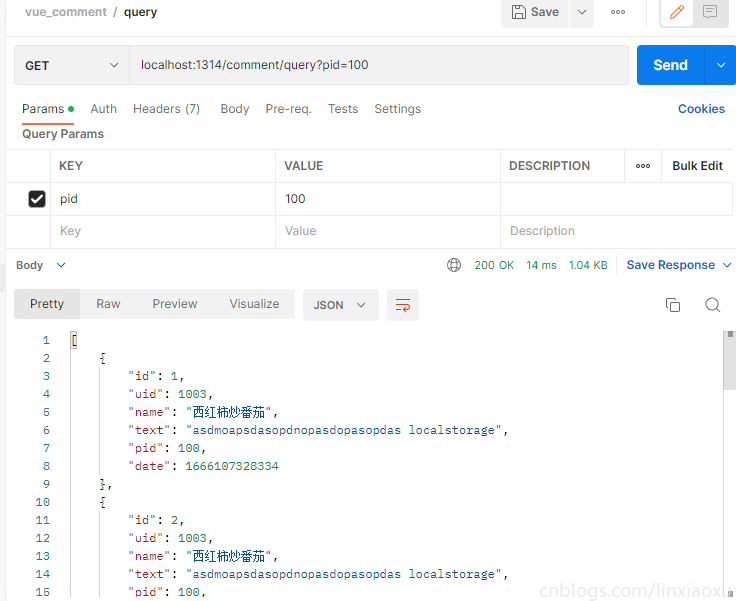
package controller

import (

	"time"

	"github.com/gin-gonic/gin"

	"wolflong.com/vue_gin/structs"

	"wolflong.com/vue_gin/variable"

)

func QueryComment(c *gin.Context) {

	db := variable.DB

	pid := c.Query("pid")

	rows, err := db.Query(`select id,uid,text,pid,date,name from comments join users using(uid) where pid = ?`, pid)

	checkError(err)

	defer rows.Close()

	var res []structs.Comment

	for rows.Next() {

		var c structs.Comment

		err = rows.Scan(&c.ID, &c.UID, &c.Text, &c.Pid, &c.Date, &c.Name)

		checkError(err)

		res = append(res, c)

	}

	c.JSON(200, res)

}

func DeleteComment(c *gin.Context) {

	db := variable.DB

	cid := c.PostForm("id")

	res, err := db.Exec("delete from comments where id = ?", cid)

	checkError(err)

	n, err := res.RowsAffected()

	checkError(err)

	if n == 0 {

		c.JSON(501, gin.H{

			"message": "failure",

		})

		c.Abort()

		return

	}

	c.JSON(200, gin.H{

		"message": "success",

	})

}

func InsertComment(c *gin.Context) {

	db := variable.DB

	uid := c.PostForm("uid")

	pid := c.PostForm("pid")

	text := c.PostForm("text")

	res, err := db.Exec(`INSERT INTO comments(uid,text,pid,date) values(?,?,?,?)`,

		uid, text, pid, time.Now().UnixMilli())

	checkError(err)

	n, err := res.RowsAffected()

	checkError(err)

	if n == 0 {

		c.JSON(501, gin.H{

			"message": "failure",

		})

		c.Abort()

		return

	}

	n, err = res.LastInsertId()

	checkError(err)

	rows, err := db.Query(`select id,uid,text,pid,date,name from comments join users using(uid) where id = ?`, n)

	checkError(err)

	defer rows.Close()

	rows.Next()

	var cm structs.Comment

	rows.Scan(&cm.ID, &cm.UID, &cm.Text, &cm.Pid, &cm.Date, &cm.Name)

	c.JSON(200, cm)

}
controllers/post.go 获取帖子信息
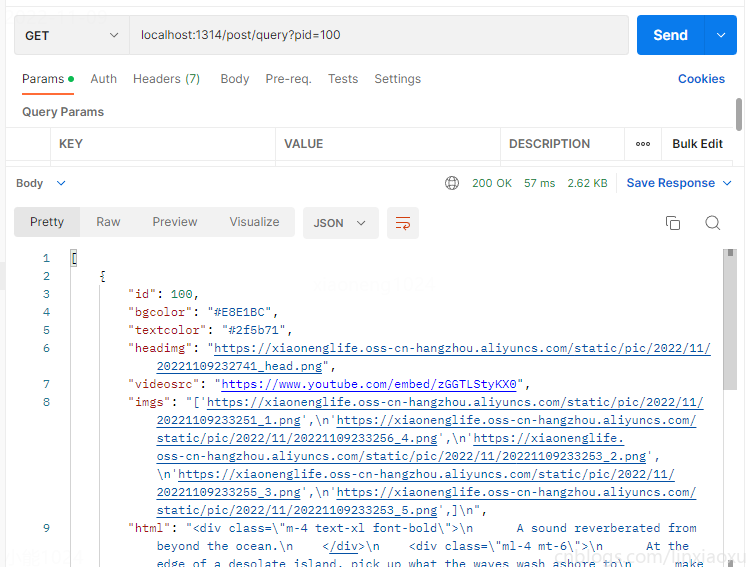
package controller

import (

	"github.com/gin-gonic/gin"

	"wolflong.com/vue_gin/structs"

	"wolflong.com/vue_gin/variable"

)

func QueryPost(c *gin.Context) {

	db := variable.DB

	pid := c.Query("pid")

	rows, err := db.Query(`select id,bgcolor,textcolor,headimg,videosrc,imgs,html from posts where id = ?`, pid)

	checkError(err)

	defer rows.Close()

	var Post []structs.Post

	rows.Next()

	var g structs.Post

	err = rows.Scan(&g.ID, &g.Bgcolor, &g.Textcolor, &g.Headimg, &g.Videosrc, &g.Imgs, &g.Html)

	checkError(err)

	Post = append(Post, g)

	c.JSON(200, Post)

}
router/router.go 配置路由组
package router

import (

	"github.com/gin-gonic/gin"

	"wolflong.com/vue_gin/controller"

)

func Router(r *gin.Engine) {

	r.GET("/", controller.HelloWorld)

	r.GET("/queryGameblog", controller.QueryGameBlog)

	r.GET("/queryGamelist", controller.QueryGameList)

	comment := r.Group("/comment")

	{

		comment.GET("/query", controller.QueryComment)

		comment.POST("/delete", controller.DeleteComment)

		comment.POST("/insert", controller.InsertComment)

	}

	post := r.Group("/post")

	{

		post.GET("/query", controller.QueryPost)

	}

}
main.go 启动Gin
package main

import (

	"github.com/gin-gonic/gin"

	"wolflong.com/vue_gin/router"

	"wolflong.com/vue_gin/utils"

)

func init() {

	utils.MySqlDB()

}

func main() {

	r := gin.Default()

	router.Router(r)

	r.Run(":1314")

}
GameView 详情页
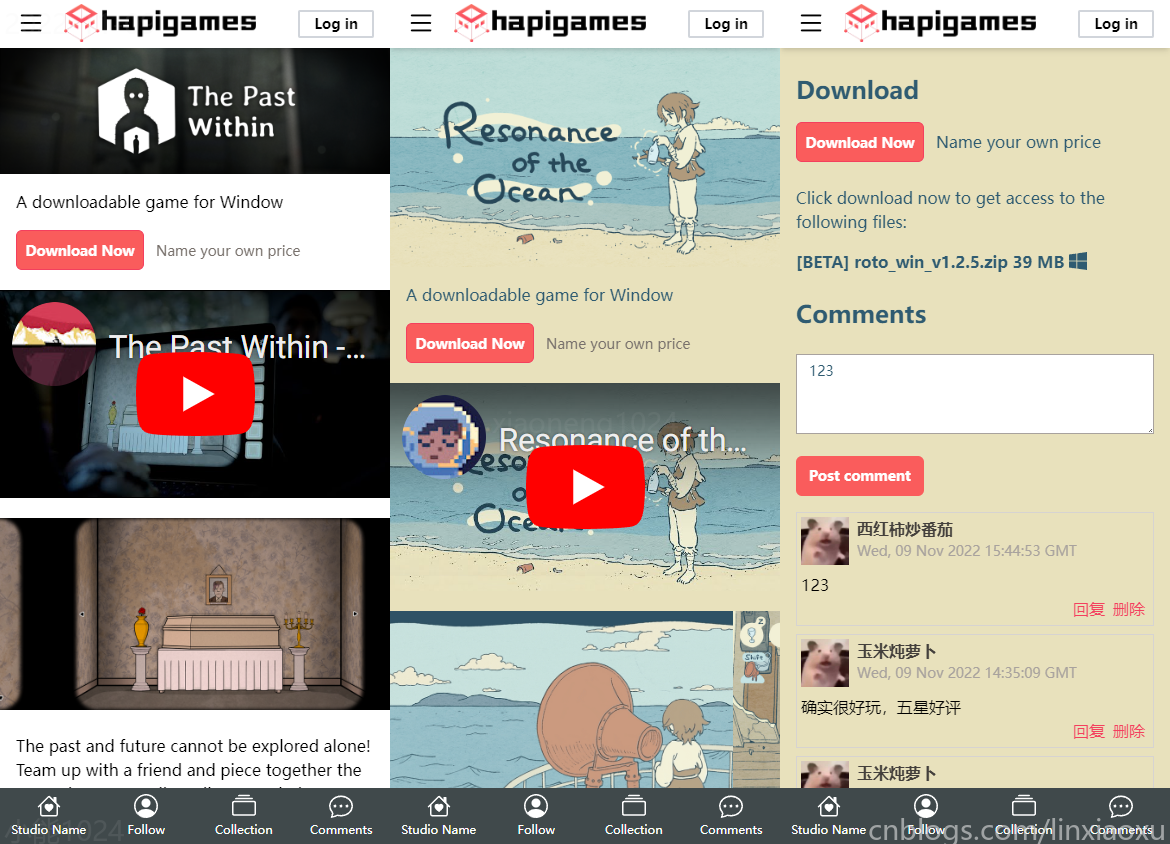
代码仓库
alicepolice/vue10 (github.com)
router/index.ts 动态路由
修改路由代码,使其变为动态路由。
  {

    path: '/gameView/:pid',

    name: 'gameView',

    component: GameViewVue

  },
views/GameView.vue
this.imgs = JSON.parse(data.imgs); 传入解析的字符串数组数据必须是双引号 ["1","2","3"],否则会出错。
在开头对路由参数this.$route.params.pid做了一次类型判断,因为传入的参数可能是 string | string[]
内容介绍使用 V-HTML 标签实现自定义,将路由参数传递给子评论组件实现不同帖子的评论机制。
<template>

  <div :style="{ 'background-color': theme.bgColor, color: theme.textColor }">

    <img :src="headImg" class="w-full" />

    <div class="m-4">A downloadable game for Window</div>

    <div>

      <div class="my_button" style="background-color: #fa5c5c">

        Download Now

        <!-- <b-icon-download

          class="inline-block text-lg align-text-top"

        ></b-icon-download> -->

      </div>

      <span class="ml-3 text-stone-500 text-sm">Name your own price</span>

    </div>

    <div class="h-52 mt-5">

      <iframe class="h-full w-full" frameborder="0" :src="videoSrc"></iframe>

    </div>

    <div class="mt-5 h-48 flex overflow-x-auto">

      <img v-for="(value, index) in imgs" :key="index" :src="value" />

    </div>

    <div v-html="html"></div>

    <div class="m-4 mt-6 text-2xl font-bold">Download</div>

    <div>

      <div class="my_button" style="background-color: #fa5c5c">

        Download Now

      </div>

      <span class="ml-3">Name your own price</span>

    </div>

    <div class="ml-4 mt-6">

      Click download now to get access to the following files:

    </div>

    <div class="ml-4 mt-4 font-bold">

      [BETA] roto_win_v1.2.5.zip 39 MB

      <b-icon-windows

        class="inline-block text-lg align-text-top"

      ></b-icon-windows>

    </div>

    <div class="m-4 mt-6 text-2xl font-bold">Comments</div>

    <comment-test-view class="m-4" :initpid="pid"></comment-test-view>

  </div>

  <bottom-bar :items="bottomItems"></bottom-bar>

</template>

<script lang="ts">

import { defineComponent } from "vue";

import CommentTestView from "@/views/CommentView.vue";

import BottomBar from "@/components/common/BottomBar.vue";

export default defineComponent({

  name: "GameVIew",

  components: { CommentTestView, BottomBar },

  data() {

    return {

      pid: 100,

      theme: {

        bgColor: "#E8E1BC",

        textColor: "#2f5b71",

      },

      headImg:

        "https://xiaonenglife.oss-cn-hangzhou.aliyuncs.com/static/pic/2022/11/20221109232741_head.png",

      videoSrc: "https://www.youtube.com/embed/zGGTLStyKX0",

      imgs: [

        "https://xiaonenglife.oss-cn-hangzhou.aliyuncs.com/static/pic/2022/11/20221109233251_1.png",

        "https://xiaonenglife.oss-cn-hangzhou.aliyuncs.com/static/pic/2022/11/20221109233256_4.png",

        "https://xiaonenglife.oss-cn-hangzhou.aliyuncs.com/static/pic/2022/11/20221109233253_2.png",

        "https://xiaonenglife.oss-cn-hangzhou.aliyuncs.com/static/pic/2022/11/20221109233255_3.png",

        "https://xiaonenglife.oss-cn-hangzhou.aliyuncs.com/static/pic/2022/11/20221109233253_2.png",

      ],

      html: `

      description

      `,

      bottomItems: [

        { text: "Studio Name", icon: "b-icon-house-heart", routerName: "home" },

        { text: "Follow", icon: "b-icon-person-circle", routerName: "about" },

        { text: "Collection", icon: "b-icon-collection", routerName: "about" },

        { text: "Comments", icon: "b-icon-chat-dots", routerName: "about" },

      ],

    };

  },

  created() {

    if (typeof this.$route.params.pid == "string")

      this.pid = parseInt(this.$route.params.pid);

    else this.pid = parseInt(this.$route.params.pid[0]);

    this.axios

      .get("/post/query", {

        params: {

          pid: this.pid,

        },

      })

      .then((response) => {

        if (!response.data) {

          console.log("无数据");

          return;

        }

        let data = response.data[0];

        console.log(data);

        this.theme.bgColor = data.bgcolor;

        this.theme.textColor = data.textcolor;

        this.headImg = data.headimg;

        this.imgs = JSON.parse(data.imgs);

        this.videoSrc = data.videosrc;

        this.html = data.html;

      })

      .catch((err) => {

        console.log(err);

      });

  },

});

</script>

<style scoped>

.my_button {

  @apply w-32

          h-10

          pt-2.5

          text-center

          ml-4

          border border-rose-500

          text-sm text-white

          inline-block

          font-bold

          rounded-md;

}

</style>
views/CommentView.vue
修改组件,添加DEBUGFLAG选项,添加传入初始pid。
<template>

  <div v-if="debug" class="m-2">

    <div class="text-3xl font-bold">[DEBUG] Query Comments</div>

	......

  </div>

  <div v-if="debug" class="m-2">

    <div class="text-3xl font-bold">[DEBUG] Insert Comments</div>

  	......

  </div>

  <div class="m-4 border-stone-500">

    <textarea

      id="text"

      class="input_text h-20 w-full"

      rows="3"

      cols="40"

      placeholder="Write your comment..."

      v-model="text"

    />

  </div>

  <input

    type="button"

    value="Post comment"

    class="

      w-32

      h-10

      text-center

      ml-4

      text-sm text-white

      inline-block

      font-bold

      rounded-md

    "

    style="background-color: #fa5c5c"

    @click="insertComment"

  />

  <comment-area

    :comments="comments"

    :uid="uid"

    @delete-comment="deleteComment"

  ></comment-area>

</template>

<script>

import CommentArea from '@/components/common/CommentArea.vue';

export default {

  components: { CommentArea },

  name: 'CommentTestView',

  props: ["debug", "initpid"],

  data: function () {

    return {

      pid: 0,

      uid: 1003, // TODO VUEX 保存用户UUID

      text: "",

      comments: [

      ]

    }

  },

  methods: {

    insertComment() {

      const params = new URLSearchParams();

      params.append('uid', this.uid)

      params.append('pid', this.pid)

      params.append('text', this.text)

      this.axios.post("comment/insert",

        params

      ).then(response => {

        console.log(response.data)

        this.comments.unshift(

          response.data

        )

        console.log(this.comments)

      }).catch(err => {

        console.log(err)

      })

    },

    deleteComment(id) {

      const params = new URLSearchParams();

      params.append('id', id)

      this.axios.post("comment/delete", params).then(response => {

        console.log(response.data)

        this.comments = this.comments.filter(elem => {

          return elem.id != id

        })

      }).catch(err => {

        console.log(err)

      })

    },

    queryComment() {

      this.axios.get("comment/query", {

        params: {

          pid: this.pid

        }

      }).then(response => {

        if (!response.data) {

          this.comments = []

          return

        }

        this.comments = response.data

        this.comments.reverse()

      }).catch(err => {

        console.log(err)

      })

    }

  },

  created() {

    this.pid = this.initpid;

    this.queryComment();

    let old = localStorage.getItem(`comment_${this.pid}`)

    if (old) {

      this.text = old

    }

  },

  watch: {

    text() {

      localStorage.setItem(`comment_${this.pid}`, this.text)

    }

  }

}

</script>

<style scoped>

.input_text {

  @apply mt-2

        inline-block

        bg-white

        focus:outline-none focus:ring focus:border-blue-200

        py-1.5

        pl-3

        border border-stone-400

        text-sm;

}

.input_button {

  @apply border border-rose-400

        text-sm

        font-bold

        text-rose-500

        rounded-sm

        px-4

        py-1

        mt-2

        ml-4

        active:bg-rose-400 active:text-white;

}

</style>
资料参考
Minimal Example | Axios Docs (axios-http.com)
JSON.parse() - JavaScript | MDN (mozilla.org)
Dynamic routing using Vue Router - LogRocket Blog
常见的HTTP状态码及HTTP状态码大全-太平洋IT百科 (pconline.com.cn)
gin package - github.com/gin-gonic/gin - Go Packages
我的Vue之旅 10 Gin重写后端、实现页面详情页 Mysql + Golang + Gin的更多相关文章
- 我的Vue之旅、04 CSS媒体查询完全指南(Media Quires)
什么是SCSS Sass: Sass Basics (sass-lang.com) SCSS 是 CSS 的预处理器,它比常规 CSS 更强大. 可以嵌套选择器,更好维护.管理代码. 可以将各种值存储 ...
- 我的Vue之旅 06 超详细、仿 itch.io 主页设计(Mobile)
第二期 · 使用 Vue 3.1 + TypeScript + Router + Tailwind.css 仿 itch.io 平台主页. 我的主题 HapiGames 是仿 itch.io 的 in ...
- SpringBoot + Vue + ElementUI 实现后台管理系统模板 -- 后端篇(五): 数据表设计、使用 jwt、redis、sms 工具类完善注册登录逻辑
(1) 相关博文地址: SpringBoot + Vue + ElementUI 实现后台管理系统模板 -- 前端篇(一):搭建基本环境:https://www.cnblogs.com/l-y-h/p ...
- Vue学习笔记-Django REST framework3后端接口API学习
一 使用环境 开发系统: windows 后端IDE: PyCharm 前端IDE: VSCode 数据库: msyql,navicat 编程语言: python3.7 (Windows x86- ...
- vue的跳转方式(打开新页面)
vue的跳转方式(打开新页面) 2018年11月22日 10:43:21 浊清... 阅读数 2043 版权声明:本文为博主原创文章,遵循CC 4.0 by-sa版权协议,转载请附上原文出处链接和 ...
- 在Mac OS X 10.8中配置Apache + PHP + MySQL
在Mac OS X 10.8中配置Apache+PHP+MySQL的内容包括: 配置Apache 配置PHP 安装MySQL 配置PHPAdmin 设置数据库默认字符集 一. 配置Apache 1. ...
- [ionic开源项目教程] - 第10讲 新闻详情页的用户体验优化
目录 [ionic开源项目教程] 第1讲 前言,技术储备,环境搭建,常用命令 [ionic开源项目教程] 第2讲 新建项目,架构页面,配置app.js和controllers.js [ionic开源项 ...
- 在Mac OS X 10.8中配置Apache+PHP+MySQL
在Mac OS X 10.8中配置Apache+PHP+MySQL的内容包括: 配置Apache 配置PHP 安装MySQL 配置PHPAdmin 设置数据库默认字符集 一. 配置Apache 1. ...
- Vue 2.x + Webpack 3.x + Nodejs 多页面项目框架(上篇——纯前端多页面)
Vue 2.x + Webpack 3.x + Nodejs 多页面项目框架(上篇--纯前端多页面) @(HTML/JS) 一般来说,使用vue做成单页应用比较好,但特殊情况下,需要使用多页面也有另外 ...
随机推荐
- C语言重定向输入:txt文件内容是中文,重定向输入显示乱码的原因
一.txt文件中的内容是中文,重定向输入显示乱码原因: 是因为文本文件的编码和和编译器的不一致导致的.我文本文件用的编码是UTF-8,而编译器是ANSI,不匹配,所以输出乱码.文本另存为时把编码改为A ...
- 08_Linux基础-vim-tmux-字符编码
@ 目录 08_Linux基础-vim-tmux-字符编码 一. vim vim编辑器作用 vim模式 vim命令模式 vim编辑模式 vim末行模式 vim视图模式 vim替换模式 练习 vim常用 ...
- DOS文档
- Centos7 安装部署Kubernetes(k8s)集群
目录 一.系统环境 二.前言 三.Kubernetes 3.1 概述 3.2 Kubernetes 组件 3.2.1 控制平面组件 3.2.2 Node组件 四.安装部署Kubernetes集群 4. ...
- 跟羽夏学 Ghidra ——数据
写在前面 此系列是本人一个字一个字码出来的,包括示例和实验截图.本人非计算机专业,可能对本教程涉及的事物没有了解的足够深入,如有错误,欢迎批评指正. 如有好的建议,欢迎反馈.码字不易,如果本篇文章 ...
- [Python]-opencv-python模块(cv2)-图片读取和格式转换
python常常用opencv模块来处理图像. import cv2 as cv 读取图片:imread() 默认按照彩色三通道读取: img = cv2.imread(path) 读取灰度图: im ...
- 【疑难杂症】关于Transformer到底是什么
在学习transform的时候,很多视频上来就是一张图开始解释图里面残差网络,self-attention等等巴拉巴拉的意思,然后组装,看也看完了,但是还是不明白transformer和selfatt ...
- (编程语言界的丐帮 C#).NET MD5 HASH 哈希 加密 与JAVA 互通
一.注意要点 1:输入字符串的的编码双方保持统一,如:UTF8: 2:HASH计算输出结果 byte[] 数组转String 时,编码要统一,如:转16进制小写字符串.当然也可以转Base64. 3: ...
- Android EGL 实践
本项目为 SurfaceView 和 TextureView 封装了 EGL 环境管理以及 Render 线程,可以和 GLSurfaceView 一样使用 OpenGLES 进行渲染.并尝试使用 O ...
- 面试突击87:说一下 Spring 事务传播机制?
Spring 事务传播机制是指,包含多个事务的方法在相互调用时,事务是如何在这些方法间传播的. 既然是"事务传播",所以事务的数量应该在两个或两个以上,Spring 事务传播机制的 ...