
网站速度优化模块HttpCompressionModule
为了优化网站的访问速度,准备采用HttpCompressionModule 6对传输数据进行压缩,下载了HttpCompressionModule 6 , 并按照示例程序中的web.config配置了网站的web.config。
<?xml version="1.0" encoding="utf-8" ?>
<configuration>
<configSections>
<section name="log4net" type="log4net.Config.Log4NetConfigurationSectionHandler, log4net" />
<sectionGroup name="blowery.web">
<section name="httpCompress" type="blowery.Web.HttpCompress.SectionHandler, blowery.Web.HttpCompress"/>
</sectionGroup>
</configSections>
<appSettings>
<add key="FCKeditor:UserFilesPath" value="/KeyuSoftShanyou/UserFiles" />
<add key="SearchIndexDir" value="~/index" />
</appSettings>
<!-- config section for my http module -->
<blowery.web>
<!--
Here's an example on how to change the algorithm or compression level
<compressionModule preferredAlgorithm="deflate|gzip" compressionLevel="high|normal|low"/>
so, to use deflate by default, and high compression, you would use the following line
-->
<httpCompress preferredAlgorithm="gzip" compressionLevel="high">
<excludedMimeTypes>
<add type="image/jpeg"/>
<add type="image/png"/>
<add type="image/gif"/>
</excludedMimeTypes>
<excludedPaths>
<!--<add path="NoCompress.aspx"/>-->
</excludedPaths>
</httpCompress>
</blowery.web>
<system.web>
<httpModules>
<!-- <add type="KeyuSoftShanyou.Util.NHSessionModule, KeyuSoftShanyou" name="NHSessionModule" />-->
<add name="CompressionModule" type="blowery.Web.HttpCompress.HttpModule, blowery.web.HttpCompress"/>
</httpModules>
<authentication mode="Forms">
<forms name="shanyouCookie" loginUrl="Admin/login.aspx" protection="All" timeout="90"/>
</authentication>
<authorization> <allow users="*" /> </authorization>
<compilation defaultLanguage="c#" debug="true" />
<customErrors defaultRedirect="Error.aspx" mode="RemoteOnly" />
<trace enabled="false" requestLimit="10" pageOutput="false"
traceMode="SortByTime"
localOnly="true"
/>
<sessionState
mode="InProc"
stateConnectionString="tcpip=127.0.0.1:42424"
sqlConnectionString="data source=127.0.0.1;Trusted_Connection=yes"
cookieless="false"
timeout="20"
/>
<globalization requestEncoding="utf-8" responseEncoding="utf-8" />
<!-- 2003-12-03, Rob Eberhardt - http://slingfive.com/demos/browserCaps/ firefox 浏览器问题 -->
<browserCaps>
<!-- GECKO Based Browsers (Netscape 6+, Mozilla/Firebird, ...) //-->
<case match="^Mozilla/5\.0 \([^)]*\) (Gecko/[-\d]+)? (?'type'[^/\d]*)([\d]*)/(?'version'(?'major'\d+)(?'minor'\.\d+)(?'letters'\w*)).*">
browser=Gecko
type=${type}
frames=true
tables=true
cookies=true
javascript=true
javaapplets=true
ecmascriptversion=1.5
w3cdomversion=1.0
css1=true
css2=true
xml=true
tagwriter=System.Web.UI.HtmlTextWriter
<case match="rv:(?'version'(?'major'\d+)(?'minor'\.\d+)(?'letters'\w*))">
version=${version}
majorversion=${major}
minorversion=${minor}
<case match="^b" with="${letters}">
beta=true
</case>
</case>
</case>
<!-- AppleWebKit Based Browsers (Safari...) //-->
<case match="AppleWebKit/(?'version'(?'major'\d)(?'minor'\d+)(?'letters'\w*))">
browser=AppleWebKit
version=${version}
majorversion=${major}
minorversion=0.${minor}
frames=true
tables=true
cookies=true
javascript=true
javaapplets=true
ecmascriptversion=1.5
w3cdomversion=1.0
css1=true
css2=true
xml=true
tagwriter=System.Web.UI.HtmlTextWriter
<case match="AppleWebKit/(?'version'(?'major'\d)(?'minor'\d+)(?'letters'\w*))( \(KHTML, like Gecko\) )?(?'type'[^/\d]*)/.*$">
type=${type}
</case>
</case>
<!-- Konqueror //-->
<case match = "Konqueror/(?'version'(?'major'\d+)(?'minor'\.\d+)(?'letters'));\w*(?'platform'[^\)]*)">
browser=Konqueror
version=${version}
majorversion=${major}
minorversion=${minor}
platform=${platform}
type=Konqueror
frames=true
tables=true
cookies=true
javascript=true
javaapplets=true
ecmascriptversion=1.5
w3cdomversion=1.0
css1=true
css2=true
xml=true
tagwriter=System.Web.UI.HtmlTextWriter
</case>
</browserCaps>
</system.web>
<!-- This section contains the log4net configuration settings -->
<log4net> <!-- Define some output appenders -->
<appender name="RollingLogFileAppender" type="log4net.Appender.RollingFileAppender">
<param name="File" value="log.txt" />
<param name="AppendToFile" value="true" />
<param name="MaxSizeRollBackups" value="2" />
<param name="MaximumFileSize" value="100KB" />
<param name="RollingStyle" value="Size" />
<param name="StaticLogFileName" value="true" />
<layout type="log4net.Layout.PatternLayout">
<param name="Header" value="[Header]\r\n" />
<param name="Footer" value="[Footer]\r\n" />
<param name="ConversionPattern" value="%d [%t] %-5p %c [%x] - %m%n" />
</layout>
</appender>
<appender name="ConsoleAppender" type="log4net.Appender.ConsoleAppender">
<layout type="log4net.Layout.PatternLayout">
<param name="ConversionPattern" value="%d [%t] %-5p %c [%x] <%X{auth}> - %m%n" />
</layout> </appender> <!-- Set root logger level to ERROR and its appenders -->
<root>
<level value="ERROR" />
<appender-ref ref="RollingLogFileAppender" />
<appender-ref ref="ConsoleAppender" />
</root>
<!-- Print only messages of level DEBUG or above in the packages -->
<logger name="IBatisNet.DataMapper.Configuration.Cache.CacheModel">
<level value="DEBUG" />
</logger>
<logger name="IBatisNet.DataMapper.Configuration.Statements.PreparedStatementFactory">
<level value="DEBUG" />
</logger>
<logger name="IBatisNet.DataMapper.LazyLoadList">
<level value="DEBUG" />
</logger>
</log4net>
</configuration>
使用效果:
使用HttpCompressionModule自带的Fetch工具进行测试,测试结果如下: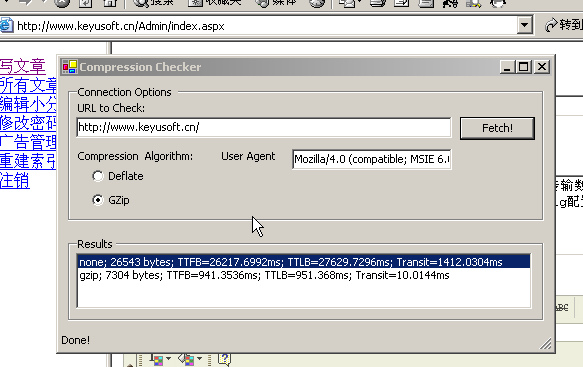
测试结果说明:
第一行数据是未使用HttpCompressionModule的测试结果。
第二行数据是使用deflate压缩算法进行压缩后的测试结果。
第二列数据是Web服务器传递到浏览器的文件大小。很明显,压缩后传输数据大大减少,有效地节约了带宽。
TTFB—首字节平均响应时间(Gets the number of milliseconds that have passed before the first byte of the response was received.)
TTLB—末字节平均响应时间(Gets the number of milliseconds that passed before the last byte of the response was received. )
Transit—传输数据到浏览器的时间。
从测试结果可以看出, 采用HttpCompressionModule后访问速度有明显改善。
http://www.asp.net/ControlGallery/ControlDetail.aspx?Control=696&tabindex=2
http://www.blowery.org/code/HttpCompressionModule.html
网站速度优化模块HttpCompressionModule的更多相关文章
- (转)网站速度优化技巧:Nginx设置js、css过期时间
网站速度优化技巧:Nginx设置js.css过期时间 原文:http://www.webkaka.com/blog/archives/Nginx-set-the-expiration-time-for ...
- netty系列之:一个价值上亿的网站速度优化方案
目录 简介 本文的目标 支持多个图片服务 http2处理器 处理页面和图像 价值上亿的速度优化方案 总结 简介 其实软件界最赚钱的不是写代码的,写代码的只能叫马龙,高级点的叫做程序员,都是苦力活.那么 ...
- [转]Asp.net mvc 网站之速度优化 -- 页面缓存
网站速度优化的一般方法 由于网站最重要的用户体验就是速度,特别是对于电子商务网站而言. 一般网站速度优化会涉及到几个方面: 1. 数据库优化 — 查询字段简历索引,使用数据库连接池和持久化,现在还有种 ...
- Asp.net mvc 网站之速度优化 -- 页面缓存
网站速度优化的一般方法 由于网站最重要的用户体验就是速度,特别是对于电子商务网站而言. 一般网站速度优化会涉及到几个方面: 1. 数据库优化 — 查询字段简历索引,使用数据库连接池和持久化,现在还有种 ...
- web访问速度优化分析
请求从发出到接收完成一共经历了DNS Lookup.Connecting.Blocking.Sending.Waiting和Receiving六个阶段,时间共计38ms.请求完成之后是DOM加载和页面 ...
- 这些优化 Drupal 网站速度的超简单办法,你忽略了多少?
“怎么样能让我的 Drupal 网站更快一些?”是我们最常遇到的一个问题.站点速度确实非常重要,因为它会影响你的 SEO排名效果.访客是否停留以及你自己管理网站所需要的时间. 今天我们就来看看那些通过 ...
- php网站速度性能优化(转)
一个网站的访问打开速度至关重要,特别是首页的打开加载过慢是致命性的,本文介绍关于php网站性能优化方面的实战案例:淘宝首页加载速度优化实践 .想必很多人都已经看到了新版的淘宝首页,它与以往不太一样,这 ...
- 网站性能优化(Yahoo 35条)
Yahoo 网站性能优化 35条 一.内容部分 尽量减少 HTTP请求 减少 DNS查找 避免跳转 缓存 Ajxa 推迟加载 提前加载 减少 DOM元素数量 用域名划分页面内容 使 frame数量最少 ...
- 【转】Yahoo!团队:网站性能优化的35条黄金守则
Yahoo!的 Exceptional Performance团队为改善 Web性能带来最佳实践.他们为此进行了一系列的实验.开发了各种工具.写了大量的文章和博客并在各种会议上参与探讨.最佳实践的核心 ...
随机推荐
- 01-hibernate注解:类级别注解准备工作
注解简介: 目的:为了简化繁琐的ORM映射文件(.hbm)的配置. JPA与hibernate的关系 JPA:全称 java Persistence API(java持久化API接口) JPA注解是J ...
- 使用Python爬虫爬取网络美女图片
代码地址如下:http://www.demodashi.com/demo/13500.html 准备工作 安装python3.6 略 安装requests库(用于请求静态页面) pip install ...
- ios8设置application badge value
在ios8中,直接设置application badge value会出错 [[UIApplication sharedApplication] setApplicationIconBadgeNumb ...
- 在go中使用leveldb --levi
github上有个比较好用的leveldb go wrapperlevigo, 安装之前需现在机器上安装leveldb 当前版本的LevelDB没有带安装脚本,需自行编译安装,过程如下: instal ...
- jBoss设置jvm参数
jBoss版本: jboss-5.1.0.GA jboss-6.0.0.Final jboss-5.1.0.GA和jboss-6.0.0.Final修改方法: 打开%JBOSS_HOME%\bin ...
- Linux 网卡丢包严重
http://hi.baidu.com/scstwy/item/cad0fbef1fdc18d3eb34c9d9
- Git 创建仓库
本文将为大学介绍如何创建一个远程的Git仓库.您可以使用一个已经存在的目录作为Git仓库或创建一个空目录. 使用您当前的目录作为Git仓库,我们只需要使它初始化. git init 使用我们指定目录作 ...
- excel导入sql server 文本被截断,或者一个或多个字符在目标代码页中没有匹配项 错误处理
excel导入sql server 文本被截断,或者一个或多个字符在目标代码页中没有匹配项 错误处理方法: 方案1:修改注册表 出现文本被截断的原因是SQL Server的导入导出为了确定数据表的字段 ...
- 百度地图和高德地图坐标系的互相转换 四种Sandcastle方法生成c#.net帮助类帮助文档 文档API生成神器SandCastle使用心得 ASP.NET Core
百度地图和高德地图坐标系的互相转换 GPS.谷歌.百度.高德坐标相互转换 一.在进行地图开发过程中,我们一般能接触到以下三种类型的地图坐标系: 1.WGS-84原始坐标系,一般用国际GPS纪录仪记 ...
- Intellij IDEA配置优化
1. 在线激活 安装IntelliJ IDEA 2016.1.2版本后,在联网状态下激活.Help --> Register,选择lisence server,粘贴地址http://idea.i ...