
js获取url参数值的几种方式
一、原生js获取URL参数值:
比如当前URL为:http://localhost:8080/#/page2?id=100&name=guanxy
<template>

  <div>

    <div>

      <button style="background-color: orange" @click="getUrlParam">方式一:采用正则表达式获取地址栏参数 (代码简洁,重点正则)</button>

      <p>结果:id={{method1_id}},name={{method1_name}}</p>

    </div>

    <div>

      <button style="background-color: green" @click="getUrlParam2"> 方法二:split拆分法 (代码较复杂,较易理解)</button>

      <p>结果:id={{method2_id}},name={{method2_name}}</p>

    </div>

    <div>

      <button style="background-color: aqua" @click="getUrlParam3"> 方法三:split拆分法(根据参数名获取对应的值)</button>

      <p>结果:id={{method3_id}},name={{method3_name}}</p>

    </div>

  </div>

</template>

<script>

  export default {

    name: "page2",

    data() {

      return {

        method1_id: '',

        method1_name: '',

        method2_id: '',

        method2_name: '',

        method3_id: '',

        method3_name: '',

      }

    },

    methods: {

      getUrlParam() {

        //为什么window.location.search取值为空?

        //“http://localhost:8080/#/page2?id=100&name=guanxy”那么使用window.location.search得到的就是空(“”)。

        // 因为“?id=100&name=guanxy”串字符是属于“#/page2?id=100&name=guanxy”这个串字符的,也就是说查询字符串search只能在取到“?”后面和“#”之前的内容,如果“#”之前没有“?”search取值为空。

        this.method1_id = this.getQueryString('id');

        this.method1_name = this.getQueryString('name');

      },

      getQueryString(name) {

        let reg = new RegExp("(^|&)" + name + "=([^&]*)(&|$)", "i");

        let url = window.location.hash.split('?')[1].match(reg);

        // console.log(url)

        if (url != null) {

          return decodeURI(url[2])//decodeURI() 函数可对 encodeURI() 函数编码过的 URI 进行解码。

        } else {

          return null

        }

      },

      getUrlParam2() {

        let url = window.location.hash.split('?')[1].split("&");

        // console.log(url)

        let paramObj = new Object()

        url.forEach((item, i) => {

          paramObj[item.split('=')[0]] = item.split('=')[1]

        })

        this.method2_id = paramObj.id,

          this.method2_name = paramObj.name

      },

      getUrlParam3() {

        this.method3_id = this.getQueryVariable('id');

        this.method3_name = this.getQueryVariable('name')

      },

      getQueryVariable(variable) {

        let url = window.location.hash.split('?')[1].split("&");

        for (let i = 0; i < url.length; i++) {

          let pair = url[i].split('=');

          if (pair[0] == variable) {

            return pair[1]

          }

        }

        return false

      }

    }

  }

</script>

<style scoped>

</style>
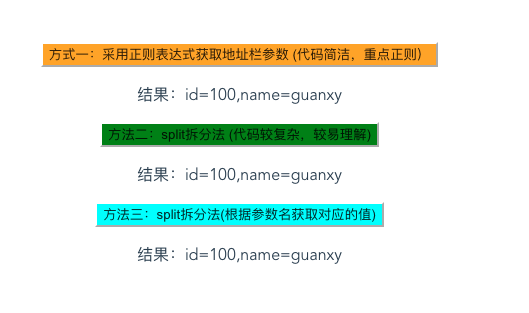
页面效果:
二、Vue 获取URL参数值
  <p>params获取当前路由参数:id={{this.$route.params.id}},name={{this.$route.params.name}}</p>

  <p>query获取当前路由参数:id={{this.$route.query.id}},name={{this.$route.query.name}}</p>
js获取url参数值的几种方式的更多相关文章
- js获取url参数值的两种方式
js获取url参数值的方法有很多,下面也为大家介绍两种. 方法一:正则分析法 function getQueryString(name) { var reg = new RegExp(" ...
- js获取url参数值(HTML之间传值)
<h3>未设置设备: <a href="javascript:addTab('设备列表','PKE_DeviceContent/PKE_DeviceContent.aspx ...
- js获取url参数值
用过的封装好的js获取url问号后的参数的方法: <script> var Request = new Object(); Request = GetRequest();var error ...
- js获取url参数值,js获取其他页面传递而来的值
index.htm?参数1=数值1&参数2=数值2&参数3=数据3&参数4=数值4&...... 静态html文件js读取url参数 根据获取html的参数值控制htm ...
- js获取url参数值的方法
index.htm?参数1=数值1&参数2=数值2&参数3=数据3&参数4=数值4&...... 静态html文件js读取url参数 根据获取html的参数值控制htm ...
- js获取url参数的两种方法
js获取参数,在以前我都是用正在去拆分,然后获取,这种方式感觉是最简单的 方式1: function QueryString(item) { var sValue=location.search.ma ...
- js获取url参数值的方法总结
1.方式一:通过字符串截取的方式获取参数值: 1).函数一:获取URL中的参数名及参数值的集合 /** * [获取URL中的参数名及参数值的集合] * 示例URL:http://htmlJsTest/ ...
- (转)js获取url参数值
明天有空编辑下 今天做项目遇到js取得url地址问号后面的参数,找了下面的,用着非常好,项目是选项卡样式的,也就是一点击二级分类,底下的同样名字的背景变红(选项卡倍选中) http://www.cnb ...
- js获取url参数值的方式
定义方法: function getParam(paramName) { paramValue = ""; isFound = false; paramName = paramNa ...
随机推荐
- 备份Oracle 数据库。
#!/bin/bash# 2018-07-07 oracle database back#filename=`date +%Y%m%d`filename=`date +%Y_%m_%d_%H%M`di ...
- Mongo导出、导入
1.mongodb 数据导出: connection options: /h, /host:<hostname> mongodb host to connect to (setname/h ...
- anaconda3创建py2环境
查看conda的py环境conda info -e # 创建一个名为python34的环境,指定Python版本是3.4(创建py27操作一样)conda create -n py34 python= ...
- vue 路由动态传参 (多个)
动态传参 传值页面 客户列表clientList.vue 路由 router.js 配置路由 接收参数的页面 客户详情CustomerDetails.vue 通过this.$router.para ...
- shell快速入门
$? 表示上一个命令退出的状态,0表示执行正常,不等于0表示执行不正常. $$ 表示当前进程编号 $ 表示当前脚本名称 $# 表示参数的个数,常用于循环 $*和$@ 都表示参数列表 $n 表示n位置的 ...
- epoll学习
一.epoll_create #include <sys/epoll.h> int epoll_create(int size); int epoll_create1(int flags) ...
- 前端工程师技能图谱skill-map
# 前端工程师技能图谱 ## 浏览器 - IE6/7/8/9/10/11 (Trident) - Firefox (Gecko) - Chrome/Chromium (Blink) - Safari ...
- Idea JAVA項目的导入JAR包和导出jar包
一.IDea项目中导入jar包 打开菜单project structure,然后选择modules/dependencies下选择右侧的+,选择jar包目录中的jar文件,导入 二.导出jar包 菜单 ...
- Python模块学习之xlrd 读取Excel时传入formatting_info=True报错:NotImplementedError: formatting_info=True not yet implemented
问题:xlrd读取Excel时传入 formatting_info=True 报错 之前我们使用读取xls文件的时候都是使用的xlrd库,但是这个库只能操作 .xls格式,对于后来的 .xlsx的版本 ...
- expand gcc case variable length
daniel@daniel-mint ~/vex $ bash gen.sh 0x10 0x1F case 10: case 11: case 12: case 13: case 14: case 1 ...