
js获取url参数值的几种方式
一、原生js获取URL参数值:
比如当前URL为:http://localhost:8080/#/page2?id=100&name=guanxy
<template>

  <div>

    <div>

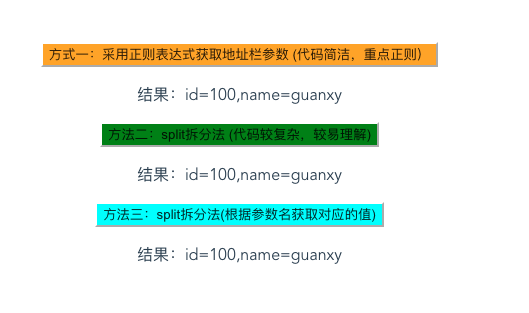
      <button style="background-color: orange" @click="getUrlParam">方式一:采用正则表达式获取地址栏参数 (代码简洁,重点正则)</button>

      <p>结果:id={{method1_id}},name={{method1_name}}</p>

    </div>

    <div>

      <button style="background-color: green" @click="getUrlParam2"> 方法二:split拆分法 (代码较复杂,较易理解)</button>

      <p>结果:id={{method2_id}},name={{method2_name}}</p>

    </div>

    <div>

      <button style="background-color: aqua" @click="getUrlParam3"> 方法三:split拆分法(根据参数名获取对应的值)</button>

      <p>结果:id={{method3_id}},name={{method3_name}}</p>

    </div>

  </div>

</template>

<script>

  export default {

    name: "page2",

    data() {

      return {

        method1_id: '',

        method1_name: '',

        method2_id: '',

        method2_name: '',

        method3_id: '',

        method3_name: '',

      }

    },

    methods: {

      getUrlParam() {

        //为什么window.location.search取值为空?

        //“http://localhost:8080/#/page2?id=100&name=guanxy”那么使用window.location.search得到的就是空(“”)。

        // 因为“?id=100&name=guanxy”串字符是属于“#/page2?id=100&name=guanxy”这个串字符的,也就是说查询字符串search只能在取到“?”后面和“#”之前的内容,如果“#”之前没有“?”search取值为空。

        this.method1_id = this.getQueryString('id');

        this.method1_name = this.getQueryString('name');

      },

      getQueryString(name) {

        let reg = new RegExp("(^|&)" + name + "=([^&]*)(&|$)", "i");

        let url = window.location.hash.split('?')[1].match(reg);

        // console.log(url)

        if (url != null) {

          return decodeURI(url[2])//decodeURI() 函数可对 encodeURI() 函数编码过的 URI 进行解码。

        } else {

          return null

        }

      },

      getUrlParam2() {

        let url = window.location.hash.split('?')[1].split("&");

        // console.log(url)

        let paramObj = new Object()

        url.forEach((item, i) => {

          paramObj[item.split('=')[0]] = item.split('=')[1]

        })

        this.method2_id = paramObj.id,

          this.method2_name = paramObj.name

      },

      getUrlParam3() {

        this.method3_id = this.getQueryVariable('id');

        this.method3_name = this.getQueryVariable('name')

      },

      getQueryVariable(variable) {

        let url = window.location.hash.split('?')[1].split("&");

        for (let i = 0; i < url.length; i++) {

          let pair = url[i].split('=');

          if (pair[0] == variable) {

            return pair[1]

          }

        }

        return false

      }

    }

  }

</script>

<style scoped>

</style>
页面效果:
二、Vue 获取URL参数值
  <p>params获取当前路由参数:id={{this.$route.params.id}},name={{this.$route.params.name}}</p>

  <p>query获取当前路由参数:id={{this.$route.query.id}},name={{this.$route.query.name}}</p>
js获取url参数值的几种方式的更多相关文章
- js获取url参数值的两种方式
js获取url参数值的方法有很多,下面也为大家介绍两种. 方法一:正则分析法 function getQueryString(name) { var reg = new RegExp(" ...
- js获取url参数值(HTML之间传值)
<h3>未设置设备: <a href="javascript:addTab('设备列表','PKE_DeviceContent/PKE_DeviceContent.aspx ...
- js获取url参数值
用过的封装好的js获取url问号后的参数的方法: <script> var Request = new Object(); Request = GetRequest();var error ...
- js获取url参数值,js获取其他页面传递而来的值
index.htm?参数1=数值1&参数2=数值2&参数3=数据3&参数4=数值4&...... 静态html文件js读取url参数 根据获取html的参数值控制htm ...
- js获取url参数值的方法
index.htm?参数1=数值1&参数2=数值2&参数3=数据3&参数4=数值4&...... 静态html文件js读取url参数 根据获取html的参数值控制htm ...
- js获取url参数的两种方法
js获取参数,在以前我都是用正在去拆分,然后获取,这种方式感觉是最简单的 方式1: function QueryString(item) { var sValue=location.search.ma ...
- js获取url参数值的方法总结
1.方式一:通过字符串截取的方式获取参数值: 1).函数一:获取URL中的参数名及参数值的集合 /** * [获取URL中的参数名及参数值的集合] * 示例URL:http://htmlJsTest/ ...
- (转)js获取url参数值
明天有空编辑下 今天做项目遇到js取得url地址问号后面的参数,找了下面的,用着非常好,项目是选项卡样式的,也就是一点击二级分类,底下的同样名字的背景变红(选项卡倍选中) http://www.cnb ...
- js获取url参数值的方式
定义方法: function getParam(paramName) { paramValue = ""; isFound = false; paramName = paramNa ...
随机推荐
- Python随笔记录之一
import os import random from copy import deepcopy ''' 读取特定目录下所有的文件夹, 和文件名 ''' def eachDir(path): for ...
- 第8篇NFS PersistentVolume
一.部署nfs服务端: k8s-master 节点上搭建了 NFS 服务器,也可以在部署节点搭建,原理一样 (1)安装nfs服务: yum install -y nfs-utils rpcbind v ...
- 记录下通过Java代码打开cmd启动appium server及在使用过程中碰到的问题
1.appium server启动后,执行测试脚本,appium日志报错,提示appium setting未安装(原因是小米手机在用appium desktop调试时总是提示是否安装appium se ...
- websocket 中使用Service层的方法
创建公共Utils 类 ApplicationContextRegister @Component @Lazy(false) public class ApplicationContextRegist ...
- python--有参装饰器、迭代器
有参装饰器的引入: import time import random from functools import wraps def timmer(func): @wraps(func) def w ...
- POJ 3414 Pots (dfs,这个代码好长啊QAQ)
Description You are given two pots, having the volume of A and B liters respectively. The following ...
- 使用JAVA如何对图片进行格式检查以及安全检查处理
一.通常情况下,验证一个文件是否图片,可以通过以下三种方式: 1).判断文件的扩展名是否是要求的图片扩展名 这种判断是用得比较多的一种方式,不过这种方式非常的不妥,别人稍微的把一个不是图片的文件的扩展 ...
- centos6编译安装php7
https://www.cnblogs.com/wenwei-blog/p/6261637.html https://www.cnblogs.com/imzye/p/5109770.html cent ...
- Android:关于onConfigurationChanged()的介绍(转)
转载:http://www.cnblogs.com/bluestorm/p/3622444.html 从事Android开发,免不了会在应用里嵌入一些广告SDK,在嵌入了众多SDK后,发现几乎每个要求 ...
- qrcode.js生成二维
使用到qrcode.js生成二维码 pako.js压缩字符串:https://github.com/nodeca/pako 参照代码如下: <!DOCTYPE HTML PUBLIC " ...