
使用VSCODE开发UE4
完全可行,速度很快,智能提示、代码格式化、查找Symbol等等都不比VS+Visual AssistX 差。
准备
- 打开编辑器的Editor Preferences>Source Code,选择VSCode
- 在工程的uproject文件上右键>Generate Visual Studio Project,就会生成一个workspace文件,双击即可打开visual studio code. 同时生成的还有一个.vscode文件夹。
配置VSCode
- VSCode需要的插件网上众说纷纭,实际证明,只需要这三个就够了:
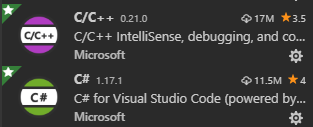

什么clang-format之类的完全不需要,因为c/c++里面自带了clang-format.
打开设置(Ctrl+,或者File>Preferences>Settings)
选择Extensions>C/C++
C_Cpp:Autocomplete    Default

C_Cpp:Clang_format_fallback Style   Visual Studio(这里是防止Clang_format_style填写的是file,而系统找不到.clang-format文件时候的情况)

C_Cpp:Clang_format_path          不需要填写(默认配置好了)

C_Cpp:Clang_format_style          Visual Studio(或者LLVM)

C_Cpp>Default: Cpp Standard        c++11

C_Cpp:Workspace Symbols          All
最后这条最重要,否则查找Symbol时候就无法识别到UE源码中的代码了。
注意上面的两个format 可以取值Visual Studio, LLVM, Google, WebKit等。推荐使用WebKit。
如果追求完美,可以这样设置
官方C/C++插件自带的clang-format版本是6.0,所以设置相关选项时要注意参考的文档版本。
可以自行下载最新的clang-format文件,目前最新版本是7.0。
下载位置:下载
选择编译好的win64版本。
安装好以后只需要找到里面的clang-format.exe 拷贝到别处(例如C:/),其余部分就可以卸载了。
然后将C_Cpp:Clang_format_path设置为刚下载的clang-format.exe路径:
"C_Cpp.clang_format_path": "C:\\clang-format.exe",
将C_Cpp:Clang_format_style设置为file,表示从工作目录或上级文件夹中寻找.clang-format配置文件。
在工作目录中创建一个名称为.clang-format的文件
windows系统中无法创建名字以.开头的文件,可以这样创建:打开cmd,输入echo >.clang-format ,回车即可创建。
内容用下方内容粘贴
这里有一个专门为UE4配置好的.clang-format文件内容:
---

Language:        Cpp

AccessModifierOffset: -4

AlignAfterOpenBracket: Align

AlignConsecutiveAssignments: false

AlignConsecutiveDeclarations: false

AlignEscapedNewlines: Left

AlignOperands:   true

AlignTrailingComments: true

AllowAllParametersOfDeclarationOnNextLine: true

AllowShortBlocksOnASingleLine: true

AllowShortCaseLabelsOnASingleLine: true

AllowShortFunctionsOnASingleLine: None

AllowShortIfStatementsOnASingleLine: false

AllowShortLoopsOnASingleLine: false

AlwaysBreakAfterReturnType: None

AlwaysBreakBeforeMultilineStrings: false

AlwaysBreakTemplateDeclarations: Yes

BinPackArguments: false

BinPackParameters: false

BreakBeforeBinaryOperators: None

BreakBeforeBraces: Allman

BreakBeforeInheritanceComma: false

BreakInheritanceList: AfterColon

BreakBeforeTernaryOperators: true

BreakConstructorInitializersBeforeComma: false

BreakConstructorInitializers: AfterColon

BreakAfterJavaFieldAnnotations: false

BreakStringLiterals: true

ColumnLimit:     0

CommentPragmas:  '^ IWYU pragma:'

CompactNamespaces: true

ConstructorInitializerAllOnOneLineOrOnePerLine: true

ConstructorInitializerIndentWidth: 4

ContinuationIndentWidth: 0

Cpp11BracedListStyle: true

DerivePointerAlignment: true

DisableFormat:   false

FixNamespaceComments: true

ForEachMacros:

  - for

IncludeBlocks:   Regroup

IncludeCategories:

  - Regex:           '.*\.generated\.h'

    Priority:        100

  - Regex:           '.*(PCH).*'

    Priority:        -1

  - Regex:           '".*"'

    Priority:        1

  - Regex:           '^<.*\.(h)>'

    Priority:        3

  - Regex:           '^<.*>'

    Priority:        4

IncludeIsMainRegex: '([-_](test|unittest))?$'

IndentCaseLabels: true

IndentPPDirectives: None

IndentWidth:     4

IndentWrappedFunctionNames: false

JavaScriptQuotes: Leave

JavaScriptWrapImports: true

KeepEmptyLinesAtTheStartOfBlocks: false

MacroBlockBegin: ''

MacroBlockEnd:   ''

MaxEmptyLinesToKeep: 2

NamespaceIndentation: None

ObjCBinPackProtocolList: Never

ObjCBlockIndentWidth: 2

ObjCSpaceAfterProperty: false

ObjCSpaceBeforeProtocolList: true

PenaltyBreakAssignment: 2

PenaltyBreakBeforeFirstCallParameter: 1

PenaltyBreakComment: 300

PenaltyBreakFirstLessLess: 120

PenaltyBreakString: 1000

PenaltyBreakTemplateDeclaration: 10

PenaltyExcessCharacter: 1000000

PenaltyReturnTypeOnItsOwnLine: 200

PointerAlignment: Left

RawStringFormats:

  - Language:        Cpp

    Delimiters:

      - cc

      - CC

      - cpp

      - Cpp

      - CPP

      - 'c++'

      - 'C++'

    CanonicalDelimiter: ''

    BasedOnStyle:    google

  - Language:        TextProto

    Delimiters:

      - pb

      - PB

      - proto

      - PROTO

    EnclosingFunctions:

      - EqualsProto

      - EquivToProto

      - PARSE_PARTIAL_TEXT_PROTO

      - PARSE_TEST_PROTO

      - PARSE_TEXT_PROTO

      - ParseTextOrDie

      - ParseTextProtoOrDie

    CanonicalDelimiter: ''

ReflowComments:  true

SortIncludes:    true

SortUsingDeclarations: true

SpaceAfterCStyleCast: true

SpaceAfterTemplateKeyword: true

SpaceBeforeAssignmentOperators: true

SpaceBeforeCpp11BracedList: false

SpaceBeforeCtorInitializerColon: true

SpaceBeforeInheritanceColon: true

SpaceBeforeParens: ControlStatements

SpaceBeforeRangeBasedForLoopColon: true

SpaceInEmptyParentheses: false

SpacesBeforeTrailingComments: 4

SpacesInAngles:  false

SpacesInContainerLiterals: true

SpacesInCStyleCastParentheses: false

SpacesInParentheses: false

SpacesInSquareBrackets: false

Standard:        Auto

TabWidth:        4

UseTab:          Always

...
自动格式化
Text Editor> Formatting
Format On Save和Format On Type都打勾。
常用快捷操作
打开Symbol: 按Ctrl键并鼠标左键点击Symbol
查找Symbol: 选择Symbol并Ctrl+T (VAssist中的Alt+Shift+S)
转到定义: F12
转到声明: Ctrl+F12
重命名: Ctrl+F2
切换头/源文件: Alt+O (VAssist快捷键一样)
快速打开文件: Ctrl+P (VAssist中的Alt+Shift+O)
使用VSCODE开发UE4的更多相关文章
- .Net Core Linux centos7行—vscode开发,linux部署运行
前面搭建好啦linux运行环境,下面搭建windows下的开发环境.并完成调试 参考地址:https://www.microsoft.com/net/core#windows. 按照步骤来就好.安装. ...
- vscode 开发.net core 从安装到部署 教程详解
一:环境准备: windows系统需要 win7 sp1 / windows 8 / windows 2008 r2 sp1 / windows10: 其他版本的windows系统在安装.NET C ...
- 用VSCode开发一个基于asp.net core 2.0/sql server linux(docker)/ng5/bs4的项目(1)
最近使用vscode比较多. 学习了一下如何在mac上使用vscode开发asp.netcore项目. 这里是我写的关于vscode的一篇文章: https://www.cnblogs.com/cgz ...
- 用VSCode开发一个基于asp.net core 2.0/sql server linux(docker)/ng5/bs4的项目(3)
第一部分: http://www.cnblogs.com/cgzl/p/8478993.html 第二部分: http://www.cnblogs.com/cgzl/p/8481825.html 由于 ...
- 使用vscode开发调试.net core应用程序并部署到Linux跨平台
使用VS Code开发 调试.NET Core RC2应用程序,由于.NET Core 目前还处于预览版. 本文使用微软提供的示例进行开发及调试. https://github.com/aspnet/ ...
- vsCode 开发微信小程序插件
用 vsCode 开发微信小程序可以配置以下插件,让开发更美好: 1. vscode weapp api 2. vscode wxml 3. vscode-wechat 4. Easy WXLESS ...
- 用vscode开发vue应用[转]
https://segmentfault.com/a/1190000019055976 现在用VSCode开发Vue.js应用几乎已经是前端的标配了,但很多时候我们看到的代码混乱不堪,作为一个前端工程 ...
- 【.NET Core项目实战-统一认证平台】基于jackcao博客使用VSCode开发及感悟One搭建开发环境
原博客系列文章链接:https://www.cnblogs.com/jackcao/ 金焰的世界 感谢博主无私的奉献,感谢博主幼儿班的教学 基于jackcao博客使用VsCode开发及感悟One搭建开 ...
- 用vscode开发vue应用
阅读 3237 收藏 205 2019-05-02 原文链接:segmentfault.com 云服务器 1 核 2G , 9元/月 ,买十送二,99/年!!!快来上车!developer.huawe ...
随机推荐
- pom.xml标签页名称
pom.xml文件双击打开后,标签页显示的名称与<artifactId></artifactId>的内容相一致.
- C++拷贝构造函数:浅拷贝与深拷贝
在介绍C++浅拷贝与深拷贝之前,我们先引出C++的拷贝构造函数. C++拷贝构造函数是一种特殊的构造函数,其形参是本类对象的引用.用于在建立一个新的对象时,使用一个已经存在的对象来初始化这个新对象.因 ...
- tp5.1中redis使用
一.环境安装 1.下载redis,igbniary https://windows.php.net/downloads/pecl/releases/igbinary/ https://windows. ...
- Postman之获得登录的token,并设置为全局变量
1.调通登录接口(可以参考上篇博客) 网址:Postman之简单使用 2.粘贴以下代码到Tests中 //把json字符串转化为对象 var data=JSON.parse(responseBody) ...
- 最短路(hdu2544)
在每年的校赛里,所有进入决赛的同学都会获得一件很漂亮的t-shirt.但是每当我们的工作人员把上百件的衣服从商店运回到赛场的时候,却是非常累的!所以现在他们想要寻找最短的从商店到赛场的路线,你可以帮助 ...
- 第一章 T-SQL查询和编程基础 T-SQL语言基础(1)
T-SQL查询和编程基础(1) 1.1 理论背景 SQL是为查询和管理关系型数据库管理系统(RDBMS)中的数据而专门设计的一种标准语言. RDBMS是一种基于关系模型的数据库管理系统,关系模型则是一 ...
- 第五篇 CSS入门 明白 三种嵌套形式,三种常用控制器
CSS入门 css是 层叠式样式表 css的作用是什么呢?举个抽象的例子啊,HTML是人,CSS则是衣服... css给html穿上衣服,有三种形式: 内嵌.内联.外联. 这三种形式,优先级为 ...
- 微信支付成功没有回调遇到的坑 onBridgeReady getBrandWCPayRequest wx.chooseWXPay
最近在调微信支付,遇到一个问题,就是支付成功回调不执行的. 遇到的问题就是 苹果手机 支付成功没有进到回调函数里,但是支付的时候,点击取消支付是可以进到回调函数里的. 安卓手机测试一切正常! ...
- Spring Boot整合actuator实现监控管理
Spring Boot使用actuator监控管理 1.在pom文件中导入相关的依赖 <dependency> <groupId>org.springframework.boo ...
- 免费安装正版Xshell6+Xftp6
先进入链接获取最新的下载地址 下载地址 填写一下姓名+邮箱,勾选需要哪个就行了 它会发给你指定邮箱一个地址,点击即可下载 安装就不用说了...