
【Flutter学习】基本组件之进度条(LinearProgressIndicator, CircularProgressIndicator)
一,概述
基本有两种类型:
- 条形进度条(LinearProgressIndicator)
new LinearProgressIndicator(

backgroundColor: Colors.blue,

// value: 0.2,

valueColor: new AlwaysStoppedAnimation<Color>(Colors.red),

),

new Container(padding: const EdgeInsets.all(20.0)), - 圆形进度条(CircularProgressIndicator)
new CircularProgressIndicator(

strokeWidth: 4.0,

backgroundColor: Colors.blue,

// value: 0.2,

valueColor: new AlwaysStoppedAnimation<Color>(Colors.red),

),
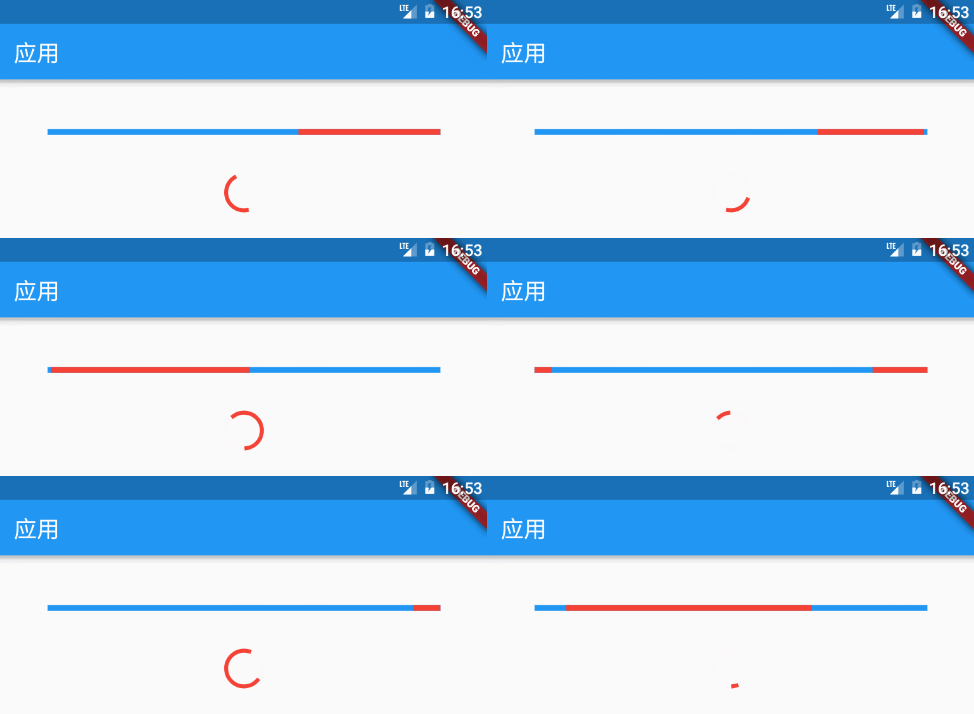
注意:如果 value 为 null 或空,则显示一个动画,否则显示一个定值。Progress 的值只能设置 0 ~ 1.0,如果大于 1,则表示已经结束。
二,构造函数
- LinearProgressIndicator
/**
 * 条形进度条

 * LinearProgressIndicator本身不能设置高度,可以包一层父容器设置高度来间接设置LinearProgressIndicator的高度,

 * 如Container,SizedBox等

 *

 * const LinearProgressIndicator({

    Key key,

    double value,//0~1的浮点数,用来表示进度多少;如果 value 为 null 或空,则显示一个动画,否则显示一个定值

    Color backgroundColor,//背景颜色

    Animation<Color> valueColor,//animation类型的参数,用来设定进度值的颜色,默认为主题色

    String semanticsLabel,

    String semanticsValue,

    })

*/ - CircularProgressIndicator
/**

 * 圆形进度条

 * 可以在外面包一层SizedBox,间接改变进度条的大小

 *const CircularProgressIndicator({

    Key key,

    double value,//0~1的浮点数,用来表示进度多少;如果 value 为 null 或空,则显示一个动画,否则显示一个定值

    Color backgroundColor,//背景颜色

    Animation<Color> valueColor,//animation类型的参数,用来设定进度值的颜色,默认为主题色

    this.strokeWidth = 4.0,//进度条宽度

    String semanticsLabel,

    String semanticsValue,

    })

 */
三,demo
- LinearProgressIndicator
body: ListView(

          children: <Widget>[

            Container(

              padding: EdgeInsets.only(left: 50.0, right: 50.0, top: 50.0),

              child: LinearProgressIndicator(

                value: 0.3,

                backgroundColor: Color(0xff00ff00),

              ),

            ),

            Container(

              padding: EdgeInsets.only(left: 50.0, right: 50.0, top: 50.0),

              child: LinearProgressIndicator(

//                    value: 0.3,

                backgroundColor: Color(0xffff0000),

              ),

            ),

            Container(

              padding: EdgeInsets.only(left: 50.0, right: 50.0, top: 50.0),

              child: LinearProgressIndicator(

                value: 0.3,

                valueColor: new AlwaysStoppedAnimation<Color>(Colors.red),

                backgroundColor: Color(0xff00ff00),

              ),

            ),

            Container(

              padding: EdgeInsets.only(left: 50.0, right: 50.0, top: 50.0),

              child: Container(

                height: 10.0,

                child: LinearProgressIndicator(

                  value: 0.3,

                  valueColor: new AlwaysStoppedAnimation<Color>(Colors.red),

                  backgroundColor: Color(0xff00ff00),

                ),

              ),

            ),

          ],

), - CircularProgressIndicator
body: Stack(

            children: <Widget>[

              Positioned(

                  left: 150.0,

                  top: 20.0,

                  child: CircularProgressIndicator(

//                    value: 0.3,

                    backgroundColor: Color(0xffff0000),

                  )

              ),

              Positioned(

                  left: 150.0,

                  top: 70.0,

                  child: CircularProgressIndicator(

                    value: 0.3,

                    backgroundColor: Color(0xffff0000),

                  )

              ),

              Positioned(

                  left: 150.0,

                  top: 120.0,

                  child: CircularProgressIndicator(

//                    value: 0.3,

                    strokeWidth: 4.0,

                    backgroundColor: Color(0xffff0000),

                    valueColor: new AlwaysStoppedAnimation<Color>(Colors.red),

                  )

              ),

              Positioned(

                  left: 150.0,

                  top: 170.0,

                  child: CircularProgressIndicator(

//                    value: 0.3,

                    strokeWidth: 8.0,

                    backgroundColor: Color(0xffff0000),

                    valueColor: new AlwaysStoppedAnimation<Color>(Colors.red),

                  )

              ),

              Positioned(

                  left: 150.0,

                  top: 220.0,

                  child: SizedBox(

                    width: 50.0,

                    height: 50.0,

                    child: CircularProgressIndicator(

//                    value: 0.3,

                      backgroundColor: Color(0xffff0000),

                      valueColor: new AlwaysStoppedAnimation<Color>(Colors.red),

                    ),

                  )

              ),

            ],

          )
【Flutter学习】基本组件之进度条(LinearProgressIndicator, CircularProgressIndicator)的更多相关文章
- 使用tqdm组件构造程序进度条
使用tqdm组件构造程序进度条 觉得有用的话,欢迎一起讨论相互学习~Follow Me 主要代码 import tqdm # 引用tqdm组件 TRAIN_STEPS = N for i in tqd ...
- 第33讲 UI组件_进度条ProcessBar和消息队列处理器handler
第33讲UI组件_进度条ProcessBar和消息队列处理器handler 1. 进度条ProcessBar 一个可视化的进度指示器,代表正在执行的耗时任务.可以为用户展示一个进度条,表示正在执行的任 ...
- progress组件(进度条)
progress组件:进度条 progress组件的属性: percent:类型:number 设置百分比 (0~100) show-info:类型:布尔 在进度条右侧显示百分比 border-rad ...
- jqueryui组件progressbar进度条和日期组件datepickers的简单使用
<!DOCTYPE html> <html lang="en"> <head> <meta charset="UTF-8&quo ...
- 自己定义View学习之12/7(进度条之混合模式)
今天重点内容是我们学习自己定义view里面的混合模式.事实上我们的画布就跟photoshop一样.是个图层关系,一层盖着一层.这样就导致有非常多种覆盖模式,这就是我们今天的主题."混合模式& ...
- 【Flutter学习】组件学习之目录
01. Flutter组件-Layout-Container-容器 02. Flutter组件-Text-Text-文本 03. Flutter组件-Text-RichText-富文本 04. ...
- android学习笔记20——ProgressDialog进度条对话框
ProgressDialog==>进度条对话框 ProgressDialog本身就代表一个进度条对话框,程序只需要创建ProgressDialog实例,并将其显示出来就是一个进度条对话框:开发者 ...
- ftk学习记录(一个进度条文章)
[ 声明:版权全部,欢迎转载,请勿用于商业用途. 联系信箱:feixiaoxing @163.com] 首先.在開始今天的文章之前.我们还是给朋友们展示一下前面一段代码的执行效果.效果例如以下, w ...
- Android学习笔记_76_Android ProgressBar 进度条
android 进度条的样式 例1:(默认样式(中等圆形))Xml代码 <ProgressBar android:id="@+id/progressBar1" ...
随机推荐
- 日志数据如何同步到MaxCompute
摘要:日常工作中,企业需要将通过ECS.容器.移动端.开源软件.网站服务.JS等接入的实时日志数据进行应用开发.包括对日志实时查询与分析.采集与消费.数据清洗与流计算.数据仓库对接等场景.本次分享主要 ...
- 【Java】字符串转json
import org.json.JSONObject; JSONObject jo = new JSONObject(new String(需要转换的字符串));
- Ajax的那点事
Ajax中什么是同步.异步? 同步:就是用户填写完信息之后,全部提交给服务器,等待服务器的回应,是一次性全部的. 异步:当用户填写完一条信息之后,这条信息会自动向服务器提交,然后服务器响应客户端,在此 ...
- BootStrap自定义轮播图播放速度
$('.carousel').carousel({ interval: 3000 });
- __attribute__ ((packed))字节对齐
1. __attribute__ ((packed)) 的作用就是告诉编译器取消结构在编译过程中的优化对齐,按照实际占用字节数进行对齐,是GCC特有的语法.这个功能是跟操作系统没关系,跟编译器有关,g ...
- jvm学习(1) 总体篇
1.1 Java体系构成 JAVA体系包括四个方面: JAVA编程语言,编辑的文件为Java源代码,文件格式为(.java): JAVA类文件格式,编译后文件格式为(.class): JA ...
- kubernetes里面有时候centos源用不了
kubernetes里面有时候centos源用不了,快速配一个阿里云的源. mkdir /etc/yum.repos.d/yangback;mv /etc/yum.repos.d/* /etc/yum ...
- Java开发中的23种设计模式详解(2)结构型
我们接着讨论设计模式,上篇文章我讲完了5种创建型模式,这章开始,我将讲下7种结构型模式:适配器模式.装饰模式.代理模式.外观模式.桥接模式.组合模式.享元模式.其中对象的适配器模式是各种模式的起源,我 ...
- win10下安装Ubuntu后,启动时没有win10选项解决方法
通过在ubuntu里修改启动引导,解决. 1.进入Ubuntu系统,Ctrl+alt+t进入终端,输入以下命令即可 sudo gedit /etc/default/grub 2.在打开的gedit编辑 ...
- SET SESSION AUTHORIZATION - 为当前会话设置会话用户标识符和当前用户标识符
SYNOPSIS SET [ SESSION | LOCAL ] SESSION AUTHORIZATION username SET [ SESSION | LOCAL ] SESSION AUTH ...