
【Shiro】四、Apache Shiro授权
1、授权实现方式
1.1、什么是授权
授权包含4个元素(一个比较流行通用的权限模型)
Resources:资源
各种需要访问控制的资源
Permissions:权限
安全策略控制原子元素
基于资源和动作
控制力度
Roles:角色
行为的集合
User:用户主体
Subject,关联Role或Permission
简单来说,可以这样理解:我们登录进系统,我们就是一个【用户】;【用户】可以是一个或多个【角色】,一个【角色】可以有多种【权限】,这些【权限】代表了我们可以访问哪些【资源】。当然【用户】也可以直接跳过【角色】,直接给【用户】分配【权限】,表明这个【用户】可以访问的【资源】。
1.2、授权方式
a、编程模型
基于Role
Role校验
API:
hasRole(String roleName)
hasRoles(List<String> roleNames)
hasAllRoles(Collection<String> roleNames)
Subject currentUser = SecurityUtils.getSubject();

if(currentUser.hasRole("admin")){

    ...

} else{

    ...

}
Role断言(Assertion)
失败会抛出异常AuthorizationException
API
checkRole(String roleName)
checkRoles(Collection<String> roleNames)
checkRoles(String... roleNames)
Subject currentUser = SecurityUtils.getSubject();

currentUser.checkRole("bankTeller");

openBankAccount();
基于Permission
Permission校验
基于对象的Permission校验
应用场景:显式控制、类型安全
API
isPermiited(Permission p)
isPermiited(List<Permission> perms)
isPermiitedAll(Collection<Permission> perms)
Permission printPermission = new PrinterPermission("hp","print");

Subject currentUser = SecurityUtils.getSubject();

if(currentUser.isPermitted(printPermission)){

    ...

} else {

    ...

}
基于String的Permission校验
应用场景:轻量级、简单
API
isPermiited(String perm)
isPermiited(String... perms)
isPermiitedAll(String... perms)
Subject currentUser = SecurityUtils.getSubject();

if(currentUser.isPermitted("printer:print:hp")){

    ...

} else {

    ...

}
Permission断言(Assertion)
失败会抛出异常AuthorizationException
API
checkPermission(Permission p))
checkPermission(String perm)
checkPermissions(Collection<Permission> perms)
checkPermissions(String... perms)
Subject currentUser = SecurityUtils.getSubject();

Permission p = new AccountPermission("open");

current.checkPermission(p);

openBankAccount();
b、JDK注解
@RequiresAuthentication
用于判断是否已认证,未认证访问该资源会抛异常,下面代码效果相同
@RequiresAuthentication

public void updateAccount(Account userAccount){

    ...

}

public void updateAccount(Account userAccount){

    if(!SecurityUtils.getSubject().isAuthenticated()){

        throw new AuthorizationException(...);

    }

}
@RequiresGuest
用于判断是否为游客,如果非游客会抛异常,下面代码效果相同
@RequiresGuest

public void signUp(User newUser){

    ...

}

public void signUp(User newUser){

    Subject currentUser = SecurityUtils.getSubject();

    PrincipalCollection principals = currentUser.getPrincipals();

    if(principals != null && !principals.isEmpty()){

        throw new AuthorizationException(...);

    }

}
@RequiresPermissions
用于判断有该权限才能访问,下面代码效果相同
@ReruiresPermissions("account:create")

public void creatAccount(Account account){

    ...

}

public void creatAccount(Account account){

    Subject currentUser = SecurityUtils.getSubject();

    if(!subject.isPermitted("account:create")){

        throw new AuthorizationException(...);

    }

}
@RequiresRoles
用于判断有该角色才能访问,下面代码效果相同
@RequiresRoles("admin")

public void deleteUser(User user){

    ...

}

public void deleteUser(User user){

    Subject currentUser = SecurityUtils.getSubject();

    if(!subject.hasRole("admin")){

        throw new AuthorizationException(...);

    }

}
@RequiresUser
用于判断非游客才能访问,下面代码效果相同
@RequiresUser

public void updateAccount(Account account){

    ...

}

public void updateAccount(Account account){

    Subject currentUser = SecurityUtils.getSubject();

    PrincipalCollection principals = currentUser.getPrincipals();

    if(principals == null || principals.isEmpty()){

        throw new AuthorizationException(...);

    }

}
c、JSP/GSP TagLibs
偏向web,不介绍
2、授权架构
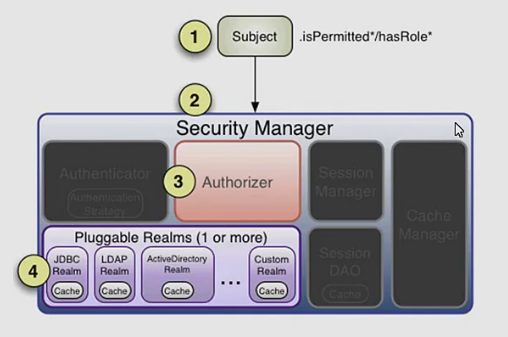
1、调用Subject的isPermitted或HasRole方法
2、找Security Manager(门面模式)
3、调用Authorizer组件
4、通过Realm访问数据库等获取数据,用于判断是否有授权
Authorizer
默认实现ModularRealmAuthorizer
迭代授权多个Realm
策略
如果一个Realm不实现Authorizer,不校验
如果一个Realm实现Authorizer
一旦校验失败,马上抛AuthorizationException
一旦校验成功,马上返回true
PermissionResolver权限解析器
用于将Permission字符串解析成Permission对象,Shiro内部都是使用Permission对象来进行验证
默认WildcardPermissionResolver(通配符权限解析器)
可以自定义解析器
RolePermissionResolver
用于将Role字符串转换为Permission对象
可以自定义解析器
【Shiro】四、Apache Shiro授权的更多相关文章
- 【Shiro】Apache Shiro架构之权限认证(Authorization)
Shiro系列文章: [Shiro]Apache Shiro架构之身份认证(Authentication) [Shiro]Apache Shiro架构之集成web [Shiro]Apache Shir ...
- 【Shiro】Apache Shiro架构之身份认证(Authentication)
Shiro系列文章: [Shiro]Apache Shiro架构之权限认证(Authorization) [Shiro]Apache Shiro架构之集成web [Shiro]Apache Shiro ...
- 【Shiro】Apache Shiro架构之自定义realm
[Shiro]Apache Shiro架构之身份认证(Authentication) [Shiro]Apache Shiro架构之权限认证(Authorization) [Shiro]Apache S ...
- 【Shiro】Apache Shiro架构之集成web
Shiro系列文章: [Shiro]Apache Shiro架构之身份认证(Authentication) [Shiro]Apache Shiro架构之权限认证(Authorization) [Shi ...
- SpringBoot整合Shiro 四:认证+授权
搭建环境见: SpringBoot整合Shiro 一:搭建环境 shiro配置类见: SpringBoot整合Shiro 二:Shiro配置类 shiro整合Mybatis见:SpringBoot整合 ...
- [转载] 【Shiro】Apache Shiro架构之实际运用(整合到Spring中)
写在前面:前面陆陆续续对Shiro的使用做了一些总结,如题,这篇博文主要是总结一下如何将Shiro运用到实际项目中,也就是将Shiro整到Spring中进行开发.后来想想既然要整,就索性把Spring ...
- 让Apache Shiro保护你的应用
在尝试保护你的应用时,你是否有过挫败感?是否觉得现有的Java安全解决方案难以使用,只会让你更糊涂?本文介绍的Apache Shiro,是一个不同寻常的Java安全框架,为保护应用提供了简单而强大的方 ...
- Apache Shiro 手册
(一)Shiro架构介绍 一.什么是Shiro Apache Shiro是一个强大易用的Java安全框架,提供了认证.授权.加密和会话管理等功能: 认证 - 用户身份识别,常被称为用户"登录 ...
- Apache Shiro 使用手册---转载
原文地址:http://www.360doc.com/content/12/0104/13/834950_177177202.shtml (一)Shiro架构介绍 一.什么是Shiro Apache ...
- Apache Shiro 使用手册
http://kdboy.iteye.com/blog/1154644 (一)Shiro架构介绍 一.什么是Shiro Apache Shiro是一个强大易用的Java安全框架,提供了认证.授权.加 ...
随机推荐
- LUOGU P4783 【模板】矩阵求逆(高斯消元)
传送门 解题思路 用高斯消元对矩阵求逆,设\(A*B=C\),\(C\)为单位矩阵,则\(B\)为\(A\)的逆矩阵.做法是把\(B\)先设成单位矩阵,然后对\(A\)做高斯消元的过程,对\(B\)进 ...
- [CSP-S模拟测试]:physics(二维前缀和+二分+剪枝)
题目传送门(内部题26) 输入格式 第一行有$3$个整数$n,m,q$.然后有$n$行,每行有一个长度为$m$的字符串,$+$表示正电粒子,$-$表示负电粒子.然后有$q$行,每行$2$个整数$x,y ...
- VMware中对Linux虚拟机的网络配置静态IP的配置
前言 踏出象牙塔,进入公司,由于公司的所有产品都是Linux下的,必然自己这段时间需要在自己的工作机器先学习一下.项目代码是用Source Insight进行查看的,总是Ctrl + Alt的切来切去 ...
- zabbix4.0部署
1.环境检查 uname -r getenforce systemctl status firewalld.service 2.设置解析,自建yum源(可选) /etc/hosts #!/bin/ba ...
- centos6.8安装redis
1.下载Redis3.2.5安装包 cd /optwget http://download.redis.io/releases/redis-3.2.5.tar.gz 2.解压.编译.安装redis-3 ...
- Redis测试类
单机&集群安装: https://blog.csdn.net/zxd1435513775/article/details/88901992 安装5.0.4版本OK,5.0.5版本make时报错 ...
- ssh 免密码登录实现批量处理
搭建集群的时候ssh 免密码登录是一个问题以下脚本将实现批量处理 文件1主机名:host 17.19.18.11:12317.19.18.12:123 文件2:ssh_setup.py #!/usr/ ...
- Git SSH连接方式配置
如果使用ssh的方式管理,需要配置ssh key. 1.打开git bash命令窗口 2.生成ssh key ssh-keygen -t rsa -b 4096 -C "your_email ...
- ubantu下关于linux命令合集
ubantu下linux的命令与操作 1.熟悉linux目录是学习linux非常必要的第一步 linux目录结构: linux目录: /:根目录,一般根目录下只存放目录,在Linux下有且只有一个根目 ...
- 二、spring的IoC
IoC的基本认识 Inversion of Control:控制反转,就是将对象的创建权反转交给spring IoC的好处 传统方式的程序编写,底层的实现切换了,需要修改源代码 使用spring之后, ...