
Redis 5.0.5 Install manual
Redis 5.0.5 安装文档(Install manual)
一、单实例安装
| 标题 | 内容 |
|---|---|
| 测试环境 | Centos 7 |
| 虚拟机 | vbox |
| redis版本 | redis 5.0.5 |
1.编译安装redis
#使用wget从官网现在redis数据库tar压缩包

$ wget http://download.redis.io/releases/redis-5.0.5.tar.gz

#使用tar解压tar压缩包

$ tar xzf redis-5.0.5.tar.gz

#进入redis解压后的目录

$ cd redis-5.0.5

#使用make编译安装redis数据库,直接make会报错,详细错误信息查看第5节错误分析内容

$ make MALLOC=libc
2.redis编译测试
#直接make test报错,需要安装相关依赖包,运行测试时候需要tcl-Tool Command Language 包

$ yum install tcl

#执行make test 测试

$ make test
测试结果如下:

3.运行redis数据库
运行完成编译后,在源码文件夹中的src文件夹中会生成redis相关的二进制文件。运行编译好的二进制文件启动redis数据库:
The binaries that are now compiled are available in the src directory. Run Redis with:
#运行redis-server 二进制执行文件,启动redis服务端程序。

$ src/redis-server
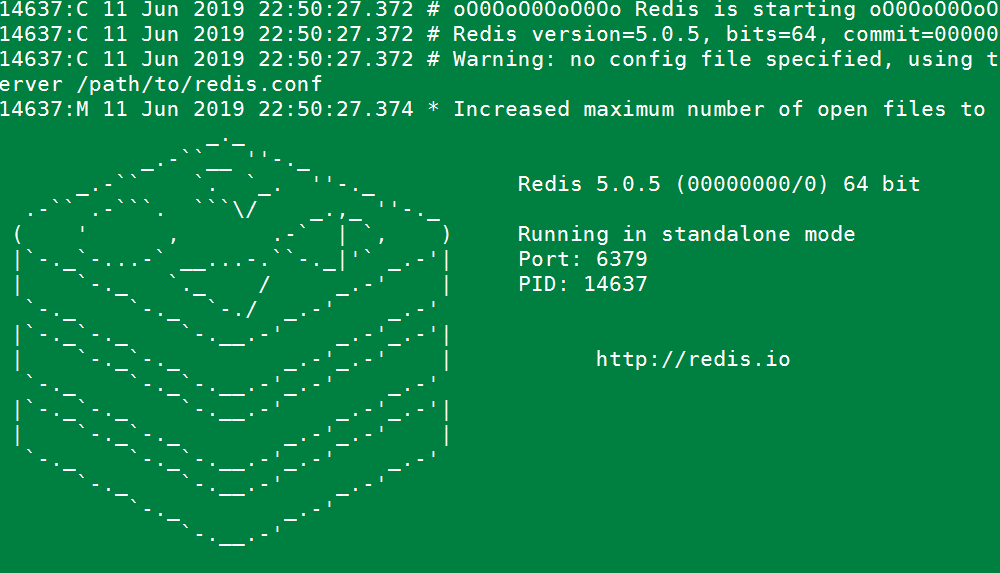
redis server启动如下图:
可以使用redis-cli命令连接数据库与数据库服务端进行交互。
You can interact with Redis using the built-in client:
#运行redis-cli启动数据库客户端,连接默认redis数据库

$ src/redis-cli

#测试redis数据库,插入一个foo bar 键值对

redis> set foo bar

#插入成功

OK

#获取foo key的值

redis> get foo

"bar"
4.redis性能测试
redis 数据库自带性能测试工具,工具名称:redis-benchmark,使用此工具对数据库进行性能测试。
redis-benchmark具体使用参数
Invalid option "-help" or option argument missing

Usage: redis-benchmark [-h <host>] [-p <port>] [-c <clients>] [-n <requests>] [-k <boolean>]

 -h <hostname>      Server hostname (default 127.0.0.1)

 -p <port>          Server port (default 6379)

 -s <socket>        Server socket (overrides host and port)

 -a <password>      Password for Redis Auth

 -c <clients>       Number of parallel connections (default 50)

 -n <requests>      Total number of requests (default 100000)

 -d <size>          Data size of SET/GET value in bytes (default 3)

 --dbnum <db>       SELECT the specified db number (default 0)

 -k <boolean>       1=keep alive 0=reconnect (default 1)

 -r <keyspacelen>   Use random keys for SET/GET/INCR, random values for SADD

  Using this option the benchmark will expand the string __rand_int__

  inside an argument with a 12 digits number in the specified range

  from 0 to keyspacelen-1. The substitution changes every time a command

  is executed. Default tests use this to hit random keys in the

  specified range.

 -P <numreq>        Pipeline <numreq> requests. Default 1 (no pipeline).

 -e                 If server replies with errors, show them on stdout.

                    (no more than 1 error per second is displayed)

 -q                 Quiet. Just show query/sec values

 --csv              Output in CSV format

 -l                 Loop. Run the tests forever

 -t <tests>         Only run the comma separated list of tests. The test

                    names are the same as the ones produced as output.

 -I                 Idle mode. Just open N idle connections and wait.

Examples:

 Run the benchmark with the default configuration against 127.0.0.1:6379:

   $ redis-benchmark

 Use 20 parallel clients, for a total of 100k requests, against 192.168.1.1:

   $ redis-benchmark -h 192.168.1.1 -p 6379 -n 100000 -c 20

 Fill 127.0.0.1:6379 with about 1 million keys only using the SET test:

   $ redis-benchmark -t set -n 1000000 -r 100000000

 Benchmark 127.0.0.1:6379 for a few commands producing CSV output:

   $ redis-benchmark -t ping,set,get -n 100000 --csv

 Benchmark a specific command line:

   $ redis-benchmark -r 10000 -n 10000 eval 'return redis.call("ping")' 0

 Fill a list with 10000 random elements:

   $ redis-benchmark -r 10000 -n 10000 lpush mylist __rand_int__

 On user specified command lines __rand_int__ is replaced with a random integer

 with a range of values selected by the -r option.
use redis-benchmark tools test redis performance .
使用redis-benchmark 测试redis性能
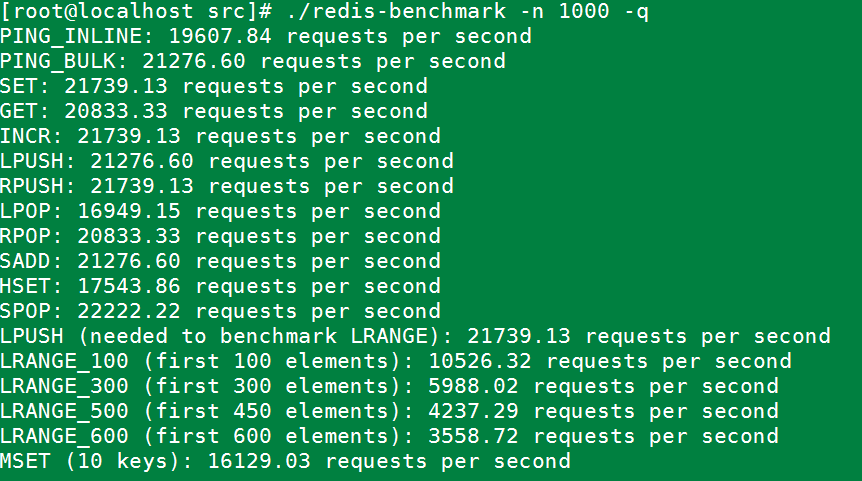
#实例同时执行 1000 个请求来检测性能

./redis-benchmark -n 1000 -q
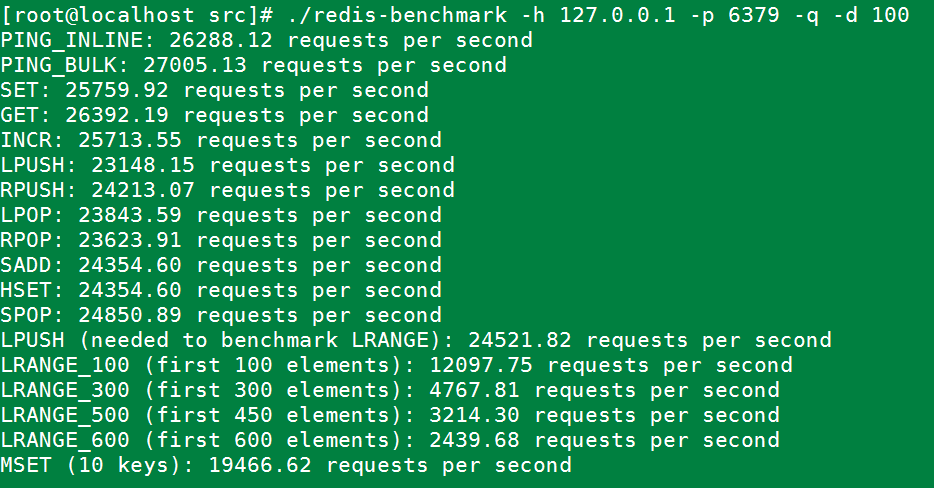
#测试存取大小为100字节的数据包的性能

redis-benchmark -h 127.0.0.1 -p 6379 -q -d 100
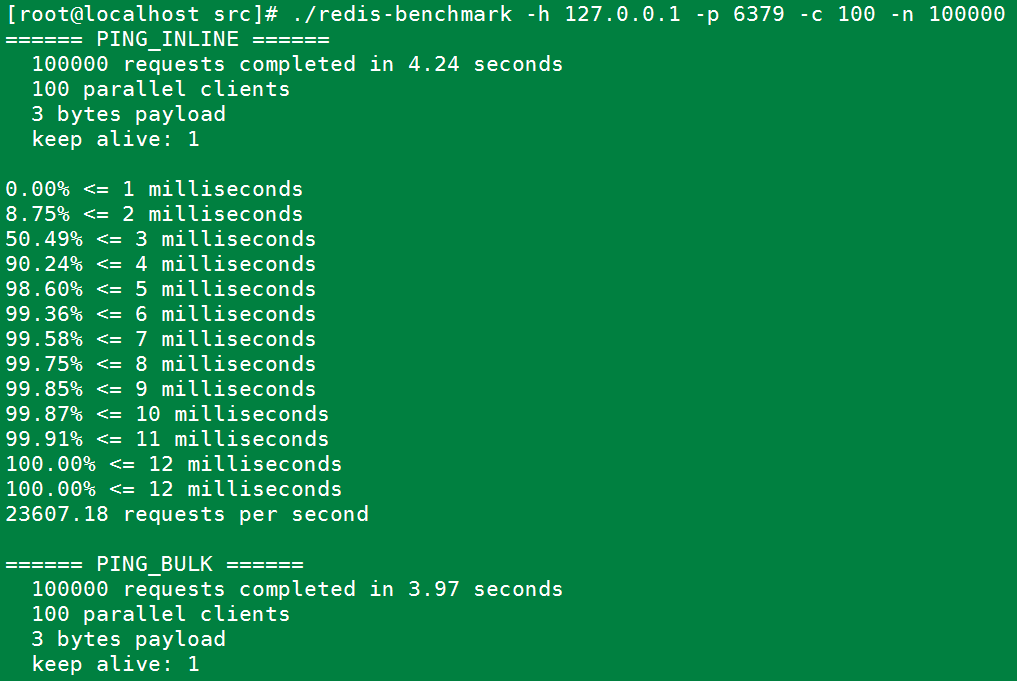
#100个并发连接,100000个请求,检测host为localhost 端口为6379的redis服务器性能

redis-benchmark -h 127.0.0.1 -p 6379 -c 100 -n 100000
5.错误记录与分析
直接make报如下错误:
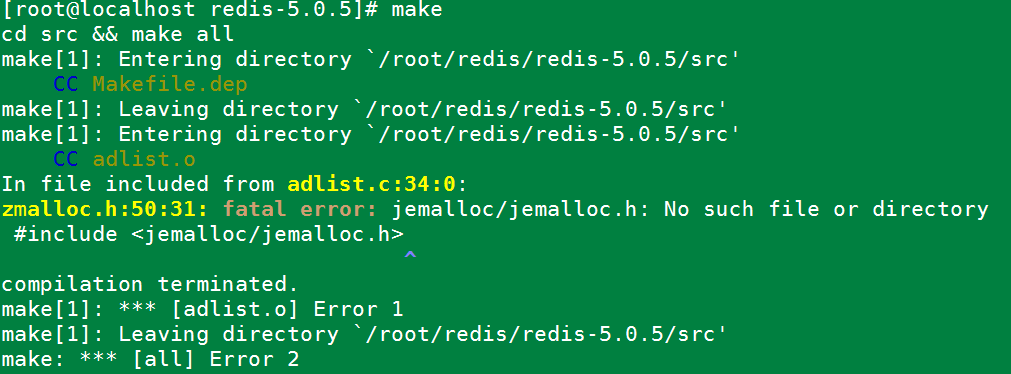
原因是jemalloc重载了Linux下的ANSI C的malloc和free函数。解决办法:make时添加参数。
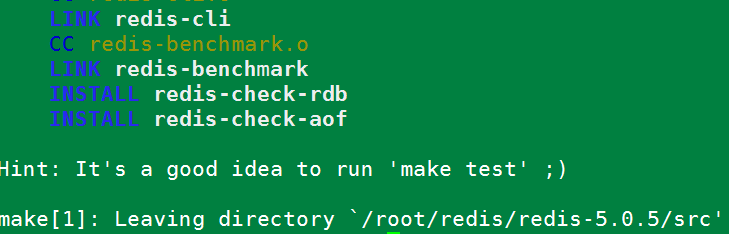
make MALLOC=libc
运行后编译成功。如下图:
Redis 5.0.5 Install manual的更多相关文章
- redis 5.0.12 install
redis 5.0.12 install ## check directory ls -l /XXXXXXX ##create dir mkdir -p /XXXXXXX/dataredis mkdi ...
- 009-docker-安装-redis:5.0.3
1.搜索镜像 docker search redis 2.拉取合适镜像 docker pull redis:5.0.3 docker images 3.使用镜像 docker run -p 6379: ...
- 在阿里云centOS7上部署Redis 5.0.5主从 + 哨兵模式
一.在两台服务器上分别安装.配置Redis 5.0.5 ,为一主一从 安装Redis关键命令: 将安装包上传至:/home 目录下解 压:.tar.gz 安装依赖:yum install gcc 安装 ...
- Redis 源码简洁剖析 11 - 主 IO 线程及 Redis 6.0 多 IO 线程
Redis 到底是不是单线程的程序? 多 IO 线程的初始化 IO 线程运行函数 IOThreadMain 如何推迟客户端「读」操作? 如何推迟客户端「写」操作? 如何把待「读」客户端分配给 IO 线 ...
- Redis 3.0 Cluster集群配置
Redis 3.0 Cluster集群配置 安装环境依赖 安装gcc:yum install gcc 安装zlib:yum install zib 安装ruby:yum install ruby 安装 ...
- redis 3.0的集群部署
转载请注明出处:http://hot66hot.iteye.com/admin/blogs/2050676 最近研究redis-cluster,正好搭建了一个环境,遇到了很多坑,系统的总结下,等到re ...
- (转)redis 3.0的集群部署
一:关于redis cluster 1:redis cluster的现状 reids-cluster计划在redis3.0中推出,可以看作者antirez的声明:http://antirez.com/ ...
- Redis 3.0.0 集群部署
简述: 1.0.1:redis cluster的现状 目前redis支持的cluster特性 1):节点自动发现 2):slave->master 选举,集群容错 3):Hot reshardi ...
- Redis 3.0 集群搭建
Redis 3.0 集群搭建 开启两个虚拟机 分别在两个虚拟机上开启3个Redis实例 3主3从两个虚拟机里的实例互为主备 下面分别在两个虚拟机上安装,网络设置参照codis集群的前两个主机 分别关闭 ...
随机推荐
- PHP全栈学习笔记23
php,基础,流程控制,函数,字符串,数组,web交互,mysql数据库,PHP数据库编程,cookie与session,日期和时间,图形图形处理,文件和目录处理,面向对象,pdo数据库抽象层,sma ...
- grafana+mysql忘记admin密码解决方法
通过mysql修改admin的密码. 我之前注册了一个用户,所以我直接复制lvusyy这个用户的密码即可. update user inner join (select password,salt,r ...
- stdu1309(不老的传说)
题目链接:http://acm.sdut.edu.cn/onlinejudge2/index.php/Home/Index/problemdetail/pid/1309.html 不老的传说问题 Ti ...
- Java枚举知识点
近几天从单例模式及阿里开发手册中遇到枚举,之前没怎么关注过. 便学习一下,此次看了多方资料,并写Demo实现,记录下知识点,方便之后巩固. 枚举的两个优点: 1. 保证了类型安全:调用者无法随意传一个 ...
- Shell中的$0、$1、$2的含义
在 shell 中我们会见到 $0.$1.$2这样的符号,这是什么意思呢? 简单来说 $0 就是你写的shell脚本本身的名字,$1 是你给你写的shell脚本传的第一个参数,$2 是你给你写的she ...
- GIS 空间分析案例教程-坐标高斯投影正反算
GIS 空间分析案例教程-坐标高斯投影正反算 商务科技合作:向日葵,135-4855__4328,xiexiaokui#qq.com 特点: 1. 地理处理工具,可以与任何arcgis 工具和语言集成 ...
- vue elementUI 表单校验(多层嵌套)
<template> <el-form :model="formData" :rules="formRule" ref="formD ...
- LC 991. Broken Calculator
On a broken calculator that has a number showing on its display, we can perform two operations: Doub ...
- 安装配置nodejs并创建Vue项目
一.下载安装node.js 1.Node.js 官方网站下载:https://nodejs.org/en/ 2.傻瓜式安装 双加安装包,除了根据自己的需要选择安装位置外,都默认下一步. 3.验证安装 ...
- 丢失libiconv-2.dll解决办法以及无法定位输入点libiconv-2.dll到动态链接库
摘自https://blog.csdn.net/mengxiangjia_linxi/article/details/78147348 丢失libiconv-2.dll解决办法以及无法定位输入点lib ...