
python实现tcp代理
1.代理流程图
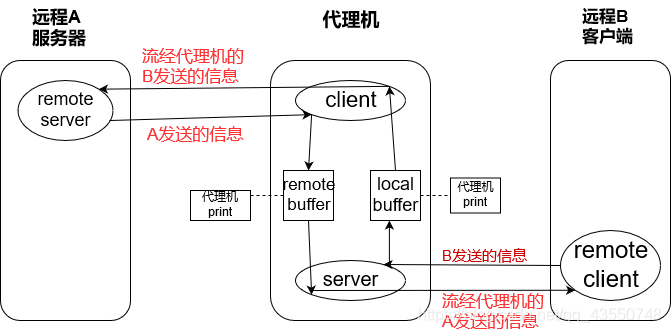
2.实现代码
#! usr/bin/python2

import sys

import socket

import thread

#handle local buffer

def request_handler(buffer):

    return buffer

#handle remote buffer

def response_handler(buffer):

    return buffer

#receive data from remote_server or remote_client

def receive_from(connection):

    buffer=""

    connection.settimeout(2)

    try:

        while True:

            data=connection.recv(4096)

            if not data:

                break

            buffer+=data

    except:

        pass

    return buffer

def server_loop(local_host,local_port,remote_host,remote_port,receive_first):

#作为服务器监听并接受remote_client连接

    server=socket.socket(socket.AF_INET,socket.SOCK_STREAM)

    server.bind((local_host,local_port))

    server.listen(5)

    while True:

        client_socket,addr=server.accept()

        print("other client has connected to me")

        #打开一个线程处理与remote_client的连接,并作为客户端连接remote_server

        thread.start_new_thread(proxy_handler, (client_socket,remote_host,remote_port,receive_first))

def proxy_handler(client_socket,remote_host,remote_port,receive_first):

#作为客户端连接remote_server

    remote_socket=socket.socket(socket.AF_INET,socket.SOCK_STREAM)

    remote_socket.connect((remote_host,remote_port))

    #判断是否先接受来自remote_server的信息

    if receive_first:

        remote_buffer=receive_from(remote_socket)

        print("from remote_server:\n"+remote_buffer)

        if len(remote_buffer):

            print("sending to client")

            client_socket.send(remote_buffer)

    while True:

    #接受来自remote_client的信息并存储在local_buffer

    #将local_buffer的信息再发送到remote_server

        local_buffer=receive_from(client_socket)

        if len(local_buffer):

            print("from client:\n"+local_buffer)

            local_buffer=request_handler(local_buffer)

            remote_socket.send(local_buffer)

            print("sent to remote_server")

    #接受来自remote_server的信息并存储在remote_buffer

    #将remote_buffer的信息再发送到remote_client

        remote_buffer=receive_from(remote_socket)

        if len(remote_buffer):

            print("from remote_server:\n"+remote_buffer)

            remote_buffer=request_handler(remote_buffer)

            client_socket.send(remote_buffer)

            print("sent to client")

def main():

    if len(sys.argv[1:]) != 5:

        print("failed to input")

        sys.exit(0)

    local_host=sys.argv[1]

    local_port=int(sys.argv[2])

    remote_host=sys.argv[3]

    remote_port=int(sys.argv[4])

    receive_first=sys.argv[5]

    if "true" in receive_first:

        receive_first=True

    else:

        receive_first=False

    server_loop(local_host,local_port,remote_host,remote_port,receive_first)

main()
python实现tcp代理的更多相关文章
- Black Hat Python之#2:TCP代理
在本科做毕设的时候就接触到TCP代理这东西,当时需要使用代理来对发送和收到的数据做修改,同时使用代理也让我对HTTP协议有了更深的了解. TCP Proxy用到的一个主要的东西就是socket.pro ...
- [转]使用 mitmproxy + python 做拦截代理
使用 mitmproxy + python 做拦截代理 本文是一个较为完整的 mitmproxy 教程,侧重于介绍如何开发拦截脚本,帮助读者能够快速得到一个自定义的代理工具. 本文假设读者有基本的 ...
- 一个简单的tcp代理实现
There are a number of reasons to have a TCP proxy in your tool belt, bothfor forwarding traffic to b ...
- nginx TCP 代理& windows傻瓜式安装
一.下载nginx Windows http://nginx.org/en/download.html 二.解压到目录 三.进入目录并start nginx.exe即可启动 cd d:/java/ng ...
- nginx : TCP代理和负载均衡的stream模块
一直以来,Nginx 并不支持tcp协议,所以后台的一些基于TCP的业务就只能通过其他高可用负载软件来完成了,比如Haproxy. 这算是一个nginx比较明显的缺憾.不过,在1.90发布后这个认知将 ...
- iOS进阶之TCP代理鉴权过程
这段时间接触了网络代理,而自己的任务是完成TCP和UDP的网络代理,所以在这里写些自己的理解吧. 这篇文章先介绍一下TCP代理的鉴权过程(采用的是用户名和密码鉴权),下一篇文章再介绍UDP代理的鉴权过 ...
- 早期nginx tcp代理(基于patch实现)
nginx tcp代理功能由nginx_tcp_proxy_module模块提供,同时监测后端主机状态.该模块包括的模块有: ngx_tcp_module, ngx_tcp_core_module, ...
- Nginx 配置TCP代理
Nginx 1.9 版本以后增加了stream模块,可以对tcp,udp请求进行代理和负载均衡了,今天来体验一下首先编译安装过程configure的时候增加选项 --with-stream --wit ...
- python之tcp自动重连
操作系统: CentOS 6.9_x64 python语言版本: 2.7.13 问题描述 现有一个tcp客户端程序,需定期从服务器取数据,但由于种种原因(网络不稳定等)需要自动重连. 测试服务器示例代 ...
随机推荐
- C# [ThreadStatic] 标记静态字段对多线程执行的影响
类的静态字段在类的实例中是共享的.多个线程修改实例字段的值在对其它线程来说是可见的,这也是clr默认的行为.对静态字段添加ThreadStaticAttribute标记可以改变这种默认的行为. Thr ...
- angular组件数据
import { Component, OnInit } from '@angular/core'; @Component({ selector: 'app-news', templateUrl: ' ...
- 34 Flutter仿京东商城项目 用户注册 注册流程 POST发送验证码 倒计时功能 验证验证码
加群452892873 下载对应34课文件,运行方法,建好项目,直接替换lib目录 以下列出的是本课涉及的文件. RegisterFirst.dart import 'package:flutter/ ...
- java生成二维码打印到浏览器
java生成二维码打印到浏览器 解决方法: pom.xml的依赖两个jar包: <!-- https://mvnrepository.com/artifact/com.google.zxin ...
- starUML建模C++【逆向工程】
1.下载starUML 2.打开starUML,选择default approach 3.添加 Profile,把C++添加进去 4.在右侧的工程上点右键—[C++]—-[Reverse Engine ...
- 【420】链表实现Quack
quack.h // quack.h: an interface definition for a queue/stack #include <stdio.h> #include < ...
- Mysql常见索引介绍
索引是一种特殊的文件,包含了对数据表中所有记录的引用指针.InnoDB引擎的数据库,其上的索引是表空间的一个组成部分. (1).索引的优缺点 优点:加快搜索速度,减少查询时间 缺点:索引是以文件的形式 ...
- (十六)toString()的用法
每一个非基本类型的对象都有一个toString()方法,而且当编译器需要一个String而你却只有一个对象时候,该方法便会被调用. public class te { public String to ...
- rdd的元素打印
在集群上运行spark程序时,rdd的操作都在worker机上,因此输出rdd的元素将在worker机的标准输出上进行,驱动节点上不会运行,故直接才程序中写如下代码 rdd.foreach(print ...
- mysql的root用户无法给普通用户授权问题处理
1.查看Grant_priv是Y还是N 执行下面 select * from mysql.user where User='root' and Host='%'\G; 下图查看结果为Grant_pri ...