
TensorFlow良心入门教程
All the matrials come from Machine Learning class in Polyu,HK and I reorganize them and add reference materials.I promise that I only use them to study and non-proft
.ipynb源文件可通过我的onedrive下载:https://1drv.ms/u/s!Al86h1dThXMNxF-J7FKHKTPkf5yr?e=SAgALh
Warm up
A short example for Tensorflow:
import tensorflow as tf
node1=tf.placeholder(tf.float32)

node2=tf.placeholder(tf.float32)

node3=tf.add(node1,node2)

tf.Session().run(node3,{node1:4,node2:4})
8.0
Basic ideas
It's okay if you don't understand the content well in this section.Section 3rd will be much more detailed and basic
Core TensorFlow constructs
- Dataflow Graphs: entire computation
- Data Nodes: individual data or operations
- Edges: implicit dependencies between nodes
- Operations: any computation
- Constants: single values (tensors)
Choose the place to run code
The whole point of having a dataflow representation is flexibility in choosing location. Tensorflow lets you choose the device to run the code:

Computational graph
A TensorFlow Core programs contains two sections:
Building the computational graph.
Running the computational graph.
So what is a computational graph?
A computational graph is a series of TensorFlow operations arranged into a graph of nodes.
Node
Each node takes zero or more tensors as inputs and produces a tensor as an output.The type of node could be constant,variable,operations and so on.
All nodes return tensors, or higher-dimensional matrices
Tensor
A tensor consists of a set of primitive(原始) values shaped into an array of any number of dimensions.
Variable
To make the model trainable, we need to be able to modify the graph to get new outputs with the same input.So we should use variable:
Variables allow us to add trainable parameters to a graph.They are constructed with a type and initial value.
Placeholder
A placeholder is a promise to provide a value later.
Initializer
To initialize all the variables in a TensorFlow program, tf.global_variables_initializer() is needed.
Model Evaluation and Training
To evaluate the model on training data: loss function
TensorFlow provides optimizers that slowly change each variable in order to minimize the loss function. (In the following example we use gradient descent.)
Session(会话)
To actually evaluate the nodes, we must run the computational graph within a session.
A session encapsulates(封装) the control and state of the TensorFlow runtime.
A linear Rgression Example:
import numpy as np

# Model parameters

W = tf.Variable([.3], dtype=tf.float32)

b = tf.Variable([-.3], dtype=tf.float32)

#Model input and output

x = tf.placeholder(tf.float32)

linear_model = W * x + b #Operator Overloading!

y=tf.placeholder(tf.float32)

#loss

loss=tf.reduce_sum(tf.square(linear_model-y))

#optimizer

optimizer=tf.train.GradientDescentOptimizer(0.01)

train=optimizer.minimize(loss)

#training data

X_train=[1,2,3,4]

y_train=[0,-1,-2,-3]

#training loop

init = tf.global_variables_initializer()

with tf.Session() as sess:

    sess.run(init)

    for i in range(1000):

        sess.run(train,{x:X_train,y:y_train})

    #evaluate training accuracy

    curr_W,curr_b,curr_loss=sess.run([W,b,loss],{x:X_train,y:y_train})

print("W:%s b:%s loss:%s"%(curr_W,curr_b,curr_loss))
W:[-0.9999969] b:[0.9999908] loss:5.6999738e-11
Suggested System Design

Parameter server
it focus:
- Hold Mutable state
- Apply updates
- Maintain availability
- Group Name: ps
Worker
it focus:
- Perform “active” actions
- Checkpoint state to FS
- Mostly stateless; can be restarted
- Group name: worker


The implemnetation of TensorFlow

Distributed Master: compiles the graph, including specialization. Think of it kind of like a query optimizer, but honestly it’s really an impoverished compiler Dataflow executor: the scheduler and coordinator, responsible for invoking kernels on various devices.
Detailed understanding
Introducing Tensors
The term "tensor" in ML,especially tensorflow, has no relation with the term "tensor(called 张量 in Chinese" in physics!
I attach a link which introduces the tensor used in physics and mathematics.After reading it you will find out that maybe google misuse the "tensor"
To understand tensors well, it’s good to have some working knowledge of linear algebra and vector calculus. You already read in the introduction that tensors are implemented in TensorFlow as multidimensional data arrays, but some more introduction is maybe needed in order to completely grasp tensors and their use in machine learning.
Plane Vectors(平面向量)
Please be aware that the content in this section is very very simple
Before you go into plane vectors, it’s a good idea to shortly revise the concept of “vectors”; Vectors are special types of matrices, which are rectangular arrays of numbers. Because vectors are ordered collections of numbers, they are often seen as column matrices(列向量): they have just one column and a certain number of rows. In other terms, you could also consider vectors as scalar(标量) magnitudes that have been given a direction.
Remember: an example of a scalar is “5 meters” or “60 m/sec”, while a vector is, for example, “5 meters north” or “60 m/sec East”. The difference between these two is obviously that the vector has a direction. Nevertheless, these examples that you have seen up until now might seem far off from the vectors that you might encounter when you’re working with machine learning problems. This is normal; The length of a mathematical vector is a pure number: it is absolute. The direction, on the other hand, is relative: it is measured relative to some reference direction and has units of radians or degrees. You usually assume that the direction is positive and in counterclockwise rotation from the reference direction.
Visually, of course, you represent vectors as arrows, as you can see in the picture above. This means that you can consider vectors also as arrows that have direction and length. The direction is indicated by the arrow’s head, while the length is indicated by the length of the arrow.
So what about plane vectors then?
Plane vectors are the most straightforward setup of tensors. They are much like regular vectors as you have seen above, with the sole difference that they find themselves in a vector space. To understand this better, let’s start with an example: you have a vector that is 2 X 1. This means that the vector belongs to the set of real numbers that come paired two at a time. Or, stated differently, they are part of two-space. In such cases, you can represent vectors on the coordinate (x,y) plane with arrows or rays.
Working from this coordinate(坐标) plane in a standard position where vectors have their endpoint at the origin (0,0), you can derive the x coordinate by looking at the first row of the vector, while you’ll find the y coordinate in the second row. Of course, this standard position doesn’t always need to be maintained: vectors can move parallel to themselves in the plane without experiencing changes.
Note that similarly, for vectors that are of size 3 X 1, you talk about the three-space. You can represent the vector as a three-dimensional figure with arrows pointing to positions in the vectors pace: they are drawn on the standard x, y and z axes.
It’s nice to have these vectors and to represent them on the coordinate plane, but in essence(本质), you have these vectors so that you can perform operations on them and one thing that can help you in doing this is by expressing your vectors as bases or unit vectors(单位向量).
Unit vectors are vectors with a magnitude(大小) of one. You’ll often recognize the unit vector by a lowercase letter with a circumflex, or “hat”. Unit vectors will come in convenient if you want to express a 2-D or 3-D vector as a sum of two or three orthogonal components, such as the x− and y−axes, or the z−axis.
And when you are talking about expressing one vector, for example, as sums of components, you’ll see that you’re talking about component vectors, which are two or more vectors whose sum is that given vector.
(now the very very easy part ends)
Tensors
Next to plane vectors, also covectors and linear operators are two other cases that all three together have one thing in common: they are specific cases of tensors. You still remember how a vector was characterized in the previous section as scalar magnitudes that have been given a direction. A tensor, then, is the mathematical representation of a physical entity that may be characterized by magnitude and multiple directions.
And, just like you represent a scalar with a single number and a vector with a sequence of three numbers in a 3-dimensional space, for example, a tensor can be represented by an array of 3^R numbers in a 3-dimensional space.
The “R” in this notation represents the rank of the tensor: this means that in a 3-dimensional space, a second-rank tensor can be represented by 3 to the power of 2 or 9 numbers. In an N-dimensional space, scalars will still require only one number, while vectors will require N numbers, and tensors will require N^R numbers. This explains why you often hear that scalars are tensors of rank 0: since they have no direction, you can represent them with one number.
With this in mind, it’s relatively easy to recognize scalars, vectors, and tensors and to set them apart: scalars can be represented by a single number, vectors by an ordered set of numbers, and tensors by an array of numbers.
What makes tensors so unique is the combination of components and basis vectors(向量基): basis vectors transform one way between reference frames and the components transform in just such a way as to keep the combination between components and basis vectors the same.
This article introduce the "sensor" in physics and mathematics:
source:https://www.jianshu.com/p/2a0f7f7735ad
And this picture summary what is sensor in tensorflow:
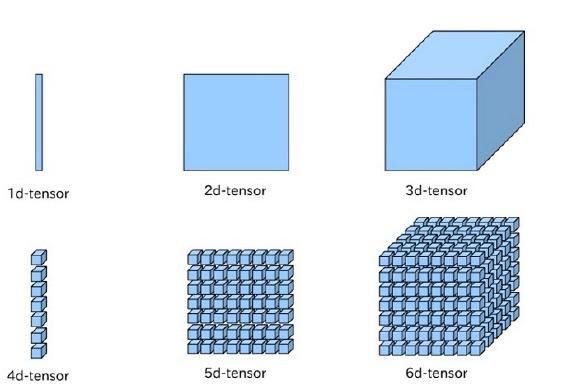
So the sensor in ML actually is just a kind of Multidimensional Arrays
Getting Started With TensorFlow: Basics
You’ll generally write TensorFlow programs, which you run as a chunk; This is at first sight kind of contradictory when you’re working with Python. However, if you would like, you can also use TensorFlow’s Interactive Session, which you can use to work more interactively with the library. This is especially handy when you’re used to working with IPython.
For this tutorial, you’ll focus on the second option: this will help you to get kickstarted with deep learning in TensorFlow. But before you go any further into this, let’s first try out some minor stuff before you start with the heavy lifting.
First, import the tensorflow library under the alias(别名) tf, as you have seen in the previous section. Then initialize two variables that are actually constants. Pass an array of four numbers to the constant() function.
Note that you could potentially also pass in an integer, but that more often than not, you’ll find yourself working with arrays. As you saw in the introduction, tensors are all about arrays! So make sure that you pass in an array
TensorFlow良心入门教程的更多相关文章
- TensorFlow 中文资源全集,官方网站,安装教程,入门教程,实战项目,学习路径。
Awesome-TensorFlow-Chinese TensorFlow 中文资源全集,学习路径推荐: 官方网站,初步了解. 安装教程,安装之后跑起来. 入门教程,简单的模型学习和运行. 实战项目, ...
- TensorFlow 中文资源精选,官方网站,安装教程,入门教程,实战项目,学习路径。
Awesome-TensorFlow-Chinese TensorFlow 中文资源全集,学习路径推荐: 官方网站,初步了解. 安装教程,安装之后跑起来. 入门教程,简单的模型学习和运行. 实战项目, ...
- Tensorflow 2.x入门教程
前言 至于为什么写这个教程,首先是为了自己学习做个记录,其次是因为Tensorflow的API写的很好,但是他的教程写的太乱了,不适合新手学习.tensorflow 1 和tensorflow 2 有 ...
- TensorFlow 2 快速教程,初学者入门必备
TensorFlow 2 简介 TensorFlow 是由谷歌在 2015 年 11 月发布的深度学习开源工具,我们可以用它来快速构建深度神经网络,并训练深度学习模型.运用 TensorFlow 及其 ...
- Tensorflow高速入门2--实现手写数字识别
Tensorflow高速入门2–实现手写数字识别 环境: 虚拟机ubuntun16.0.4 Tensorflow 版本号:0.12.0(仅使用cpu下) Tensorflow安装见: http://b ...
- Fakeapp 入门教程(1):安装篇!
在众多AI换脸软件中Fakeapp是流传最广,操作最简单的一款,当然他同样也是源于Deepfakes. 这款软件在设计上确实是花了一些心事,只要稍加点拨,哪怕是再小白的人也能学会.下面我就做一个入门教 ...
- TensorFlow从入门到实战资料汇总 2017-02-02 06:08 | 数据派
TensorFlow从入门到实战资料汇总 2017-02-02 06:08 | 数据派 来源:DataCastle数据城堡 TensorFlow是谷歌基于DistBelief进行研发的第二代人工智能学 ...
- GAN网络之入门教程(四)之基于DCGAN动漫头像生成
目录 使用前准备 数据集 定义参数 构建网络 构建G网络 构建D网络 构建GAN网络 关于GAN的小trick 训练 总结 参考 这一篇博客以代码为主,主要是来介绍如果使用keras构建一个DCGAN ...
- 【0】TensorFlow光速入门-序
本文地址:https://www.cnblogs.com/tujia/p/13863181.html 序言: 对于我这么一个技术渣渣来说,想学习TensorFlow机器学习,实在是太难了: 百度&qu ...
随机推荐
- vuejs2从入门到精通与项目开发实战
vuejs2从入门到精通:一.基础部分0.课件1.介绍2.vue实例3.模板语法4.计算属性和观察者5.Class与Style绑定6.条件渲染7.列表渲染8.事件处理9.表单输入绑定10.1.组件(1 ...
- 3.JSON使用
把 JSON 文本转换为 JavaScript 对象 JSON 最常见的用法之一,是从 web 服务器上读取 JSON 数据(作为文件或作为 HttpRequest),将 JSON 数据转换为 Jav ...
- easyUI之LinkButton(按钮)
<!DOCTYPE HTML PUBLIC "-//W3C//DTD HTML 4.01 Transitional//EN"> <html> <hea ...
- springboot自定义filter获取spring容器bean对象
今天在自己定义的filter中,想要直接注入spring容器的其它bean进行操作,发现不能正常的注入: 原因:web容器加载顺序导致, 加载顺序是listener——filter——servlet, ...
- Heartbeat实现web服务器高可用
一.Heartbeat概述: Heartbeat的工作原理:heartbeat最核心的包括两个部分,心跳监测部分和资源接管部分,心跳监测可以通过网络链路和串口进行,而且支持冗余链路,它们之间相互发送报 ...
- 公式test
- Linux命令集锦:tmux命令
tmux是一款优秀的终端复用软件,平时用到的强大功能有下面两个: 窗口管理:同时启用多个窗口: 保护现场:连接到远程主机之后,一旦断开,那么当前账户登录的任务就被取消了,但是使用 tmux 可以在断开 ...
- 虚拟IP技术 ip地址漂移技术
虚拟IP地址(VIP) 是一个不与特定计算机或一个计算机中的网络接口卡(NIC)相连的IP地址.数据包被发送到这个VIP地址,但是所有的数据还是经过真实的网络接口.VIPs大部分用于连接冗余:一个VI ...
- Java泛型(1):概述
通常而言,我们使用一种容器来存储一种类型的对象.而泛型的主要目的之一就是用来指定这个容器要持有什么类型的对象.因此,与其使用Object,我们可以暂时不指定类型. 看下面3个例子: (1) 我们有时候 ...
- C# 加解密工具类
using System; using System.IO; using System.Security.Cryptography; using System.Text; namespace Clov ...