
Android Service 入门
说明
Service 工作在主进程上。生命周期图
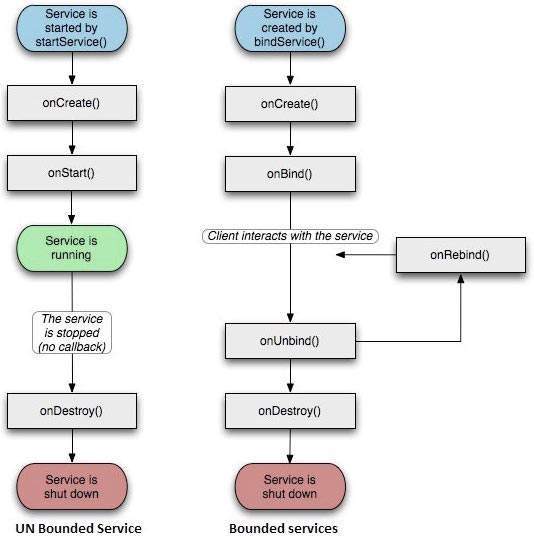
两种状态
Started
比如Activity通过调用startService 方法。一旦被启动(Started),服务就永久在后台运行,即使创建他的Activity被销毁。
Bound
当一个Component通过调用bindService方法来绑定该服务。服务提供接口让组件和服务交互。
回调方法说明
onStartCommand 其他组件通过调用startService时,被调用,如果实现该方法,需要调用stopSelf或者stopService来结束服务。
onBind 其他组件通过调用bindService时,被调用。需要实现接口,返回IBinder对象,让Client和服务交互。如果不绑定服务,返回null
onUnbind 所有已经绑定的组件断开
onCreate创建服务只有一次。
onDestroy服务被销毁时调用,这里应该清理相应资源。
例子1:
主界面两个按钮

Activity对应的两个方法
    public void startService(View view)

    {

        startService(new Intent(getBaseContext(), MyService.class));

    }

    public void stopService(View view)

    {

        stopService(new Intent(getBaseContext(), MyService.class));

    }
服务类的内容
public class MyService extends Service {

    @Nullable

    @Override

    public IBinder onBind(Intent intent) {

        return null;

    }

    @Override

    public int onStartCommand(Intent intent, int flags, int startId) {

        Toast.makeText(this, "Servcie Started", Toast.LENGTH_LONG).show();

        return START_STICKY;

    }

    @Override

    public void onDestroy() {

        super.onDestroy();

        Toast.makeText(this, "Service Destroyed", Toast.LENGTH_SHORT).show();

    }

}
然后在AndroidManifest.xml中添加

运行效果
点击启动服务

点击停止服务

例子2:使用绑定服务,并且在Activity中调用Service的内部类的方法
在例子1的基础上
public class MyService extends Service {

    public static final String SERVICE_LOG = "service_LOG";

    @Nullable

    @Override

    public IBinder onBind(Intent intent) {

        Log.d(SERVICE_LOG, "MyServic Bound");

        return new Mybind();

    }

    @Override

    public boolean onUnbind(Intent intent) {

        Log.d(SERVICE_LOG, "MyService Unbound");

        return super.onUnbind(intent);

    }

    @Override

    public void onCreate() {

        super.onCreate();

        Log.d(SERVICE_LOG, "Myservice created");

    }

    @Override

    public int onStartCommand(Intent intent, int flags, int startId) {

        Log.d(SERVICE_LOG, "Myservice Started");

        return START_STICKY;

    }

    @Override

    public void onDestroy() {

        super.onDestroy();

        Log.d(SERVICE_LOG, "MyService destroyed");

    }

    public class Mybind extends Binder

    {

        public  void getString() {

            Log.d(SERVICE_LOG, "============> get a string");

        }

    }

}
主要变化,新增内部类Mybind,并且在onBind返回Mybind对象。
Activity中新增

.
新增代码
    private MyService.Mybind mybind;

    private ServiceConnection connection=new ServiceConnection() {

        @Override

        public void onServiceConnected(ComponentName componentName, IBinder iBinder) {

            mybind = (MyService.Mybind) iBinder;

            mybind.getString();

        }

        @Override

        public void onServiceDisconnected(ComponentName componentName) {

        }

    };

    public void BindService(View view) {

        Intent bindIntent = new Intent(LoginActivity.this, MyService.class);

        bindService(bindIntent, connection, BIND_AUTO_CREATE);

    }

    public void UnbindService(View view) {

        unbindService(connection);

    }
全部代码
public class LoginActivity extends AppCompatActivity {

    @Override

    public void onCreate(Bundle savedInstanceState) {

        super.onCreate(savedInstanceState);

        setContentView(R.layout.test_login);

    }

    public void startService(View view)

    {startService(new Intent(getBaseContext(), MyService.class));

    }

    public void stopService(View view)

    {

        stopService(new Intent(getBaseContext(), MyService.class));

    }

    private MyService.Mybind mybind;

    private ServiceConnection connection=new ServiceConnection() {

        @Override

        public void onServiceConnected(ComponentName componentName, IBinder iBinder) {

            mybind = (MyService.Mybind) iBinder;

            mybind.getString();

        }

        @Override

        public void onServiceDisconnected(ComponentName componentName) {

        }

    };

    public void BindService(View view) {

        Intent bindIntent = new Intent(LoginActivity.this, MyService.class);

        bindService(bindIntent, connection, BIND_AUTO_CREATE);

    }

    public void UnbindService(View view) {

        unbindService(connection);

    }

}
运行效果
A测试
点击绑定服务,此时创建服务,然后绑定服务,
Myservice created
MyService Bound
============> get a string
点击解除绑定(解绑之后,再点击解绑,程序会崩溃)
MyService Unbound
MyService destroyed
如果Activity销毁,服务同样自动解绑,销毁。
B测试
点击启动服务
Myservice created
Myservice Started
点击绑定服务
MyServic Bound
============> get a string
点击解除绑定
MyService Unbound
因为是通过startService创建的后台Service,不会销毁。
如果有client绑定,点击“停止服务”,service 不会停止,一旦所有client解除绑定,因为已经点击过“停止服务”,此时服务停止。
Android Service 入门的更多相关文章
- [译]:Xamarin.Android开发入门——Hello,Android Multiscreen深入理解
原文链接:Hello, Android Multiscreen_DeepDive. 译文链接:Xamarin.Android开发入门--Hello,Android Multiscreen深入理解. 本 ...
- android service 本地 远程 总结
android编写Service入门 android SDK提供了Service,用于类似*nix守护进程或者windows的服务. Service有两种类型: 本地服务(Local Service) ...
- Android开发入门要点记录:四大组件
cocos2dx跨平台开发中需要了解android开发,昨天快速的浏览了一本Android开发入门教程,因为之前也似懂非懂的写过Activity,Intent,XML文件,还有里面许多控件甚至编程思想 ...
- [译]:Xamarin.Android开发入门——Hello,Android深入理解
返回索引目录 原文链接:Hello, Android_DeepDive. 译文链接:Xamarin.Android开发入门--Hello,Android深入理解 本部分介绍利用Xamarin开发And ...
- [译]:Xamarin.Android开发入门——Hello,Android快速上手
返回索引目录 原文链接:Hello, Android_Quickstart. 译文链接:Xamarin.Android开发入门--Hello,Android快速上手 本部分介绍利用Xamarin开发A ...
- android service两种启动方式
android service的启动方式有以下两种: 1.Context.startService()方式启动,生命周期如下所示,启动时,startService->onCreate()-> ...
- 1、Android Studio集成极光推送(Jpush) 报错 java.lang.UnsatisfiedLinkError: cn.jpush.android.service.PushProtoco
Android studio 集成极光推送(Jpush) (华为手机)报错, E/JPush: [JPushGlobal] Get sdk version fail![获取sdk版本失败!] W/Sy ...
- Android Service完全解析,关于服务你所需知道的一切(下)
转载请注册出处:http://blog.csdn.net/guolin_blog/article/details/9797169 在上一篇文章中,我们学习了Android Service相关的许多重要 ...
- Android Service完全解析,关于服务你所需知道的一切(上)
转载请注明出处:http://blog.csdn.net/guolin_blog/article/details/11952435 相信大多数朋友对Service这个名词都不会陌生,没错,一个老练的A ...
随机推荐
- PHP mysqli_fetch_object() 函数
定义和用法 mysqli_fetch_object() 函数从结果集中取得当前行,并作为对象返回. 注释:该函数返回的字段名是区分大小写的. <?php // 假定数据库用户名:root,密码: ...
- git log/show/HEAD step(2)
git log can see all commit log #git logcommit 2737cfa37f81810072f074dcf19964be0a5eea2e (HEAD -> m ...
- 洛谷P4317 花神的数论题
洛谷题目链接 数位$dp$ 我们对$n$进行二进制拆分,于是就阔以像十进制一样数位$dp$了,基本就是套模板.. 接下来是美滋滋的代码时间~~~ #include<iostream> #i ...
- hdu 5187 zhx's contest (快速幂+快速乘)
zhx's contest Time Limit: 2000/1000 MS (Java/Others) Memory Limit: 65536/65536 K (Java/Others) To ...
- [Luogu] 逛公园
https://www.luogu.org/problemnew/show/P3953 https://www.zybuluo.com/wsndy-xx/note/1134388 #include&l ...
- HGOI20191115 模拟赛 题解
Problem A 表演 有$n$个有点权的点,$m$个有边权的边.对于每个点$u$,输出从这个点出发到$v$,其路径权值的两倍加上v的点权和最小的值. 对于$100\%$的数据,满足$1 \leq ...
- c语言if-else的效率比较
闲着没事测试下if-else的执行效率 测试环境:Mac pro i7 2.3Ghz ...编译器gcc 4.9,代码没有进行优化-O0: 测试代码:c代码1: int main(){ int n=1 ...
- jmeter从文件中读取参数,并实现循环
1. 通过BeanShell Sampler获取csv的行数 import java.io.BufferedReader;import java.io.FileReader;BufferedReade ...
- Django-静态文件导入/url命名及反向解析
一.静态文件导入 js.css.img等都叫做静态文件,那么关于django中静态文件的配置,我们就需要在settings配置文件里面写上这写内容: # STATIC_URL = '/xxx/' #别 ...
- 网络层中的 IP 协议
IP协议 IP(IPv4.IPv6)相当于 OSI 参考模型中的第3层——网络层.网络层的主要作用是“实现终端节点之间的通信”.这种终端节点之间的通信也叫“点对点通信”. 网络的下一层——数据链路层的 ...