
python线程+队列(queue)
---恢复内容开始---
python的线程学习
用处

pocpiliang脚本的编写
函数式:调用 _thread 模块中的start_new_thread()函数来产生新线程。语法如下:
_thread.start_new_thread ( function, args[, kwargs] )
参数说明:
- function - 线程函数。
- args - 传递给线程函数的参数,他必须是个tuple类型。
- kwargs - 可选参数。
import _thread

import time

为线程定义一个函数

def print_time(threadName,delay):

    i=

    while i<:

        time.sleep(delay)

        i=i+

        print("%s,%s"%(threadName,time.ctime(time.time())))

try:

_thread.start_new_thread(print_time,("first",,))

_thread.start_new_thread(print_time,("second",,))

except:

    print("太快了")
我们可以看见 这个线i<5发送四次包 first发两次 second发一次

线程模块

Python3 通过两个标准库 _thread 和 threading 提供对线程的支持。

_thread 提供了低级别的、原始的线程以及一个简单的锁,它相比于 threading 模块的功能还是比较有限的。

threading 模块除了包含 _thread 模块中的所有方法外,还提供的其他方法:

    threading.currentThread(): 返回当前的线程变量。

    threading.enumerate(): 返回一个包含正在运行的线程的list。正在运行指线程启动后、结束前,不包括启动前和终止后的线程。

    threading.activeCount(): 返回正在运行的线程数量,与len(threading.enumerate())有相同的结果。

除了使用方法外,线程模块同样提供了Thread类来处理线程,Thread类提供了以下方法:

    run(): 用以表示线程活动的方法。

    start():启动线程活动。

    join([time]): 等待至线程中止。这阻塞调用线程直至线程的join() 方法被调用中止-正常退出或者抛出未处理的异常-或者是可选的超时发生。

    isAlive(): 返回线程是否活动的。

    getName(): 返回线程名。

    setName(): 设置线程名。
import threading

import time

class myThread(threading.Thread):

    def __init__(self,threadID,name,counter):

        threading.Thread.__init__(self)

        self.threadID = threadID

        self.name =name

        self.counter =counter

    def run(self):

        print("开始线程"+self.name)

        print_time(self.name,self.counter,)

        print("退出线程"+self.name)

def print_time(threadName,delay,counter):

    while counter>:

        time.sleep(delay)

        print("%s: %s" % (threadName, time.ctime(time.time())))

        counter=counter-

#创建新线程

thread1 =myThread(,"第一个线程",)

thread2 =myThread(,"第二个线程",)

# 开启新线程

thread1.start()

thread2.start()

thread1.join()

thread2.join()

print ("退出主线程")
可以看见这里我们调用线程
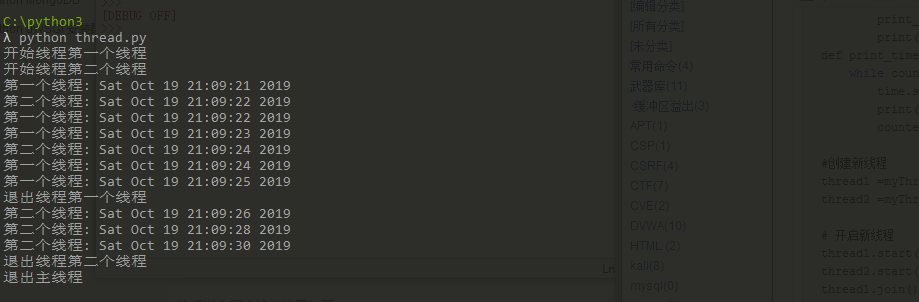
那么接下来重点来了
多线程
多线程的优势在于可以同时运行多个任务(至少感觉起来是这样)。但是当线程需要共享数据时,可能存在数据不同步的问题。
考虑这样一种情况:一个列表里所有元素都是0,线程"set"从后向前把所有元素改成1,而线程"print"负责从前往后读取列表并打印。
那么,可能线程"set"开始改的时候,线程"print"便来打印列表了,输出就成了一半0一半1,这就是数据的不同步。为了避免这种情况,引入了锁的概念。
import threading

import time

class myThread (threading.Thread):

    def __init__(self, threadID, name, counter):

        threading.Thread.__init__(self)

        self.threadID = threadID

        self.name = name

        self.counter = counter

    def run(self):

        print ("开启线程: " + self.name)

        # 获取锁,用于线程同步

        threadLock.acquire()

        print_time(self.name, self.counter, )

        # 释放锁,开启下一个线程

        threadLock.release()

def print_time(threadName, delay, counter):

    while counter:

        time.sleep(delay)

        print ("%s: %s" % (threadName, time.ctime(time.time())))

        counter -=

threadLock = threading.Lock()

threads = []

# 创建新线程

thread1 = myThread(, "Thread-1", )

thread2 = myThread(, "Thread-2", )

# 开启新线程

thread1.start()

thread2.start()

# 添加线程到线程列表

threads.append(thread1)

threads.append(thread2)

# 等待所有线程完成

for t in threads:

    t.join()

print ("退出主线程")
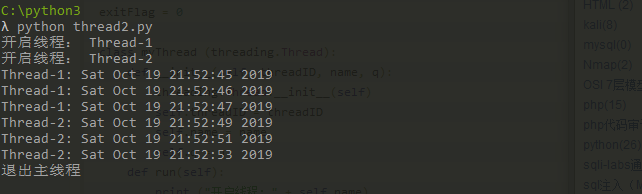
可以看见是先开始线程1然后线程一完了在开线程二
线程优先级队列( Queue)
线程优先级队列( Queue)

Python 的 Queue 模块中提供了同步的、线程安全的队列类,包括FIFO(先入先出)队列Queue,LIFO(后入先出)队列LifoQueue,和优先级队列 PriorityQueue。

这些队列都实现了锁原语,能够在多线程中直接使用,可以使用队列来实现线程间的同步。

Queue 模块中的常用方法:

    Queue.qsize() 返回队列的大小

    Queue.empty() 如果队列为空,返回True,反之False

    Queue.full() 如果队列满了,返回True,反之False

    Queue.full 与 maxsize 大小对应

    Queue.get([block[, timeout]])获取队列,timeout等待时间

    Queue.get_nowait() 相当Queue.get(False)

    Queue.put(item) 写入队列,timeout等待时间

    Queue.put_nowait(item) 相当Queue.put(item, False)

    Queue.task_done() 在完成一项工作之后,Queue.task_done()函数向任务已经完成的队列发送一个信号

    Queue.join() 实际上意味着等到队列为空,再执行别的操作
队列1 单向先进先出队列
import queue

#单向队列

q = queue.Queue()

print(q.maxsize)

for i in range():

    q.put(i)

print(q.get())

print(q.qsize())

#先进后出队列
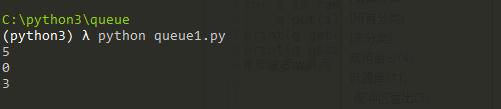
此时q.get()从队列里面取出来的是0 q.qsize还剩3个所以输出3
如果代码改成
import queue

#单向队列

q = queue.Queue(5)

print(q.maxsize)

for i in range(4):

    q.put(i)

    print(q.get())

print(q.qsize())

#先进后出队列
那么将输出 进一个出一个 那么队列为空 q.qsize为0

接下来是先进后出队列
import queue

q =queue.LifoQueue()

for i in range():

    q.put(i)

print(q.get())

print(q.qsize())
那么看看运行效果
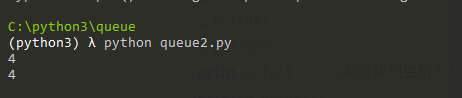
和我们预想的一样
接下来是优先级队列的讲解
import queue

q =queue.PriorityQueue()

q.put((, ))

q.put((, ))

q.put((, ))

q.put((, ))

print(q.get())

print(q.get())
优先级队列put进去的是一个元祖,(优先级,数据),优先级数字越小,优先级越高 话不多说我们看代码
如果有两个元素优先级是一样的,那么在出队的时候是按照先进先出的顺序的。

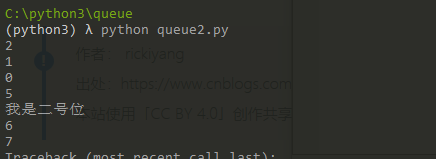
接下来是双端队列的讲解 看代码
import queue

q =queue.deque()

for i in range(3):

    q.append(i) 尾部加入

for c in range(5,8):

    q.appendleft(c) 首部加入

q.insert(2,"我是二号位") 任意位置插入

for i in range(10):

    print(q.pop()) 从尾部出
python线程+队列(queue)的更多相关文章
- Python进阶----异步同步,阻塞非阻塞,线程池(进程池)的异步+回调机制实行并发, 线程队列(Queue, LifoQueue,PriorityQueue), 事件Event,线程的三个状态(就绪,挂起,运行) ,***协程概念,yield模拟并发(有缺陷),Greenlet模块(手动切换),Gevent(协程并发)
Python进阶----异步同步,阻塞非阻塞,线程池(进程池)的异步+回调机制实行并发, 线程队列(Queue, LifoQueue,PriorityQueue), 事件Event,线程的三个状态(就 ...
- Python 单向队列Queue模块详解
Python 单向队列Queue模块详解 单向队列Queue,先进先出 '''A multi-producer, multi-consumer queue.''' try: import thread ...
- python 线程队列PriorityQueue(优先队列)(37)
在 线程队列Queue / 线程队列LifoQueue 文章中分别介绍了先进先出队列Queue和先进后出队列LifoQueue,而今天给大家介绍的是最后一种:优先队列PriorityQueue,对队列 ...
- python 线程队列LifoQueue-LIFO(36)
在 python线程队列Queue-FIFO 文章中已经介绍了 先进先出队列Queue,而今天给大家介绍的是第二种:线程队列LifoQueue-LIFO,数据先进后出类型,两者有什么区别呢? 一.队 ...
- python线程队列Queue-FIFO(35)
之前的文章中讲解很多关于线程间通信的知识,比如:线程互斥锁lock,线程事件event,线程条件变量condition 等等,这些都是在开发中经常使用的内容,而今天继续给大家讲解一个更重要的知识点 — ...
- 网络编程基础--多线程---concurrent.futures 模块---事件Event---信号量Semaphore---定时器Timer---死锁现象 递归锁----线程队列queue
1 concurrent.futures 模块: # from abc import abstractmethod,ABCMeta # # class A(metaclass=ABCMeta): # ...
- 线程队列queue的使用
其实线程队列queue跟进程Queue的用法一样. 一.先进先出 import queue q = queue.Queue() q.put('kobe') q.put('cxk') print(q.g ...
- python网络编程-线程队列queue
一:线程queu作用 Python中,queue是线程间最常用的交换数据的形式. 队列两个作用:一个是解耦,一个是提高效率 二:语法 1)队列的类 class queue.Queue(maxsize= ...
- python 线程队列、线程池、全局解释器锁GIL
一.线程队列 队列特性:取一个值少一个,只能取一次,没有值的时候会阻塞,队列满了,也会阻塞 queue队列 :使用import queue,用法与进程Queue一样 queue is especial ...
随机推荐
- 使用IP代理初体验
在很多时候我们需要用到IP代理,比如爬虫.投票等 封IP是一种很常用的办法,所谓道高一尺.魔高一丈,IP代理应运而生 最简单的一段代码 static void Main(string[] args) ...
- Visual Studio 开发大量 JavaScript 代码项目程序崩溃的解决方案
最近公司做新项目,基于 Bootstrap.AngularJS 和 kendo 开发一套后台的管理系统,在项目中使用了大量的 JavaScript 文件,这两天 Visual Studio 2015 ...
- K最近邻算法项目实战
这里我们用酒的分类来进行实战练习 下面来代码 1.把酒的数据集载入到项目中 from sklearn.datasets import load_wine #从sklearn的datasets模块载入数 ...
- kong命令(三)route
介绍 route 是一套匹配客户端请求的规则.每个route都会匹配一个service,每个service可定关联多个route. 可以说service:route=1:n.一对多的关系.每个匹配到r ...
- MyCAT详解【转】
原文链接:MyCAT详解 作者:Rangle 一.MyCAT概述MyCAT是一款由阿里Cobar演变而来的用于支持数据库读写分离.分片的分布式中间件.MyCAT可不但支持Oracle.MSSQL.MY ...
- ionic 局部刷新
$scope.$on('$ionicView.beforeEnter', console.log("刷新"); })
- kNN(K-Nearest Neighbor)最邻近规则分类(转)
KNN最邻近规则,主要应用领域是对未知事物的识别,即判断未知事物属于哪一类,判断思想是,基于欧几里得定理,判断未知事物的特征和哪一类已知事物的的特征最接近: K最近邻(k-Nearest Neighb ...
- Kafka的性能分析
都说Kafka的吞吐量很大,但是我一直不直到Kafka为何有如此大的吞吐量.最近在看Kafka权威指南,陆陆续续得到了如下结论: 1.分区:Kafka支持分区,这样就支持多个生产者和多个消费者同时请求 ...
- 搭建一个jumpserver跳板机
1,部署jumpserver 建立阿里云公网源yum仓库 清除缓存重新建立缓存 ip后面直接回车,下面输入y 地址端口账户密码直接回车 ,询问跳过输入y,是否继续输入y 用户名回车,输入自己要设置的密 ...
- Ubuntu系统---编译opencv程序的几种方式g++、Makefile、Cmake
Ubuntu系统---编译opencv程序的几种方式g++.Makefile.Cmake 先建立一个工程(一个文件夹),写好xxx.cpp文件,可以是多个: //----------opencv.cp ...