
Qt编写输入法V2019终极版
一、前言
之前写过的V2018版本的输入法,本来已经很完善了,不打算更新升级了,最近有个朋友找我定制一个输入法,需要高仿一个苹果MAC电脑的输入法,MAC操作系统的审美无疑是相当棒的,于是乎直接拿以前的输入法高仿了一个,由于之前有做过输入法这块的开发,而且改进了四年,各种需求都遇到过,陆陆续续完善了很多年,所以这个高仿起来难度不大,而且要支持滑动选词,直接撸代码。
体验地址:https://pan.baidu.com/s/1vIyEdB4QGo5OvxLYj7kq5g 提取码:sysn
二、功能特点
- 未采用Qt系统层输入法框架,独创输入切换机制。
- 纯QWidget编写,支持任何目标平台(亲测windows、linux、嵌入式linux等),支持任意Qt版本(亲测Qt4.6.0到Qt5.13),支持任意编译器(亲测mingw、gcc、msvc等),支持任意控件输入包括网页中的输入控件。
- 调用极为方便,pri文件调用形式,只要改成文件包含即可,例如pro文件中写 include($$PWD/input2019/input2019.pri)。
- 界面清晰简洁,UI美观友好,高仿IOS输入法,非常适合触摸设备。
- 顶部滑动选词+弹出汉字面板选词,支持滑动。
- 具有记忆功能,之前选中过的词语首先显示,支持单个拼音多个汉字,自动调整优先级。
- 具有造词功能,可以直接打开文件文件写入自定义词组,最高级别显示。
- 支持Qt程序嵌入的浏览器中的网页中的文本框等控件的输入。
- 界面大小随意设置,采用布局自使用任何分辨率。
- 属性控制数字输入,例如需要文本框默认弹出的是数字则设置代码 ui->txt->setProperty("flag", "number");
- 自由控制需要显示输入法和不需要显示输入法,当某些控件不需要弹出输入法,只需要对应不需要弹出输入法的控件设置属性noinput为真即可。例如ui->txt->setProperty("noinput", true);
- 界面自适应屏幕大小,输入法弹出位置为控件底部时,当超过桌面右边或者底部时,自动调整位置。
- 实现了长按超过500毫秒重复执行按下的键的功能。例如长按退格键,不断删除。
- 英文、中文、数字字母、大小写、特殊字符自由切换。
- 支持单拼、全拼、模糊拼音输入,智能分页算法,可任意翻页查看汉字词组。
- 默认自带5种皮肤颜色,可随意切换,用户也可用QSS自定义皮肤。
- 谷歌内核的输入法引擎,品质保证,字库文件1MB,不依赖数据库,资源占用低效率极高。支持模糊拼音,比如nh=你好。
- 可选windows专有版本,支持外部程序输入,比如输入到记事本、QQ聊天窗口等。
- 整个输入法代码行数1000行左右,非常小,不会对程序增加大小造成负担。
- 代码结构极为清晰,注释详细,非常容易阅读和理解,同时也可以自行修改拓展自定义的需求。
三、效果图
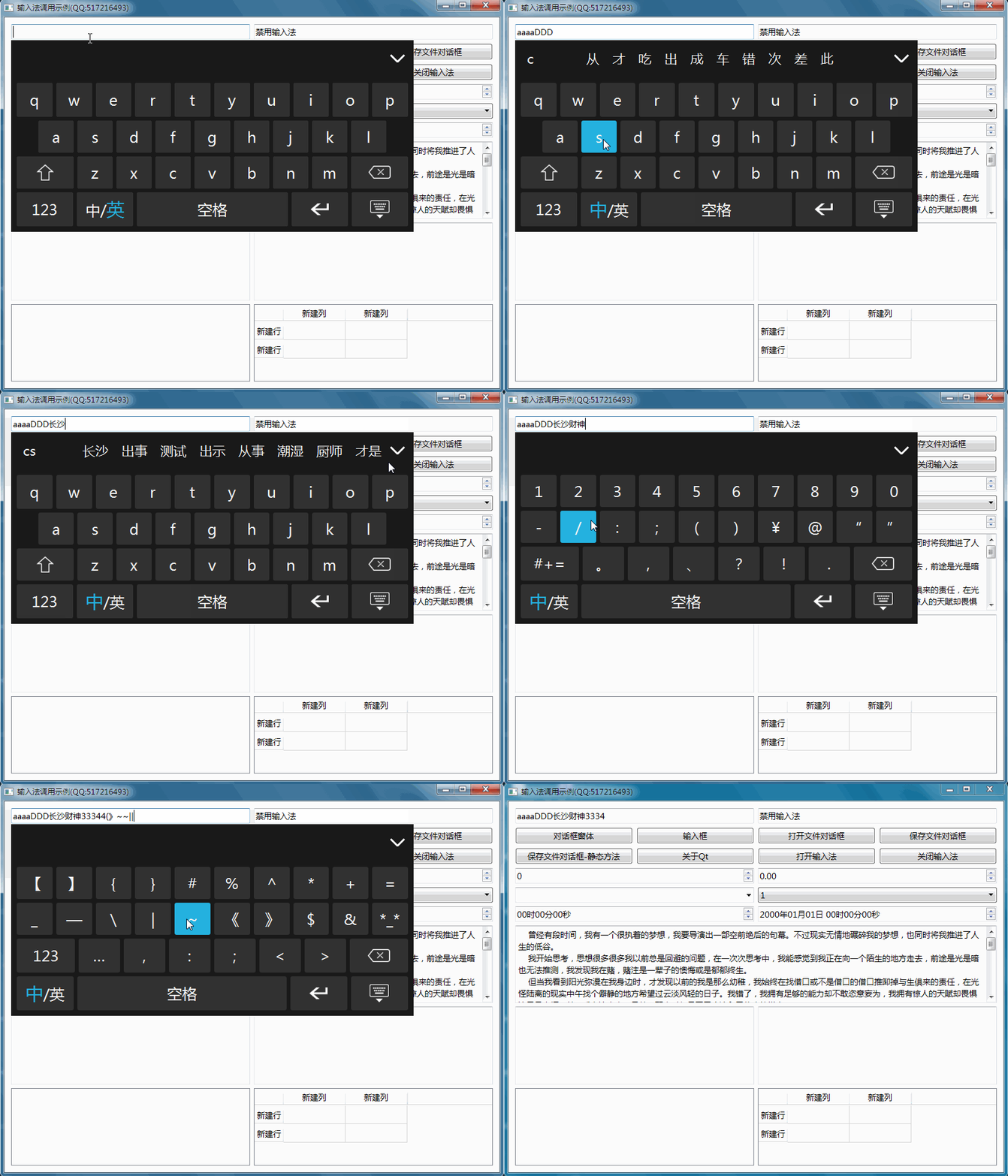
四、使用方法
- 将input2019整个目录放到你的项目的pro同一级别目录中。
- 在你的主程序的pro文件中加一行 include($$PWD/input2019/input2019.pri)
- 在你的程序的main函数中引入头文件 #include "input2019/frminput2019.h"
- 在你的程序的main函数中加一行代码 QApplication a(argc, argv);之后加 frmInput2019::Instance()->hide();
- 将源码下的dict_pinyin.dat+dict_pinyin_user.dat字库文件复制到可执行文件同一目录。
五、其他说明
- 如果想设置更小的尺寸,可用setFixedSize。
- 源码下的chinese_user.txt为自定义词组文件,打开编辑即可,该文件放到可执行文件同一目录即可。
- 如果是dialog窗体,请在dialog窗体exec前增加一行代码,QDialog dialog;dialog.setWindowModality(Qt::WindowModal);否则会阻塞窗体消息。
- 在某些嵌入式linux系统中,如果没有带有XCB,则输入法需要先show再hide一次,然后输入法才能起作用,不然程序会崩溃。
六、核心代码
bool frmInput2019::eventFilter(QObject *watched, QEvent *event)

{

    if (watched == this) {

        //处理自身拖动

        static QPoint mousePoint;

        static bool mousePressed = false;

        QMouseEvent *mouseEvent = static_cast<QMouseEvent *>(event);

        //按下的时候记住坐标,移动到鼠标松开的位置

        if (event->type() == QEvent::MouseButtonPress) {

            if (mouseEvent->button() == Qt::LeftButton) {

                mousePressed = true;

                mousePoint = mouseEvent->globalPos() - this->pos();

                return true;

            }

        } else if (event->type() == QEvent::MouseButtonRelease) {

            mousePressed = false;

            return true;

        } else if (event->type() == QEvent::MouseMove) {

            if (mousePressed && (mouseEvent->buttons() && Qt::LeftButton && position != "bottom")) {

                this->move(mouseEvent->globalPos() - mousePoint);

                this->update();

                return true;

            }

        }

    } else if (watched == ui->labMore) {

        if (event->type() == QEvent::MouseButtonPress) {

            if (inputType == "chinese" && !upper && labCn.first()->isEnabled()) {

                if (!ui->widgetChinese->isVisible()) {

                    ui->widgetLetter->setVisible(false);

                    ui->widgetNumber->setVisible(false);

                    ui->widgetChinese->setVisible(true);

                } else {

                    ui->widgetLetter->setVisible(true);

                    ui->widgetNumber->setVisible(false);

                    ui->widgetChinese->setVisible(false);

                }

                //重新设置图标

                QString strMore = ui->widgetMore->isVisible() ? "up" : "down";

                ui->labMore->setPixmap(QString(":/image/btn_%1_%2.png").arg(strMore).arg(iconType));

                return true;

            }

        }

    } else if (watched == ui->labType) {

        if (event->type() == QEvent::MouseButtonPress) {

            if (inputType == "english") {

                setInputType("chinese");

            } else if (inputType == "chinese") {

                setInputType("english");

            }

        }

    } else if (watched == ui->labType2) {

        if (event->type() == QEvent::MouseButtonPress) {

            setInputType("english");

        }

    } else if (watched == ui->widgetCn) {

        //没有汉字或者按下的地方没有汉字或者当前汉字标签个数过少都不用继续

        if (!labCn.first()->isEnabled() || lastText.isEmpty()) {

            return false;

        }

        //记住最后按下拖动的时间,过短则认为是滑动,启动滑动动画

        static bool pressed = false;

        static QPoint lastPos = QPoint();

        static QDateTime lastTime = QDateTime::currentDateTime();

        QMouseEvent *mouseEvent = static_cast<QMouseEvent *>(event);

        if (event->type() == QEvent::MouseButtonPress) {

            pressed = true;

            lastPos = mouseEvent->pos();

            animationCn->stop();

            lastTime = QDateTime::currentDateTime();

        } else if (event->type() == QEvent::MouseButtonRelease) {

            pressed = false;

            if (lastPos != mouseEvent->pos()) {

                //判断当前时间和鼠标按下事件比较,时间短则说明是滑动

                QDateTime now = QDateTime::currentDateTime();

                if (lastTime.msecsTo(now) < 600) {

                    //可以改变下面的值来调整幅度

                    bool moveleft = (mouseEvent->pos().x() - lastPos.x()) < 0;

                    int offset = moveleft ? 350 : -350;

                    int value = ui->scrollAreaCn->horizontalScrollBar()->value();

                    animationCn->setStartValue(value);

                    animationCn->setEndValue(value + offset);

                    animationCn->start();

                }

            }

        } else if (event->type() == QEvent::MouseMove) {

            if (pressed && labCn.first()->isEnabled()) {

                //计算滑过的距离

                bool moveleft = (mouseEvent->pos().x() - lastPos.x()) < 0;

                int offset = moveleft ? 5 : -5;

                int value = ui->scrollAreaCn->horizontalScrollBar()->value();

                ui->scrollAreaCn->horizontalScrollBar()->setValue(value + offset);

                return true;

            }

        }

    } else if (watched == ui->widgetMore) {

        //没有汉字或者按下的地方没有汉字或者当前汉字标签个数过少都不用继续

        if (!labMore.first()->isEnabled() || lastText.isEmpty()) {

            return false;

        }

        //记住最后按下拖动的时间,过短则认为是滑动,启动滑动动画

        static bool pressed = false;

        static QPoint lastPos = QPoint();

        static QDateTime lastTime = QDateTime::currentDateTime();

        QMouseEvent *mouseEvent = static_cast<QMouseEvent *>(event);

        if (event->type() == QEvent::MouseButtonPress) {

            pressed = true;

            lastPos = mouseEvent->pos();

            animationMore->stop();

            lastTime = QDateTime::currentDateTime();

        } else if (event->type() == QEvent::MouseButtonRelease) {

            pressed = false;

            if (lastPos != mouseEvent->pos()) {

                //判断当前时间和鼠标按下事件比较,时间短则说明是滑动

                QDateTime now = QDateTime::currentDateTime();

                if (lastTime.msecsTo(now) < 600) {

                    //可以改变下面的值来调整幅度

                    bool movebottom = (mouseEvent->pos().y() - lastPos.y()) < 0;

                    int offset = movebottom ? 150 : -150;

                    int value = ui->scrollAreaMore->verticalScrollBar()->value();

                    animationMore->setStartValue(value);

                    animationMore->setEndValue(value + offset);

                    animationMore->start();

                }

            }

        } else if (event->type() == QEvent::MouseMove) {

            if (pressed && labMore.first()->isEnabled()) {

                //计算滑过的距离

                bool movebottom = (mouseEvent->pos().y() - lastPos.y()) < 0;

                int offset = movebottom ? 5 : -5;

                int value = ui->scrollAreaMore->verticalScrollBar()->value();

                ui->scrollAreaMore->verticalScrollBar()->setValue(value + offset);

                return true;

            }

        }

    } else if (watched->inherits("QLabel")) {

        QLabel *lab = (QLabel *)watched;

        if (!upper && inputType == "chinese") {

            if (lab->property("labCn").toBool()) {

                //记住最后按下的滚动条位置,如果滚动条一直没有变化则认为单击了标签

                static int lastPosition = 0;

                if (event->type() == QEvent::MouseButtonPress) {

                    lastPosition = ui->scrollAreaCn->horizontalScrollBar()->value();

                    lastText = lab->text();

                } else if (event->type() == QEvent::MouseButtonRelease) {

                    if (lastPosition == ui->scrollAreaCn->horizontalScrollBar()->value() && !lastText.isEmpty()) {

                        insertValue(lab->text());

                        clearChinese();

                    }

                }

            } else if (lab->property("labMore").toBool()) {

                //记住最后按下的滚动条位置,如果滚动条一直没有变化则认为单击了标签

                static int lastPosition = 0;

                if (event->type() == QEvent::MouseButtonPress) {

                    lastPosition = ui->scrollAreaMore->verticalScrollBar()->value();

                    lastText = lab->text();

                } else if (event->type() == QEvent::MouseButtonRelease) {

                    if (lastPosition == ui->scrollAreaMore->verticalScrollBar()->value() && !lastText.isEmpty()) {

                        insertValue(lab->text());

                        clearChinese();

                    }

                }

            }

        }

    } else {

        if (event->type() == QEvent::MouseButtonPress) {

            if (currentWidget != 0) {

                if (!isVisible()) {

                    showPanel();

                }

            } else {

                if (isVisible()) {

                    hidePanel();

                }

            }

        }

    }

    return QWidget::eventFilter(watched, event);

}

void frmInput2019::initForm()

{

#if (QT_VERSION > QT_VERSION_CHECK(5,0,0))

    setWindowFlags(Qt::Tool | Qt::WindowDoesNotAcceptFocus | Qt::WindowStaysOnTopHint | Qt::FramelessWindowHint | Qt::X11BypassWindowManagerHint);

#else

    setWindowFlags(Qt::Tool | Qt::WindowStaysOnTopHint | Qt::FramelessWindowHint | Qt::X11BypassWindowManagerHint);

#endif

    currentWidget = 0;

    upper = false;

    number = false;

    onlyControl = false;

    autoHide = false;

    columnCount = 8;

    maxCount = 256;

    dbPath = qApp->applicationDirPath();

    //绑定按钮到事件

    QList<QPushButton *> btns;

    btns << ui->widgetLetter->findChildren<QPushButton *>();

    btns << ui->widgetNumber->findChildren<QPushButton *>();

    foreach (QPushButton *btn, btns) {

        btn->setProperty("btnInput", true);

        connect(btn, SIGNAL(clicked()), this, SLOT(btnClicked()));

    }

    //设置字母属性

    btns.clear();

    btns << ui->widgetLetter1->findChildren<QPushButton *>();

    btns << ui->widgetLetter2->findChildren<QPushButton *>();

    foreach (QPushButton *btn, btns) {

        btn->setProperty("btnLetter", true);

    }

    //设置所有按钮输入法不可用+长按自动重复事件

    btns.clear();

    btns << this->findChildren<QPushButton *>();

    foreach (QPushButton *btn, btns) {

        btn->setFocusPolicy(Qt::NoFocus);

        btn->setProperty("noinput", true);

        btn->setAutoRepeat(true);

        btn->setAutoRepeatDelay(500);

    }

    //默认最大生成256个,添加到顶部滚动区域中

    for (int i = 0; i < maxCount; i++) {

        QLabel *lab = new QLabel;

        lab->setProperty("labCn", true);

        lab->setEnabled(false);

        ui->layout->addWidget(lab);

        labCn << lab;

    }

    //默认最大生成256个,添加到更多滚动区域中

    int row = 0;

    int column = 0;

    for (int i = 0; i < maxCount; i++) {

        QLabel *lab = new QLabel;

        lab->setProperty("labMore", true);

        lab->setEnabled(false);

        lab->setAlignment(Qt::AlignCenter);

        lab->setSizePolicy(QSizePolicy::Preferred, QSizePolicy::Fixed);

        ui->gridLayout->addWidget(lab, row, column);

        labMore << lab;

        column++;

        if (column >= columnCount) {

            row++;

            column = 0;

        }

    }

    ui->lab1->setEnabled(false);

    ui->lab2->setEnabled(false);

    ui->labPY->setEnabled(false);

    ui->labMore->setEnabled(false);

    //输入法面板的字体名称和按钮字体大小即汉字区域字体大小

    setFontInfo(this->font().family(), 11, 10);

    //图标固定大小

    setIconSize(20, 20);

    //按钮之间的间隔

    setSpacing(6);

    //顶部汉字区域高度

    setTopHeight(40);

    //输入法面板的显示位置  control--显示在对应输入框的正下方 bottom--填充显示在底部  center--窗体居中显示

    setPosition("control");

    //输入法模式 english--英文模式  chinese--中文模式  number--数字特殊字符模式

    setInputType("english");

    //输入法面板的样式  black--黑色  blue--淡蓝色  brown--灰黑色  gray--灰色  silvery--银色

    setStyleName("black");

    //定义动画产生平滑数值

    animationCn = new QPropertyAnimation(ui->scrollAreaCn->horizontalScrollBar(), "value");

    animationCn->setEasingCurve(QEasingCurve::OutCirc);

    animationCn->setDuration(500);

    animationMore = new QPropertyAnimation(ui->scrollAreaMore->verticalScrollBar(), "value");

    animationMore->setEasingCurve(QEasingCurve::OutCirc);

    animationMore->setDuration(500);

}

void frmInput2019::init()

{

    if (onlyControl) {

        ui->labPY->setVisible(false);

        this->installEventFilter(this);

        ui->labType->installEventFilter(this);

        ui->labType2->installEventFilter(this);

        ui->labMore->installEventFilter(this);

        ui->widgetCn->installEventFilter(this);

        ui->widgetMore->installEventFilter(this);

        foreach (QLabel *lab, labCn) {

            lab->installEventFilter(this);

        }

        foreach (QLabel *lab, labMore) {

            lab->installEventFilter(this);

        }

    } else {

        //绑定全局改变焦点信号槽

        connect(qApp, SIGNAL(focusChanged(QWidget *, QWidget *)), this, SLOT(focusChanged(QWidget *, QWidget *)));

        qApp->installEventFilter(this);

    }

    py.open(dbPath);

    readChinese();

}
Qt编写输入法V2019终极版的更多相关文章
- Qt编写输入法终极版V2018
输入法是很多Qt+嵌入式linux开发的同学的痛,自从5.7自带了输入法后,这个痛终于缓解了不少,不过还有大量的嵌入式linux程序停留在qt4时代,为此特意选择了QWidget来写这个输入法,为了兼 ...
- Qt编写输入法V2018超级终结版
对于qt嵌入式linux开发人员来说,输入法一直是个鸡肋问题,要么不支持实体键盘同步,要么不能汉字输入,要么不支持网页输入等,这几年通过陆续接触大量的各种输入法应用场景客户,得到真实需求,不断改进,最 ...
- 前端、HTML+CSS+JS编写规范(终极版)
HTMLCSS文档规范 HTML和CSS文档必须采用UTF-8编码格式: HTML文档必须使用HTML5的标准文档格式: HTMLCSS编写规范 HTML和CSS的标签.属性.类名.ID都必须使用小写 ...
- 软件工程课堂作业(五)——终极版随机产生四则运算题目(C++)
一.升级要求:让程序能接受用户输入答案,并判定对错.最后给出总共对/错的数量. 二.设计思想: 1.首先输入答案并判断对错.我想到的是定义两个数组,一个存放用户算的结果,另一个存放正确答案.每输出一道 ...
- Qt编写项目作品大全(自定义控件+输入法+大屏电子看板+视频监控+楼宇对讲+气体安全等)
一.自定义控件大全 (一).控件介绍 超过160个精美控件,涵盖了各种仪表盘.进度条.进度球.指南针.曲线图.标尺.温度计.导航条.导航栏,flatui.高亮按钮.滑动选择器.农历等.远超qwt集成的 ...
- Qt编写可换肤的中文双拼汉字输入法
时间过得真快,不知不觉已到2015年,农历春节一眨眼就过去了,端正状态收拾心情整装待发出发. 曾经有段时间,我有一个很执着的梦想,我要导演出一部空前绝后的巨幕.不过现实无情地碾碎我的梦想,也同时将我推 ...
- Qt编写数据可视化大屏界面电子看板13-基础版
一.前言 之前发布的Qt编写的可视化大屏电子看板系统,很多开发者比较感兴趣,也收到了很多反馈意见,纵观市面上的大屏系统,基本上都是B/S结构的web版本,需要在后台进行自定义配置模块,绑定数据源等,其 ...
- Qt编写的开源帖子集合(懒人专用)
回顾自己学习Qt以来九年了,在这九年多时间里面,从本论坛学习不到不少的东西,今天特意整了一下自己开源过的资源的帖子,整理一起方便大家直接跳转下载,不统计不知道,一统计吓一跳,不知不觉开源了这么多代码, ...
- Qt编写自定义控件二动画按钮
现在的web发展越来越快,很多流行的布局样式,都是从web开始的,写惯了Qt widgets 项目,很多时候想改进一下现有的人机交互,尤其是在现有的按钮上加一些动画的效果,例如鼠标移上去变大,移开还原 ...
随机推荐
- django实现发送邮件功能
django实现邮件发送功能 1)首先注册一个邮箱,这里以163邮箱为例 2)注册之后登录,进行如下修改 找到设置,设置一个授权码,授权码的目的仅仅是让你有权限发邮件,但是不能登录到邮箱进行修改,发送 ...
- Selenium(十二)嵌套frame定位
第一种:iframe有id.name属性 网页上有3个frame:header.menu.main,分别代码顶部.左侧.右侧(其中menu.main在另外一个frameset中) 如何定位到“head ...
- js onclick事件传参
传字符串参数 var html = "<a href='#' onclick='onedit(""+ row.name + "")';>编 ...
- seaborn模块的基本使用
Seaborn是基于matplotlib的Python可视化库. 它提供了一个高级界面来绘制有吸引力的统计图形.Seaborn其实是在matplotlib的基础上进行了更高级的API封装,从而使得作图 ...
- idea中关闭当前文件快捷键
一.idea中关闭当前文件快捷键 1.一般编辑器中关闭当前文件快捷键为ctrl+w 2.而idea中默认为Ctrl+F4 3.可以将其改为自己熟悉的键位. 4.settings——>keymap ...
- Vue全家桶之——Vuex
Vuex 是什么? Vuex 是一个专为 Vue.js 应用程序开发的状态管理模式.它采用集中式存储管理应用的所有组件的状态,并以相应的规则保证状态以一种可预测的方式发生变化.Vuex 也集成到 Vu ...
- 函数指针,使用qsort,进行结构体排序
#include <stdio.h> #include <stdlib.h> #define STU_NAME_LEN 16 /*学生信息*/ typedef struct s ...
- redis危险命令
KEYS 单行遍历,速度很慢很占执行时间,对单核来说,极有可能导致执行完后处理不过来这段时间堆积的任务量,导致雪崩. FLUSHALL FLUSHDB CONFIG 今晚搜索kombu用的key,用了 ...
- LOJ P10163 Amount of Degrees 题解
每日一题 day6 打卡 Analysis 题目的意思是找在区间[x,y]之间满足能够由k个b的不同次幂相加得到的数的总数.这题的关键是转换进制,之前几道题我们保存的是数的每位数,其实也就是10进制, ...
- antd 表单获取参数
wrappedComponentRef是为了把form的值赋值到自定的对象中 <OpenCityForm wrappedComponentRef={(inst)=>{this.cityFo ...