
ElasticSearch——常用命令
集群相关
--查询集群健康状态

GET _cluster/health

--查询所有节点

GET _cat/nodes

--查询索引及分片的分布

GET _cat/shards

--查询指定索引分片的分布
GET _cat/shards/order_stpprdinf_2019-12?v

--查询所有插件

GET _cat/plugins
索引相关查询
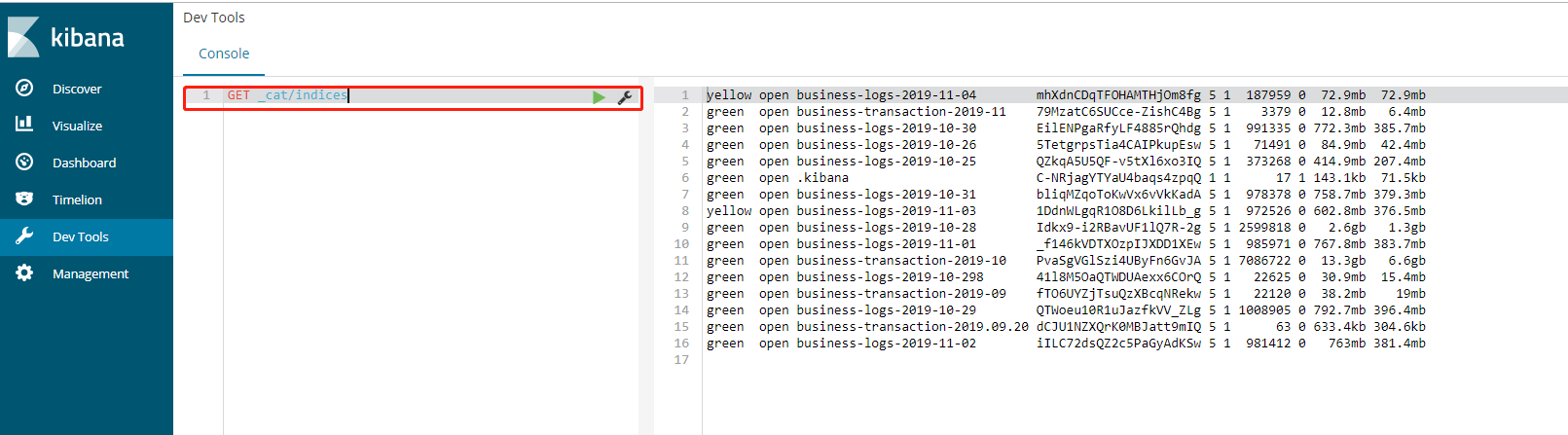
--查询所有索引及容量

GET _cat/indices

--查询索引映射结构

GET my_index/_mapping

--查询所有索引映射结构

GET _all

--查询所有的相同前缀索引

GET my-*/_search

--查询所有索引模板

GET _template

--查询具体索引模板

GET _template/my_template
索引相关操作
1、创建索引模板
# 创建模板
PUT _template/test_hot_cold_template

{

    "index_patterns": "test_*",

    "settings": {

        "number_of_shards" : ,

        "index.number_of_replicas":

     },

    "mappings": {

      "order": {

          "dynamic": false,

          "properties": {

              "id": {"type": "long"},

              "name": {"type": "keyword"}

          }

      }

    },

    "aliases": {

      "test": {}

    }

}

# 根据模板创建索引并写入数据

POST test_hot_cold---/order

{

  "id":,

  "name":"cwx"

}

# 删除模板
DELETE _template/order_stpprdinf_template
2、直接创建索引
PUT my_index

{

  "mappings": {

    "doc": {

      "properties": {

        "name": {

          "type": "text"

        },

        "blob": {

          "type": "binary"

        }

      }

    }

  }

}
-- 增加字段
put my_index/_mapping/doc

{

    "properties": {

      "cwxtest": {"type": "keyword"}

    }

}

-- 数据冷备份
PUT _snapshot/my_backup  # my_backup 备份的名称

{

    "type": "order",

    "settings": {

        "location": "/mount/backups/my_backup"

    }

}
3、写入索引
PUT my_index/doc/

{

  "name": "Some binary blob",

  "blob": "U29tZSBiaW5hcnkgYmxvYg=="

}
4、删除索引
DELETE my-index
5、修改索引setting
PUT /test_hot_cold---/_settings

{

  "settings": {

    "index.routing.allocation.require.hotwarm_type": "cold"

  }

}
DSL query查询
--1.查询所有

GET _search

{

  "query": {

    "match_all": {}

  }

}

--2.查询单个索引 的 固定属性

--精确匹配

GET _search

{

  "query": {

    "term": { "name" : "you" }

  }

}

--模糊匹配

GET _search

{

  "query": {

    "match": { "name" : "you" }

  }

}

--范围查找

GET _search

{

  "query": {

    "range": {

        "age":{ "gte" :  , "lte" :  }

    }

  }

}
GET indexName/_search
{
"query": {
"wildcard":{"relateId":"*672499460503*"}
}
}
--3.功能性查询

--过滤

GET my_index/_search

{

  "query": {

    "bool": {

      "filter": {

        "term":{"age":}

      }

    }

  }

}

--或 or

GET my - test / _search
{

  "query": {

    "bool": {

      "should": [{

        "term": {

          "name": "you"

        }

        }, {

        "match": {

          "age":

        }

      }]

    }

  }

}

--与 AND

GET my-test/_search

{

  "query": {

    "bool": {

      "must" : [{

        "match" : {

          "name" : "you"

        }

      },{

        "range":{

        "age":{

          "from" :  , "to" :

        }

        }

      }]

    }

  }

}

--必须 =

GET my_index/_search

{

  "query": {

    "bool": {

      "must" : {

        "range" : {

          "age" : { "from" : , "to" :  }

        }

      }

    }

  }

}

--必须不 not

GET my_index/_search

{

  "query": {

    "bool": {

      "must_not" : {

        "term" : {

          "name" : "you"

        }

      }

    }

  }

}

--复合查找

GET my_index/_search

{

"query": {

"bool": {

"should": [{

"match": {

"age":

}

},

{

"match": {

"age":

}

}],

"filter": {

  "match":{

    "name":"you"

  }

}

}

}

}

--4.索引迁移

--场景 从A索引 复制到B索引

POST _reindex

{

  "source": {

    "index": "my_index"

  },

  "dest": {

    "index": "new_my_index"

  }

}

--5.基于查询的删除

POST test-index/_delete_by_query

{

  "query":{

        "term": {

         "cameraId":""

        }

  }

}

--查询

GET test-index/_search

{

  "query":{

        "term": {

         "cameraId":""

        }

  }

}
按时间范围查询:
GET order_stpprdinf_2019-/_search

{

  "size":,

  "query":{

    "range":{

      "order_time":{

        "gte":"2019-12-11T00:00:00+08:00",

        "lte":"2019-12-11T23:59:59+08:00"

      }

    }

  }

}
按条件删除:
GET order_stpprdinf_2019-/_delete_by_query?conflicts=proceed

{

  "query":{

    "range":{

      "order_time":{

        "gte":"2019-12-11T00:00:00+08:00",

        "lte":"2019-12-11T23:59:59+08:00"

      }

    }

  }

}
可在kibana的Dev Tools控制板上执行以上命令:
参考链接:https://blog.csdn.net/ailice001/article/details/79541816
ElasticSearch——常用命令的更多相关文章
- elasticsearch常用命令
elasticsearch的rest访问格式: curl -X<REST Verb> <Node>:<Port>/<Index>/<Type> ...
- elasticsearch 常用命令
#查看集群状态 curl -XGET "http://localhost:9200/_cluster/health?pretty" #查看所有的快照 curl -XGET &quo ...
- 实战ELK(2) ElasticSearch 常用命令
1.Cluster Health 集群状态 curl 'localhost:9200/_cat/health?v' yellow代表分片副本确实,因为我们现在只有一台机器. curl 'localho ...
- elasticsearch 常用命令(一)
索引 搜索 mapping 分词器 1.创建索引 http://192.168.65.131:9200/smartom_index?pretty 2.查看索引: http://192.168.65.1 ...
- elasticsearch 常用命令 一直红色 重启不稳定 不停的宕机
persistent (重启后设置也会存在) or transient (整个集群重启后会消失的设置). 查看集群状态和每个indices状态.搜索到red的,没用就删除 GET /_cluster/ ...
- elasticsearch常用命令备注
1.检查集群健康状态 curl 'localhost:9200/_cat/health?v' 2.检查节点健康状态 curl 'localhost:9200/_cat/nodes?v' 3.新增一条索 ...
- elasticsearch(四) 之 elasticsearch常用的一些集群命令
目录 elasticsearch常用的一些集群命令 查看集群健康状态 查看集群的节点列表 查看所有的索引 删除索引 查询索引的某个文档内容 更新文档 删除文档 自动创建索引 定时删除索引 elasti ...
- elasticsearch 索引清理脚本及常用命令
elastic索引日志清理不及时,很容易产生磁盘紧张,官网给出curl -k -XDELETE可以清理不需要的索引日志. 清理脚本 #!/bin/bash #Author: 648403020@qq. ...
- Docker安装和常用命令
Docker安装 Docker的安装可以参考 https://docs.docker.com/ 下面的 Get Docker / Docker CE / Linux, 需要关注的主要是CentOS和U ...
随机推荐
- Spring 注解无效 空指针异常
对于Java开发,现在Spring已成为一种生态,使用Spring成为一种享受,Spring的使用让开发变得更加便捷. 而Spring好用归好用,若不清楚里面的工作原理,使用的时候难免会踩到一些坑. ...
- docker 在push镜像到本地registry出现的500 Internal Server Error
]# docker push 192.168.163.131:5000/test The push refers to a repository [192.168.163.131:5000/test] ...
- Mybatis一对一和一对多配置
作者:夕下奕林 问题描述 现在有三张数据表,表名为orders,orderdetail,items,分别表示订单,订单详情,商品. 其中一个订单包含多个订单详情,表示订单中的不同个具体的商品,订单详情 ...
- MFC 标签页Tab Control
自带的标签页不好用,因此借助了TabSheet文件TabSheet源码 1.在解决方案资源管理器——项目处鼠标右键——在文件资源管理器中打开文件夹(或者按下图,更方便),把TabSheet.h.Tab ...
- redis,memcached,mongodb之间的区别
Redis Redis的优点: 支持多种数据结构,如 string(字符串). list(双向链表).dict(hash表).set(集合).zset(排序set).hyperloglog(基数估算) ...
- import torch错误解决
import torch出现 ”from torch._C import * ImportError: DLL load failed: 找不到指定的模块“错误这里torch=1.0.1,torchv ...
- #define定义宏函数 的正确使用
如何使用宏来定义一个自定义函数呢?首先我们来看下面这段代码 #define SQUARE(x) x*x int main() { int a = 5; printf("SQUARE(a): ...
- 图论——Floyd算法拓展及其动规本质
一.Floyd算法本质 首先,关于Floyd算法: Floyd-Warshall算法是一种在具有正或负边缘权重(但没有负周期)的加权图中找到最短路径的算法.算法的单个执行将找到所有顶点对之间的最短路径 ...
- shell编程之 ()[] {}
shell脚本中各种括号的区别以及用法 2018年08月19日 14:55:33 M_QiJunChao 阅读数:273 最近学到了shell脚本编程,觉得脚本中的不同括号有不同的用处,以及有些括 ...
- oracle 中INSTR 函数和SUBSTR函数的使用
INSTR (源字符串, 目标字符串, 起始位置, 匹配序号) 在Oracle/PLSQL中,instr函数返回要截取的字符串在源字符串中的位置.只检索一次,就是说从字符的开始 到字符的结尾就结束. ...