
Label 自适应文本(StoryBoard/xib)
To make your label automatically resize height you need to do following:
- Set layout constrains for label
- Set height constraint with low priority. It should be lower than ContentCompressionResistancePriority
- Set numberOfLines = 0
- Set ContentHuggingPriority higher than label's height priority
- Set preferredMaxLayoutWidth for label. That value is used by label to calculate its height
For example:
self.descriptionLabel = [[UILabel alloc] init];

self.descriptionLabel.numberOfLines = 0;

self.descriptionLabel.lineBreakMode = NSLineBreakByWordWrapping;

self.descriptionLabel.preferredMaxLayoutWidth = 200;

[self.descriptionLabel setContentHuggingPriority:UILayoutPriorityRequired forAxis:UILayoutConstraintAxisVertical];

[self.descriptionLabel setContentCompressionResistancePriority:UILayoutPriorityRequired forAxis:UILayoutConstraintAxisVertical];

[self.descriptionLabel setTranslatesAutoresizingMaskIntoConstraints:NO];

[self addSubview:self.descriptionLabel];

NSArray* constrs = [NSLayoutConstraint constraintsWithVisualFormat:@"|-8-[descriptionLabel_]-8-|" options:0 metrics:nil views:NSDictionaryOfVariableBindings(descriptionLabel_)];

[self addConstraints:constrs];

[self addConstraints:[NSLayoutConstraint constraintsWithVisualFormat:@"V:|-8-[descriptionLabel_]" options:0 metrics:nil views:NSDictionaryOfVariableBindings(descriptionLabel_)]];

[self.descriptionLabel addConstraints:[NSLayoutConstraint constraintsWithVisualFormat:@"V:[descriptionLabel_(220@300)]" options:0 metrics:nil views:NSDictionaryOfVariableBindings(descriptionLabel_)]];
Using Interface Builder
Set up four constraints. The height constraint is mandatory.
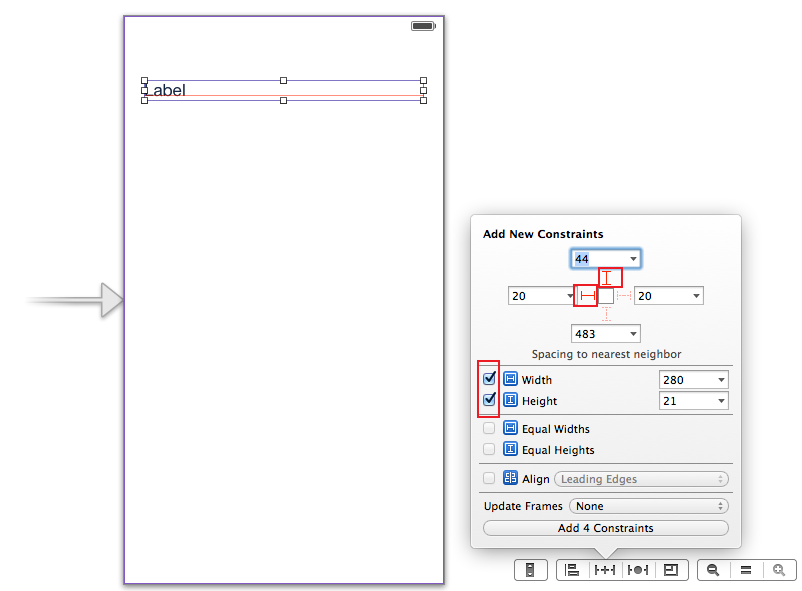
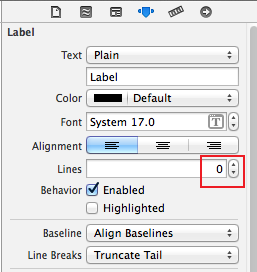
Then go to the label's attributes inspector and set number of lines to 0.
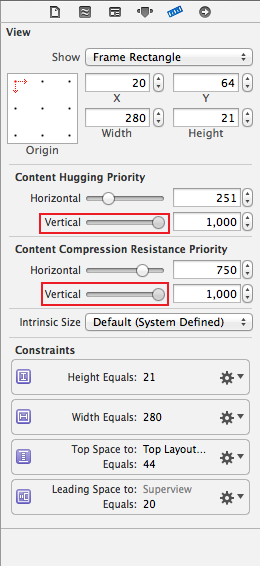
Go to the label's size inspector and increase vertical ContentHuggingPriority and vertical ContentCompressionResistancePriority.
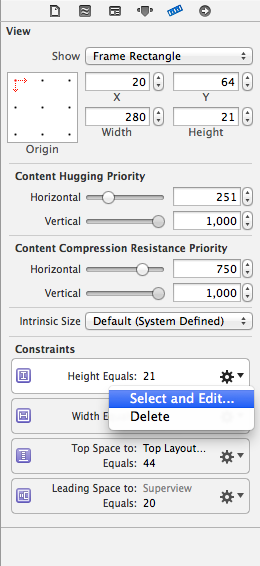
Select and edit height constraint.
And decrease height constraint priority.
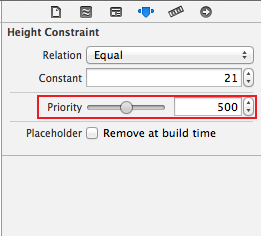
Enjoy. :)
Label 自适应文本(StoryBoard/xib)的更多相关文章
- 27、Label 自适应文本 xib
第一步: 第二步: 第三步: 第四步:
- label自适应文本大小
UILabel *label = [[UILabelalloc] initWithFrame:CGRectZero]; NSString *string = @"aa2fkoksdajfis ...
- 通过代码创建label 计算最佳尺寸 让其自适应文本高度或宽度
通过xib创建label 让label随着文本内容的变化而动态改变尺寸比较简单 只要不固定死尺寸就可以了 但是通过代码创建的话我们需要给label设置一个frame 否则label默认是没有尺 ...
- iOS UILabel UITextView自适应文本,或文本大小自适应
//UILabel自适应文本的高度 UILabel *label = [[UILabel alloc]initWithFrame:CGRectMake(, , , )]; label.numberOf ...
- 浅析 - Storyboard / Xib
大家都知道纯代码写应用的成本是很高的,特别是涉及到UI界面的实现,相当耗费时间.之前自己写应用时有了解过Storyboard,也简单使用过,但随着最近深入了解它之后,发现自己低估了它的作用和影响力,因 ...
- label自适应
//label自适应 self.label = [UILabel new]; self.label.font = [UIFont systemFontOfSize:14]; NSString *tit ...
- iOS Label 自适应高度
推荐第二个 测试一,只改变numberOfLines属性,label的高度不会自适应(会有text中的一部分内容称为......) NSString *str = @"jgreijgirje ...
- iOS开发笔记-根据frame大小动态调整fontSize的自适应文本及圆形进度条控件的实现
最近同样是新App,设计稿里出现一种圆形进度条的设计,如下: 想了想,圆形进度条实现起来不难,但是其中显示百分比的文本确需要自适应,虽然可以使用时自己设定文本字体的大小,但是这样显得很麻烦,也很low ...
- TableView中Label自适应高度
//Xcode6.3以后label自适应需要添加两个属性 _tableView.rowHeight = UITableViewAutomaticDimension; //给予预计行高 _tableVi ...
随机推荐
- Vue常见的框架
1. Element:一套为开发者,设计师和产品经理准备的基于Vue 2.0的桌面端组件库 地址:https://element.eleme.cn/#/zh-CN 2.iview:主要服务于PC界面的 ...
- dokcer部署code-server web版vscode
#dokcer部署code-server web版vscode codercom/code-server:latest不支持插件在线安装 codercom/code-server:v2目前为最新版1. ...
- CentOS 6 系统基础配置
系统版本:CentOS 6.8 Minimal 采用最小化系统安装,许多组件默认是不安装的,通过手工安装一些常用工具包,让系统用起来更顺手. 1.设置机器名: # echo "NETWORK ...
- 图片和Base64字符串互转
图片URL转成Base64字符串 /// <summary> /// 通过Url获取到Image格式的文件 /// </summary> /// <param name= ...
- 【经验分享】Mongodb操作类实现CRUD
一.背景 公司项目中在做数据存储时使用到Mongodb,所以想着将Mongodb的操作封装后可供项目中其他成员方便使用. 附上Mongodb的下载地址: 下载 1.Mongodb类 此类主要是用来构造 ...
- WinRar制作安装包
这次研究了下WinRar制作程序安装包,我使用的是5.21版本. 选中要打包的文件,先压缩为RAR文件,然后双击打开文件 输入目录时可以选择前两项,输入绝对路径时,则为第三项. 配置解压前运行的解压后 ...
- app测试自动化操作方法之三
首先导包: from appium.webdriver.common.touch_action import TouchAction #(导包指针定位滑动手势密码那个) #设置手势密码(前提是在设备上 ...
- WEB框架初识
HTTP介绍 Hyper Text Transfer Protocol,超文本传输书协议,是万维网数据通信的基础,规定了请求和响应标准. HTTP工作原理 HTTP 请求以及响应的步骤 客户端连接到W ...
- 【并行计算】Windows系统下搭建MPI环境
Windows系统下搭建MPI环境 MPI的全称是Message Passing Interface即标准消息传递界面,可以用于并行计算.MPI的具体实现一般采用MPICH.下面介绍如何在Window ...
- Nginx网络负载均衡,负载均衡,网络负载,网络均衡
本节就聊聊采用Nginx负载均衡之后碰到的问题: Session问题 文件上传下载 通常解决服务器负载问题,都会通过多服务器分载来解决.常见的解决方案有: 网站入口通过分站链接负载(天空软件站,华军软 ...