
单点登录CAS使用记(四):为登录页面加上验证码
CAS默认的登录页面样式如下,只有用户名与密码两项验证项目。

现在需要为首页登录加上验证码功能。
第一步:首页对默认登录页面的样式进行了调整,使其看上去还算美观。
在页面上加上了验证码项目。

第二步:导入验证码生成工具包及生成验证码配置
pom.xml中加入如下配置
<dependency>

    <groupId>com.google.code.kaptcha</groupId>

    <artifactId>kaptcha</artifactId>

    <version>2.3.2</version>

</dependency>
web.xml中加入如下配置(只配置了宽高度等其他默认)
    <servlet>

        <servlet-name>captchacode</servlet-name>

        <servlet-class>com.google.code.kaptcha.servlet.KaptchaServlet</servlet-class>

        <init-param>

            <description>边框粗细度。必须是一个大于0的值</description>

            <param-name>kaptcha.border.thickness</param-name>

            <param-value>1</param-value>

        </init-param>

        <init-param>

            <description>图片的宽度</description>

            <param-name>kaptcha.image.width</param-name>

            <param-value>140</param-value>

        </init-param>

        <init-param>

            <description>图片的高度</description>

            <param-name>kaptcha.image.height</param-name>

            <param-value>55</param-value>

        </init-param>

    </servlet>

    <servlet-mapping>

        <servlet-name>captchacode</servlet-name>

        <url-pattern>/captchacode</url-pattern>

    </servlet-mapping>
登录页jsp中
<form:input cssClass="required" cssErrorClass="error" id="imgverifycode" path="imgverifycode" htmlEscape="true" autocomplete="off" placeholder="输入验证码" />

<img id="cimg" src="${base_path}/captchacode" onclick="refreshcaptchacode(this)" title="看不清?点击更换另一个。"/>
JavaScript:
function refreshcaptchacode(obj) {

    obj.setAttribute("src", base_path+ "/captchacode?date=" + new Date());

}
第三步:CAS源码需要做哪些修改?
1.首先将新增项目imgverifycode绑定到表单
打开login-webflow.xml,找到这一段
    <view-state id="viewLoginForm" view="casLoginView" model="credentials">

        <binder>

            <binding property="username" />

            <binding property="password" />

        </binder>

        <on-entry>

            <set name="viewScope.commandName" value="'credentials'" />

        </on-entry>

        <transition on="submit" bind="true" validate="true" to="realSubmit">

            <evaluate expression="authenticationViaFormAction.doBind(flowRequestContext, flowScope.credentials)" />

        </transition>

    </view-state>
修改为(注意红色加大部分):
    <view-state id="viewLoginForm" view="casLoginView" model="credentials">

        <binder>

            <binding property="username" />

            <binding property="password" />

            <binding property="imgverifycode" />

        </binder>

        <on-entry>

            <set name="viewScope.commandName" value="'credentials'" />

        </on-entry>

        <transition on="submit" bind="true" validate="true" to="imgverifycodeValidate">

            <evaluate expression="authenticationViaFormAction.doBind(flowRequestContext, flowScope.credentials)" />

        </transition>

    </view-state>

    <!--  并增加了下面这一段代码 -->

    <action-state id="imgverifycodeValidate">

        <evaluate

            expression="authenticationViaFormAction.validatorCode(flowRequestContext, flowScope.credentials, messageContext)" />

        <transition on="error" to="generateLoginTicket" />

        <transition on="success" to="realSubmit" />

    </action-state>
主要是在登录的工作流中加上了 验证码提交绑定以及验证码验证处理。
其次,在UsernamePasswordCredentials.java中添加验证码字段。
    /** The imgverifycode. */

    @NotNull

    @Size(min = 1, message = "required.imgverifycode")

    private String imgverifycode;
对于的修改一下equals,hascode方法。
    @Override

    public boolean equals(final Object o)

    {

        if (this == o)

            return true;

        if (o == null || getClass() != o.getClass())

            return false;

        UsernamePasswordCredentials that = (UsernamePasswordCredentials) o;

        if (username != null ? !username.equals(that.username)

                : that.username != null)

            return false;

        if (password != null ? !password.equals(that.password)

                : that.password != null)

            return false;

        if (imgverifycode != null ? !imgverifycode.equals(that.imgverifycode)

                : that.imgverifycode != null)

            return false;

        return true;

    }

    @Override

    public int hashCode()

    {

        int result = username != null ? username.hashCode() : 0;

        result = 31 * result + (password != null ? password.hashCode() : 0);

        result = 31 * result

                + (imgverifycode != null ? imgverifycode.hashCode() : 0);

        return result;

    }
2.添加验证逻辑
注意上一段配置加上了一个action-state:imgverifycodeValidate,执行的是AuthenticationViaFormAction.validatorCode(...)方法
打开AuthenticationViaFormAction.java(cas-server-core工程下),添加如下方法
    public final String validatorCode(final RequestContext context,

            final Credentials credentials, final MessageContext messageContext)

            throws Exception

    {

        final HttpServletRequest request = WebUtils.getHttpServletRequest(context);

        HttpSession session = request.getSession();

        UsernamePasswordCredentials upc = (UsernamePasswordCredentials) credentials;

        String submitAuthcode = upc.getImgverifycode();

        if (!StringUtils.hasText(submitAuthcode))

        {

            populateErrorsInstance(new NullImgVerifyCodeAuthenticationException(),

                    messageContext);

            return "error";

        }

        if (StringUtils.equalsIgnoreCase((String) session.getAttribute(Constants.KAPTCHA_SESSION_KEY), captchacode))

        {

            return "success";

        }

        populateErrorsInstance(new BadImgVerifyCodeAuthenticationException(),

                messageContext);

        return "error";

    }
其中NullImgVerifyCodeAuthenticationException,BadImgVerifyCodeAuthenticationException是仿照源码异常类新增的自定义异常类。
NullImgVerifyCodeAuthenticationException.java
/*

 * Copyright 2007 The JA-SIG Collaborative. All rights reserved. See license

 * distributed with this file and available online at

 * http://www.ja-sig.org/products/cas/overview/license/

 */

package com.tongxiang.cas.auth.handler;

import org.jasig.cas.ticket.TicketException;

/**

 * Generic Bad Credentials Exception. This can be thrown when the system knows

 * the credentials are not valid specificially because they are bad. Subclasses

 * can be specific to a certain type of Credentials

 * (BadUsernamePassowrdCredentials).

 *

 * @author Scott Battaglia

 * @version $Revision$ $Date$

 * @since 3.0

 */

public class NullImgVerifyCodeAuthenticationException extends TicketException

{

    /**

     * Static instance of class to prevent cost incurred by creating new

     * instance.

     */

    public static final NullImgVerifyCodeAuthenticationException ERROR = new NullImgVerifyCodeAuthenticationException();

    /** UID for serializable objects. */

    private static final long serialVersionUID = 3256719585087797044L;

    /**

     * Default constructor that does not allow the chaining of exceptions and

     * uses the default code as the error code for this exception.

     */

    private static final String CODE = "required.imgverifycode";

    /**

     * Default constructor that does not allow the chaining of exceptions and

     * uses the default code as the error code for this exception.

     */

    public NullImgVerifyCodeAuthenticationException()

    {

        super(CODE);

    }

    /**

     * Constructor to allow for the chaining of exceptions. Constructor defaults

     * to default code.

     *

     * @param throwable the chainable exception.

     */

    public NullImgVerifyCodeAuthenticationException(final Throwable throwable)

    {

        super(CODE, throwable);

    }

    /**

     * Constructor method to allow for providing a custom code to associate with

     * this exception.

     *

     * @param code the code to use.

     */

    public NullImgVerifyCodeAuthenticationException(final String code)

    {

        super(code);

    }

    /**

     * Constructor to allow for the chaining of exceptions and use of a

     * non-default code.

     *

     * @param code the user-specified code.

     * @param throwable the chainable exception.

     */

    public NullImgVerifyCodeAuthenticationException(final String code,

            final Throwable throwable)

    {

        super(code, throwable);

    }

}
BadImgVerifyCodeAuthenticationException.java
/*

 * Copyright 2007 The JA-SIG Collaborative. All rights reserved. See license

 * distributed with this file and available online at

 * http://www.ja-sig.org/products/cas/overview/license/

 */

package com.tongxiang.cas.auth.handler;

import org.jasig.cas.ticket.TicketException;

/**

 * Generic Bad Credentials Exception. This can be thrown when the system knows

 * the credentials are not valid specificially because they are bad. Subclasses

 * can be specific to a certain type of Credentials

 * (BadUsernamePassowrdCredentials).

 *

 * @author Scott Battaglia

 * @version $Revision$ $Date$

 * @since 3.0

 */

public class BadImgVerifyCodeAuthenticationException extends TicketException

{

    /**

     * Static instance of class to prevent cost incurred by creating new

     * instance.

     */

    public static final BadImgVerifyCodeAuthenticationException ERROR = new BadImgVerifyCodeAuthenticationException();

    /** UID for serializable objects. */

    private static final long serialVersionUID = 3256719585087797044L;

    /**

     * Default constructor that does not allow the chaining of exceptions and

     * uses the default code as the error code for this exception.

     */

    private static final String CODE = "error.authentication.imgverifycode.bad";

    /**

     * Default constructor that does not allow the chaining of exceptions and

     * uses the default code as the error code for this exception.

     */

    public BadImgVerifyCodeAuthenticationException()

    {

        super(CODE);

    }

    /**

     * Constructor to allow for the chaining of exceptions. Constructor defaults

     * to default code.

     *

     * @param throwable the chainable exception.

     */

    public BadImgVerifyCodeAuthenticationException(final Throwable throwable)

    {

        super(CODE, throwable);

    }

    /**

     * Constructor method to allow for providing a custom code to associate with

     * this exception.

     *

     * @param code the code to use.

     */

    public BadImgVerifyCodeAuthenticationException(final String code)

    {

        super(code);

    }

    /**

     * Constructor to allow for the chaining of exceptions and use of a

     * non-default code.

     *

     * @param code the user-specified code.

     * @param throwable the chainable exception.

     */

    public BadImgVerifyCodeAuthenticationException(final String code,

            final Throwable throwable)

    {

        super(code, throwable);

    }

}
并且,在messages_zh_CN.properties文件中添加对应上面两个异常类的两个异常消息
required.imgverifycode=请输入验证码

error.authentication.imgverifycode.bad=验证码错误
3.验证
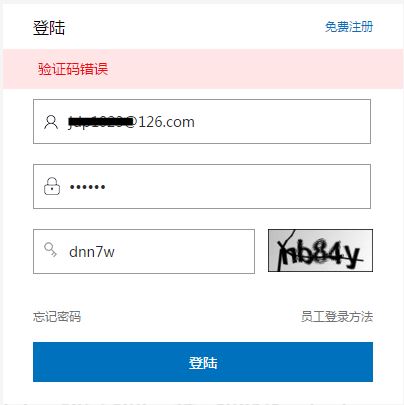
OK。
单点登录CAS使用记系列:
单点登录CAS使用记(一):前期准备以及为CAS-Server配置SSL协议
单点登录CAS使用记(二):部署CAS服务器以及客户端
单点登录CAS使用记(三):实现自定义验证用户登录
单点登录CAS使用记(四):为登录页面加上验证码
单点登录CAS使用记(五):cas-client不拦截静态资源以及无需登录的请求。
单点登录CAS使用记(六):单点登出、单点注销
单点登录CAS使用记(七):关于服务器超时以及客户端超时的分析
单点登录CAS使用记(八):使用maven的overlay实现无侵入的改造CAS
单点登录CAS使用记(四):为登录页面加上验证码的更多相关文章
- 单点登录CAS使用记(一):前期准备以及为CAS-Server配置SSL协议
知识点: SSO:单点登录(Single Sign On),是目前比较流行的企业业务整合的解决方案之一.SSO的定义是在多个应用系统中,用户只需要登录一次就可以访问所有相互信任的应用系统. CAS:耶 ...
- 单点登录CAS使用记(二):部署CAS服务器以及客户端
CAS-Server下载地址:https://www.apereo.org/projects/cas/download-cas CAS-Client下载地址:http://developer.jasi ...
- 单点登录CAS使用记(三):实现自定义验证用户登录
问题: CAS自带的用户验证逻辑太过简单,如何像正常网站一样,通过验证DB中的用户数据,来验证用户以及密码的合法性呢? 方案1:CAS默认的JDBC扩展方案: CAS自带了两种简单的通过JDBC方式验 ...
- 单点登录CAS使用记(五):cas-client不拦截静态资源以及无需登录的请求。
一.问题在哪? 在配置cas-client中,有这么一段配置: <filter> <filter-name>CAS Filter</filter-name> < ...
- 单点登录CAS使用记(六):单点登出、单点注销
单点登出基本上没有啥配置 直接在原来logout的时候,重定向到Cas-Server的logout方法 @RequestSecurity @RequestMapping(value = "l ...
- 单点登录CAS使用记(七):关于服务器超时以及客户端超时的分析
我的预想情况 一般情况下,当用户登录一个站点后,如果长时间没有发生任何动作,当用户再次点击时,会被强制登出并且跳转到登录页面, 提醒用户重新登录.现在我已经为站点整合了CAS,并且已经实现了单点登录以 ...
- 单点登录CAS使用记(八):使用maven的overlay实现无侵入的改造CAS
前期在学习CAS部署的过程中,都是网上各种教程,各种方案不停的尝试. 期间各种侵入改源码,时间久了,改了哪个文件,改了哪段配置,增加了哪段代码,都有可能混淆不清了. 而且最大的问题是,万一换个人来维护 ...
- 单点登录cas常见问题(十四) - ST和TGT的过期策略是什么?
ST和TGT的过期策略能够參看配置文件:ticketExpirationPolicies.xml 1.先说ST:ST的过期包含使用次数和时间,默认使用一次就过期,或者即使没有使用.一段时间后也要过期 ...
- cas sso单点登录系列7_ 单点登录cas常见问题系列汇总
转:http://blog.csdn.net/matthewei6/article/details/50709252 单点登录cas常见问题(一) - 子系统是否还要做session处理?单点登录ca ...
随机推荐
- 新建PCH文件以及常用宏定义
$(SRCROOT)/项目名/pch文件名.pch //0-255的随机数 #define randint arc4random() % 256 //随机色 #define randColor [UI ...
- POJ3349 Snowflake Snow Snowflakes(哈希)
题目链接. 分析: 哈希竟然能这么用.检查两片雪花是否相同不难,但如果是直接暴力,定会超时.所以要求哈希值相同时再检查. AC代码: #include <iostream> #includ ...
- 多线程同步、异步(BeginInvoke)
一.线程的基础知识 1 System.Threading.Thread类 System.Threading.Thread是用于控制线程的基础类,通过Thread可以控制当前应用程序域中线程的创建.挂起 ...
- 实现zbar扫描二维码的时候就把照片存储出来的办法
业务场景 当实现二维码扫描的时候(用的扫码库是zbar),有时候需要悄悄的整个扫描的照片存储下来,(charles有部分变态业务就是这样)就是说给扫描的图片照个全景照片. 那么代码如何实现 ...
- Selenium webdriver 高级应用
对于这一段还蛮有感慨的,只想说,代码还是需要自己去敲的. 1. 改变用户代理 import org.junit.AfterClass; import org.junit.BeforeClass; im ...
- Linux 上使用 Gmail SMTP 服务器发送邮件通知
导读 假定你想配置一个 Linux 应用,用于从你的服务器或桌面客户端发送邮件信息.邮件信息可能是邮件简报.状态更新(如 Cachet).监控警报(如 Monit).磁盘时间(如 RAID mdadm ...
- XML的四种解析器原理及性能比较
转自zsq 1.DOM DOM 是用与平台和语言无关的方式表示 XML 文档的官方 W3C 标准.DOM 是以层次结构组织的节点或信息片断的集合.这个层次结构允许开发人员在树中寻找特定信息.分 ...
- SpringMVC进行文件的上传以及多文件的上传(转)
基本的SpringMVC的搭建在我的上一篇文章里已经写过了,这篇文章主要说明一下如何使用SpringMVC进行表单上的文件上传以及多个文件同时上传的步骤 SpringMVC 基础教程 框架分析:htt ...
- spring mvc model.addAttribute页面c:forEach取不到
昨天和今天都在解决一个问题,即: @RequestMapping(value = "/listAccounts", method = RequestMethod.GET) publ ...
- 递归实现生成Grey码
腾讯2016研发笔试题1: 在一组数的编码中,若任意两个相邻的代码只有一位二进制数不同, 则称这种编码为格雷码(Gray Code),请编写一个函数,使用递归的方法生成N位的格雷码. 给定一个整数n, ...