
Android源码分析:HeaderViewListAdapter
http://bj007.blog.51cto.com/1701577/643568
对于手机开发,我一直坚持的是“用iPhone的方式开发iPhone应用,用Android的方式开发Android应用”。但如何去把握iPhone 或者Android的方式呢?在iPhone开发时可能需要看大量Apple文档。而Android在看文档的同时还可以看看源码。这源码中有时可以发现 一些内部实现加深理解,有时可以受到某些可以在应用中使用的启发。总之源码是一个需要去发掘的“矿场”,时而不时地都会发现一些“金子”。
在Android开发的时候经常会有一些列表数据分组显示的需求,对于iPhone来说修改下模型数据并设置下风格就可以轻松搞定(如下图)。但对于 Android这种需求就会有些痛苦了。因为系统提供的ListAdapter无法提供这种支持,因此只能自定义Adapter。为了实现该功 能,Adapter通常就开始充斥很多特殊处理以及各种硬编码。如何用Android的方式设计和实现一个自定义Adapter呢?源码中的 HeaderViewListAdapter可能会提供些答案或者启发。
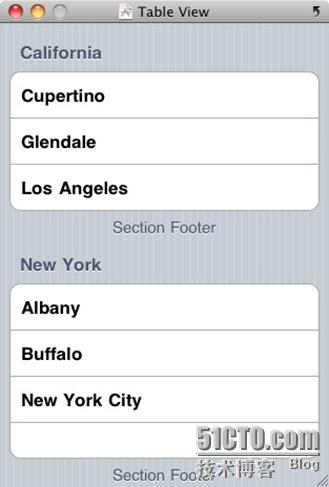
图1:Group分隔的iPhone表格
注释版本的HeaderViewListAdapter.java如下:
/*如果List需要有标题就会使用该ListAdapter。该ListAdapter包装了另一个ListAdapter并保存着
标题视图和相关数据对象。该类是作为基类,在代码中可能不需要直接使用。
*/
// 类名有点不确切,其实是支持Header和Footter的
public class HeaderViewListAdapter implements WrapperListAdapter, Filterable {
private final ListAdapter mAdapter;
// These two ArrayList are assumed to NOT be null.
// They are indeed created when declared in ListView and then shared.
ArrayList<ListView.FixedViewInfo> mHeaderViewInfos;
ArrayList<ListView.FixedViewInfo> mFooterViewInfos;
// Used as a placeholder in case the provided info views are indeed null.
// Currently only used by some CTS tests, which may be removed.
static final ArrayList<ListView.FixedViewInfo> EMPTY_INFO_LIST =
new ArrayList<ListView.FixedViewInfo>();
boolean mAreAllFixedViewsSelectable;
/// 这是个很有趣的概念,之后我们会一起了解
private final boolean mIsFilterable;
public HeaderViewListAdapter(ArrayList<ListView.FixedViewInfo> headerViewInfos,
ArrayList<ListView.FixedViewInfo> footerViewInfos,
ListAdapter adapter) {
mAdapter = adapter;
mIsFilterable = adapter instanceof Filterable;
/// 很好的处理,这里实际是使用了一种Null对象模式
if (headerViewInfos == null) {
mHeaderViewInfos = EMPTY_INFO_LIST;
} else {
mHeaderViewInfos = headerViewInfos;
}
if (footerViewInfos == null) {
mFooterViewInfos = EMPTY_INFO_LIST;
} else {
mFooterViewInfos = footerViewInfos;
}
mAreAllFixedViewsSelectable =
areAllListInfosSelectable(mHeaderViewInfos)
&& areAllListInfosSelectable(mFooterViewInfos);
}
/// 支持多个标题栏哦
public int getHeadersCount() {
return mHeaderViewInfos.size();
}
/// 支持多个尾注栏哦
public int getFootersCount() {
return mFooterViewInfos.size();
}
public boolean isEmpty() {
return mAdapter == null || mAdapter.isEmpty();
}
/// FixedViewInfo名字很贴切,这是相对于包装Adapter中的可变数据命名的
private boolean areAllListInfosSelectable(ArrayList<ListView.FixedViewInfo> infos) {
if (infos != null) {
for (ListView.FixedViewInfo info : infos) {
if (!info.isSelectable) {
return false;
}
}
}
return true;
}
/// 支持标题删减
public boolean removeHeader(View v) {
for (int i = 0; i < mHeaderViewInfos.size(); i++) {
ListView.FixedViewInfo info = mHeaderViewInfos.get(i);
if (info.view == v) {
mHeaderViewInfos.remove(i);
mAreAllFixedViewsSelectable =
areAllListInfosSelectable(mHeaderViewInfos)
&& areAllListInfosSelectable(mFooterViewInfos);
return true;
}
}
return false;
}
/// 支持尾注删减
public boolean removeFooter(View v) {
for (int i = 0; i < mFooterViewInfos.size(); i++) {
ListView.FixedViewInfo info = mFooterViewInfos.get(i);
if (info.view == v) {
mFooterViewInfos.remove(i);
mAreAllFixedViewsSelectable =
areAllListInfosSelectable(mHeaderViewInfos)
&& areAllListInfosSelectable(mFooterViewInfos);
return true;
}
}
return false;
}
/// 标题视图、尾注视图和普通的数据视图,一视同仁
public int getCount() {
if (mAdapter != null) {
return getFootersCount() + getHeadersCount() + mAdapter.getCount();
} else {
return getFootersCount() + getHeadersCount();
}
}
public boolean areAllItemsEnabled() {
if (mAdapter != null) {
return mAreAllFixedViewsSelectable && mAdapter.areAllItemsEnabled();
} else {
return true;
}
}
public boolean isEnabled(int position) {
// Header (negative positions will throw an ArrayIndexOutOfBoundsException)
int numHeaders = getHeadersCount();
if (position < numHeaders) {
return mHeaderViewInfos.get(position).isSelectable;
}
// Adapter
final int adjPosition = position - numHeaders;
int adapterCount = 0;
if (mAdapter != null) {
adapterCount = mAdapter.getCount();
if (adjPosition < adapterCount) {
return mAdapter.isEnabled(adjPosition);
}
}
// Footer (off-limits positions will throw an ArrayIndexOutOfBoundsException)
return mFooterViewInfos.get(adjPosition - adapterCount).isSelectable;
}
/// 需要分段处理
public Object getItem(int position) {
// Header (negative positions will throw an ArrayIndexOutOfBoundsException)
int numHeaders = getHeadersCount();
if (position < numHeaders) {
return mHeaderViewInfos.get(position).data;
}
// Adapter
final int adjPosition = position - numHeaders;
int adapterCount = 0;
if (mAdapter != null) {
adapterCount = mAdapter.getCount();
if (adjPosition < adapterCount) {
return mAdapter.getItem(adjPosition);
}
}
// Footer (off-limits positions will throw an ArrayIndexOutOfBoundsException)
return mFooterViewInfos.get(adjPosition - adapterCount).data;
}
/// 这可不包括Header和Footer
public long getItemId(int position) {
int numHeaders = getHeadersCount();
if (mAdapter != null && position >= numHeaders) {
int adjPosition = position - numHeaders;
int adapterCount = mAdapter.getCount();
if (adjPosition < adapterCount) {
return mAdapter.getItemId(adjPosition);
}
}
return -1;
}
public boolean hasStableIds() {
if (mAdapter != null) {
return mAdapter.hasStableIds();
}
return false;
}
/// 需要分段处理,其中Header和Footer视图已经事先存储在ListView.FixedViewInfo对象中了
public View getView(int position, View convertView, ViewGroup parent) {
// Header (negative positions will throw an ArrayIndexOutOfBoundsException)
int numHeaders = getHeadersCount();
if (position < numHeaders) {
return mHeaderViewInfos.get(position).view;
}
// Adapter
final int adjPosition = position - numHeaders;
int adapterCount = 0;
if (mAdapter != null) {
adapterCount = mAdapter.getCount();
if (adjPosition < adapterCount) {
return mAdapter.getView(adjPosition, convertView, parent);
}
}
// Footer (off-limits positions will throw an ArrayIndexOutOfBoundsException)
return mFooterViewInfos.get(adjPosition - adapterCount).view;
}
/// 支持同一个List中不同类型的视图
public int getItemViewType(int position) {
int numHeaders = getHeadersCount();
if (mAdapter != null && position >= numHeaders) {
int adjPosition = position - numHeaders;
int adapterCount = mAdapter.getCount();
if (adjPosition < adapterCount) {
return mAdapter.getItemViewType(adjPosition);
}
}
return AdapterView.ITEM_VIEW_TYPE_HEADER_OR_FOOTER;
}
public int getViewTypeCount() {
if (mAdapter != null) {
return mAdapter.getViewTypeCount();
}
return 1;
}
public void registerDataSetObserver(DataSetObserver observer) {
if (mAdapter != null) {
mAdapter.registerDataSetObserver(observer);
}
}
public void unregisterDataSetObserver(DataSetObserver observer) {
if (mAdapter != null) {
mAdapter.unregisterDataSetObserver(observer);
}
}
/// 这有点意思,有待发掘
public Filter getFilter() {
if (mIsFilterable) {
return ((Filterable) mAdapter).getFilter();
}
return null;
}
public ListAdapter getWrappedAdapter() {
return mAdapter;
}
}
本文出自 “林家男孩” 博客,请务必保留此出处http://bj007.blog.51cto.com/1701577/643568
Android源码分析:HeaderViewListAdapter的更多相关文章
- Android源码分析-全面理解Context
前言 Context在android中的作用不言而喻,当我们访问当前应用的资源,启动一个新的activity的时候都需要提供Context,而这个Context到底是什么呢,这个问题好像很好回答又好像 ...
- Android源码分析(六)-----蓝牙Bluetooth源码目录分析
一 :Bluetooth 的设置应用 packages\apps\Settings\src\com\android\settings\bluetooth* 蓝牙设置应用及设置参数,蓝牙状态,蓝牙设备等 ...
- Android源码分析(十七)----init.rc文件添加脚本代码
一:init.rc文件修改 开机后运行一次: chmod 777 /system/bin/bt_config.sh service bt_config /system/bin/bt_config.sh ...
- Android源码分析(十六)----adb shell 命令进行OTA升级
一: 进入shell命令界面 adb shell 二:创建目录/cache/recovery mkdir /cache/recovery 如果系统中已有此目录,则会提示已存在. 三: 修改文件夹权限 ...
- Android源码分析(十五)----GPS冷启动实现原理分析
一:原理分析 主要sendExtraCommand方法中传递两个参数, 根据如下源码可以知道第一个参数传递delete_aiding_data,第二个参数传递null即可. @Override pub ...
- Android源码分析(十四)----如何使用SharedPreferencce保存数据
一:SharedPreference如何使用 此文章只是提供一种数据保存的方式, 具体使用场景请根据需求情况自行调整. EditText添加saveData点击事件, 保存数据. diff --git ...
- Android源码分析(十三)----SystemUI下拉状态栏如何添加快捷开关
一:如何添加快捷开关 源码路径:frameworks/base/packages/SystemUI/res/values/config.xml 添加headset快捷开关,参考如下修改. Index: ...
- Android源码分析(十二)-----Android源码中如何自定义TextView实现滚动效果
一:如何自定义TextView实现滚动效果 继承TextView基类 重写构造方法 修改isFocused()方法,获取焦点. /* * Copyright (C) 2015 The Android ...
- Android源码分析(十一)-----Android源码中如何引用aar文件
一:aar文件如何引用 系统Settings中引用bidehelper-1.1.12.aar 文件为例 源码地址:packages/apps/Settings/Android.mk LOCAL_PAT ...
- Android源码分析(十)-----关机菜单中如何添加飞行模式选项
一:关机菜单添加飞行模式选项 源码路径:frameworks/base/core/res/res/values/config.xml 增加<item>airplane</item&g ...
随机推荐
- FZU 2237 中位数 主席树 树上k大
#include <cstdio> #include <cstring> #include <queue> #include <set> #includ ...
- Entity Framework Linq 简单笔记
类型查询 public class bbb:xxx {} var items = from c in context.Dbset<xxx> where c is bbb sele ...
- Django学习随想(1)
关于Django的模型部分: 模型操作实际上都是针对数据库的一系列操作. Django封装了底层的操作,给用户提供了一组非常python化的模型对象.让python开发者可以很方便.直观地进行数据库表 ...
- [Codechef October Challenge 2014]刷漆
问题描述 Czy做完了所有的回答出了所有的询问,结果是,他因为脑力消耗过大而变得更虚了:).帮助Czy恢复身材的艰巨任务落到了你的肩上. 正巧,你的花园里有一个由N块排成一条直线的木板组成的栅栏,木板 ...
- CodeForces 362B Petya and Staircases
题意:一个小男孩要上楼梯,他一次可以走1个台阶或2个台阶或3个台阶,但是有一些台阶是脏的,他不想走在脏台阶上.一共有n个台阶和m个脏台阶,他最开始在第1个台阶上,要走到第n个台阶.问小男孩能不能不踩到 ...
- Jni 类型转换接口
1.JString char*互相转化 char* JstringToChar(JNIEnv* env, jstring jstr) { char* rtn = NULL; jclass clsstr ...
- STM32F103 与 STM32F407引脚兼容问题
===========突袭网收集的解决方案如下=========== 解决方案1: STM32F103有的功能407都有,并且这些功能的引脚完全兼容,只是程序不同而已...而STM32F407有的功能 ...
- Sublime Text3使用及常用插件
1.安装packages组件: 参考一: https://sublime.wbond.net/installation 参考二: http://blog.csdn.net/superskk6/arti ...
- PTA 5-12 How Long Does It Take (25分)
这题看不太懂题目啊~ 参考的http://blog.csdn.net/qq_26437925/article/details/49420089?locationNum=6&fps=1 先放着 ...
- 模拟等待事件row lock waits
是索引块分裂引起的锁等待,往往与enq: TX - index contention 伴随产生,enq:TX - index contention的解释. Waits for TX in mode 4 ...