
spring07 JDBC
1.创建对应的数据库

2.在MyEclipse中创建项目 引入需要的jar包
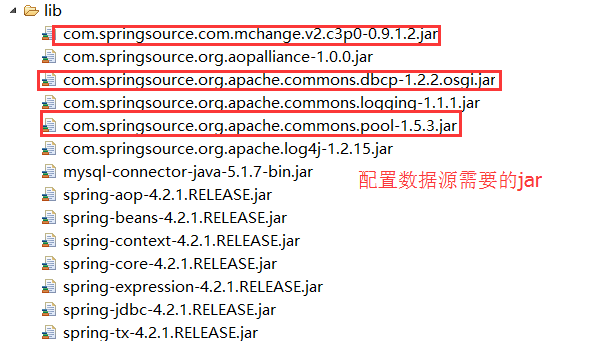
3.创建数据访问层
public interface StudentDao {

    //新增学生

    int addStudent(Student student);

    //删除学生

    int delStudent(Student student);

    //修改学生

    int updateStudent(Student student);

    //查询所有

    List<Student> findStudents();

    //查询所有的学生姓名

    List<String> findNames();

}
StudentDao
public class StudentDaoImpl extends JdbcDaoSupport  implements StudentDao {

    @Override//新增

    public int addStudent(Student student) {

        String sql="insert into  student(age,name) values(?,?)";

        return getJdbcTemplate().update(sql,student.getAge(),student.getName());

    }

    @Override//删除

    public int delStudent(Student student) {

        String sql="delete  from  student where id=?";

        return getJdbcTemplate().update(sql,student.getId());

    }

    @Override//修改

    public int updateStudent(Student student) {

        String sql="update   student   set age=?,name=? where id=?";

        return getJdbcTemplate().update(sql,student.getAge(),student.getName(),student.getId());

    }

    //查询所有的学生信息

    @Override

    public List<Student> findStudents() {

        String sql="select * from student";

        //需要配置  行 映射器    因为 表中有3列  spring期望值是一列

        return getJdbcTemplate().query(sql, new StudentRowMapper());

    }

    //查询所有的姓名

    @Override

    public List<String> findNames() {

        String sql="select name from student";

        return getJdbcTemplate().queryForList(sql, String.class);

    }

}
StudentDaoImpl
public class StudentRowMapper implements RowMapper<Student> { //行映射器

    //这里的ResultSet指的是单行数据  并不是 所有行的结果集

    @Override

    public Student mapRow(ResultSet rs, int rowNum) throws SQLException {

    Student student=new Student();

    student.setId(rs.getInt("id"));

    student.setAge(rs.getInt("age"));

    student.setName(rs.getString("name"));

        return student;

    }

}
StudentRowMapper
4.创建业务逻辑层
public interface StudentService {

        //新增学生

        void addStudent(Student student);

        //删除学生

        void delStudent(Student student);

        //修改学生

        void updateStudent(Student student);

        //查询所有

        List<Student> findStudents();

        //查询所有的学生姓名

        List<String> findNames();

}
StudentService
public class StudentServiceImpl implements StudentService {

    private StudentDao dao;

    // 新增

    @Override

    public void addStudent(Student student) {

        int num = dao.addStudent(student);

        if (num > 0) {

            System.out.println("新增成功");

        } else {

            System.out.println("新增失败");

        }

    }

    @Override

    // 删除

    public void delStudent(Student student) {

        int num = dao.delStudent(student);

        if (num > 0) {

            System.out.println("删除成功");

        } else {

            System.out.println("删除失败");

        }

    }

    @Override

    // 修改

    public void updateStudent(Student student) {

        int num = dao.updateStudent(student);

        if (num > 0) {

            System.out.println("修改成功");

        } else {

            System.out.println("修改失败");

        }

    }

    @Override

    // 查询所有的学生信息

    public List<Student> findStudents() {

        return dao.findStudents();

    }

    @Override

    // 查询所有的学生姓名

    public List<String> findNames() {

        return dao.findNames();

    }

    public StudentDao getDao() {

        return dao;

    }

        //DI 依赖注入

    public void setDao(StudentDao dao) {

        this.dao = dao;

    }

}
StudentServiceImpl
5.书写配置文件
<?xml version="1.0" encoding="UTF-8"?>

<beans xmlns="http://www.springframework.org/schema/beans"

    xmlns:xsi="http://www.w3.org/2001/XMLSchema-instance" xmlns:context="http://www.springframework.org/schema/context"

    xmlns:aop="http://www.springframework.org/schema/aop" xmlns:tx="http://www.springframework.org/schema/tx"

    xsi:schemaLocation="

        http://www.springframework.org/schema/beans

        http://www.springframework.org/schema/beans/spring-beans.xsd

        http://www.springframework.org/schema/context

        http://www.springframework.org/schema/context/spring-context.xsd

        http://www.springframework.org/schema/tx

        http://www.springframework.org/schema/tx/spring-tx.xsd

        http://www.springframework.org/schema/aop

        http://www.springframework.org/schema/aop/spring-aop.xsd">

    <!-- 配置数据源 01.spring的默认数据源 -->

    <!-- <bean id="dataSource" class="org.springframework.jdbc.datasource.DriverManagerDataSource">

        <property name="driverClassName" value="com.mysql.jdbc.Driver"/> <property

        name="url" value="jdbc:mysql:///news"/> <property name="username" value="wym"/>

        <property name="password" value="wym"/> </bean> -->

    <!-- 配置数据源 02.dbcp数据源 -->

    <!-- <bean id="dataSource" class="org.apache.commons.dbcp.BasicDataSource">

        <property name="driverClassName" value="com.mysql.jdbc.Driver"/> <property

        name="url" value="jdbc:mysql:///news"/> <property name="username" value="wym"/>

        <property name="password" value="wym"/> </bean> -->

    <!-- 配置数据源 03.c3p0数据源 -->

    <bean id="dataSource" class="com.mchange.v2.c3p0.ComboPooledDataSource">

        <property name="driverClass" value="${driverClass}" />

        <property name="jdbcUrl" value="${jdbcUrl}" />

        <property name="user" value="${user}" />

        <property name="password" value="${password}" />

    </bean>

    <!-- 01. 使用配置文件 加载 数据库需要的4要素 经常使用 -->

    <context:property-placeholder location="classpath:jdbc.properties" />

    <!-- 02.使用配置文件 加载 数据库需要的4要素 <bean class="org.springframework.beans.factory.config.PropertyPlaceholderConfigurer">

        <property name="location" value="classpath:jdbc.properties"></property> </bean> -->

    <!-- 配置模板 -->

    <bean id="template" class="org.springframework.jdbc.core.JdbcTemplate">

        <property name="dataSource" ref="dataSource"></property>

    </bean>

    <!--配置dao -->

    <bean id="dao" class="cn.bdqn.dao.impl.StudentDaoImpl">

        <property name="jdbcTemplate" ref="template"></property>

    </bean>

    <!-- 配置service -->

    <bean id="service" class="cn.bdqn.service.impl.StudentServiceImpl">

        <property name="dao" ref="dao"></property>

    </bean>

</beans>
applicationContext.xml
jdbc.properties文件

6.书写测试类
public class StudentTest {

    @Test

    // 新增

    public void addTest() {

        ApplicationContext context = new ClassPathXmlApplicationContext(

                "applicationContext.xml");

        StudentService service = (StudentService) context.getBean("service");

        service.addStudent(new Student(5655, "小白5"));

    }

    @Test

    // 删除

    public void delTest() {

        ApplicationContext context = new ClassPathXmlApplicationContext(

                "applicationContext.xml");

        StudentService service = (StudentService) context.getBean("service");

        Student student = new Student();

        student.setId(2);

        service.delStudent(student);

    }

    @Test

    // 修改

    public void updateTest() {

        ApplicationContext context = new ClassPathXmlApplicationContext(

                "applicationContext.xml");

        StudentService service = (StudentService) context.getBean("service");

        Student student = new Student();

        student.setId(1);

        student.setName("xiao");

        student.setAge(1000);

        service.updateStudent(student);

    }

    @Test

    // 查询学生姓名

    public void findNames() {

        ApplicationContext context = new ClassPathXmlApplicationContext(

                "applicationContext.xml");

        StudentService service = (StudentService) context.getBean("service");

        List<String> names = service.findNames();

        for (String string : names) {

            System.out.println(string);

        }

    }

    @Test

    // 查询学生

    public void findStudents() {

        ApplicationContext context = new ClassPathXmlApplicationContext(

                "applicationContext.xml");

        StudentService service = (StudentService) context.getBean("service");

        List<Student> list = service.findStudents();

        for (Student student : list) {

            System.out.println(student);

        }

    }

}
测试代码
spring07 JDBC的更多相关文章
- Java数据库连接技术——JDBC
大家好,今天我们学习了Java如何连接数据库.之前学过.net语言的数据库操作,感觉就是一通百通,大同小异. JDBC是Java数据库连接技术的简称,提供连接各种常用数据库的能力. JDBC API ...
- 玩转spring boot——结合AngularJs和JDBC
参考官方例子:http://spring.io/guides/gs/relational-data-access/ 一.项目准备 在建立mysql数据库后新建表“t_order” ; -- ----- ...
- [原创]java使用JDBC向MySQL数据库批次插入10W条数据测试效率
使用JDBC连接MySQL数据库进行数据插入的时候,特别是大批量数据连续插入(100000),如何提高效率呢?在JDBC编程接口中Statement 有两个方法特别值得注意:通过使用addBatch( ...
- JDBC MySQL 多表关联查询查询
public static void main(String[] args) throws Exception{ Class.forName("com.mysql.jdbc.Driver&q ...
- JDBC增加删除修改
一.配置程序--让我们程序能找到数据库的驱动jar包 1.把.jar文件复制到项目中去,整合的时候方便. 2.在eclipse项目右击"构建路径"--"配置构建路径&qu ...
- JDBC简介
jdbc连接数据库的四个对象 DriverManager 驱动类 DriverManager.registerDriver(new com.mysql.jdbc.Driver());不建议使用 ...
- JDBC Tutorials: Commit or Rollback transaction in finally block
http://skeletoncoder.blogspot.com/2006/10/jdbc-tutorials-commit-or-rollback.html JDBC Tutorials: Com ...
- FineReport如何用JDBC连接阿里云ADS数据库
在使用FineReport连接阿里云的ADS(AnalyticDB)数据库,很多时候在测试连接时就失败了.此时,该如何连接ADS数据库呢? 我们只需要手动将连接ads数据库需要使用到的jar放置到%F ...
- JDBC基础
今天看了看JDBC(Java DataBase Connectivity)总结一下 关于JDBC 加载JDBC驱动 建立数据库连接 创建一个Statement或者PreparedStatement 获 ...
随机推荐
- 学习C++——只声明忘记定义了
#include <iostream> #include <list> #include <string> using namespace std; class E ...
- 仿猪八戒一个提示(jQuery插件) v0.1 beta
先看下效果 js jQuery.extend({ prompt: function (text, type, times) { var prompt = $(['<div class=" ...
- HTML语义化标签(一)
总所周知,现在的网页是由HTML.CSS.JS三大元素组成,而HTML是其中最重要的部分,是整个网页的骨架,CSS和js在骨架的基础上进行相应的修饰,使得网页成为一个有血有肉,可以动的“人”.如果HT ...
- php 5.2 版本isset()方法小坑
PHP 5.2.17p1 (cli) (built: May 28 2015 16:15:30)Copyright (c) 1997-2010 The PHP GroupZend Engine v2. ...
- CSS3圆角详解
一.CSS3圆角的优点 传统的圆角生成方案,必须使用多张图片作为背景图案.CSS3的出现,使得我们再也不必浪费时间去制作这些图片了,而且还有其他多个优点: * 减少维护的工作量.图片文件的生成.更新. ...
- UIImageView设置为圆形
CGFloat headimageX = self.view.frame.size.width * 0.2; CGFloat headimageY = self.view.frame.size. ...
- Mesh绘制雷达图(UGUI)
参考资料:http://www.cnblogs.com/jeason1997/p/5130413.html ** 描述:雷达图 刷新 radarDate.SetVerticesDirty(); usi ...
- C51 库函数(3)
3.3 STRING.H:串函数 串函数通常将指针串作输入值.一个串就包括2个或多个字符.串结以空字符表示.在函数memcmp,memcpy,memchr,memccpy,memmove和memset ...
- 腾讯CDC谈扁平化设计
扁平化设计无疑是当前讨论最多,最火的设计形式,自ios7面世以来更是将扁平化设计的讨论推向风口浪尖. 在这里我不想分析拟物设计和扁平化设计的优劣,更不想说谁更好!在形式服从内容的今天,我只能说哪种设计 ...
- URL图片预览(createObjectURL)
1.说明 1)createObjectURL 作用:创建url(creates a URL for the specified object); 语法:var url = URL.createObj ...