
Jquery 简单的Tab选项卡特效
<!DOCTYPE html PUBLIC "-//W3C//DTD XHTML 1.0 Transitional//EN" "http://www.w3.org/TR/xhtml1/DTD/xhtml1-transitional.dtd">

<html xmlns="http://www.w3.org/1999/xhtml">

<head>

<meta http-equiv="Content-Type" content="text/html; charset=utf-8" />

<title>TAB特效</title>

<script type="text/javascript" src="jquery-1.9.1.min.js"></script>

</head>

<body>

<style type="text/css">

    *{padding:0; margin:0;}

    ul,ol{list-style-type:none;}

    body{font-size:12px;}

    .tab_box{width:500px; border:1px solid #000; margin:100px auto 0px  auto;}

    .tab_box ul{width:80px; height:400px; background-color:#eee; display:block; float:left;}

    .tab_box ul li{display:block; width:100%; height:40px; line-height:40px; text-align:center; background-color:#bbb; margin-top:10px; cursor:pointer;}

    .tab_box ul .tab_one{background-color:#abcdef;}

    .tab_span{width:410px; height:400px; overflow:hidden; border:1px solid #000; margin-left:5px; float:right;}

    .tab_span_c{width:100%; height:100%; background-color:#ccc; display:none;}

</style>

    <script type="text/javascript">

        $(document).ready(function(){

        $(".tab_box .tab_span .tab_span_c:first").css("display","block");

        $(".tab_box ul li").click(function(event){

            var $btnlistindex = $(this).index();

                $(".tab_box .tab_span .tab_span_c").eq($btnlistindex).show().siblings().hide();

                $(".tab_box ul li").eq($btnlistindex).addClass("tab_one").siblings().removeClass("tab_one");

                });

        });

    </script>

    <div class="tab_box">

        <ul>

            <li class="tab_one">选项按钮1</li>

            <li>选项按钮2</li>

            <li>选项按钮3</li>

            <li>选项按钮4</li>

            <li>选项按钮5</li>

        </ul>

        <div class="tab_span">

            <div class="tab_span_c">

                1sadfasdfasdf1sadfasdfasdf1sadfasdfasdf

            </div>

            <div class="tab_span_c">

                2sadfasdfasdf1sadfasdfasdf1sadfasdfasdf

            </div>

            <div class="tab_span_c">

                3sadfasdfasdf1sadfasdfasdf1sadfasdfasdf

            </div>

            <div class="tab_span_c">

                4sadfasdfasdf1sadfasdfasdf1sadfasdfasdf

            </div>

            <div class="tab_span_c">

                5sadfasdfasdf1sadfasdfasdf1sadfasdfasdf

            </div>

        </div>

    </div>

</body>

</html>
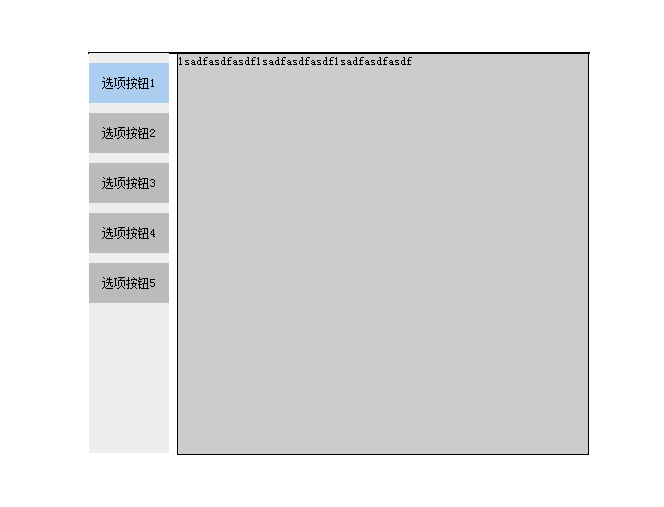
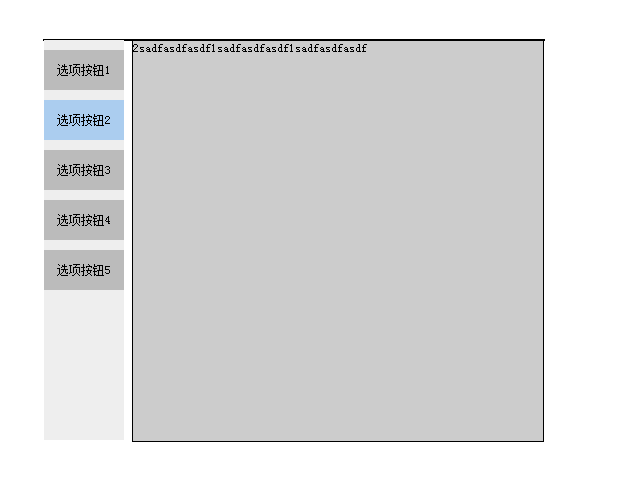
最终效果如下:
Jquery 简单的Tab选项卡特效的更多相关文章
- jquery简单实现tab选项卡效果
html: <ul class="tab"> <li>最新</li> <li class="cur">热门< ...
- jQuery简单的轮播特效
<!DOCTYPE html PUBLIC "-//W3C//DTD XHTML 1.0 Transitional//EN" "http://www.w3.org/ ...
- 简单竖向Tab选项卡
<!DOCTYPE html> <html> <head lang="en"> <meta charset="UTF-8&quo ...
- 使用jQuery开发tab选项卡插件
为了复习巩固jQuery的插件开发.HTML和CSS方面的知识,做了一个简单的tab选项卡插件,简单记录一下开发.使用的过程,以备日后使用. 一.插件效果 tab选项卡插件常用的功能均已实现,包括:动 ...
- js 实现tab选项卡
最近一直在研究js 如果不及时复习的话前边学到的东西很快就会忘掉,所以把前段时间的一个简单的tab选项卡的思路写出来也算复习了一下吧, 第一步:先把布局写出来: <div id="d ...
- jQuery实现TAB选项卡切换特效简单演示
本文实例为大家分享jQuery实现TAB选项卡切换特效,供大家参考,具体内容如下 1.tab切换 on ? 1 2 3 4 5 6 7 8 9 10 11 12 13 14 15 16 17 18 1 ...
- jQuery Tab选项卡切换代码
jQuery Tab选项卡切换代码是一款简单的jquery tab选项卡切换网页特效代码样式,可以修改tab选项卡相关样式. 代码下载:http://www.huiyi8.com/sc/10863.h ...
- Jquery tab 选项卡 无刷新切换
转载的 演示地址:http://www.freejs.net/demo/29/index.html 首页>>TAB标签>>jquery实现简单的Tab切换菜单(2013-09- ...
- jQery简单Tab选项卡效果
简单的Tab效果 <!DOCTYPE html> <html> <head> <meta charset="UTF-8"> < ...
随机推荐
- 开源sip server & sip client 和开发库 一览
http://www.voip-info.org/wiki/view/Open+Source+VOIP+Software http://blog.csdn.net/xuyunzhang/article ...
- java 哈希码
加入新的元素到数组中 /** * Append the given object to the given array, returning a new array * consisting of t ...
- 使用EF连接现有数据库
新建个项目---在项目内添加新建项-- 选择ADo.NET实体数据模型(我的软件vs2012 上面之所以有两个ADo.NET实体数据模型 是因为上面一个EF4.0 下面一个EF5.0 ) 在实际操作中 ...
- Spring 的注册与注入
之前和同学老是爱混淆注册与注入.今天再看一遍感觉多了一些理解. 注册就是声明bean.就是让spring能够找到这个bean服务. 注入就是把bean(A)加入到另一个bean(B)的属性中.让另外一 ...
- Spring与Ibatis整合入门
Ibatis作为一个将java对象与sql中的数据进行映射的工具,可以将一个应用中常用的sql操作抽象为模版,在应用后续与数据库的交互中,将输入sql语句简化为更改一部分参数. ibatis整合到sp ...
- 【Android - MD】之FloatingActionButton的使用
FloatingActionButton(FAB) 是 Android 5.0 新特性--Material Design 中的一个控件,是一种悬浮的按钮. FloatingActionButton 是 ...
- java.lang包
作者:gnuhpc 出处:http://www.cnblogs.com/gnuhpc/ 1.特性——不用import 2.String String x = "abc"; < ...
- ExtractNewFolderPath
unit Unit1; interface uses Winapi.Windows, Winapi.Messages, System.SysUtils, System.Variants, Syst ...
- Android bitmap图片处理
一.View转换为Bitmap 在Android中所有的控件都是View的直接子类或者间接子类,通过它们可以组成丰富的UI界面.在窗口显示的时候Android会把这些控件都加载到内存中 ...
- 计算机体系结构-CPU
NUMA